New Release D3D9Client Development

Maybe it's just me, but it seems like the Celestial-Sphere-Background-Image is not rendered.
I haven't looked very deep into this to check whether main branch also had this issue.

The rendering of the stars (dots) itself seems to work as expected, though (y)
 
Last edited:
It's not just you. Fixing it now. Hang on ...

Edit: Should be fixed now. The problem was that I had overlooked one instance of an arbitrary radius applied to the celestial sphere. In this case, the mesh used for rendering the background image was set to a radius of 2000, which meant that it was beyond the camera far plane (set to 10 for celestial sphere rendering) and so was cut off. I've fixed this now to radius 1, which also makes the code look a little bit nicer. Can you try again please?

Also, can you check if "planetarium" features (constellations, grids, stellar markers) work as expected? (F9, Ctrl-F9 and activate grids, constellation and celestial markers)

Finally, it would be good if the performance (frame rate) could be compared between main branch and the 257 feature branch for a couple of different scenarios and camera positions, just in case I messed something up with hidden tile removals or a sketchpad call at the wrong position causing a GPU lock. I'll do it myself, but getting samples from different hardware should make the result more reliable.
 
Last edited:
The celestial background is fixed! (y)
Most of the "planetarium" features work as expected (y),
except "Target Equator" checkbox isn't...

...so just some minor code that seems to be missing ;)
C++:
void D3D9CelestialSphere::Render(LPDIRECT3DDEVICE9 pDevice, const VECTOR3& skyCol)
        // ...

        // render equator of target celestial body
        if (renderFlag & PLN_EQU) {
            // ...
        }
       // ...

Thanks for the quick fix!
 
Last edited:
Finally, it would be good if the performance (frame rate) could be compared between main branch and the 257 feature branch for a couple of different scenarios and camera positions, just in case I messed something up with hidden tile removals or a sketchpad call at the wrong position causing a GPU lock. I'll do it myself, but getting samples from different hardware should make the result more reliable.
There's no performance drop for me 👍
 
A small request to the D3D9Client developers:
There is a feature branch pull request that could do with a review from somebody familiar with the D3D9Client.
This started out as an innocuous small feature to add spectral class information to the star database which could be used to provide colour variations for background star rendering. Over time this has grown to a fairly extensive rewrite of the entire CelestialSphere class implementation affecting all graphics clients.

Nice, the star field looks much better now. I have reviewed the changes and I didn't spot anything wrong. The performance is the same that I have used to, so, no issues there. It also passed all of my tests without problems. The Sketchpad should be pretty safe to use, if something goes wrong a debug assert should be triggered.
I have been a bit busy and tired but I really hope to get back to speed soon.

Go for Merge (y)
 
One minor thing:
As DrawOrbits (D3D9Client Sample) is strongly related to planetarium mode, I checked and found a small issue.
Some files were stored with the wrong encoding - resulting in garbish-characters display.
And as I am not sure whether I can/should change that direct in the 257-hipparcos_spectral_type branch, here's the changed files:

If you can incorporate these into the PR (branch), great! If not, I'll make that in a dedicated PR.

Changes:
- fixed (wrong) encoding (from UTF-8 to ANSI) - minor warning fix (type oveerflow DWORD to size_t)
 

Attachments

Branch is merged now. Thanks for all your help!
One minor thing:
As DrawOrbits (D3D9Client Sample) is strongly related to planetarium mode, I checked and found a small issue.
Some files were stored with the wrong encoding - resulting in garbish-characters display.
And as I am not sure whether I can/should change that direct in the 257-hipparcos_spectral_type branch, here's the changed files:

If you can incorporate these into the PR (branch), great! If not, I'll make that in a dedicated PR.
Is included in the 257 PR.

Since I am already on the celestial sphere and planetarium mode now, one other thing I want to include is the constellation boundaries. I found a database for that, so shouldn't take too long.
 
Then I went to Edwards and saw this scene out of the movie 2012...
View attachment 30604
Changing the interpolation option had no effect. Things look normal in Florida, but there are a extra few "peaks and valleys" in Vandenberg, but nothing like the image above.
Orbiter_ng.exe with MOGE shows a gray scene and CTDs in a few seconds without any info in the log, and with Orbiter.exe everything works fine.
I have posted a pull request that addresses this issue. Would be good if people who observed this problem could try it, and if a D3D9 developer could have a look at the code.
Note that this only addresses problems with the D3D9Client. I couldn't find any problems with the D3D7Client. Does this:
Code:
Orbiter_ng.exe with MOGE shows a gray scene and CTDs in a few seconds without any info in the log
still happen with the latest sources, and do I need to do something specific to reproduce it?
 
I have posted a pull request that addresses this issue. Would be good if people who observed this problem could try it, and if a D3D9 developer could have a look at the code.
Note that this only addresses problems with the D3D9Client. I couldn't find any problems with the D3D7Client. Does this:
Code:
Orbiter_ng.exe with MOGE shows a gray scene and CTDs in a few seconds without any info in the log
still happen with the latest sources, and do I need to do something specific to reproduce it?
Can confirm it works with D3D7. At least for me.

Also some issues that I think needs fixing as soon as possible though you and Jarmonik probably know these:
1) Local lights not working (not working in D3D7 too)
2) Elevation issues already discussed
3) Landing pads of bases clipping into terrain
 
As far as missing things go, here's two big ones:

1)Celestial objects casting shadows on other celestial objects. This prevents eclipses from being a thing currently.
2)Diffuse particle streams not affected by shadows be it vessel or celestial objects. This makes them visible even during the dead of night which is wrong.
 
Last edited:
2) Elevation issues already discussed
This was addressed in Martins previous post. See Pull Request

3) Landing pads of bases clipping into terrain
I have fixed this problem 2-3 times and it keeps re-appearing. This is non trivial problem, you have to choose between "see through terrain landing pads" or "clipping landing pads". Fix is simple by disabling depth test but it will trade one problem to an other. I am working on an atmospheric-remake and this process would include an auxiliary floating point depth buffer for an other use, but that could also provide new options to fix the "clip through terrain" problem. Also it might work if the depth test is enabled/disabled based on camera distance to the base or pad.

1) Local lights not working (not working in D3D7 too)
They should work in D3D7 have you forgotten to enable them ? I will look into the Local lights problem in D3D9.
 
As far as missing things go, here's two big ones:

1)Celestial objects casting shadows on other celestial objects. This prevents eclipses from being a thing currently.
2)Diffuse particle streams not affected by shadows be it vessel or celestual objects. This makes them visible even during the dead of night which is wrong.

This was addressed in Martins previous post. See Pull Request


I have fixed this problem 2-3 times and it keeps re-appearing. This is non trivial problem, you have to choose between "see through terrain landing pads" or "clipping landing pads". Fix is simple by disabling depth test but it will trade one problem to an other. I am working on an atmospheric-remake and this process would include an auxiliary floating point depth buffer for an other use, but that could also provide new options to fix the "clip through terrain" problem. Also it might work if the depth test is enabled/disabled based on camera distance to the base or pad.


They should work in D3D7 have you forgotten to enable them ? I will look into the Local lights problem in D3D9.
Yes I just meant the work on elevation issues are super important.
👍 For looking at the bases.
And about the lights: let me try it again.

Edit: Yep , sorry, it works
 
Last edited:
Hey,
another small question to the experts ;)
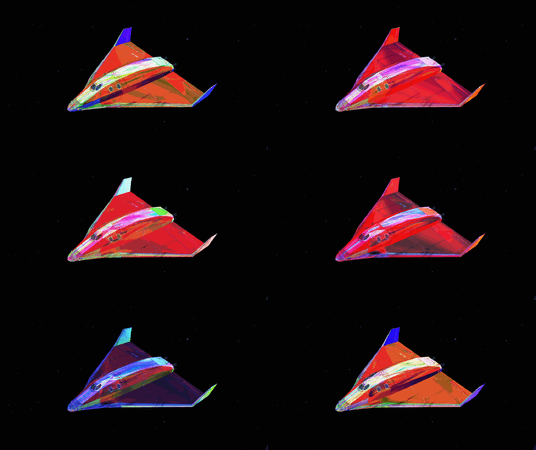
My DeltGlider flashes strangely (or fancy whatever you like) for quite some time now.
I'm not sure what I've done to make it do this, but can someone maybe give me a hint on what I might have done (wrong)?
Some metallness shader mess I assume.
strange2.gif
 
Hey,
another small question to the experts ;)
My DeltGlider flashes strangely (or fancy whatever you like) for quite some time now.
I'm not sure what I've done to make it do this, but can someone maybe give me a hint on what I might have done (wrong)?
Some metallness shader mess I assume.
View attachment 30815
Oh, you got a much colorful flashing... mine is just bright red.
 
@GLS : I would love to have a "boring red one". Can we exchange[*]? ;)

[*] "Nur an Selbstabholer" / "Only for pickup" :D
 
I haven't seen anything like that before. Could it be broken Local lights producing some random noise. Try to isolate them from the shaders.
I'll have to make x86 test build to see if it's all right there. Usually I forgot to enable Win32 and I got x64 build.
 
Thanks Jarmo, I'll see whether I can isolate the local lights.
BTW: This happens in both x64 and 32bit builds, which share many things (via symbolic links).
This indicates a "configuration" issue present in both - so .hlsl and/or .fx files might be a good guess.
I'm currently some days away from an Orbiter-machine, so don't expect results too soon.
 
@GLS : I would love to have a "boring red one". Can we exchange[*]? ;)

[*] "Nur an Selbstabholer" / "Only for pickup" :D
It is very hard to capture it, as it doesn't flash as much as that, maybe a couple of flashes in a row and them normal for several seconds.
 
Back
Top