I am not actually sure what this means. Are you saying your build doesn't produce a D3D9Client.dll in Modules/Plugin of your build directory when you build Orbiter? Do you get any error messages?It doesn't seem to include a built binary in the actual artifact build process output archive. Is this intended?

-
ORBITER-FORUM will be temporarily closed at 2026-07-23 18:00 UTC while we complete some OF maintenance tasks. The amount of downtime is expected to take up to one hour, but probably less.
You are using an out of date browser. It may not display this or other websites correctly.
You should upgrade or use an alternative browser.
You should upgrade or use an alternative browser.
New Release D3D9Client Development
- Thread starter jarmonik
- Start date
I think he meant https://github.com/orbitersim/orbiter/actions/runs/2989073829
- Joined
- Feb 4, 2008
- Messages
- 9,758
- Reaction score
- 1,028
- Points
- 203
I am not actually sure what this means. Are you saying your build doesn't produce a D3D9Client.dll in Modules/Plugin of your build directory when you build Orbiter? Do you get any error messages?
This is exactly what I meant. The automated build runs. They don't include any of the D3D9Client elements, just the bare Orbiter items.
I see. I suspect what's happening is that when building Orbiter on the github CI runner, cmake doesn't find the DXSDK installation and skips the D3D9Client build. I'll have a look to see if I can figure out what is going on here. Or maybe somebody more familiar with the build.yml script can spot what is happening.

A few questions:
a) is MOGE gone, or will it "share the stage" with D3D9?
b) what version of the DirectX SDK is needed/recommended to compile D3D9?
c) is the D3D9/vessel interface still via gcCore?
a) is MOGE gone, or will it "share the stage" with D3D9?
b) what version of the DirectX SDK is needed/recommended to compile D3D9?
c) is the D3D9/vessel interface still via gcCore?
I think I fixed the build script for the github runner. Can you please check if it works for you now?It doesn't seem to include a built binary in the actual artifact build process output archive. Is this intended?
a) It's not gone yet. The inline and DX7 clients still build with the current sources (32-bit target only). When the 32-bit platform gets dropped, which will happen eventually, the DX7-based clients will be history. For now, they are still useful to me, because I am more familiar with them, so I can test things quicker.A few questions:
a) is MOGE gone, or will it "share the stage" with D3D9?
b) what version of the DirectX SDK is needed/recommended to compile D3D9?
c) is the D3D9/vessel interface still via gcCore?
b) This is explained in Doc/D3D9Client.pdf, section DirectX Runtimes. The download contains not only the runtime dlls but also the development headers and libs. If you install the SDK in a non-standard location, you have to set the cmake DXSDK_DIR path.
c) I have to refer this to the D3D9Client developers.
- Joined
- Feb 4, 2008
- Messages
- 9,758
- Reaction score
- 1,028
- Points
- 203
I can confirm that it does indeed work now and all of the files are included.I think I fixed the build script for the github runner. Can you please check if it works for you now?
- Joined
- Mar 28, 2008
- Messages
- 2,707
- Reaction score
- 881
- Points
- 128
Is it ok to delete the d3d9client branch? I tend to delete merged branches to keep the branch list clean.
It's ok to delate it at-least for me. I see no problem there.
- Joined
- Mar 28, 2008
- Messages
- 2,707
- Reaction score
- 881
- Points
- 128
A few questions:
a) is MOGE gone, or will it "share the stage" with D3D9?
b) what version of the DirectX SDK is needed/recommended to compile D3D9?
c) is the D3D9/vessel interface still via gcCore?
The future of gcCode interface depends on the community. Right now there are many functions that depend on DX9 and can't be implemented on DX7 so it might be better to keep it as it is for now. We have to think about the future of gcCore after the DX7 is removed which may lead to transfer of the functions to oapi* namespace but it's a community decision.
After the removal of DX7, D3D9 will continue to support DX7 based add-ons under it's DX7 "emulator" mode which is toggled on per surface basis.
Recommended SDK is June 2010

What is the version of d3d9 client integrated into current OpenOrbiter hosted on GitHub? What are its new features? Anyway to get this information? Also, does it support the 64 bit build?

- Joined
- Apr 1, 2008
- Messages
- 2,167
- Reaction score
- 663
- Points
- 113
It's basically the same version as 30.7 (for orbiter BETA) - as could be downloaded here .What is the version of d3d9 client integrated into current OpenOrbiter hosted on GitHub?
The version information (Windows File Version info via right click on D3D9Client.dll) will show that, too.
Nothing mayor. Mainly it was "tweaked" to be included in the OpenOrbiter build-chain and to be build as 64-bit version!What are its new features?
No, sorry. The "what's new" page is not (yet) plannedAnyway to get this information?

Most of the changes are discussesd and addressed in this forum thread.
I know that that is not a good solution.
Yes, yes it does!Also, does it support the 64 bit build?
The latest 64-bit build atrifact contains the 64-bit versions of OpenOrbiter & D3D9Client.
Thanks for the reply, kuddelIt's basically the same version as 30.7 (for orbiter BETA) - as could be downloaded here .
The version information (Windows File Version info via right click on D3D9Client.dll) will show that, too.
Nothing mayor. Mainly it was "tweaked" to be included in the OpenOrbiter build-chain and to be build as 64-bit version!
No, sorry. The "what's new" page is not (yet) planned
Most of the changes are discussesd and addressed in this forum thread.
I know that that is not a good solution.
Yes, yes it does!
The latest 64-bit build atrifact contains the 64-bit versions of OpenOrbiter & D3D9Client.
Regarding the version and new features, I remember jarmonik posting about remaking the shaders and adding/reworking features and graphics effects in the client, and wanting to leave behind the d3d9 client codebase for orbiter 2016. I was wondering whether that new version of d3d9 client was the version integrated into OpenOrbiter
Finally got around to compiling D3D9, and it doesn't work with a Debug build. With everything in Debug I get
in the log when opening the Launchpad, but if I recompile D3D9 in Release, keeping the rest of Orbiter in Debug, then it works as usual.
0 errors or warnings in build either configuration.
Another issue is the local lights not working, but they work in MOGE. Of note is that it seems they work for the vc meshes, I turn on the Payload Bay lights and some of it hits the vc mesh, and that still happens, but nothing is lit outside.
I also get these in the log:
On the positive side, I managed to find the correct file to include and got SSV to compile!
Then I went to Edwards and saw this scene out of the movie 2012...
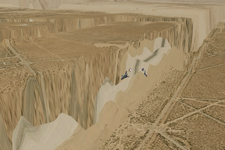
Changing the interpolation option had no effect. Things look normal in Florida, but there are a extra few "peaks and valleys" in Vandenberg, but nothing like the image above.
Orbiter_ng.exe with MOGE shows a gray scene and CTDs in a few seconds without any info in the log, and with Orbiter.exe everything works fine.
Code:
Failed loading module Modules\Plugin\D3D9Client.dll (code 126)
[Orbiter::LoadModule | D:\repos\orbiter\Src\Orbiter\Orbiter.cpp | 619]0 errors or warnings in build either configuration.
Another issue is the local lights not working, but they work in MOGE. Of note is that it seems they work for the vc meshes, I turn on the Payload Bay lights and some of it hits the vc mesh, and that still happens, but nothing is lit outside.
I also get these in the log:
Code:
D3D9ERROR: CreateShaderCache: CreateFile Error: 0x3
D3D9ERROR: Path=[Cache/Shaders/IPIVS_VSMain_IPI.hlsl.bin]
D3D9ERROR: CreateShaderCache: CreateFile Error: 0x3
D3D9ERROR: Path=[Cache/Shaders/IPIPS_PSBlur_EnvMapBlur.hlsl.bin]
D3D9ERROR: CreateShaderCache: CreateFile Error: 0x3
D3D9ERROR: Path=[Cache/Shaders/IPIVS_VSMain_IPI.hlsl.bin]
D3D9ERROR: CreateShaderCache: CreateFile Error: 0x3
D3D9ERROR: Path=[Cache/Shaders/IPIPS_PSPreInteg_IrradianceInteg.hlsl.bin]
D3D9ERROR: CreateShaderCache: CreateFile Error: 0x3
D3D9ERROR: Path=[Cache/Shaders/IPIPS2_PSInteg_IrradianceInteg.hlsl.bin]
D3D9ERROR: CreateShaderCache: CreateFile Error: 0x3
D3D9ERROR: Path=[Cache/Shaders/IPIPS2_PSPostBlur_IrradianceInteg.hlsl.bin]
On the positive side, I managed to find the correct file to include and got SSV to compile!
Then I went to Edwards and saw this scene out of the movie 2012...
Changing the interpolation option had no effect. Things look normal in Florida, but there are a extra few "peaks and valleys" in Vandenberg, but nothing like the image above.
Orbiter_ng.exe with MOGE shows a gray scene and CTDs in a few seconds without any info in the log, and with Orbiter.exe everything works fine.
Also, I'm noticing a bright red reflection on the outside of the DG, just flickering sometimes.... can't tell much more, it still happens when paused and it doesn't seem to be related to the direction of the Sun.
- Joined
- Mar 28, 2008
- Messages
- 2,707
- Reaction score
- 881
- Points
- 128
I haven't seen any red reflections lately. There's been a few like seeing a specular reflection of Mars in the past. If you see it then check the reflection map if there's any anomalous dots in it. Or it could be post-processing related.
I never have had problems building a Debug build. Could it be missing debug runtimes ? Check Windows SysWOW64/D3dx9d_43.dll
I'll look into the Log errors. Nothing vital. I got them too.
Orbiter Beta/OpenOrbiter are using different height configuration than Orbiter 2016 which might cause the elevation failure. There are a number of problem with the elevation that should be corrected.
I never have had problems building a Debug build. Could it be missing debug runtimes ? Check Windows SysWOW64/D3dx9d_43.dll
I'll look into the Log errors. Nothing vital. I got them too.
Orbiter Beta/OpenOrbiter are using different height configuration than Orbiter 2016 which might cause the elevation failure. There are a number of problem with the elevation that should be corrected.
Antelope is broken for me tooThen I went to Edwards and saw this scene out of the movie 2012...
View attachment 30604
Changing the interpolation option had no effect. Things look normal in Florida, but there are a extra few "peaks and valleys" in Vandenberg, but nothing like the image above.
Orbiter_ng.exe with MOGE shows a gray scene and CTDs in a few seconds without any info in the log, and with Orbiter.exe everything works fine.

A small request to the D3D9Client developers:
There is a feature branch pull request that could do with a review from somebody familiar with the D3D9Client.
This started out as an innocuous small feature to add spectral class information to the star database which could be used to provide colour variations for background star rendering. Over time this has grown to a fairly extensive rewrite of the entire CelestialSphere class implementation affecting all graphics clients.
Some of the modifications include:
There is a feature branch pull request that could do with a review from somebody familiar with the D3D9Client.
This started out as an innocuous small feature to add spectral class information to the star database which could be used to provide colour variations for background star rendering. Over time this has grown to a fairly extensive rewrite of the entire CelestialSphere class implementation affecting all graphics clients.
Some of the modifications include:
- The individual client CelestialSphere implementations are now derived from a CelestialSphere base class (which is part of the API) that performs all the client-independent functions such as loading the databases from file and preprocessing them. The clients now only have to do graphic-engine specific stuff such as mapping the data to device data structures and rendering them.
- Some functions for loading star and constellation databases have been moved from the global API (oapi namespace) to the CelestialSphere class.
- The celestial sphere now is assumed to be the unit sphere (radius 1), so it is no longer necessary to multiply coordinates on it by some arbitrary radius.
- Rendering the celestial sphere is now done in the CelestialSphere class instead of the Scene class.
- Some general cleaning up of the code, e.g. use of std::vector and std::string instead of manual heap allocation.
- Oh, and the original feature of providing colour information for background stars has been implemented as well, but it is very subtle. Still, if you look at Orion and compare Betelgeuse to Rigel, you should see a difference.
Similar threads

- Sticky
- Replies
- 6
- Views
- 10K

- Replies
- 10
- Views
- 4K


- Replies
- 1
- Views
- 4K


- Replies
- 7
- Views
- 4K