New Release D3D9Client Development

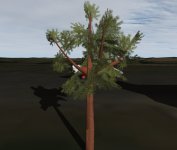
It should work or is there something I have overlooked ?? I don't have a tree so can't test it. It might be good idea to check that the tree really goes through the shader being modified. You can test it by adding the following line in the shader. It should turn everything red that goes through it. You should have red tree.

Code:
float4 FAST_PS(float4 sc : VPOS, FASTData frg) : COLOR
{
    return float4(1, 0, 0, 1);   // <-- add this -->
I think I have an explanation for this, after looking at the code you posted earlier. The code you posted, deals with alpha levels used by materials which is all well and good but if I have understood N_Molson right, his tree uses texture alpha, not material alpha. So the branches are essentially textured 2D planes with the empty areas blanked out using an alpha layer in the texture.
 
Last edited:
I think I have an explanation for this, after looking at the code you posted earlier. The code you posted, deals with alpha levels used by materials which is all well and good but if I have understood N_Molson right, his tree uses texture alpha, not material alpha. So the branches are essentially textured 2D planes with the empty areas blanked out using an alpha layer in the texture.
That's not the case. Material alpha is called "gMtrlAlpha". "cDiff.a" is a texture alpha and it's sampled just 3 lines earlier in the code.
 
Good news, it seems I forgot to check the "sort meshgroups by name" option in the exporter. So, with the foilage being the last meshgroup and the code fix provided by @jarmonik , it is much better ! 1) The DG is now correctly rendered 2) the "foilage plates" have stopped conflicting each others. The only thing is the shadow, but after all we can remove it completely by deleting "SHADOW" in the config file.

AlphaBug_05.jpg
 
That is a very nice tree.
 
The only thing is the shadow, but after all we can remove it completely by deleting "SHADOW" in the config file.
It should be possible to get the shadow appear right as well but it requires more then just one line.
 
Anyone knows whats the suffix d3d9 looks for when searching for metalness map? I guess the Metalness PBR has support for those kinds of maps, right? Maybe a short list of the suffixxes (_norm, _rghn, etc) the new Metalness PBR shader uses would be useful until we get an updated Doc
 
The Metalness shader makes use of only two additional textures, which is _metal and _rghn. The _rghn texture defines the roughness in an inverted way, in that the closer to pure white (255) something is the rougher it is. So for something ultra-smooth you want it close to pure black (0) rather than pure white (255).
 
The Metalness shader makes use of only two additional textures, which is _metal and _rghn. The _rghn texture defines the roughness in an inverted way, in that the closer to pure white (255) something is the rougher it is. So for something ultra-smooth you want it close to pure black (0) rather than pure white (255).
Great! Thanks! And is there any way of setting the Metalness PBR shader as the default for a mesh? Or every user has to change it upon install?
 
Great! Thanks! And is there any way of setting the Metalness PBR shader as the default for a mesh? Or every user has to change it upon install?
Ctrl-F4, select D3D9 Debug Controls. Then click on any part of the mesh and make sure "Default Shader" is set to Metalness PBR. Then you will have to go through the mesh to make sure each separate material is set properly. Once you are done, click the "Save" button, this will create .cfg file in Config\GC\ that has the class name of the vessel that you will have to include with the actual download package.
 
Ctrl-F4, select D3D9 Debug Controls. Then click on any part of the mesh and make sure "Default Shader" is set to Metalness PBR. Then you will have to go through the mesh to make sure each separate material is set properly. Once you are done, click the "Save" button, this will create .cfg file in Config\GC\ that has the class name of the vessel that you will have to include with the actual download package.
So if I include that cfg file with my mod, itll be activated by default? Nice, tnxs!
 
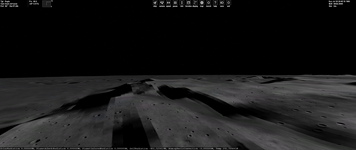
What causes this artefact at low sun angles?

This is with R1346 for Orbiter Beta.

1662174274807.png
 
Just checking in to say hello (it doesn't happen very often these days). I wanted to ask @jarmonik and the D3D9 developers about the d3d9client branch on github orbitersim/orbiter: is it ok with you guys if I merge the branch? I did upload a few commits to it (mainly minor stuff - rebasing to fix conflicts with main and some streamlining of the cmake files. The only real change was an update to the tile loading calls to add support for the PlanetTexDir config option, which is useful for the git sources, because most people will have their planet textures installed elsewhere, and it avoids having to drop symbolic links in the Textures directory.

If you want to review my changes I will hold off merging for now. There is no rush - I will be incommunicado again from next week for two weeks, so unless I do it instantly it will have to wait a few weeks anyway.
 
Just checking in to say hello...

Hi, it's great to hear from you.

Yes, it would be good idea to merge it as soon as possible. It would clarify the situation a lot especially for contributors, also having two branches drifting apart too much increases the change for merge conflicts and makes them more difficult to solve. So, go for merge. I have also reviewed the changes and they look good to me, Thanks. The PlanetTexDir has been on a wishlist quite some time and it's very good to have it.
 
Is it ok to delete the d3d9client branch? I tend to delete merged branches to keep the branch list clean.
For me it's totally fine! All the changes I've made in thta branch on my fork were such minor things, that it's much easier to work only on the main branch.
Also workflow for automatic builds as a bonus :D
 
Perfect - thanks for the quick response!
All done now - enjoy the D3D9 client on the Orbiter main branch!
Is it ok to delete the d3d9client branch? I tend to delete merged branches to keep the branch list clean.
It doesn't seem to include a built binary in the actual artifact build process output archive. Is this intended?
 
For me it's totally fine! All the changes I've made in thta branch on my fork were such minor things, that it's much easier to work only on the main branch.
Also workflow for automatic builds as a bonus :D
That is actually not quite what I meant. It is just that now that the d3d9client feature branch is merged into main, all commits to d3d9client are now commits to main. So for future modifications to the D3D9Client it would be cleaner to branch off main than to continue to commit to the merged d3d9client branch (which won't contain any of the commits to main from here on, so would require continued re-basing).

I would still not recommend to commit directly to main, because that bypasses any discussion/review of the new features to be worked on. The workflow I would recommend (which incidentally is the one I use at work) is:
  • when you want to add a feature or fix a bug, create an issue describing what you found or intend to do
  • create a new branch referencing the issue
  • commit your work to the new branch
  • when done, create a pull request, and ask for reviews from the relevant people, if applicable
  • merge to main and close the issue
  • delete the branch
Or in other words, the main branch should always be stable. All developmental/experimental stuff should happen in feature branches and only be merged once you are satisfied that it works as intended and doesn't break anything else.
 
Last edited:
Back
Top