New Release D3D9Client Development

An advanced option exists to control what vessels have shadows, but I'm not sure that is working as intended (or I'm interpreting it the wrong way :shrug:). The "Near by objects" will show "full detail" in the selected vessel (and some/all child attachments?), and only "low detail" in nearby vessels. The "Focus + payload" doesn't always show the "full detail" on the child vessels. The "All visible objects" sometimes doesn't set "full detail" on any vessel (even the selected one).
Maybe there should be 2 options: one to control what vessels will have shadows, and another to decided what level of detail the shadow will have on the vessels "selected" by the first option, a sort of subset option.
 
An advanced option exists to control what vessels have shadows, but I'm not sure that is working as intended....


You could provide a screen shot to clarify the situation. But there is no level of detail control like that for shadows. Following is not entirely true, but we can consider that there is a fixed sized shadow map of 2048 pixels and those pixels will create a charper shadow on a small vessel and rougher shadow on a larger vessel. So, in other words the level of detail simply depends on vessel size. Large construction like ISS can have a sharp shadow if it's composed from a multiple smalled modules. Which is true in reality.
 
You could provide a screen shot to clarify the situation. But there is no level of detail control like that for shadows. Following is not entirely true, but we can consider that there is a fixed sized shadow map of 2048 pixels and those pixels will create a charper shadow on a small vessel and rougher shadow on a larger vessel. So, in other words the level of detail simply depends on vessel size. Large construction like ISS can have a sharp shadow if it's composed from a multiple smalled modules. Which is true in reality.

That's it then... the vessel that "doesn't like shadows" is the SSU pad, which although not the largest detailed mesh, it has a large area.
Thanks!
 
Quick question for the graphics experts on how the textures and materials of mesh groups are handled: when going thru the groups, and the group needs a different texture than the previous group, does the material also get automatically "reset", or if it is the same you don't spend time switching that as well?
I'm trying to understand how it works so I can produce stats on texture and material switching based on the mesh group order. In a pdf, Martin mentions that groups should ordered by texture, and then material, for best performance (and it makes total sense), but nothing is said about what happens to the current material when a texture is changed. :shrug:
 
but nothing is said about what happens to the current material when a texture is changed. :shrug:


In D3D9 current material remains in use when a texture is changed.
Also, a current texture remains in use when a material is changed.
Atleast this is how it should be.

Material and texture changes are pretty fast so there is no need to go extreme lenghts while attempting to optimizing them. Of course, if some attention is paid to avoid unnessecary changes then it can gain a few percent of extra frame rate. :thumbup:

---------- Post added at 16:11 ---------- Previous post was at 16:00 ----------

New build 3.13 of the client is out for Orbiter 2016. There are a lot of changes but, the most important ones are related to shadows and terrain.

- Stencil shadows are now better aligned with a terrain and should appear in the right place for vessels and base object meshes.

- Underground meshes are nolonger creating a "false" shadows.

- When "linear interpolation" and "Experimental lunar terrain interpolation" are selected the resulting visual terrain should match the surface used by physics with an accuracy of 2cm. Otherwise, the deviation can be a few meters.
 
Last edited:
In D3D9 current material remains in use when a texture is changed.
Also, a current texture remains in use when a material is changed.
Atleast this is how it should be.
Makes sense, thanks!

Material and texture changes are pretty fast so there is no need to go extreme lenghts while attempting to optimizing them. Of course, if some attention is paid to avoid unnessecary changes then it can gain a few percent of extra frame rate. :thumbup:
Well, I'd guess the texture and material changes are a small "overhead" in the complete drawing process, so gains in there shouldn't be drastic. But, performance is far from good with 20MB meshes, so if we can gain anything, why not gain it? :shrug:
The re-ordering process is done by a one-time pass thru a script I'm finishing. My current logic assumes the materials are reset when a texture changes (much easier :lol:), so with the new info above I'd have to change things to get the absolute best group order. Not sure I'll do it, as I'm getting a ~60% reduction in total changes as is, and the cases where the same material is used in 2 groups with different textures should be small.

In the end, even if the performance gains are small, I'm learning Python so there is a gain anyway! :thumbup:
 
hello Jarmo

I'd just tested the latest version of D3D9 (v3.13) and now I no longer have the floating shadow problem that I had encountered with my Kourou-CSG add-on.

Thank you somuch for that !!! :thumbup::tiphat:...


New build 3.13 of the client is out for Orbiter 2016. There are a lot of changes but, the most important ones are related to shadows and terrain.

- Stencil shadows are now better aligned with a terrain and should appear in the right place for vessels and base object meshes.

- Underground meshes are nolonger creating a "false" shadows.

- When "linear interpolation" and "Experimental lunar terrain interpolation" are selected the resulting visual terrain should match the surface used by physics with an accuracy of 2cm. Otherwise, the deviation can be a few meters.


Are these amazing features there in the Orbiter Beta D3D9 Client?
If not, will it be possible to port them to the beta client also?

---------- Post added at 11:06 AM ---------- Previous post was at 11:04 AM ----------

I've added a missing feature in D3D9Client (trunk) that should now enable planetary bodies that are defined as a mesh and "Size = xxx" parameter in their .cfg file.
(See attachment and the threads here and here for what I mean by that).

Until this revision (r1187) the body mesh had to be scaled (by Shipedit.exe for example) to be rendered correct (full) size with D3D9Client.
Now the mesh can be kept in usual "1.0 based" coordinates and the Scale parameter from the config is applied (as Orbiter 2016 does)!

@Jarmo: It seem that the texturing is not working 100%, though. Could you take a quick look, as it might take you only seconds while I'm a bit lost... :)

For the test I've added 67P/Churyumov-Gerasimenko as it is sooo non-spherical :P
The texture is just a dummy as the texturing is probably not right anyway.

This is not (yet) a new release, we have to sort out the texturing issue first (if it is one), before we create a new D3D9Client-forBETA and back-port it to D3D9Client-for2010 as well.


Have you been able to fix the texturing issues?
When can we have a release of d3d9 beta with this feature?
 
Are these amazing features there in the Orbiter Beta D3D9 Client?
If not, will it be possible to port them to the beta client also?

These features are not yet available for beta. I am waiting Martin's response to how do we fix the terrain elevation issue from Orbiter beta and I have not received an answer. Also, the shadow fixes are tied to a terrain elevation so they are not working without elevation fix.

We will create a beta build as soon as the issues are resolved.


Have you been able to fix the texturing issues?
When can we have a release of d3d9 beta with this feature?

I don't know if the issue is fixed. In some cases textures were not working due to missing texture coordinates. Kuddel might have new information.
 
Have you been able to fix the texturing issues?
When can we have a release of d3d9 beta with this feature?

This "texturing issue" is fixed already (rev.1196 @ trunk) . A new release will have it fixed.
A GO/NO-GO on a new BETA release-version would be: GO!
For when jarmonik will build and publish a new release, I cannot predict any date.
Quite a number of changes/fixes since "R28.11" (rev.1173), so it's time for a new release :salute:

As X-mas came early this year (with AMSO for Orbiter-2016), maybe a new build will come up soon.
 
New Build

There are new builds 4.0 and 29.0 published for Orbiter 2016 and Orbiter Beta, currently carying "Beta" status.

- There is a new gcCore interface to access gcAPI functions. Since, the interface is growing larger and the old method is slightly problematic and time taking to maintain the gcCore could be a solution to that. The old gcAPI is going to remain and work as it is however new functions will be available only through gcCore interface, currently declared in gcConst.h

- There is a new custom swapchain interface added. This means that users can create a double buffered DirectX rendering context in a custom window or control. Which can be written in by SketchPad or oapiBlt().

- New version of DX9ExtMFD is made available which is using the swapchain interface. Unzip it in "/Modules/Plugin/" folder.

- Screen space GDI access is restored. And can be enabled from the D3D9Clontrol dialog from the launchpad. However, I haven't been able to test it. Most addons known to use it are crashing even with the DX7.

- The accurate terrain interpolation is no longer an experimental feature and the checkbox is removed.

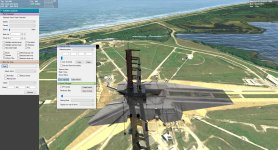
- There is also an experimental gcGUI interface that should put through some testing and if it passes then a new development tools will be hopefully made by using it. I have a surface base/terrain editing tool and vessel visual editor in the plans. The gcGUI can be enabled form D3D9Controls from the launchpad and there are two modes "Default" and "Windowed". Testing is required at 4k resolution and multi-monitor configurations. Note: that the controls in the dialogs are not yet operational. The old D3D9Debug control dialog is still fully operational.

The "Default" mode has two dockbars in left/right edge of the screen and the controls can be freely moved around the screen. The dock bars can be currently locked in current open/closed position by holding down [LShift + LCtrl] and pressing [LeftArrow] or [RightArrow].

The "Windowed" doesn't have dockbars and the sub-dialogs can't be detached from the main section.


:cheers:
 

Attachments

  • DX9ExtMFD.zip
    DX9ExtMFD.zip
    131.6 KB · Views: 15
  • gcGUI.jpg
    gcGUI.jpg
    345.6 KB · Views: 100
Last edited:
Major bug to report: I can't use the MFD target selection menus in D3D9Client. They come up but the arrow keys does nothing, I can't move between the different menu items. Only way to make it go away is by left-clicking.
 
Major bug to report: I can't use the MFD target selection menus in D3D9Client. They come up but the arrow keys does nothing, I can't move between the different menu items. Only way to make it go away is by left-clicking.


Oh no. How did this happen :facepalm: You need to roll back to 3.13 until I can make a new build. Sorry about this. EDIT: Also, disabling gcGUI should solve the problem.

BTW, have you tried the new gcGUI dialogs in 4k resolution ? Are they working/scaling properly ?
 
Last edited:
Oh no. How did this happen...You need to roll back to 3.13 until I can make a new build...
I have to add that reverting back to 3.13, then to 3.12 didn't fix my MFD issue.

D3D9's ExtMFDs show up completely empty.
Pressing SEL cycles through my installed MFDs (I can see the side selection buttons with the ">" and "<" arrows changing accordingly), but the MFD itself remains blank.
 
I have to add that reverting back to 3.13, then to 3.12 didn't fix my MFD issue.
D3D9's ExtMFDs show up completely empty.

The latest build of the DX9ExtMFD only works with D3D9Client versions 4.0+

There is a bug that causes a keyboard issues if the gcGUI is enabled in "Default" of "Windowed" mode. Version 4.0 should work fine as long as the experimental gcGUI is "Disabled" from client configuration dialog.
 
The latest build of the DX9ExtMFD only works with D3D9Client versions 4.0+
My bad! Of course!

There is a bug that causes a keyboard issues if the gcGUI is enabled in "Default" of "Windowed" mode. Version 4.0 should work fine as long as the experimental gcGUI is "Disabled" from client configuration dialog.
External MFDs are still blank with latest DX9ExtMFD, latest client R4.0 and gcGUI disabled.
 
External MFDs are still blank with latest DX9ExtMFD, latest client R4.0 and gcGUI disabled.

I just remembered that it wont work in a true-fullscreen mode. In which case error: "Failed to create a swapchain. (Feature not supported in true-fullscreen mode)" should be printed in Orbiter.log.

Could you chack that if the true-fullscreed is the case here or is there something else wrong ?

The new DX9ExtMFD will create it's own front and backbuffer for MFD drawing, I don't know if there are any other limitations to the availability of that feature. You were using Windows XP, right ?
 
You were using Windows XP, right ?
Ehehehh, those days are long gone, I'm on Win10 now.

I just remembered that it wont work in a true-fullscreen mode.
...
Could you chack that if the true-fullscreed is the case here or is there something else wrong ?
...
Yes, that was the case :thumbup:
In full screen, opening an D3D9extMFD resulted in an empty MFD (as you know), but it was also impossible to close it.
Double clicking on the (invisible) "x" at the righmost of the MFD's titlebar, the MFD "minimized" but the titlebar was still visible.

In Video -> Window mode, D3D9extMFD finally worked as expected, BUT:

I tried with all 3 gcGUI modes, and while going in and out of Orbiter, I noticed that the "DX9 External MFD" option in CTRL+F4 menu had disappeared...mostly when switching from "windowed" to "default" gcGUI mode.

Completely exiting and relaunching Orbiter fixed the issue.

I also saw a "gcGUI test" option in the CTRL+F4 menu, but only in gcGUI "windowed" mode.
Moving that window (D3D9 Controls) around with the mouse was a bit erratic: with a first click on the titlebar, it jumped and sticked to the left of my monitor, ouside of Orbiter window.
It is as if there is an offset position between the mouse pointer and the window coordinates, drawing the window at the left of the mouse.

In gcGUI "default" mode, the same window (D3D9 Controls) appears automatically whenever my mouse touches the left Orbiter window border.


By the way, the other "normal" options I have in CTRL+F4 menu are:
DX9 External MFD
Scenario Editor
D3D9 Debug Controls
D3D9 Atmospheric Controls
 
Last edited:
Running Orbiter 2016 with D3D9 R3.12, R3.13 or R4.0 and loading a mesh with a group containing FLAG 8 produces a CTD +/- when the sim should start. Both logs show the message:
Code:
[ERROR] MeshGroupFlag 0x8 in use (OPERATION NOT IMPLEMENTED)

I'm sure this worked without the CTDs in Orbiter Beta... not sure if the log message was present...
So is this something not available just for Orbiter 2016, or it's not available at all and the CTD is (maybe) something else?
 
Back
Top