New Release D3D9Client Development

Time to update it then.
They have been (2017-08-31). I believe the 2016-branch didn't get that merge.

Everyone that finds an error in the documents, please tell us! Documenting an ever changing environment is not without flaws.

Nevertheless, this Runtimes issue comes up every couple of weeks and the forum is full of hints about this.

---------- Post added at 14:24 ---------- Previous post was at 13:19 ----------

Merged some "logging features" from trunk to 2016-branch:
Code:
Merged revision(s) 861,1042-1047 from trunk:
- Documentation update
  - updated DirectX runtimes URL to link to the current (June 2010) version.
- fixed incorrect report of spacecraft.dll used
  when starting another scenario without closing the Launchpad dialog.
- Added logging of loaded D3D9 DLLs and their versions.
- added EditorConfig file
  Visual Studio 2017 supports this natively, Visual Studio 2015 might need a plugin
  (see https://EditorConfig.org)
I did expect that to have happened already :facepalm:
 
gcSetupCustomCamera shadow

hello

I am using gcSetupCustomCamera in an MFD

it works but I don't get vessel shadows

Is there something to do to have shadows activated ?

Thanks
 
I have a minor issue with the self-shadows: When I set the terrain mapping to projected this works very well for the most part, except that the shadow is not visible from internal views. This makes it quite challenging for scenarios such as landing the LM on the moon as one relies a lot on the shadow for height perception. Using stencil mode is the only way right now to see your shadow from internal views.
 
DX9 to Vulkan wrapper

Don't know if you guys would take an interest in this but I came across a wrapper called VK9 which apparently runs DirectX 9 applications on Vulkan. Given by what I've read on other forums, it's to help increase frame rate, etc. I installed the latest pre-release available on Orbiter and it didn't have any conflicts. However, I can't tell if it's a) running and b) if there's any improvement to Orbiter as I have an GTX 1080 and Orbiter always runs smoothly, even when I push it at DSR.

Anyway, link is below if you want to check it out:

https://github.com/disks86/VK9
 
Where is this set? I'd like to tweak it for myself.

It was in the shader files but since it didn't really worked very well it got disabled. Line 845 in Surface.fx. The real problem is the blue atmospheric haze that makes the shadows less visible against dark blue water. Maybe the haze is too thick ?

There is also "OrbitalShadowMult = 0.85" parameter added in D3D9Client.cfg that will control ground shadow intensity.

PHP:
//float fBlue = saturate(cTex.b - (cTex.g + cTex.r)*0.5f)*3.0f + 0.5f;
fShd = saturate(1.0 - fShd*fAlpha); // *fBlue);


---------- Post added at 16:49 ---------- Previous post was at 16:39 ----------


New Build of the Client Is Out

The name of the beta build is messed up for some reason but it's supposed to be for r.88 of the Orbiter.

- Vessel ground shadows should be now visible from the cockpit view.
- Some other ground shadow fixes been made. Overlapping stencil shadows shouldn't be as common anymore but can still occur with very large structures.
- Planet night lights intensity fixes has been made and the runway lights should be brighter.
- An attempt is made to address the VC over-saturation issue in SSU. (Haven't been able to test it) (feedback required)
- There is also "OrbitalShadowMult = 0.85" parameter added in D3D9Client.cfg to control cloud shadow intensity (you may need to run the client once for the line to appear)


:cheers:
 
Last edited:
- An attempt is made to address the VC over-saturation issue in SSU. (Haven't been able to test it) (feedback required)
Thanks for this and things are much better now, everything is perfectly usable again, no over-saturation anywhere.
 
Is there any update on the smaller sized MFD font issue I posted about a while back? It's not a major concern but I just wanted to point it out as it still remains the way it used to be even with the latest D3D9 build and GPU drivers (I also had an OS reinstallation in the meantime and the issue persisted with a clean W10 install).
 
Is there any update on the smaller sized MFD font issue I posted about a while back? It's not a major concern but I just wanted to point it out as it still remains the way it used to be even with the latest D3D9 build and GPU drivers (I also had an OS reinstallation in the meantime and the issue persisted with a clean W10 install).


I'll forward this to Martin.
 
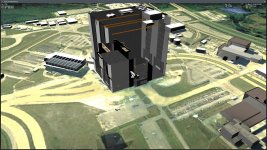
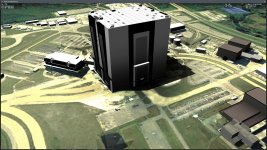
I think I have discovered a bug in the D39DClient's handling of the UNDERSHADOWS base element parameter. I was playing around with the SSU Canaveral.cfg file and when I applied the UNDERSHADOWS parameter to the MESH elements, I got what is shown in the first attached screenshot. When I removed UNDERSHADOWS from the VAB MESH entry, I got the proper looking second screenshot.
 

Attachments

  • VAB_UNDERSHADOWS_1.jpg
    VAB_UNDERSHADOWS_1.jpg
    308.1 KB · Views: 39
  • VAB_UNDERSHADOWS_2.jpg
    VAB_UNDERSHADOWS_2.jpg
    297.2 KB · Views: 36
I think I have discovered a bug in the D39DClient's handling of the UNDERSHADOWS base element parameter.


The UNDERSHADOWS is supposed to be applied to a flat runways and landing pads. The object will be rendered without z-buffer beneath/below any other building or vessel. So, it looks ok to me.
 
The name of the beta build is messed up for some reason but it's supposed to be for r.88 of the Orbiter.
My fault ... :blush:

That's fixed now with the new version of the over.exe tool. It used to look at the "old" Orbiter repository path to figure out the revision of Orbiter.lib.
So after an update[1] the build script should work again and identify the version to be r88!

[1] Also merged into branches "2010-P1" and "2016"
 
Is there any work on going to improve the atmosphere rendering? I've tried my best to get the current implementation pretty accurate but it's just not getting there, no matter how much I play with the sliders in the Atmospheric Controls dialog, I'm not getting anywhere close to an accurate color.
 
Is there any work on going to improve the atmosphere rendering?

Unfortunately no. The atmosphere rendering should be complitely reimplemented. The current one is a very simpple physics model that's been pushed to fovor orbital rendering with the cost of twilight/sunset/rise conditions.
Current focus is pretty much in a development tools regarding surface bases, virtual cockpit lighting, mesh utilities. But, of course, a new atmospheric model would be important.
 
Older version

I installed the version 25-Feb-2019, but it's not good for my hardware. Same problem with D3D9ClientR3.5-forOrbiter2016(r1061).zip.
Is there an even older version? Probably I need a very old version, but I forgot the working version.
I don't need the most up to date version, I just need a reasonably stable version.

EDIT: I found my post #4176 on Sep 2016, hence a version published at that time should be fine.
 
Last edited:
I do not "collect" old versions, as we are pretty happy when those "extinct" ;)
The hardware requirements did not change much over the whole project lifetime (as far as I'm aware), so I guess you might just miss some (VC-) runtime(s)...

I think VS 2012 redist (32/64bit?) is needed, but you might have to try others (2015, or 2013)[*]

If you really want to take the shot at an "old version" I would step back in this thread from the date you've mentioned until you find a post by Jarmo or me that had a ZIP attached.

Out of curiosity:
- Do you have an XP machine?
- Did you re-install your System? You might have forgotten to install the DirectX 9 runtimes...(happened to me a couple of weeks ago too, thinking: "Why doesn't this start at all?" :facepalm:)
- Does the log (Orbiter.log and/or Modules\D3D9Client\D3D9ClientLog.html) tell anything?


[*] For all those runtimes: All in One Runtimes worked fine for me more than once.
 
Last edited:
I installed the version 25-Feb-2019, but it's not good for my hardware. Same problem with D3D9ClientR3.5-forOrbiter2016(r1061).zip.
Is there an even older version? Probably I need a very old version, but I forgot the working version.
I don't need the most up to date version, I just need a reasonably stable version.

EDIT: I found my post #4176 on Sep 2016, hence a version published at that time should be fine.

Why need D3D9 on Orbiter 2016 at all? I am not using D3D9 on Orbiter 2016 but on Orbiter 2010.
 
If you really want to take the shot at an "old version" I would step back in this thread from the date you've mentioned until you find a post by Jarmo or me that had a ZIP attached.

Good! I'll do it.

Out of curiosity:
- Do you have an XP machine?
- Did you re-install your System? You might have forgotten to install the DirectX 9 runtimes...(happened to me a couple of weeks ago too, thinking: "Why doesn't this start at all?" :facepalm:)
- Does the log (Orbiter.log and/or Modules\D3D9Client\D3D9ClientLog.html) tell anything?

Windows 7 64 bit. No significant changes since 2016. The problem is that with the new D3D9 version I see the FPS display (RivaTunerStatisticsServer) flashing near the center of the window, like D3D9 is repeatedly opening and closing a new window. Anyway, is not a problem, an old version will be good for me.

---------- Post added at 09:42 ---------- Previous post was at 09:39 ----------

Why need D3D9 on Orbiter 2016 at all? I am not using D3D9 on Orbiter 2016 but on Orbiter 2010.

Because Orbiter 2016 (and 2010) looks much beautiful and runs much more smoothly.
 
Back
Top