New Release D3D9Client Development

I am sorry to bother here..I searched but cant find..I used to have 3d in orbiter but that was long ago when I experimented with that and I cant remember did I use d3d9 or ogla for that..anyway I see there is option for stereoscopic 3d in settings but I dont know how to activate it..I have those red and blue glasses..thanks
Hi,
there is a 'Stereoscopic' mode in D3D9Client for NVIDIA NvAPI. This however should only work with NVIDIA cards[1] if I'm not wrong.
The 'red/green-glasses' mode was -as far as I remember- a feature of the OGLA-Client...

/Kuddel

---
[1] See "StereoScopic 3D" chapter in Doc/D3D9Client.pdf (Page 5)
or online here
 
Last edited:
At sunset/sunrise over earth, there are sharp dark/light borders on the horizon, is there any fix for this?
 
Last edited:
At sunset/sunrise over earth, there are sharp dark/light borders on the horizon, is there any fix for this?
I have no idea. Do you have a screen shot ?

---------- Post added at 21:50 ---------- Previous post was at 21:46 ----------

By the way, the R15 release has a bug with some part of the stereoscopic display that was not present in the R14 release: most part of HUD, Info texts and Map MFD are only visible on the right image and not on the left one. It hurts the eyes...

I don't have nVidia card right now on my computer so I can't really run any tests. Don't expect it to be fixed anytime soon.
 
It's weird how I was able to get ENB Series and SweetFX to work with the D3D Client, but here with Reshade I have no luck: when I copy the injector and open Orbiter the launchpad freeze while loading the modules.

(I don't except anything to be done in favor to that, it's just that I am thinking out loud)
 
This:
attachment.php
 

Attachments

  • sunrise.jpg
    sunrise.jpg
    64.6 KB · Views: 382

Oh, that one. I almost forgot. I am not exactly sure where it's coming from but I'll take a closer look when upgrading a water rendering to catch up with the inline engine. It's likely a specular mask issue of some kind.
 
Oh, that one. I almost forgot. I am not exactly sure where it's coming from but I'll take a closer look when upgrading a water rendering to catch up with the inline engine. It's likely a specular mask issue of some kind.

I've just downloaded the level 19 textures for earth, and this problem gone, but maybe just because of the higher resolution of textures
 
The new atmospheric scattering effects are amazing. Truly a great departure from the old ugly looking atmosphere.
 
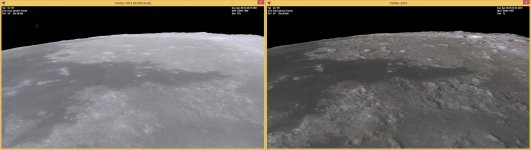
For me the planet/moon textures look washed out. Is this normal? In dx7 mod the terrain is looking better, especially the shadows.

attachment.php


Is this normal?
 

Attachments

  • washed.jpg
    washed.jpg
    91 KB · Views: 354
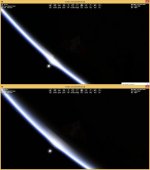
15.01.21 17-40-39 Horizon cropped.jpg

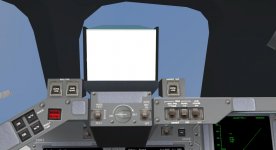
Came across a bug yesterday while setting up this flight with Shuttle Fleet.

The HUD is rendered as a white box in the VC. Not a game breaker by any means, cycling the HUD on to off removes the box and makes the HUD render as it should, it seems to be just something that pops up when loading a scenario. Havent seen it appear once the HUD has been cycled. Just letting you know.

Cheers :cheers:
 
Could you make available R14? R15 doesn't seem to play well with transparencies.
 
Could you make available R14? R15 doesn't seem to play well with transparencies.


Just deactivate geometric instancing in the D3D9Client advanced options.
 
D3D9Client Beta 11 for Orbiter Beta 2015 (rev 10)

Beta 11 is now available from CodePlex. It contains an improved water rendering and some bug fixes.

- Reflections and custom cameras must be disabled. Since, they are not yet fully implemented. Can cause issues like surface tile flickering.

- There are some problems with atmospheric rendering. Land and sky are somewhat out of sync. Will be fixed when the cloud shadows are implemented for lower altitudes.

---------- Post added at 04:35 ---------- Previous post was at 04:22 ----------

Just deactivate geometric instancing in the D3D9Client advanced options.

Deactivation is a solution for now. But I am concerned about who would the transparency issue effect in vessel self shadowing and some other things. The star trackers would likely appear as a black spots, since the vessel's hull would block the sunlight. But it's too early to be certain about it.
 
Deactivation is a solution for now. But I am concerned about who would the transparency issue effect in vessel self shadowing and some other things. The star trackers would likely appear as a black spots, since the vessel's hull would block the sunlight. But it's too early to be certain about it.
Here's a photo of the -Z star tracker on Discovery as seen from the ISS during the RPM of STS-133. as you can see, it's fully lit by the orbital noon sun. If you look closely, you can also see the glinting of the throats of the upward firing RCS nozzles.

iss026e029827.jpg
 
Here's a photo of the -Z star tracker on Discovery as seen from the ISS during the RPM of STS-133. as you can see, it's fully lit by the orbital noon sun. If you look closely, you can also see the glinting of the throats of the upward firing RCS nozzles.

I was talking about the SSU Mesh in the Orbiter not about real-life shuttle. In the mesh, the star trackers are located beneath the vessel's hull. The transparent mesh group is used as a tool to produce a z-buffer clipping trick to cut a hole in the hull. So, technically the hull is intact and the hole is just a visual rendering anomaly. That kind of trick could be incompatible with many rendering techniques, but it's too early to say how and with what.
 
Hi Jarmo!

Just tried to play with nVidia 3D Vision and my 42'' LG Tv. It looks like nVidia don't want to work with d3d9 client. This is what I did:
1. Enable 3D Vision in nVidia control panel, set 1920x1080@24Hz
2. TV recognizes 3D stream and glasses do their job
3. I set orbiter resolution to 1920x1080@24Hz also and click launch
4. TV drops 3D mode, screen goes black and one thing I can see is mouse
5. When I press Ctrl+Q, orbiter shuts down, TV picks 3D signal back.

Similar problem is with 1280x720@60Hz with only one difference - when launching orbiter in that mode, TV doesn't drop 3D signal, orbiter scene shows up, but it isn't rendered in stereoscopic mode, just plain picture.

Any thoughts?
 
Ooooooh, water shaders in Orbiter, at least effect, which looks like water shaders! Water looks quite real, huge step ahead! :thumbup:
P.S. I noticed that distant buildings (VAB etc.), objects are not affected by distance fog...
In Orbiter beta inline client Martin recently has made them affected (by fog).
 
Hi Jarmo!

Just tried to play with nVidia 3D Vision and my 42'' LG Tv. It looks like nVidia don't want to work with d3d9 client. This is what I did:

Any thoughts?

R15 May have been compiled without nVidia API. Also, It looks like there is a similar API available for AMD-ATI cards as well.

Does this one work ? It's for Orbiter 2010-P1.

EDIT: Check the D3D9ClientLog if it's not working.
 

Attachments

Last edited:
Thanks. It partially worked, as I can see loading screen now. But scene still doesn't appear. I see some errors in log, related pretty much to hardware or wrong settings (maybe too much MSAA?).

View attachment D3D9ClientLog.zip
 
Back
Top