New Release D3D9Client Development

b) Automatically adjust the diffuse texture brightness using reflection intensity within the D3D9 code itself; i.e. high reflection intensity = low diffuse brightness. This way, the model would appear unchanged in the inline client, but also look good in the D3D9 client.

Will be implemented in Alpha 3

---------- Post added at 02:08 ---------- Previous post was at 01:21 ----------

It's becoming apparent that specularity and reflectivity need to be independent, in their color as well as their intensity. Maybe we ought to have two rgba files, one called _spec and one called _env or something. Each file would control the color and intensity of its respective effect. Specular reflection would use material definitions unless a _spec texture was present, and environment reflection would be enabled only if a _env texture was present.

We can have independent control for both specularity and reflectivity but do we need two different files for them ? Do we need to specify specularity color in a per pixel basis or is it enough that we can control specularity intensity in a per pixel basis. So the color information would become from a mesh material. If that's enough then we could fit the reflectivity control channel into the specular map and avoid having a huge set of textures.

Specular power effects to light sources alone
Reflectivity effects to reflected image alone
Specular color would effect in both in options #1 and #2

Option #1 (1 - texture):
_spec.r = specular red
_spec.g = specular green
_spec.b = specular blue
_spec.a = reflectivity
(no per pixel control for specular power, comes from mesh material)

Option #2 (1 - texture):
_spec.r = specular intensity
_spec.g = specular power
_spec.b = reflectivity
_spec.a = unused
(Specular color = Material.Specular.rgb * Specular Intensity)

Option #3 (2 - textures):
_spec.r = specular red
_spec.g = specular green
_spec.b = specular blue
_spec.a = specular power
(Current implementation)

_refl.r = reflectivity red
_refl.g = reflectivity green
_refl.b = reflectivity blue
_refl.a = unused

---------- Post added at 02:15 ---------- Previous post was at 02:08 ----------

I was able to implement a picking algorithm for the Mesh debugger and next version will have a material editor in the debugger as well. There will be a configuration file for a vessels that will allow a skin specific material configurations. It will also allow to define material reflectivity without any control textures.

---------- Post added at 02:23 ---------- Previous post was at 02:15 ----------

By the way, I think this feature will be permanent, so I'll update the documentation (images) in the repository later on. Or do you plan to "re-phrase" the Video-Dialog check-box?

You already changed the documentation and I already change the configuration.:facepalm: There is a high change that it will change again before R10 release, so hold on a second.
 
Last edited:
You already changed the documentation and I already change the configuration.:facepalm: There is a high change that it will change again before R10 release, so hold on a second.
Yeah, I just jumped the gun a bit:lol:
But just drop me a note and I'll update the documentations as soon as possible.
By the way: It would be nice if you could add some "descriptional insight" somewhere (mail/PM/SVN), cause in some cases I can only do "educated guesses" ;)
In the meantime I am working on some extra documentation for the "D3D9 Debug Controls",... that will keep me busy for a while.
/Kuddel
 
I think I will take the option #3, for all its per-pixel avaliable configuration... Even if I don't think this will be often used, but there are here.
Otherwise I would go with the #1
 
I agree with SolarLiner on both counts.

I think most spacecraft will not need to adjust the specular color and power on a per-pixel basis for any particular skin, so getting the information from a mesh material would be fine in those cases. But there will be other cases where adjusting the specular color and power on a per-pixel basis will be an advantage, like on Hubble, the Apollo LM, and other spacecraft with metallic, reflective surfaces. Most materials in all spacecraft will not need a huge set of textures.

However, if there is a need to change the overall specular color and power, but not on a per-pixel basis, then it could be possible to make the _spec file extremely low-resolution, like 16x16 pixels, to save on disk space and video memory space. This could also be done with the _refl file.

Option #3:
_spec.r = specular red
_spec.g = specular green
_spec.b = specular blue
_spec.a = specular power

_refl.r = reflectivity red
_refl.g = reflectivity green
_refl.b = reflectivity blue
_refl.a = unused


Here are some example scenarios in order of probability (most to least), and their solutions:

1) no _refl or _spec present = no reflections, specular color and power comes from the material definition

2) _refl is present, no _spec present = reflection color from _refl rgb, reflection intensity from _refl rgb, specular same as 1)

3) _refl is present, _spec is present = reflection same as 2), specular color from _spec rgb, specular power from _spec.a

4) no _refl present, _spec is present = no reflections, specular same as 3)
 
You already changed the documentation and I already change the configuration.:facepalm: There is a high change that it will change again before R10 release, so hold on a second.
I see. I have reverted the online documentation[1] so it fits to the recomended "official" R9 release, downloadable there!

/Kuddel

[1]http://d3d9client.codeplex.com/documentation
 
Hey guys,

just wanted to tell you that as soon as you guys found the way to implement reflectivity and mirror effect (great job!) NASA released the 3D model of James Webb Space Telescope...
Given that the coolest part of the model would be the big mirror this could be a sign that they are checking on Orbiter Forum :cheers:

here's the link:

http://www.nasa.gov/multimedia/3d_resources/models.html

Bye!

Fred
 
Alpha 3

Here is alpha 3 release.

- Specular map implemented using option #1, rgb=specular color, alpha=reflectivity
- Reflection map *_refl.dds is loaded by the client and is available for shader to use it but it's not currently used by default shaders.
- Picking implemented in mesh debugger.
- Material editor added in mesh debugger. (Enable picking to properly use it)
- Vessel / Skin specific material configuration located /Config/GC/ (See DeltaGlider.cfg)
- Using "Save Material" in the editor will create temp.cfg file in above folder containing material configuration. Must be manually copied in a right file under a right skin.

I have implemented an experimental technique that allows to dissolve reflections. A dissolve control texture is very much like an object space normal map. The initial idea was to provide an ability to create a blurred reflections without heavy blur filters, dissolving is pretty cheap. Dissolve feature cannot be used with normal mapping. Normal maps can create the same effects as the dissolve technique but normal mapping is more expensive.

We need to deside whether we keep the dissolve technique or do we dumb it overboard.

Using the dissolve technique requires that :
- An effect texture is selected from material editor
- Reflectivity is set to non zero value.
- All dissolve parameters are set to non zero value.

Reflectivity params in material editor:
First = reflectivity
Second = Viewing angle dependency (Only for transparent non-textures surfaces like glass) (Glass doesn't reflect much if you are looking directly towards it)

Here is our pixel shader for non-normal mapped meshes:

PHP:
// 66 instructions

float4 MeshTechPS(AdvancedVS frg) : COLOR
{

    // Normalize input
    float3 CamW = normalize(frg.CamW);
    float3 nrmW = normalize(frg.nrmW);
    float4 cTex = gMat.diffuse;
    float glass = 1.0;
    
    float4 cSpe; 
    
    if (gTextured) {
        cTex = tex2D(WrapS, frg.tex0);
        if (gModAlpha) cTex.a *= gMat.diffuse.a;    
    }
    else {
        glass = 1.0 - pow(saturate(dot(CamW, nrmW)), gReflCtrl[3]);
    }
   
    if (gFullyLit) return float4(cTex.rgb*gMat.diffuse.rgb, cTex.a);
   
    if (gUseSpec) cSpe = tex2D(SpecS, frg.tex0);
    else           cSpe = float4(gMat.specular.rgb, gReflCtrl[0]);

    // Sunlight calculations
    float3 r = reflect(gSun.direction, nrmW);
    float  d = saturate(-dot(gSun.direction, nrmW));
    float  s = pow(saturate(dot(r, CamW)), gMat.specPower) * saturate(gMat.specPower); 

    //if (gMat.specPower<2.0 || d==0) s = 0;
    if (d==0) s = 0;

    float3 diff = frg.diffuse.rgb + (d * gSun.diffuse.rgb);
    float3 spec = frg.spec.rgb + (s * gSun.specular.rgb);

    if (gUseEmis) diff += tex2D(EmisS, frg.tex0).rgb;

    cTex.rgb *= saturate(diff);
    
    float3 cInt = cSpe.rgb * spec;

    if (gEnvMapEnable) {
        float3 v = reflect(-CamW, nrmW);
        if (gUseDisl) v += (tex2D(DislMapS, frg.tex0*gReflCtrl[1])-0.5f) * gReflCtrl[2];
        float3 c = cSpe.rgb * texCUBE(EnvMapS, v).rgb;
        cTex.rgb = lerp(cTex.rgb, c.rgb, cSpe.a);    
        cInt += c * cSpe.a;
    }
    
    // Must alter a glass transparency to make reflections visible.
    // Reflection intensity calculations makes the shader bigger and slower
    cTex.a = saturate(cTex.a + saturate(cInt.r+cInt.g+cInt.b)*glass); // Reflection from a glass

    // -------------------------------------------------------------------------    
       float3 color = cTex.rgb + cSpe.rgb * saturate(spec);
    // float3 color = 1.0f - exp(-1.0f*(cTex.rgb + cSpe.rgb * spec));  // "HDR" lighting
    // -------------------------------------------------------------------------

    if (gNight && gTextured) color.rgb += tex2D(NightS, frg.tex0).rgb; 
    
    if (gDebugHL) color = color*0.5 + gColor.rgb;

    return float4(color.rgb*frg.atten.rgb+frg.insca.rgb, cTex.a);
}
One problem is that it will take 66 instruction and we would need to squeeze it to 64 to fit it for pixel shader model 2.0. I suppose the best way to do that is to create a different shader for non-textured meshes like glass.
 

Attachments

Hey guys,

just wanted to tell you that as soon as you guys found the way to implement reflectivity and mirror effect (great job!) NASA released the 3D model of James Webb Space Telescope...

Yeah ! Imagine NASA working (secretly) with Orbiter ...
 
I have used the D3D9Client Alpha 3 Material Editor and created the temp.cfg file in Config\GC. Now what I do with that one? Do I just rename it to whatever the class name is of the vessel I created it for?
 
I have used the D3D9Client Alpha 3 Material Editor and created the temp.cfg file in Config\GC. Now what I do with that one? Do I just rename it to whatever the class name is of the vessel I created it for?

Yes, that should work. But you need to insert #default and #end statements into the file.

EDIT: I suppose the client could do that by it self at least if there are no skin specific configuration defined.
 
Last edited:
Yes, that should work. But you need to insert #default and #end statements into the file.

EDIT: I suppose the client could do that by it self at least if there are no skin specific configuration defined.
There seems to be a problem with the dissolve textures. I can't get them to work. I picked the group that I wanted to try it out on, then played around with the settings and nothing showed up. The reflective texture remained unchanged even if I put the dissolve settings to max.

---------- Post added at 09:32 PM ---------- Previous post was at 09:21 PM ----------

Update: Turns out I was trying to use dissolve textures on a group that used a normal map. Once I removed the normal map, the dissolve textures worked fine. Sorry for the false alarm.
 
cannot say anything but amazing...

AMSO CM before:

AMSOprima.jpg


and now:

AMSOdopo.jpg


and my addon that I am about to release is a space telescope and look at the brand new external mirror here...

mirrorMT4.jpg


Great job guys!!!

:hailprobe:
 
Here is a small update.

- Fixed a bug related to '/' and '\' charters in a class name.
- Material is automatically saved with the vessle's class name if no skin specific configuration exists in a target file.

Zip contains a D3D9Client.dll alone. Download Alpha 3 from above.
 

Attachments

In the second AMSO picture, surely the black part should be bright, as it ,s lit and reflecting the Sun.
 
Not so sure about that, seems the sun is lighting the SM more from behind, so the top of the CM would be in shadow. JMO
 
- Reflection map *_refl.dds is loaded by the client and is available for shader to use it but it's not currently used by default shaders.

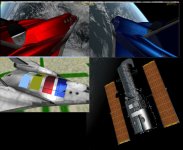
For what it's worth, I implemented the *_refl.dds functionality. The new functionalities by jarmonik should still be intact, except for the way the textures affect the specular highlights and environment reflection. So now it is (I think) in compliance with the Option #3 discussed earlier.

Option #3:
_spec.r = specular red
_spec.g = specular green
_spec.b = specular blue
_spec.a = specular power

_refl.r = reflectivity red
_refl.g = reflectivity green
_refl.b = reflectivity blue
_refl.a = unused

Here's a compliation of screenshots, showing metallic red, metallic blue, a variety of swatches, and Hubble. Also, there is a zip file containing Mesh.fx and NormalMap.fx.
 

Attachments

  • Image8.jpg
    Image8.jpg
    126.2 KB · Views: 81
  • Option 3.zip
    Option 3.zip
    5.6 KB · Views: 26
This is really great ! Excellent work Jarmonik ! :thumbup: :thumbup:
 
In the second AMSO picture, surely the black part should be bright, as it ,s lit and reflecting the Sun.

actually it seems to me that the effect is quite the same that the real one:

as17-145-22261.jpg
 
Hi Jarmo,
You are really doing a great job with the D3D 9 client.
I like it very much too such a degree that I rarely chose the inline D3D7 client anymore.
Now bear with me, I do not know much about coding.
I noticed that when I enable the ambient light check box in the debug window, the object look much better.
How can I implement it to the default setting every time I launch the client?
Here is what I got.

http://www.orbiter-forum.com/attachment.php?attachmentid=11334&stc=1&d=1360834941

And another thing I noticed that when enable the dual side check box, the radiator and solar panels of the ISS is flickering way too much. And it persist even when I rotate the view.
 
Last edited:
Back
Top