
You are using an out of date browser. It may not display this or other websites correctly.
You should upgrade or use an alternative browser.
You should upgrade or use an alternative browser.
New Release D3D9Client Development
- Thread starter jarmonik
- Start date
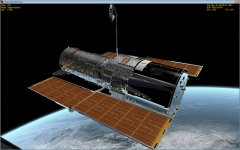

Using quick and dirty normal and spec maps. Made with D3D9 alpha 2
I must say results are really impressive and realistic.
can you show us the same model in inline client?? I think models should be designed to look at least acceptable with inline d3d7 client

can you show us the same model in inline client?? I think models should be designed to look at least acceptable with inline d3d7 client
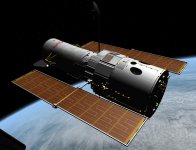
Same model, inline client this time.
Goodnight, all!
Attachments


Kendo
New member
- Joined
- Oct 16, 2007
- Messages
- 587
- Reaction score
- 2
- Points
- 0
Felix, that is good. What DTX setting did you use?.
Can the reflectiveness be controlled by this texture, to make the effect in places more or less.? For example can it be altered do the parts that aren,t shiny or reflective. It would save a lot of mesh work if it could.
Can the reflectiveness be controlled by this texture, to make the effect in places more or less.? For example can it be altered do the parts that aren,t shiny or reflective. It would save a lot of mesh work if it could.
can you show us the same model in inline client?? I think models should be designed to look at least acceptable with inline d3d7 client
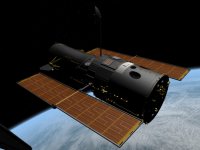
I'm sorry, I think I completely misunderstood the request. Here is the HST in the inline client after I modified the textures, and before I enabled the D3D9 client. As you can see, something will have to be done about this, because to make a good mirror-like surface, the underlying diffuse texture has to be black. It would be better to have 1 of 2 choices:
a) Create two sets of textures, one for any graphics client that doesn't support reflections, and one for the D3D9 client, and somehow switch between the two when you want to change clients.
b) Automatically adjust the diffuse texture brightness using reflection intensity within the D3D9 code itself; i.e. high reflection intensity = low diffuse brightness. This way, the model would appear unchanged in the inline client, but also look good in the D3D9 client.
Attachments
- Joined
- Feb 4, 2008
- Messages
- 9,759
- Reaction score
- 1,028
- Points
- 203
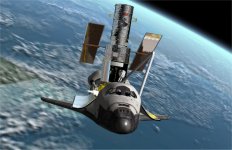
What is needed now is a way to separate the shinyness from the reflectivity. If you take a look at the screenshot that Donamy has posted above, take a look at the Ku band antenna dish above the radiator panels. It's supposed to be only shiny, not reflective.

- Joined
- Apr 13, 2011
- Messages
- 2,215
- Reaction score
- 0
- Points
- 36
- Location
- Los Angeles
- Website
- www.youtube.com
I dont think the planet shine effect needs to be too great. And I am looking for pics to show how the shuttle's bay looked when pointed at the Earth. I know I had seen some good ones before which game me the idea a while back.
This one I think is the aft of the Shuttle lit up purly on Earth Shine. There might be some baylights...I dont think that is the case judging by how soft the light is and the shadows...
http://media.sacbee.com/static/weblogs/photos/images/2010/may10/atlantis2_sm/atlantis13.jpg
But you get the idea. In orbiter as it is now, if you go into the "regular' attitude of bay down tail first, you pretty much need the baylights on to see anything back there. In RL this was not the case.
http://rlv.zcache.com/space_shuttle...48d088ec12a184da28ed_7vpp_400.jpg?bg=0xffffff
Another one......not the quality I was hoping for when searching for pics.
I have a bunch of Shuttle pics on my hard drives too, I will search around and see if I can find some other good quality examples of how the Earthshine looked on the Shuttle.
---------- Post added at 11:43 AM ---------- Previous post was at 11:39 AM ----------
http://upload.wikimedia.org/wikipedia/commons/f/f0/STS-68_payload_bay_view.jpg
http://www.americaspace.com/wp-content/uploads/2013/02/spacehab-rdm2.jpg
http://upload.wikimedia.org/wikipedia/commons/d/d4/LDEF_over_payload_bay.jpg
Some more I found of a higher resolution.
The last one it seems clear to me the PLB lights are in fact on, but their effect is overpowered by planet shine....
This one I think is the aft of the Shuttle lit up purly on Earth Shine. There might be some baylights...I dont think that is the case judging by how soft the light is and the shadows...
http://media.sacbee.com/static/weblogs/photos/images/2010/may10/atlantis2_sm/atlantis13.jpg
But you get the idea. In orbiter as it is now, if you go into the "regular' attitude of bay down tail first, you pretty much need the baylights on to see anything back there. In RL this was not the case.
http://rlv.zcache.com/space_shuttle...48d088ec12a184da28ed_7vpp_400.jpg?bg=0xffffff
Another one......not the quality I was hoping for when searching for pics.
I have a bunch of Shuttle pics on my hard drives too, I will search around and see if I can find some other good quality examples of how the Earthshine looked on the Shuttle.
---------- Post added at 11:43 AM ---------- Previous post was at 11:39 AM ----------
http://upload.wikimedia.org/wikipedia/commons/f/f0/STS-68_payload_bay_view.jpg
http://www.americaspace.com/wp-content/uploads/2013/02/spacehab-rdm2.jpg
http://upload.wikimedia.org/wikipedia/commons/d/d4/LDEF_over_payload_bay.jpg
Some more I found of a higher resolution.
The last one it seems clear to me the PLB lights are in fact on, but their effect is overpowered by planet shine....
Felix, that is good. What DTX setting did you use?.
Can the reflectiveness be controlled by this texture, to make the effect in places more or less.? For example can it be altered do the parts that aren,t shiny or reflective. It would save a lot of mesh work if it could.
For now, here's how to control the reflections:
Edit the diffuse texture, and make a specular map.
Edit the diffuse texture only if you want to add bright reflections. The brighter the reflection, the darker you want the diffuse texture to be. For relatively dim reflections, like glossy car paint, you can probably get away with not editing the diffuse texture. But as you increase the reflection without darkening the diffuse texture, the values add together so that your glossy red XR-2 looks pink or even white when within earth's atmosphere during daytime.
The specular map has an rgb channel, and an alpha channel. The rgb channel governs two things at the moment, the color of the environment reflection, and the color of the specular reflection. For a color-neutral reflection like chrome, paint the rgb channel full white. Painting the rgb channel a certain color will color the reflection accordingly; yellowish orange will make the reflection look like gold, red will make the reflection look red, etc. Painting it dark colors will subdue the reflection, and black will block any reflection. The color and intensity of the specular reflection is also affected in the same way, at the same time. The specular reflection and environmental reflection are controlled on a per-pixel basis, so that you can have different colors and intensities in the same texture.
The alpha channel controls two things at the moment, specular intensity and reflection intensity. At the value of 0, there is no specular reflection nor environment reflection. As values increase above 6, specular reflection starts out very wide and bright, like metallic spray paint, and progressively gets narrower, more polished-looking, and more focused into bright spots at 255. Environment reflection is zero at 0 and increases to full "chrome" at 255. This is also on a per-pixel basis.
It's becoming apparent that specularity and reflectivity need to be independent, in their color as well as their intensity. Maybe we ought to have two rgba files, one called _spec and one called _env or something. Each file would control the color and intensity of its respective effect. Specular reflection would use material definitions unless a _spec texture was present, and environment reflection would be enabled only if a _env texture was present.
This will definitely save a lot of mesh work. It means more texture work, but I think more people are comfortable with fiddling with textures than digging through mesh files and changing values.

Using quick and dirty normal and spec maps. Made with D3D9 alpha 2
Oh thanks, I didn't need my jaw today anyways, because it's stuck to the floor. :jawdrops:

This is a brand new Orbiter now.
Needs maybe a quality factor to the environnement mapping (and for the perfectness: Self-reflections (reflection of the spaceship on itself)) and shadows (witch I know there are in D3D11, but don't have any of these features).
That will be the perfect graphic engine.
One more to leave ?
Lens flares.- Joined
- Feb 4, 2008
- Messages
- 9,759
- Reaction score
- 1,028
- Points
- 203
Give me solar glare instead!One more to leave ?


- Joined
- Feb 4, 2008
- Messages
- 9,759
- Reaction score
- 1,028
- Points
- 203
I agree fully with this suggestion. Two different files would be the best (IMHO) solution.It's becoming apparent that specularity and reflectivity need to be independent, in their color as well as their intensity. Maybe we ought to have two rgba files, one called _spec and one called _env or something. Each file would control the color and intensity of its respective effect. Specular reflection would use material definitions unless a _spec texture was present, and environment reflection would be enabled only if a _env texture was present.
I agree fully with this suggestion. Two different files would be the best (IMHO) solution.
I realize now that the _env file only needs to be rgb, with no alpha. The rgb channel by itself should be enough information to control both the color and the intensity of the environment reflection.

- Joined
- Apr 1, 2008
- Messages
- 2,168
- Reaction score
- 663
- Points
- 113
Yes and noSo, everything works fine with Orbiter 2010-P1 but the screen is black in the Orbiter Beta ?

I've run through a more detailed test now, here my results:
If I use your packet (D3D9ClientAlpha2.zip) on Orbiter 2010-P1, it runs and the env-map cross appears if I enable it from the debug controls.
If I however build the client myself (based on HEAD revision of SVN), the 'black screen' problem comes up (even in the BETA, so it's independent of BETA-build; So I currently only concentrate on 2010-P1!)
Could it be that the environment-mapping needs a more recent NVAPI to be build?
No, it's not defined!Have you #defined _SURFACE_EX ?
Yes, when I use your build. All is (and stays) black with my buildDoes the env-map cross appear if you enable it from the debug controls ?

With only this line disabled (like this):What if you disable this code section from the end of render main scene:
[...]
Code:
//if (Config->EnableEnvMaps) vFocus->RenderENVMap(pDevice, 1);I suspect a mixture of *fx files and/or NVAPI to be the problem, but maybe you can "see more" in this.
Thanks,
Kuddel
By the way, I think this feature will be permanent, so I'll update the documentation (images) in the repository later on. Or do you plan to "re-phrase" the Video-Dialog check-box?
---------- Post added at 21:06 ---------- Previous post was at 20:39 ----------
Hi again,
I think it is/was the uninitialized member "vVessel::iFace"!
Setting it to zero in the constructor seems to solve my problem!
(see rev. 23402)
Thanks for helping,
Kuddel
---------- Post added at 21:08 ---------- Previous post was at 21:06 ----------
...just for the record: Both builds (BEAT and 2010-P1) work as advertised!

Screamer7
Member
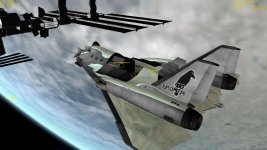
I tried the D3D9ClientAlpha2 client on the XR2 and this is what I got.
http://www.orbiter-forum.com/attachment.php?attachmentid=11326&stc=1&d=1360619652
It looks good but notice the transition of the reflective body near the cockpit.
http://www.orbiter-forum.com/attachment.php?attachmentid=11326&stc=1&d=1360619652
It looks good but notice the transition of the reflective body near the cockpit.
Attachments
Similar threads

- Sticky
- Replies
- 6
- Views
- 11K

- Replies
- 10
- Views
- 4K


- Replies
- 1
- Views
- 4K


- Replies
- 7
- Views
- 4K