New Release D3D9Client Development

I've just updated my working-copy and it seems that your recent commits seem to break the Client for Orbiter BETA (r20).

I just made a test run with Orbiter Beta and everyting seems to work fine here.

What shader model you have 2.0 or 3.0 ?
Are there any error in the log ?

---------- Post added at 00:06 ---------- Previous post was at 00:03 ----------

any suggestion?

Yes, you need to use oapiSetMaterial(). oapiMeshMaterial() doesn't work with graphics clients.

---------- Post added at 00:12 ---------- Previous post was at 00:06 ----------

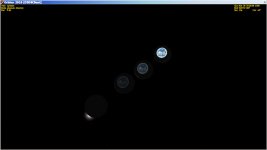
[1] ..when enabeling 'env. mapping' in the DebugControl Dialog, I only see a "cross" showing the reflections ;) But as I said, that's another issue.

That's ok. DebugControl Dialog will display the contents of the environment map as an cross. It's a debugging option. If you try that on pixel shader 2.0 then I don't know what would happen. Maybe the option should be greyed out.
 
What shader model you have 2.0 or 3.0 ?
3.0 ...I think ;) Here's what the D3D9ClientLog.html tells me:
Code:
(36: 2.66s 2060us)(0x13E0) VertexShaderVersion....: 0x300
(37: 2.66s 2130us)(0x13E0) PixelShaderVersion.....: 0x300

Are there any error in the log ?
Nope. No red lines anywhere.

That's ok. DebugControl Dialog will display the contents of the environment map as an cross. It's a debugging option.
Ah! Thanks for the info! ...makes sense, it's the DebugControl Dialog :thumbup:

If you try that on pixel shader 2.0 then I don't know what would happen. Maybe the option should be greyed out.
Let's first wait what is really happening on my side. As usual it just so happened that I updated my graphic-card driver a couple of days ago...I had forgotten that fact. Maybe it has something to do with that. I'll check if I can revert to the previous (driver-) version.

Thanks,
Kuddel

---------- Post added 10-02-13 at 00:45 ---------- Previous post was 09-02-13 at 23:53 ----------

Hi again,

I was able to return to my previous driver version (via a System Restore Point), but with no change :(
My graphic card tells that it supports DirectX 10.10, but I don't know if all features are supported ;)

Well I will try some more checks etc. and see if I can get any further informations.

I really don't need this feature, but it would have been nice :thumbup:

So no need for any immediate action, I think.

Good night,
Kuddel
 
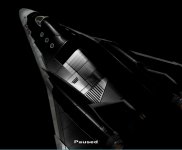
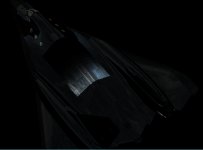
I'm trying to make a spec map to work with the environment map. Why do the specular reflections seem to be backwards? The large black rectangle towards the front of the spacecraft is zero on the spec map, but as the values increase towards the back it shows a sort of inverse relationship.

The reflection intensity shows the proper gradations.
 

Attachments

  • Image2.jpg
    Image2.jpg
    238.9 KB · Views: 53
  • Image3.jpg
    Image3.jpg
    401 KB · Views: 42
I'm trying to make a spec map to work with the environment map. Why do the specular reflections seem to be backwards? The large black rectangle towards the front of the spacecraft is zero on the spec map, but as the values increase towards the back it shows a sort of inverse relationship.

The reflection intensity shows the proper gradations.

Sorry, I don't understand. What makes you believe it's backwards ? Specular map works like the specular material in mesh material defination except it's defined for every pixel. Black (zero) specular color should give no reflection at-all.

Specular power setting in alpha channel doesn't work currently very well. It might be better to override it with material power.

change this:
PHP:
if (gUseSpec) {
	cSpe = tex2D(SpecS, frg.tex0);
	cSpe.a *= 80.0f;
}

to this:
PHP:
if (gUseSpec) {
	cSpe = tex2D(SpecS, frg.tex0);
	cSpe.a = gMat.specPower;
}


---------- Post added at 10:49 ---------- Previous post was at 10:36 ----------

I was able to return to my previous driver version (via a System Restore Point), but with no change :(
My graphic card tells that it supports DirectX 10.10, but I don't know if all features are supported ;)

Well I will try some more checks etc. and see if I can get any further informations.

I really don't need this feature, but it would have been nice :thumbup:

So no need for any immediate action, I think.

There is nothing wrong with your graphics card.

So, everything works fine with Orbiter 2010-P1 but the screen is black in the Orbiter Beta ?

Have you #defined _SURFACE_EX ? If yes, then remove it.
Does the env-map cross appear if you enable it from the debug controls ?

What if you disable this code section from the end of render main scene:
PHP:
// Render Environmental Map For the Focus Vessel ----------------------------
    //
    if (Config->EnableEnvMaps) vFocus->RenderENVMap(pDevice, 1);

    // EnvMap Debugger ----------------------------------------------------------
    // 
    if (DebugControls::IsActive()) {
        DWORD flags  = *(DWORD*)gc->GetConfigParam(CFGPRM_GETDEBUGFLAGS);
        if (flags&DBG_FLAGS_DSPENVMAP) VisualizeCubeMap(vFocus->GetEnvMap());
    }
 
Last edited:
Dan's add-ons and some scenario on the XR Series seems to have issues with the environnement maps ... Otherwise it is beautiful !

Can you do something with the sun position relative to the parent planet and the position on orbit (and also with distance to surface for attenuation) ?
 
Another little problem: I have to use DEVMESHHANDLE but it's not compatible with oapiLoadMeshGlobal i use to pre load meshes. How can I "convert" it?
 
Dan's add-ons and some scenario on the XR Series seems to have issues with the environnement maps ... Otherwise it is beautiful !

Don't worry. Environment maps will be only enabled if an add-on is supporting them.

Can you do something with the sun position relative to the parent planet and the position on orbit (and also with distance to surface for attenuation) ?

What do you mean ?

---------- Post added at 15:08 ---------- Previous post was at 14:59 ----------

Here are some results from my latest experiment. I tried to implement a dissolve mapping technique that seems to be working pretty well. One major benefit is that it almost comes for free. The frame rate impact is minimal. It's also pretty flexible bacause sharpness and strength can be adjusted.

Noise pattern. Weak effect.

dispt6.jpg


Noise pattern. Strong effect.
dispt5.jpg


Crosshatch pattern. Weak effect.

dispt4.jpg


Crosshatch pattern. Strong effect.

dispt3.jpg


Line pattern.

dispt2.jpg


Crystal pattern.

dispt1.jpg


---------- Post added at 15:20 ---------- Previous post was at 15:08 ----------

Here are some smaples of dissolve maps used in examples above.

Hatch2.jpg


Hatch3.jpg
 
Jarmonik, I think the reflections are far too strong. At the moment, everything reflects like mirrors, which is unreal. If you make it less shiny, there will be less visual distortion.
A lot of your problems would be solved by the mesh properties, which would need to be altered to suit reflections better.
You could then set standard settings in your programme.
 
Does anyone have any experience about 3DSMax and how reflections are parameterized ?

What short of parameters there are ?

We would need a point of reference for the values we use in the reflections. Of course we could also have a global scale factor as well.

---------- Post added at 17:39 ---------- Previous post was at 16:43 ----------

Here is a dumb question. What are the *.ini files located in /Config/spacecraft/

Could they be used for graphics client specific configurations ?
 
The ini files are what makes up a vessel that use SC3 or MS2. They're like vessel cfg files but with more options.
 
I messed around with a couple of my meshes a while ago, and realised I could go above the 100 specular settings. For a more sharper, pinpointed reflection, I was going to around 150 or so. These mesh settings can be altered manually with Notepad or Wordpad.
 
I don't know about Max, but AC3D lets you adjust the shininess of the model. I make some examples using spheres and report back.
 
Does anyone have any experience about 3DSMax and how reflections are parameterized ?

What short of parameters there are ?


In 3dsMax standard (blinn) material has following values:

global material setting:

ambient color (rgb)
diffuse color (rgb)
specular color (rgb)

specular level (numeric value from 0 to 999)
glossiness (numeric value from 0 to 100)
soften (for glossiness) (from 0 to 1)

most of those parameters (+ few more) can overriden for every texel using maps (list on screenshot)
met-edit.jpg
 
Some examples: All settings for defuse,ambient, and specular are the same, only the shine was adjusted

left (partial eclipse) to right

0, 30, 40, 128
 

Attachments

  • shine.jpg
    shine.jpg
    66.4 KB · Views: 66
So, it would be better to use a different value to control the reflectivity. I suppose one might think that specularity and reflectivity are pretty close to each other. But I will place the reflectivity under it's own control value.

I don't recall any add-on using the specular maps then perhaps we could re-purpose the specular maps so that Red channel is containing a value to control specularity and Green channel is containing a value to control reflectivity.

---------- Post added at 21:38 ---------- Previous post was at 21:34 ----------

Oops, I was thinking of an idea for toggling the Earth glow effect on day/night sides.

Does this work better and how intense the Earth "glow" should be ?

The gAtmColor is currently loaded with "AtmHazeColor" parameter from Earth.cfg
PHP:
// Earth "glow" ------------------------------------------------------------
    float dotb = saturate(-dot(gCameraPos, gSun.direction));
    float dota = -dot(gCameraPos, nrmW);
    float angl = saturate((dota-gProxySize)/(1.0f-gProxySize));
    outVS.diffuse += gAtmColor * (pow(angl*dotb, 0.3) * 0.15);
 
So, it would be better to use a different value to control the reflectivity. I suppose one might think that specularity and reflectivity are pretty close to each other. But I will place the reflectivity under it's own control value.

I don't recall any add-on using the specular maps then perhaps we could re-purpose the specular maps so that Red channel is containing a value to control specularity and Green channel is containing a value to control reflectivity.

Would it be possible to store the specular red-green-blue as hue-saturation-luminance instead? The specular color would come from the hue and saturation, the intensity would come from the luminance, and there would be an alpha channel available to store reflection intensity.
 
Specular power setting in alpha channel doesn't work currently very well.

Okay, that's what was happening. I was trying to use the alpha channel alone to change the specular power. Also, I may not have understood it well myself- it's making more sense now.

I think the "specularity" feature has been overlooked because few people know its potential. The "reflectivity" feature really completes it. Within the bounds of the diffuse texture, normal map, spec color, spec intensity, and reflection intensity, it's now possible to simulate a wide variety of paints or textures such as glossy or flat paint, metallic or solid color, duct tape, perfect mirror (Iridium satellite, anyone?), soot and dirt, wet or oily patches, etc.

I think it is a good idea to separate the specularity from the reflectivity so that each can be individually controlled.

I find it a difficult to create a textures where an alpha channel is containing some data so maybe we should consider an alternative ways to define the specular maps.

a) One channel texture (L8) that would modulate the reflected image but the color and power information would come from a meterial defination.

b) Dual channel texture (DXT1, U8V8). Red channel would modulate the reflection and green channel would modulate the specular power.

I like option b better. I think specular color and power information should come from textures, but if the textures are not present, then they could come from a material definition.

At the risk of adding too much complexity to something already complicated, would it be possible to change the reflectivity based on the camera vector relative to the normal vector, i.e. reflections around the edges of a sphere would be stronger than those on the sphere directly facing the camera?

Truly amazing work. I still have to pick up my jaw off the floor multiple times. Thank you for all the work you're doing, and for putting up with me.

---------- Post added at 04:29 AM ---------- Previous post was at 03:45 AM ----------

How can I do that ?

Use GIMP (http://www.gimp.org/), the GIMP normalmap plugin (http://code.google.com/p/gimp-normalmap/), and the GIMP DDS plugin (http://code.google.com/p/gimp-dds/).

Install GIMP and both plugins by following the instructions.

In GIMP, open the diffuse texture containing the metal foil. In the "Filters" menu, open the "Map" menu, and click "Normalmap". Click the "3D Preview" button. In the window that opens, you can pan around the texture with the left mouse button, and zoom with the right. To make it easier to view the bumpy texture, turn on "Specular lighting", and set "Diffuse color" to black. Now, in the first Normal map window, start playing with settings. I like using the "4 sample" or "3x3" filters. Adjust the "scale" to get the desired depth. If the resulting texture looks inside out, you can use negative scales. Explore the other options, but it isn't necessary to change them, as the default works well. When you are satisfied, click "OK". You can now export the file as a .dds. Make sure the file is named like this: if the diffuse texture you used is called "HubbleFoil.dds", your new file should be named "HubbleFoil_norm.dds"

I'm afraid this isn't a very good tutorial, especially for someone reading who has never used GIMP before, which I don't know if you have or not. I may try to make a video tutorial.

 
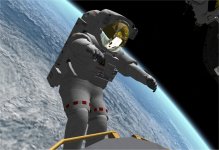
This is fun !!!
 

Attachments

  • HubbleHugger.jpg
    HubbleHugger.jpg
    141.1 KB · Views: 157
Back
Top