
New Release D3D9Client Development

When I flew to Mars today and prepared for a Phobos landing, I found the following bug:
Phobos, Deimos and any other celestial bodies with mesh do not show up (they are there, but not their meshes).
This happens in both the P1 and Beta versions of RC37 and RC36. I also tested it in RC35, and they showed up again.

I made some changes into the rendering code a while ago and it looks like the non-spherical bodies went broken once again.
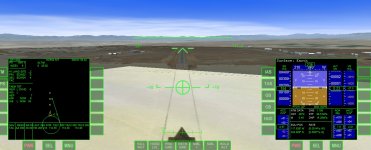
 
Strange shadows in RC37 (and RC36 too)

I was flying some shuttle landings into Slat's Edwards AFB and noticed that there is a "shadow" that boxes around the ground and moves with me as I'm landing. I reverted back to RC36, same behavior, then reverted back to RC35 and the shadow was gone. You can see it out the window in this screen shot:
 

Attachments

  • shadows.jpg
    shadows.jpg
    205.1 KB · Views: 58
Hi, sorry to diverge a bit from the discussion, but I have a question regarding support for Orulex with the D3D9 client. So the client does not support the Orulex-Core module yet ?

I was getting fps of about 8 with the inline client of Orbiter when I have Orulex enabled. So I tried out the D3D9ClientRC36_forBeta_111105 with
orbiter100830 updated with orbiter111105-100830diff, so I could get higher fps.

But I get a CTD :(
 
I was flying some shuttle landings into Slat's Edwards AFB and noticed that there is a "shadow" that boxes around the ground and moves with me as I'm landing. I reverted back to RC36, same behavior, then reverted back to RC35 and the shadow was gone. You can see it out the window in this screen shot:

I found the problem. It's the new base shadow implementation I made for RC36. In a RC38 you will be able to disable Object Shadows from a Visual Effects tab. That should take care of the problem until we find a better fix for it. There are a lot of problems with base shadows and there is no information available from runway lights and other things. The surface base/graphics client interface would need some work from Martin. After getting these things to work the client wound be technically fully complete.
 
Hi, sorry to diverge a bit from the discussion, but I have a question regarding support for Orulex with the D3D9 client. So the client does not support the Orulex-Core module yet ?

I was getting fps of about 8 with the inline client of Orbiter when I have Orulex enabled. So I tried out the D3D9ClientRC36_forBeta_111105 with
orbiter100830 updated with orbiter111105-100830diff, so I could get higher fps.

But I get a CTD :(

IIRC, Orulex and D3D9 and higher do not get along. CTD is the usual result. It would take a new Orulex to make it compatible with the clients. sorry.
 
Hi, sorry to diverge a bit from the discussion, but I have a question regarding support for Orulex with the D3D9 client. So the client does not support the Orulex-Core module yet ?

I was getting fps of about 8 with the inline client of Orbiter when I have Orulex enabled. So I tried out the D3D9ClientRC36_forBeta_111105 with
orbiter100830 updated with orbiter111105-100830diff, so I could get higher fps.

But I get a CTD :(

I PMed Artlav about this issue some time ago. I don't think he'd mind me quoting his reply here.

Artlav said:
A quick check shows that D3D9 client simply does not support the hack i used to make that thing work, so the answer is - likely impossible.

In the broad picture, any updates for Orulex are extremely unlikely.
It's design as a landscape generator is fundamentally flawed due to a need to be interfacing with Orbiter through a narrow hack, and i'm writing a new one that would work in a normal environment of an integrated renderer (and not a chance of working through the old hack, obviously).
It's plausible to integrate it into D3D9 client directly, but it must be finished first.

I'm sure you're with me in looking forward to the next version of Orulex or any 3D terrain generator. Flying over flat painted billiard balls is immersion breaking for me, no matter how high the framerate is.
 
oh , ok I ll work with the inline client & Orulex for the moment then.

I think OGLA wont allow the Orulex SDK access to the terrain elevations.

I'm sure you're with me in looking forward to the next version of Orulex or any 3D terrain generator. Flying over flat painted billiard balls is immersion breaking for me, no matter how high the framerate is.

Yes :), so currently I ll just use what we have and try to put in collisions with the mesh. Thanks for the info.
 
Last edited:
OGLA has Orulex built into it. But I always found OGLA to be HIGHLY unstable.

I am looking forward to the day when Orbiter supports 3d terrain natively.
 
Have I understood it right that there's no other way to get my various MFDs working but to turn on the "GDI compatibility" and if it doesn't help I've got to forget either about the MFDs or D3D9 client?

Thanks.
 
which MFD doesn't work? From my experience if it doesn't work, it is because it doesn't work in 2010P1, not because of D3D9. Some Huds don't display correctly, but GDI fixes those. Some MFDs may not display exactly as they should, like Glideslope MFD for example, but they still work. At least from what I have experienced anyway.
 
AeroBrakeMFD; BaseSyncMFD; BurnTimeMFD; RendezvousMFD; InterMFD55; Universal Autopilots alpha v0.3.1... These do not work with the D3D9 client but they do work in 2010P1 (well, at least on my laptop...)

When I say 'don't work' I mean they don't work at all; not that they are not being displayed correctly, there's simply nothing displayed.

Thanks.
 
Considering that I use all of those MFDs you mentioned pretty much on every flight, I would suggest something is wrong with your installation or your graphics drivers.

Aerobrake, BaseSync, BurnTime, Rendezvous, IMFD, LTMFD, UAP, Attitude, they all work and display perfectly.

There was an issue with GPCMFD for Shuttle Fleet but that has been fixed, and Glideslope MFD does not display perfectly, but well enough to use and it still functions perfectly.
 
As I have come to understand recently all issues have something to do with graphics drivers... :(
Well, mine are of November 04, 2011, so, I reckon, I can do nothing about them in this case.
 
I had an issue on laptop of none of the XR2's displays were working properly. Updated to the newest (at the time) nVidia drivers and it was fixed.

So that is something I still recommend.

If that does not work, then I recommend a fresh install of orbiter to see if it happens again. If that does not work...:shrug:
 
Mine are the newest, as far as I know.

As it always happens they resolved some issues concerning BSoD while running some programs, but at the same time created new ones regarding others (Orbiter must be one of them, unfortunately).

Incidentally, I have tried 111105 today and MFDs were not displayed at all, this time there weren't even black squares where they would be expected, just a spectacular vista of Cape Canaveral (although the buttons were displayed... which is kind of odd...)
 
Last edited:
Incidentally, I have tried 111105 today and MFDs were not displayed at all, this time there weren't even black squares where they would be expected, just a spectacular vista of Cape Canaveral (although the buttons were displayed... which is kind of odd...)
All old style MFDs those are using a GDI won't work in Orbiter Beta 111105 with RC36 and older versions of D3D9Client. However, they should work fine with RC37. (There is a delay of one second before the MFDs show up)

Could you test RC37 and report back ?

You can also change the SketchPad Device from the Advanced setup from the Video Tab and see if it makes any difference.
 
Could you test RC37 and report back ?

I've got the same problem with RC37 as Cras has (or had?).
This message keeps popping up every time I try to run Orbiter:

Entry Point Not Found The procedure entry point CreateSymbolicLinkA could not be located in the dynamic link library KERNEL32.dll


I seem not to be able to find the SketchPad Device... would you be so kind to expand on it?

Thanks.
 
Last edited:
I've got the same problem with RC37 as Cras has (or had?).
This message keeps popping up every time I try to run Orbiter:

Entry Point Not Found The procedure entry point CreateSymbolicLinkA could not be located in the dynamic link library KERNEL32.dll
If you don't have Visual Studio/C++ Express and DirectX SDK installed, I'm afraid you'll have to wait for RC38.
 
jarmonik: Any way to tweak the sunrise/sunset effect color? Currently it's too red when it should be a intense golden yellow color.

To illustrate what I mean, here's one screenshot and one photo. Compare the light color.

Columbia at SLC-6(Orbiter 2010-P1, D3D9Client RC37):
Columbia_SLC6_FVV_9.jpg


Enterprise at SLC-6(Real USAF photo):
VAN-078-19850300-29_DoD-photo.JPEG
 
Back
Top