New Release D3D9Client Development

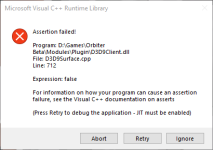
I'm getting an error running SR71-R with the latest D3D9Client branch from github. Orbiter.log is below.

This appears to be happening while I'm trying to bitblt the MFD buttons from a texture.

Thanks.
Format conversion from XRGB to ARGB isn't supported from a non-texture source, because the GPU can read only from a texture and the auxiliary blitter can't do format conversion. So, the source surface (60, 40) should be created with "OAPISURFACE_TEXTURE, OAPISURFACE_RENDERTARGET" flags in place. Have you taken a look at Orbiter2DGraphics.pdf ?

This latest build of the client doesn't have automation in place to override a programmer because it creates a chaos where a programmer can never be sure what's actually happening.
 
Thanks jarmonik, adding the 'D' to the mesh file texture resolved the issue.
 
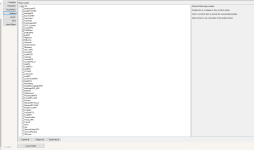
I can reproduce an issue that causes a CTD. If I open an external MFD and resize the window so the MFD panel is 0x0 pixels an abort is called in the D3D9 client.
You can find the crashdump here: https://puu.sh/IILOZ/5a485c5d9e.dmp

Issues arise before I get to 0x0, if I slowly shrink the panel to a tiny squere the panel turns black and stops wokring until you close the Ext. MFD and reopen it.
Could someone take a look? Thanks so much in advance! :)

1644703453331.png
 
It should be easy to fix in D3D9ClientSurface::ConvertToRenderTarget by adding a "zero dimension check"
C++:
bool D3D9ClientSurface::ConvertToRenderTarget(bool bLock)
{
    LPDIRECT3DSURFACE9 pTgt;

    if (bBackBuffer) return true;
    if (GetAttribs()&OAPISURFACE_SYSMEM) return false;
    if (GetAttribs()&OAPISURFACE_TEXTURE) return false;
    if ((bLockable==bLock) && (desc.Usage&D3DUSAGE_RENDERTARGET) && pTex==NULL) return true;
// ++++
    if (desc.Width == 0 || desc.Height == 0) return false; // <= either width or height to small ;)
// ++++

    if (pDevice->CreateRenderTarget(desc.Width, desc.Height, desc.Format, D3DMULTISAMPLE_NONE, 0, bLock, &pTgt, NULL)!=S_OK) {
        LogErr("CreateRenderTarget Failed in ConvertToRenderTarget(0x%X) W=%u, H=%u, usage=0x%X, Format=0x%X", this, desc.Width, desc.Height, desc.Usage, desc.Format);
        LogSpecs("Surface");
        assert(false);
        return false;
    }
    // ...
}
but I am curruntly so far from "in the development loop", that I don't even know where to commit.
...I lost track where the current development is going on (x64, Orbiter repository, or D3D9Client @ Face-1 github....) sorry ;)
 
but I am curruntly so far from "in the development loop", that I don't even know where to commit.

That seems to be the state of things at the moment unfortunately. And I think most of us are far too busy with life/other projects to provide direction.
 
I was working on labels for Earth landmarks and noticed that the DX9 client seems to read the color of the Label.cfg file wrong. Here the comparison:

Default:


DX9:


The RGB values for Airports are 255 255 128. That should be that yellow tone, not cyan. Is some DX9 client code using a different order for RGB in the Label.cfg?
 
  • Like
Reactions: GLS
You might be right, it seems the color definitions in label.cfg are RGB and D3D9Client internaly uses BGR:

D3DPad.h
C++:
    /**
     * \brief Set the foreground colour for text output.
     * \param col colour description (format: 0xBBGGRR)
     * \return Previous colour setting.
     * \default None, returns 0.
     */
    DWORD SetTextColor (DWORD col);
 
A little macro like this:
C++:
// DWORD colour conversion (RGB to BGR, keeping the 'A' untouched)
#define ARGB_2_ABGR(rgb) ( (rgb & 0xFF00FF00) | ((rgb & 0xFF)<<16) | ((rgb & 0xFF0000)>>16)  )
will do the trick, when used at TileLabel.cpp:
C++:
void TileLabel::Render (D3D9Pad *skp, oapi::Font **labelfont, int *fontidx)
{
    // ...
                if (nl = tile->smgr->Client()->GetSurfaceMarkerLegend(hPlanet, &lspec)) {
                    for (int j = 0; j < nl; ++j) {
                        if (renderlabel[i]->labeltype == lspec[j].labelId) {
                            symbol = lspec[j].markerId;
                            col = ARGB_2_ABGR(lspec[j].col);
                            active = lspec[j].active;
                            break;
                        }
                    }
                }
    // ...
}

Unfortunately -again- I am currently not really able to commit this into the right repository (git), so maybe @jarmonik can add this for us and generate a new client.
 
Last edited:
A bizarre issue I've encountered. Somehow, D3D9 no longer works on my orbiter installation. I tried reinstalling it and the runtimes, but no avail. When I go to my Plugin modules to select D3D9Client, there's a bunch of weird characters at the top (even with a fresh install of Orbiter). I have no idea what on Earth caused this to happen, other than a PC update to Windows 10 I had overnight. The video tab is also missing. No addons were installed between now and the Windows update.
 

Attachments

  • Untitled.png
    Untitled.png
    62.9 KB · Views: 9
A bizarre issue I've encountered. Somehow, D3D9 no longer works on my orbiter installation. I tried reinstalling it and the runtimes, but no avail. When I go to my Plugin modules to select D3D9Client, there's a bunch of weird characters at the top (even with a fresh install of Orbiter). I have no idea what on Earth caused this to happen, other than a PC update to Windows 10 I had overnight. The video tab is also missing. No addons were installed between now and the Windows update.
Anything in the log?
 
Anything in the log?

Nothing that looked helpful. Just tons of error codes indicating missing plugins.

Code:
**** Orbiter.log
000000.000: Build Aug 28 2016 [v.160828]
000000.000: Timer precision: 1e-007 sec
000000.000: Found 1 joystick(s)
============================ ERROR: ===========================
Failed loading module Modules\Startup\AtlantisConfig.dll (code 126)
[Orbiter::LoadModule | .\Orbiter.cpp | 600]
===============================================================
============================ ERROR: ===========================
Failed loading module Modules\Startup\AtmConfig.dll (code 126)
[Orbiter::LoadModule | .\Orbiter.cpp | 600]
===============================================================
============================ ERROR: ===========================
Failed loading module Modules\Startup\DGConfigurator.dll (code 126)
[Orbiter::LoadModule | .\Orbiter.cpp | 600]
===============================================================
============================ ERROR: ===========================
Failed loading module Modules\Startup\EnergyConfigurator.dll (code 126)
[Orbiter::LoadModule | .\Orbiter.cpp | 600]
===============================================================
============================ ERROR: ===========================
Failed loading module Modules\Startup\ProjectApolloConfigurator.dll (code 126)
[Orbiter::LoadModule | .\Orbiter.cpp | 600]
===============================================================
============================ ERROR: ===========================
Failed loading module Modules\Startup\ProjectOutpostsConfig.dll (code 126)
[Orbiter::LoadModule | .\Orbiter.cpp | 600]
===============================================================
============================ ERROR: ===========================
Failed loading module Modules\Plugin\D3D9Client.dll (code 126)
[Orbiter::LoadModule | .\Orbiter.cpp | 600]
===============================================================
============================ ERROR: ===========================
Failed loading module Modules\Plugin\D3D9Client.dll (code 126)
[Orbiter::LoadModule | .\Orbiter.cpp | 600]
===============================================================
 
you scared my kyle, now I don't have the courage to start my own Orbiter
had some troubles with games refusing to work with windows update before
that's something hard to fight with. maybe even impossible
I sure hope this isn't it
those... gibberish signs... can it be some kind of area mix up ?
did you tried gpu drivers reinstallation ?
 
Maybe Windows deleted some needed dll or file? You should run the Depends program on one of those files to see what is missing.
 
Missing video tab is/was a clear indication of something missing, but right now I can't remember what it was off the top of my head.
 
Nothing that looked helpful. Just tons of error codes indicating missing plugins.

Code:
**** Orbiter.log
000000.000: Build Aug 28 2016 [v.160828]
000000.000: Timer precision: 1e-007 sec
000000.000: Found 1 joystick(s)
============================ ERROR: ===========================
Failed loading module Modules\Startup\AtlantisConfig.dll (code 126)
[Orbiter::LoadModule | .\Orbiter.cpp | 600]
===============================================================
============================ ERROR: ===========================
Failed loading module Modules\Startup\AtmConfig.dll (code 126)
[Orbiter::LoadModule | .\Orbiter.cpp | 600]
===============================================================
============================ ERROR: ===========================
Failed loading module Modules\Startup\DGConfigurator.dll (code 126)
[Orbiter::LoadModule | .\Orbiter.cpp | 600]
===============================================================
============================ ERROR: ===========================
Failed loading module Modules\Startup\EnergyConfigurator.dll (code 126)
[Orbiter::LoadModule | .\Orbiter.cpp | 600]
===============================================================
============================ ERROR: ===========================
Failed loading module Modules\Startup\ProjectApolloConfigurator.dll (code 126)
[Orbiter::LoadModule | .\Orbiter.cpp | 600]
===============================================================
============================ ERROR: ===========================
Failed loading module Modules\Startup\ProjectOutpostsConfig.dll (code 126)
[Orbiter::LoadModule | .\Orbiter.cpp | 600]
===============================================================
============================ ERROR: ===========================
Failed loading module Modules\Plugin\D3D9Client.dll (code 126)
[Orbiter::LoadModule | .\Orbiter.cpp | 600]
===============================================================
============================ ERROR: ===========================
Failed loading module Modules\Plugin\D3D9Client.dll (code 126)
[Orbiter::LoadModule | .\Orbiter.cpp | 600]
===============================================================
I had something very similar happen to me. The only remedy was a complete new reinstall of Orbiter and D3D9.
 
I had something very similar happen to me. The only remedy was a complete new reinstall of Orbiter and D3D9.

Well, I tried that but the problem remains. So it's nothing wrong with my Orbiter install, but rather a dependency on my computer somehow got deleted in this Windows update. Trying to run diagnoses to narrow down the issue.
 
Missing video tab is/was a clear indication of something missing, but right now I can't remember what it was off the top of my head.
I found one of my old notes (quoting this post) where I wrote "if you don't install latest DirectX, Orbiter's video TAB could not be displayed".
So, get June2010 version
 
I am making a test for the space shuttles. I am using D#D9 version 4.25 for 2016

I get a CTD and get this in the log;

000000.000: Module MEEP1.dll ............. [Build 220202, API 160828] D3D9: ERROR: Large surface created Handle=0x381FB6A8 (9889568,9889596) 000000.000: Module STS76CB.dll ........... [Build 220320, API 160828] 000000.000: Module MEEP2.dll ............. [Build 220204, API 160828] D3D9: ERROR: Large surface created Handle=0x381FE9E8 (9889568,9889596) 000000.000: Module MEEP3.dll ............. [Build 220204, API 160828] D3D9: ERROR: Large surface created Handle=0x381FE610 (9889568,9889596) 000000.000: Module MEEP4.dll ............. [Build 220204, API 160828] D3D9: ERROR: Large surface created Handle=0x381FE9E8 (9889568,9889596)


When I add this vessel MEEP1 I get this error:
000000.000: Finished initialising world 000000.000: Module VesselBuilder1.dll .... [Build 190415, API 160828] 000000.000: Module SPACESHUTTLE2016early.dll [Build 220515, API 160828] 000000.000: Module STS86CB.dll ........... [Build 220320, API 160828] 000000.000: Module DOCKINGMODULE.dll ..... [Build 220226, API 160828] 000000.000: Module BRIDGEPFR.dll ......... [Build 220318, API 160828] 000000.000: Finished initialising status 000000.000: Finished initialising camera 000000.000: Finished setting up render state 000000.000: D3D9: [Scene Initialized] 000000.000: Finished initialising panels D3D9: ERROR: Large surface created Handle=0x377DEFD8 (9890688,9890716)
 

Attachments

The latest version of the client for R90 Beta does not support virtual cockpit lights, it appears, is there a reason for this, or could those be reënabled?
 
Back
Top