New Release D3D9Client Development

-all XR2 skins don't have any reflections anymore...means...XR2 looks like made out of plastic (only the windows doing a nice reflection).

I wasn't aware of any reflective skins existed. Could you provide some links ? The default skin at-least renders the same way in DX7 and DX9.

---------- Post added at 08:58 ---------- Previous post was at 08:53 ----------

-local-lights are a bit to bright, i.e. when used the front-light of the XR2 or the stock DG, it nearly illuminates the entire vessel very bright (nearly white).

Yes, something is very wrong there. It wasn't like that at all when I tested it last time.
 
This nice skin is good for testing:
[ame="http://orbithangar.com/searchid.php?ID=6322"]XR2 Jaxa[/ame]

In previous Orbiter2010 and previous Orbiter2016 D3D9-builds, I can see some kind of blue reflections (spec. map) using this skin.
I.e. if you copy the provided spec map to another skin, depends on the view/light angle, the "JAXA" logo can still be seen as a blue reflection.

In the current version, this (and all other skins I have tested so far), all looks like plastic.
I.e. the JAXA skin should be silverish, but is just looks bright-grey.

Maybe the new extreme brightness is the problem (still too bright even if post processing is off).
It's realy hard to differ land vs water when flying coastal line at about 3000-5000 meters altitude.
 
This nice skin is good for testing:
XR2 Jaxa

Maybe the new extreme brightness is the problem (still too bright even if post processing is off).
It's realy hard to differ land vs water when flying coastal line at about 3000-5000 meters altitude.

Thanks, I will test the skin.

"New extreme brightness" I haven't noticed anything like that during any test flights and I have made plenty of them. Could this be installation problem or a faulty distribution package. It's always a good idea to take a screen shot from a problems like this, they might give some ideas what's wrong.

---------- Post added at 15:33 ---------- Previous post was at 11:07 ----------

Local light sources issues and the malfunctioning specular map will be fixed from the next version. Fixes are applied to SVN.
 
Many thanks.

I have tried to reproduce the "extreme brightness" problem, but afer a simple reboot, things are looing better.
Maybe there was an issue with my poor notebook graphics-card.
Yesterday, I switched a lot between Orbiter2010 and Orbiter2016.
Maybe this caused issues with my graphics-card.

The issue was.... like too much gamma, the water looked very "milk'ish".
But for now, the water looks "blue enough" to differ between coast and land.
I will test this a bit further, and as soon as the problem might reapear, I will post a screenshot.
But again, my notebook-garphics-combo-card is a bad reference for troubleshooting in general.
So, if something goes wrong it might be very likely my HW-setup.
 
R2-Beta 2 Release

Here's a new build of the client for the Official Orbiter 2016 release.

1) Upgraded atmospheric model:
- Horizon haze color and intensity sliders added in control panel.
- Independent gamma and brightness controls for terrain and atmosphere.

The upgraded model should be tested and evaluated if we keep that or roll-back to the previous one. The sun has a light bluish/greenish look and that's out of control.

2) Missing vessel and building shadow fixed. Unfortunately shadow offsets may be little off depending on the terrain and scenario.

:cheers:
 
Last edited:
R2-Beta3 Release

Here's the latest build of the client. The SSU related texture issues should be fixed and some other adjustments has been made. Sunlight color issue (too yellow) has been fixed too.

This build is for the Official 2016 Release.
 

Attachments

Beta 3 fixes the issues. I haven't noticed any other issues so far.
 
never mind, My bad !!!
 
Last edited:
Hello Jarmo and everyone,
I have a problem with runway lights:

I've been using Orbiter r.65 and D3D9ClientBeta25_3-forRev65.
qVDYpxj.jpg


With regular version is all ok
TMkIohQ.jpg


Code:
RUNWAYLIGHTS
	END1 1950 0 490
	END2 -1720 0 490
	WIDTH 90
	PAPI 5.0 3.0 257 3 ; both sides of the green line, in both ends
	PAPI 20.0 3.0 -2000 0 0 ; on a center line 2km before rwy in END 1
	PAPI 20.0 3.0 -2000 3 1 ; both sides of center line, 2km before rwy, in END 2
	VASI 1.5 152 671
	TD_DISP 257
	TD_LENGTH 600
	DECISION_DIST 257
	APPROACH_START 900
END

I do not know if he had this problem also with the other versions.
 
Hello Jarmo and everyone,
I have a problem with runway lights:

Yes, It's known that runway lights won't work with Orbiter Beta. Something has changed there and will be sorted out later on. We will likely focus more efforts in beta branch when the next Orbiter release gets closer.
 
I think sun flare gets to its full intensity too late, when its already a few degrees above horizon, I have a feeling that it should happen earlier, Especially in orbit situations, when orbital sunrise happens, and sun is almost "clear" of atmosphere and still flare is small.
 
I found a bug: the HUD mesh group is being rendered (at least it is illuminated when the light is from behind), even though it has the FLAG 2 entry as recommended by the Orbiter manual.

I managed to "fix" this by changing the recommended FLAG 2 to FLAG 7 (no shadows, no render, no lighting), as is used in the DG. So now I don't know if this is a D3D9 issue and/or something changed inside Orbiter and the manual simply wasn't updated. :shrug:
 
I managed to "fix" this by changing the recommended FLAG 2 to FLAG 7 (no shadows, no render, no lighting), as is used in the DG. So now I don't know if this is a D3D9 issue and/or something changed inside Orbiter and the manual simply wasn't updated. :shrug:

I found this code from the client:
PHP:
// This mesh group must be skipped by user orders
if ((Grp[g].UsrFlag&0x2) && (Grp[g].MFDScreenId==0)) continue;		
bool bHUD = Grp[g].MFDScreenId == 0x100;

so, it looks like the flag 0x2 is ignored on purpose if the group is MFD or HUD render surface. I don't recall why it is there but obviously to prevent a malicious behavior in some add-on.

I'll remove it and we see if bug reports are filed regarding a non-functioning MFDs or HUD.
 
I think sun flare gets to its full intensity too late, when its already a few degrees above horizon, I have a feeling that it should happen earlier, Especially in orbit situations, when orbital sunrise happens, and sun is almost "clear" of atmosphere and still flare is small.

That particular code is taken from the lighting code - and I noticed that too when I was putting it together.
 
Speaking of the sunrise/sunset atmosphere effect. The area illuminated is a bit too small, when you compare it to this nice photo from STS-125/HST SM4. Note how the redness extends quite a bit beyond the immediate solar illumination. Not being able to see the full extent of the atmosphere, I would guess that it extends to the full limb. Here's another one from STS-130: https://spaceflight.nasa.gov/gallery/images/shuttle/sts-130/hires/iss022e062672.jpg
 
Last edited:
I found this code from the client:
PHP:
// This mesh group must be skipped by user orders
if ((Grp[g].UsrFlag&0x2) && (Grp[g].MFDScreenId==0)) continue;		
bool bHUD = Grp[g].MFDScreenId == 0x100;

so, it looks like the flag 0x2 is ignored on purpose if the group is MFD or HUD render surface. I don't recall why it is there but obviously to prevent a malicious behavior in some add-on.

I'll remove it and we see if bug reports are filed regarding a non-functioning MFDs or HUD.

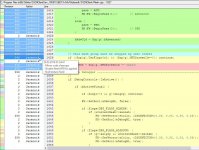
According to "SVN-Blame" and "SVN-Log" the line was introduced to fix some needs for Shuttle fleet MFD, I suspect:
Code:
Revision: 540
Author: jarmonik
Date: Sunday, 20 March 2016 01:34:47
Message:
- Minor code cleanups
- [COLOR="Blue"]Shuttle fleet MFD fix applied[/COLOR]
- Null texture fixed
----
Modified : /trunk/D3D9Client.cfg
Modified : /trunk/Orbitersdk/D3D9Client/AABBUtil.h
Modified : /trunk/Orbitersdk/D3D9Client/AtmoControls.h
Modified : /trunk/Orbitersdk/D3D9Client/D3D9Effect.cpp
Modified : /trunk/Orbitersdk/D3D9Client/D3D9Effect.h
Modified : /trunk/Orbitersdk/D3D9Client/D3D9Frame.h
Modified : /trunk/Orbitersdk/D3D9Client/D3D9Pad.h
Modified : /trunk/Orbitersdk/D3D9Client/D3D9Surface.h
Modified : /trunk/Orbitersdk/D3D9Client/D3D9Util.h
Modified : /trunk/Orbitersdk/D3D9Client/Mesh.cpp
Modified : /trunk/Orbitersdk/D3D9Client/Mesh.h
Modified : /trunk/Orbitersdk/D3D9Client/VBase.h
Modified : /trunk/Orbitersdk/D3D9Client/VVessel.cpp
Modified : /trunk/Orbitersdk/D3D9Client/VVessel.h
Modified : /trunk/Textures/Null.dds
 

Attachments

  • blame.jpg
    blame.jpg
    110.8 KB · Views: 24
Thanks, Kuddel.

The line appears to be related to this post: http://www.orbiter-forum.com/showthread.php?p=529637&postcount=3592

But that is related to Orbiter2010-P1 build and I can't reproduce the issue with Orbiter 2016. So maybe something else has changed after that.

I guess this is a good example of typical trouble, trying to find solutions that keep things running.:lol:

---------- Post added at 02:39 ---------- Previous post was at 02:38 ----------

That particular code is taken from the lighting code - and I noticed that too when I was putting it together.

This has been fixed.
 
...that is related to Orbiter2010-P1 build and I can't reproduce the issue with Orbiter 2016. So maybe something else has changed after that.
Perfect.
Removing (now) unnecessary lines of code reduces the number of possible erroneous lines, too :lol: :thumbup:
 
Back
Top