

You are using an out of date browser. It may not display this or other websites correctly.
You should upgrade or use an alternative browser.
You should upgrade or use an alternative browser.
Project CST-100
- Thread starter ky
- Start date

- Joined
- Oct 20, 2010
- Messages
- 832
- Reaction score
- 1
- Points
- 16
- Location
- Alamogordo
- Website
- www.h-10-k.com
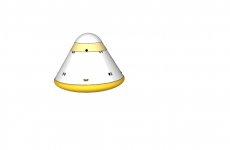
OK, It looks smooth right now.
Are you aware the heat shield is black(very dark charcoal gray), not orange?
The Orange ring is on the SM and is probably spray on insulation or a foam gasket. Just an observation!
Are you aware the heat shield is black(very dark charcoal gray), not orange?
The Orange ring is on the SM and is probably spray on insulation or a foam gasket. Just an observation!
ky
Director of Manned Spaceflight
Ok because in a pic I saw it orange.I need to edit the heat sheild of the card model too.
---------- Post added at 12:56 PM ---------- Previous post was at 12:55 PM ----------
We could use that model in the photo I posted earlier,but it's the textures that keep failing us.
---------- Post added at 12:56 PM ---------- Previous post was at 12:55 PM ----------
We could use that model in the photo I posted earlier,but it's the textures that keep failing us.
- Joined
- Oct 20, 2010
- Messages
- 832
- Reaction score
- 1
- Points
- 16
- Location
- Alamogordo
- Website
- www.h-10-k.com
Yeah. Textures are going to be an issue for a short time. I'm confidant we can beat this.
I'm just colorizing, maybe I should make a swatch, and use it to texture the stuff instead? What do you think?
I'm just colorizing, maybe I should make a swatch, and use it to texture the stuff instead? What do you think?
ky
Director of Manned Spaceflight
Me too.I can also start working on a Virtual cockpit.I have no Idea how we could model the inside since there are no photos only concepts,so i'm going to use the apollo cockpit as a starting point to make my own.
---------- Post added at 01:20 PM ---------- Previous post was at 01:00 PM ----------
But heres a pic of the mockup
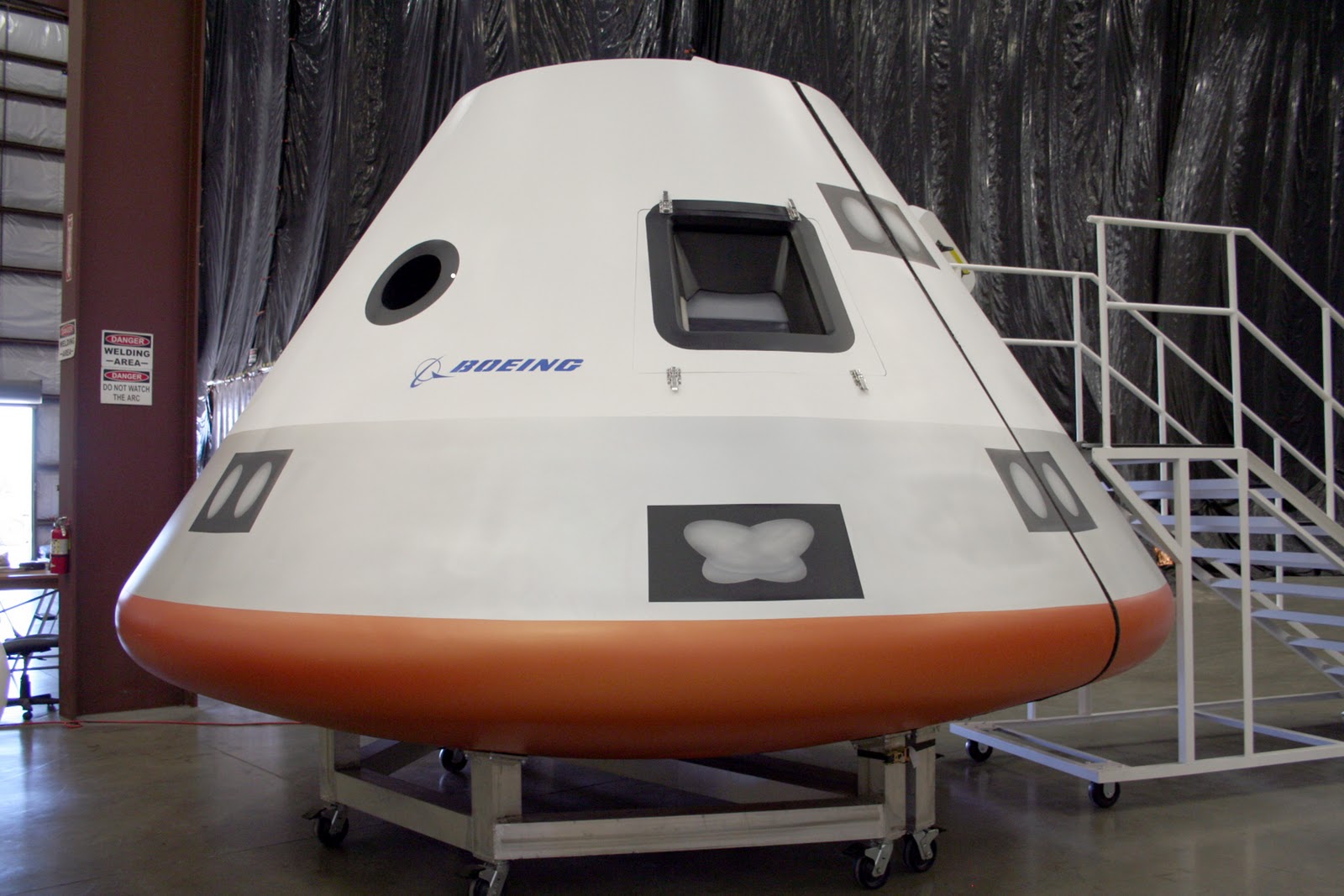 So I guess it is orange.
---------- Post added at 01:24 PM ---------- Previous post was at 01:20 PM ----------
Heres a pic of inside

---------- Post added at 01:20 PM ---------- Previous post was at 01:00 PM ----------
OK, It looks smooth right now.
Are you aware the heat shield is black(very dark charcoal gray), not orange?
The Orange ring is on the SM and is probably spray on insulation or a foam gasket. Just an observation!
But heres a pic of the mockup
---------- Post added at 01:24 PM ---------- Previous post was at 01:20 PM ----------
Heres a pic of inside
- Joined
- Oct 20, 2010
- Messages
- 832
- Reaction score
- 1
- Points
- 16
- Location
- Alamogordo
- Website
- www.h-10-k.com
Me too.I can also start working on a Virtual cockpit.I have no Idea how we could model the inside since there are no photos only concepts,so i'm going to use the apollo cockpit as a starting point to make my own.
---------- Post added at 01:20 PM ---------- Previous post was at 01:00 PM ----------
But heres a pic of the mockupSo I guess it is orange.
Yeah I've seen that, and it is "Just" a mock up. the thrusters are just painted on, and many other features were excluded. It could be that the orange paint is just primer. Or it could be that I'm dead wrong.
My assumption comes from looking at the new carbon-carbon reinforced shields used by Space X, Roscosmos, and the older leading edges on the Space Shuttles. Generally speaking heat-shields or tiles have traditionally been dark colors. Dark colors absorb high heat, light colors reflect.
The ablatives used on Mercury, Gemini, and Apollo were also dark.
Maybe Boeing can reflect on this in the L2 Forum? I'll check.
ky
Director of Manned Spaceflight
Heres a real good pic of inside
 I think I can work from this.
- Joined
- Oct 20, 2010
- Messages
- 832
- Reaction score
- 1
- Points
- 16
- Location
- Alamogordo
- Website
- www.h-10-k.com
VC work sounds good, it's your add-on. I'll try more work on the shell meshes and textures. We have positive momentum, lets keep it up.
ky
Director of Manned Spaceflight
I think this is a cutaway of the mockup

---------- Post added at 01:45 PM ---------- Previous post was at 01:40 PM ----------
Ok,hopefully i'll find more pics of inside the capsule like this

---------- Post added at 01:45 PM ---------- Previous post was at 01:40 PM ----------
Ok,hopefully i'll find more pics of inside the capsule like this

Actually, Dragon's heatshield is yellow before reentry (example: http://www.spacex.com/assets/img/20101001_dragonc1.jpg ). It becomes black only after reentry (because of carbon produced during heating ), so maybe the heatshield of CST-100 also can be orange or so.My assumption comes from looking at the new carbon-carbon reinforced shields used by Space X...
About missing textures: textures should be added manually at the end of .msh file. You should write there a path to your .dds file in the \Textures folder.
Also if some part of your mesh is gray when it is supposed to be white - then you should change properties of a material that is assigned to that part( ambient and diffuse parts should be changed to 1.0 1.0 1.0 1.0 ), then it will be white.
ky
Director of Manned Spaceflight
What exactly do you mean?
I meant that Dragon's heatshield is not dark gray. Also I meant that may be, the heatshield of CST doesn't have to be textured with dark gray texture. The color depends on type of heatshield's material.What exactly do you mean?
http://www.aiaa.org/pdf/industry/presentations/Keith_Reiley.pdf
(page 10) It seems that the material is white-yellow. But becomes black after heating.
Or, do you ask me about what I mean about textures ?
ky
Director of Manned Spaceflight
About the textures.
At first, I meant that you get a "Missing Texture" notification in Orbiter.log when some texture doesn't exist at the location specified in the .msh file. I.e. if you have a folder with name "CST-100" in your \Textures folder and some example.dds file that you want to use as a texture within. Then, you have to open .msh file by notepad and make sure that you have "CST-100\example.dds", not "example.dds" ( or something like examp.dds ) in the end of your mesh file. Otherwise you will get a "Missing texture".About the textures.
And if a part of your mesh ( hull, heatshield etc ) is gray in Orbiter (or the texture appears darker than it should ) when you want it to be white, it means that the first two lines after a "MATERIAL hull" (assuming that the part of mesh I'm talking about have a "hull" material ) are like these:
MATERIAL hull
0.5 0.5 0.5 1.0
0.5 0.5 0.5 1.0
0.5 0.5 0.5 1.0 0.0
0.0 0.0 0.0 1.0
Then, If you change them to this:
MATERIAL hull
1.0 1.0 1.0 1.0
1.0 1.0 1.0 1.0
0.5 0.5 0.5 1.0 10.0
0.0 0.0 0.0 1.0
you'll get a white color ( or correct colors of a texture ).
ky
Director of Manned Spaceflight
Oh ok I get what you mean.
ky
Director of Manned Spaceflight
- Joined
- Oct 20, 2010
- Messages
- 832
- Reaction score
- 1
- Points
- 16
- Location
- Alamogordo
- Website
- www.h-10-k.com
Actually, Dragon's heat-shield is yellow before reentry (example: http://www.spacex.com/assets/img/20101001_dragonc1.jpg ). It becomes black only after reentry (because of carbon produced during heating ), so maybe the heat-shield of CST-100 also can be orange or so.
^ no...
Bottom of this page, it shows a black HS prior to testing. I guess you have to have the image in your reference in context to what you are reading. These are PICA tiles.
http://www.spacex.com/updates_archive.php?page=121007
I think what you were looking at were fit test tiles, they are dense foam tile mock ups that are used for making the (3d)molds for the real PICA tiles. We did this on the B-2 Hot-Deck as well. The foam can be any color, but is generally light orange. It's a two part mix epoxy resign foam.
On the same token, there is another image that shows the test tiles with context to that affect here:
http://www.spacex.com/updates_archive.php?page=2009_1
40-50% down the page
the above are all Space X references to Dragon HS, not CST
However CST will probably use the same technique, I've seen green, and yellow Heat Shields as well.
KY please use what you think is best, I recommend the Black, We have a firm reference for black until Boeing confirms otherwise.
I digress here...
PS just for reference or FYI Orion "Fiber Glass Composite"structure image is green, no tiles here http://xpda.com/junkmail/junk198/heatshield.jpg from this thread: http://forum.nasaspaceflight.com/index.php?topic=22041.msg645245#msg645245 Post No# 308
Space X uses a "Graphite Composite" which is also dark gray(or black)
http://www.spacex.com/updates_archive.php?page=121007
about 80% down the page...
I say gray because a graphite composite is really dark gray when the resign matrix used to make it rigid is cured, the albedo changes in light sources but what you see is a clear or near clear matrix coating over the near black graphite composite threads. The light has a distance to travel through to get to the fiber and loses a portion of the spectrum as it reflects of the fabric of the composite threads. Sorry my USAF Structural Maintenance days are showing through.
---------- Post added at 05:09 PM ---------- Previous post was at 05:05 PM ----------
It works!
OK did you want it all lt. gray or white?
I had no Idea that the max2msh converter did not append the end of the file with the texture paths.
Last edited:
ky
Director of Manned Spaceflight
I'll use black.But I need to experiment with the lines in the mesh file,so the textures show up the right color.Right now the capsule is all white.
- Joined
- Oct 20, 2010
- Messages
- 832
- Reaction score
- 1
- Points
- 16
- Location
- Alamogordo
- Website
- www.h-10-k.com
I'll use black.But I need to experiment with the lines in the mesh file,so the textures show up the right color.Right now the capsule is all white.
Cool go to town, were on a roll!
ky
Director of Manned Spaceflight
Cool go to town, were on a roll!
Haha yup.I'll need to figure this out again.
---------- Post added at 05:37 PM ---------- Previous post was at 05:33 PM ----------
These are the materials in the mesh file:
Code:
MATERIALS 4
mat00
mat01
mat02
mat03
MATERIAL mat00
0.000 0.000 0.000 1.000
1.000 1.000 1.000 1.000
0.000 0.000 0.000 1.000
0 0 0 1
MATERIAL mat01
0.000 0.000 0.000 1.000
0.584 0.584 0.584 1.000
0.000 0.000 0.000 1.000
0 0 0 1
MATERIAL mat02
0.000 0.000 0.000 1.000
1.000 0.898 0.600 1.000
0.000 0.000 0.000 1.000
0 0 0 1
MATERIAL mat03
0.000 0.000 0.000 1.000
1.000 0.800 0.196 1.000
0.000 0.000 0.000 1.000
0 0 0 1
TEXTURES 1
0Similar threads

- Replies
- 2
- Views
- 3K


- Replies
- 2
- Views
- 4K

- Replies
- 13
- Views
- 6K

