- Joined
- Feb 4, 2008
- Messages
- 9,758
- Reaction score
- 1,028
- Points
- 203
Where do we stand on getting this issue from 2020 properly addressed: https://www.orbiter-forum.com/threads/d3d9client-development.16787/post-263061

ORBITER-FORUM will be temporarily closed at 2026-07-23 18:00 UTC while we complete some OF maintenance tasks. The amount of downtime is expected to take up to one hour, but probably less.

Sorry if I worded it badly, I wasn't saying go back to the old one I was just asking about the feature.There are newer patches available that should work and you can compile the latest "Raytraced VC" feature branch from GitHub. There's been quite lot of progress since the patch you linked so we are not going to revert back to that revision. Latest patch should have all the functionality that the old one had. Have you done some work with ray-traced VC ? If yes, then could you share some screen shots, it would be interesting to see it in operation.

The promised continuation on the report of yesterday's problems: 2016 MOGE also doesn't work with the NVIDIA in window mode... not sure how it switched GPUs in the new version. In full screen with the NVIDIA, the 2016 MOGE works well with just a few visual glitches and white image instead of splash screen. In the new version it only shows white. Both work in window mode with the iGPU.
On D3D9, comparing my "old" and "new" Orbiter_NG.cfg files, I think I found the culprit for the missing planetary textures: "PlanetTexDir = C:\Software\Orbiter2016-SVN-Clean\Textures\", which is not a path in my system.
D3D9: OK on NVIDIA and iGPU.
D3D9on12Client: kaput just after selection. Log: "Failed to create DirectX9".
One thing I've been meaning to ask for a while now: can a SURFHANDLE be saved to a JPG or PNG file? I remember seeing some functions in the code when Orbiter first went public (and there has to be something to save the scenario images that are shown in the launchpad), but I don't think that feature is "exposed" in the API. If work needs to be done, then let's leave this for a later Orbiter version.
Something that might be fixable for the current version is the glowing DIFFUSE particles in D3D9.
Sorry if I worded it badly, I wasn't saying go back to the old one I was just asking about the feature.
void Atlantis::clbkVisualCreated (VISHANDLE _vis, int refcount)
{
    if (refcount > 1) return; // we don't support more than one visual per object
    vis = _vis;
    SetVisualProperty(vis, VisualProp::CREATE_VC_PROBE, 0, typeid(FVECTOR3), &FVECTOR3(0.0f, 2.6f, 14.0f));
    // make sure the RMS attachment point is in sync with the animation state of the visual
    SetAttachmentParams (rms_attach, arm_tip[0], arm_tip[1]-arm_tip[0], arm_tip[2]-arm_tip[0]);
}Almost there, latest VC rendering experiments could ALMOST get the job done. Interior parts of the Payload bay should be a separate mesh like the VC is. Bay doors should also belong into that mesh. There are some details that are not so clear yet. After the release of Orbiter 2024 these modifications should be made to Stock Atlantis so that I have a model I can work (experiment) with.Where do we stand on getting this issue from 2020 properly addressed: https://www.orbiter-forum.com/threads/d3d9client-development.16787/post-263061
Ah ok, I got it to show shadows in both the DeltaGlider and NASSP.You need to open D3D9DebugControls select the VC mesh and then apply "This is VC Mesh" and "Cast VC Shadows" options. You may need to apply "Cast VC Shadows" to exterior mesh too. I don't know how it's going to work without ambient probe. In a stock Atlantis it's done like this: Coordinates are in a local vessel coords. Open space with good visibility to everywhere in a cockpit.


The GraphicsClient base class[*] has the virtual method[...] Functions to save and load jpg and png files do exists in D3D9Client but I don't remember if those are exposed to API. I can take a look.
clbkSaveSurfaceToImage (SURFHANDLE surf, const char *fname, ImageFileFormat fmt, float quality=0.7f)gclient->clbkSaveSurfaceToImage (0, "Images\\CurrentState", oapi::IMAGE_JPG);Orbitersdk\include\GraphicsAPI.hIt's been noted. D3D9 is falling apart, newer laptop computers can't run it anymore. New replacement is planned and we need a better GUI, before that happens, I don't think I'll start working on any new graphics features.Where in the development phase is this: https://github.com/orbitersim/orbiter/issues/381
Isn't more a case of that Windows 11 can't run it? Also, what about the Terrain Toolkit guide?It's been noted. D3D9 is falling apart, newer laptop computers can't run it anymore. New replacement is planned and we need a better GUI, before that happens, I don't think I'll start working on any new graphics features.
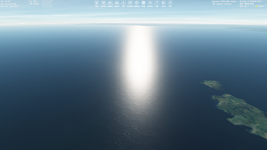
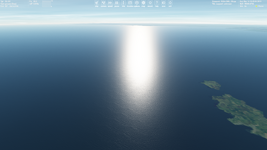
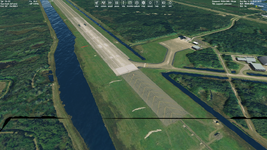
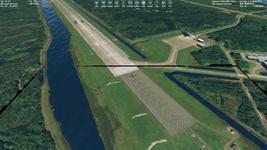
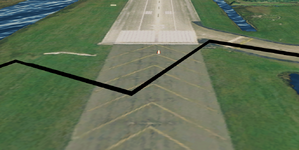
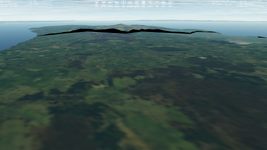
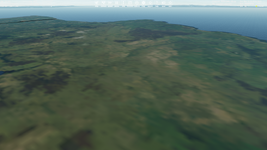
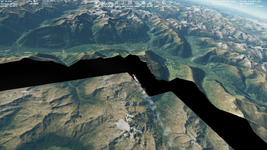
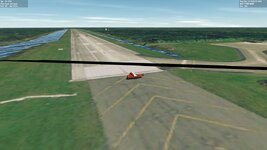
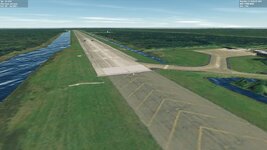
Yes (if I understand correctly). The hills shown in the first picture become flat after the camera approcahing them (second picture):Is the flat area always under the camera ?