OHM Dragon DLL

Would you have to disable the re-entry effects on the launchpad?

 
Would you have to disable the re-entry effects on the launchpad?
I don't think you would have to disable re-entry effects - but you might get Orbiter's default re-entry stream kicking in where you don't want it.

I'm just playing around with alternative ways to trigger re-entry trails, I'll let you know how it goes :-)

I guess I'm aiming for visible plasma trails from ~80km down to ~50km, with smoke/char effects kicking in later and ending later. Does that seem about right?
 
I guess I'm aiming for visible plasma trails from ~80km down to ~50km, with smoke/char effects kicking in later and ending later. Does that seem about right?

I found an old reference that says that the plasma sheath exists between about 120km and 15km, but that is from the perspective of effecting radio communication. I don't know how much will be "visible" to the human eye.

The intro to the paper outlines the bow shock structure, etc. It is too large to attach on O-F, so PM me an email if you want to see.

But, I would re-iterate that I think a Mach number based definition will be best for rendering re-entry plasma. See for example:
http://www.grc.nasa.gov/WWW/BGH/lowhyper.html

They seem to be using Mach 10 as the transition from "low hypersonic" to "high-hypersonic," where "high-hypersonic" is characterized by electrically charged plasma. So, it would seem reasonable to me to render reentry plasma above Mach 10 regardless of altitude so long as there is some detectable atmosphere.

What is the cutoff for Surface MFD to display N/A instead of a number for OAT and M? You might start rendering plasma there if the Mach number is above 10.
 
OK, < Mach10 can be velocity cut-off limit. I recall a quote from a Shuttle astronaut (posted by DaveS I think) that plasma was visible out the window at about 71km alt, so my hunch is to have visible plasma trails start somewhere around there. I'll play around with it when I have some time.

Meanwhile, I'm getting a hideous, messed-up-display bug (internal/external views overlaid, etc.) whenever I start a scenario with internal view of the Dragon.

I think this started when I installed a new monitor for my PC and updated the graphics driver.

Just to check - can someone help me out by running the CRS-6 De-orbit scenario, go to internal view and exit the sim, then restart the "current state.scn" - does your Ortbiter display go wonky if you try to switch back to external view?

Many thanks!
Brian
 
Just to check - can someone help me out by running the CRS-6 De-orbit scenario, go to internal view and exit the sim, then restart the "current state.scn" - does your Ortbiter display go wonky if you try to switch back to external view?
Many thanks!
Brian

I just checked this and I have no issues on my end. Hope you can fix yours

PS: thanks for your efforts to improve the reentry visual effects :)
 
Hi there,

one quick question/suggestion: from the internal view in normal cockpit (not VC) i always see only the front door hatch. Is there a away to see also outside without switching to external view? It would be nice and useful for ISS approach. Maybe i'm missing something, in case I apologize!

Cheers and congrats for this amazing job!

Fred
 
I just checked this and I have no issues on my end. Hope you can fix yours

PS: thanks for your efforts to improve the reentry visual effects :)
Many thanks for the report. Guess it must my new graphics driver. Sigh.

Hi there,

one quick question/suggestion: from the internal view in normal cockpit (not VC) i always see only the front door hatch. Is there a away to see also outside without switching to external view? It would be nice and useful for ISS approach. Maybe i'm missing something, in case I apologize!

Cheers and congrats for this amazing job!

Fred
Hi Fred,
you are not missing anything! But...the Dragon has no windows, so I'm not sure what I can do. I'm not clever enough with code to make an "External TV Monitor" for the Dragon cockpit. Do you have any suggestions?

Cheers,
Brian
 
Hi Fred,
you are not missing anything! But...the Dragon has no windows, so I'm not sure what I can do. I'm not clever enough with code to make an "External TV Monitor" for the Dragon cockpit. Do you have any suggestions?

Cheers,
Brian

what about giving the option to toggle between an inside camera and one "outside camera" while in the inside visual? it's just a matter of calling the oapi function that set the default camera position if i correctly remember (it's been a while since my last coding)
 
Hi Fred,
ah! I see what you mean. Yes, can certainly do that.
 
If you are willing to give up the graphics of DXD9, the inline graphics allow for CameraMFD. Although I haven't recently, I used to use it pretty extensively.
 
Hi,
the Dragon1 and 2 are very much down to Donamy(this Dragon1 add-on is really just an update of his previous work) - so really you should be asking him. I'm hopeful he does have a Dragon V2 in the pipeline....

Meanwhile, I have had fun experimenting with Orbiter's re-entry trails function. After many tries, I couldn't find any way to change or delete a particle stream set with AddReentryStream(), which is a shame because it has some additional colour management, I think. So, I've simply used AddParticleStream() with a custom reentry_contrail.dds texture and level that ramps up from 0-1 where atmospheric density goes from 0.03 - 0.13 g/m^3 and ramps down from Mach14 -10. So plasma trails are visible from about 76km alt down to about 46km.
I added a bit of a glow to the heatshield, after the "charred" texture change over as it doesn't look great with the white texture. Even so, hard to see the effect if the sun is on the heatshield.
Also, made the nosecone jettison automatic at 150km (as I usually forget to do it manually).
Key [N] now shifts the cockpit view internal/external.

If anyone fancies doing a bit of beta testing, attached is a .zip with new dragon1_capsule.dll and reentry_contrail.dds.

I suspect the heatshield "glow" will not be compatible with the D3D9 graphics client, so there is a sub folder Modules/dragon1/d3d9/ which has a .dll without the heatshield glow stuff.

I'm trying to compile a version for the OrbiterBeta r.13, but still getting random CTD's with it.

Cheers,
Brian
 

Attachments

I suspect the heatshield "glow" will not be compatible with the D3D9 graphics client, so there is a sub folder Modules/dragon1/d3d9/ which has a .dll without the heatshield glow stuff.
Such a mesh fully compatible with D3D9Client:

STS107_entry.jpg


The alpha is modulated by a special equation which can be found here (please do note that the equation is not right, the velocities it shows up between is all wrong):https://sourceforge.net/p/shuttleultra/code/HEAD/tree/trunk/Orbitersdk/Space%20Shuttle%20Ultra/Atlantis.cpp#l4554
 
Last edited:
Thanks DaveS,
I don't use the D3D9 client, but I had thought there was a problem using DevMeshHandle.
Maybe someone using the D3D9 can confirm the "standard" dragon1_capsule.dll works OK.

From a quick look at the SSU code, it looks like it uses an extra "invisible" mesh(with modulated alpha)on top of the regular mesh for adding the heatshield glow effects.
Is that right?

Cheers,
Brian
 
From a quick look at the SSU code, it looks like it uses an extra "invisible" mesh(with modulated alpha)on top of the regular mesh for adding the heatshield glow effects.
Is that right?

That's correct.
 
From a quick look at the SSU code, it looks like it uses an extra "invisible" mesh(with modulated alpha)on top of the regular mesh for adding the heatshield glow effects.
Is that right?
This is correct. The alpha levels are controlled by the heating levels calculated by the equations on lines 4454-4465.
 
Meanwhile, I have had fun experimenting with Orbiter's re-entry trails function. After many tries, I couldn't find any way to change or delete a particle stream set with AddReentryStream(), which is a shame because it has some additional colour management, I think. So, I've simply used AddParticleStream() with a custom reentry_contrail.dds texture and level that ramps up from 0-1 where atmospheric density goes from 0.03 - 0.13 g/m^3 and ramps down from Mach14 -10. So plasma trails are visible from about 76km alt down to about 46km.
I added a bit of a glow to the heatshield, after the "charred" texture change over as it doesn't look great with the white texture. Even so, hard to see the effect if the sun is on the heatshield.
Also, made the nosecone jettison automatic at 150km (as I usually forget to do it manually).
Key [N] now shifts the cockpit view internal/external.

If anyone fancies doing a bit of beta testing, attached is a .zip with new dragon1_capsule.dll and reentry_contrail.dds.

I suspect the heatshield "glow" will not be compatible with the D3D9 graphics client, so there is a sub folder Modules/dragon1/d3d9/ which has a .dll without the heatshield glow stuff.

I'm trying to compile a version for the OrbiterBeta r.13, but still getting random CTD's with it.

Cheers,
Brian

I ran a reentry with DRD9 and this is what I got so far:

PROS: I can confirm the plasma trail (orange) starts showing around 76 Km. It then intesifies passing 65 Km. At Mach 10 the orange plasma disappears and the white trail persists until hitting Mach 7.

CONS: Could not see any heatshield glow on the capsule: as you said maybe it is due to the sun hitting directly the heatshield (will have to test it with a night or dawn reentry). Since there is no glow showing the texture change from white to charred appears very abrupt (the glow effect could maybe smooth up a little the texture change..?)
 
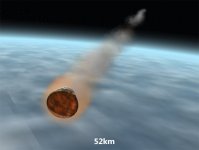
Thanks Wolf, good to know the "glow" doesn't cause problems with D3D9. Agreed, it's not much of a glow. Would need to go the same route as the SSU for more of an effect. Just for ref, here's a pic of what I get in Orbiter2010-P1 at about 52km alt. during CRS4 re-entry (heatshield in shadow). Looks OK for me, but depends what Don thinks....

crs4_reentrytrails.jpg
 
Looks great to me !! :thumbup:
 
Back
Top