boogabooga
Bug Crusher
- Joined
- Apr 16, 2011
- Messages
- 3,010
- Reaction score
- 16
- Points
- 63
Would you have to disable the re-entry effects on the launchpad?

I don't think you would have to disable re-entry effects - but you might get Orbiter's default re-entry stream kicking in where you don't want it.Would you have to disable the re-entry effects on the launchpad?

I guess I'm aiming for visible plasma trails from ~80km down to ~50km, with smoke/char effects kicking in later and ending later. Does that seem about right?
Just to check - can someone help me out by running the CRS-6 De-orbit scenario, go to internal view and exit the sim, then restart the "current state.scn" - does your Ortbiter display go wonky if you try to switch back to external view?
Many thanks!
Brian
Many thanks for the report. Guess it must my new graphics driver. Sigh.I just checked this and I have no issues on my end. Hope you can fix yours
PS: thanks for your efforts to improve the reentry visual effects
Hi Fred,Hi there,
one quick question/suggestion: from the internal view in normal cockpit (not VC) i always see only the front door hatch. Is there a away to see also outside without switching to external view? It would be nice and useful for ISS approach. Maybe i'm missing something, in case I apologize!
Cheers and congrats for this amazing job!
Fred
Hi Fred,
you are not missing anything! But...the Dragon has no windows, so I'm not sure what I can do. I'm not clever enough with code to make an "External TV Monitor" for the Dragon cockpit. Do you have any suggestions?
Cheers,
Brian

But...the Dragon has no windows, so I'm not sure what I can do. I'm not clever enough with code to make an "External TV Monitor" for the Dragon cockpit. Do you have any suggestions?
Cheers,
Brian
Such a mesh fully compatible with D3D9Client:I suspect the heatshield "glow" will not be compatible with the D3D9 graphics client, so there is a sub folder Modules/dragon1/d3d9/ which has a .dll without the heatshield glow stuff.


From a quick look at the SSU code, it looks like it uses an extra "invisible" mesh(with modulated alpha)on top of the regular mesh for adding the heatshield glow effects.
Is that right?
This is correct. The alpha levels are controlled by the heating levels calculated by the equations on lines 4454-4465.From a quick look at the SSU code, it looks like it uses an extra "invisible" mesh(with modulated alpha)on top of the regular mesh for adding the heatshield glow effects.
Is that right?
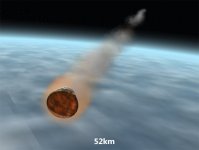
Meanwhile, I have had fun experimenting with Orbiter's re-entry trails function. After many tries, I couldn't find any way to change or delete a particle stream set with AddReentryStream(), which is a shame because it has some additional colour management, I think. So, I've simply used AddParticleStream() with a custom reentry_contrail.dds texture and level that ramps up from 0-1 where atmospheric density goes from 0.03 - 0.13 g/m^3 and ramps down from Mach14 -10. So plasma trails are visible from about 76km alt down to about 46km.
I added a bit of a glow to the heatshield, after the "charred" texture change over as it doesn't look great with the white texture. Even so, hard to see the effect if the sun is on the heatshield.
Also, made the nosecone jettison automatic at 150km (as I usually forget to do it manually).
Key [N] now shifts the cockpit view internal/external.
If anyone fancies doing a bit of beta testing, attached is a .zip with new dragon1_capsule.dll and reentry_contrail.dds.
I suspect the heatshield "glow" will not be compatible with the D3D9 graphics client, so there is a sub folder Modules/dragon1/d3d9/ which has a .dll without the heatshield glow stuff.
I'm trying to compile a version for the OrbiterBeta r.13, but still getting random CTD's with it.
Cheers,
Brian