
New Release D3D9Client Development

Any other ideas for better clouds ?
The easiest thing to do with what we have would be to generate the normal map using the cloud layer's alpha channel as the bump height. This is assuming that the cloud color is uniformly white everywhere- if there's variation in the color of the clouds apart from the alpha value, then we have a bit more data to work with.

And this would only be for on-orbit viewing. Up close, the clouds would basically look the same as they do now.

Would it be possible to add a normal map cloud microtexture?
 
Is the new DX9ExtMFD included?

Should be!
Additionally to D3D9Client.dll, DX9ExtMFD.dll and GenericCamera.dll are included.
That is for both, 2016 and BETA zip.

Whether the 2016 zip includes the "new version" you expect...I can't currently say.
 
Last edited:
It's "simple" - use the global cloud textures to generate your particle placement and density :thumbup:
That has cross my mind, it could improve how the clouds looks from a surface but it would do nothing for orbital views.
 
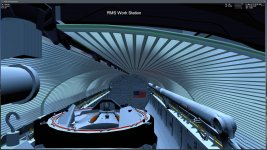
To switch gears for a moment, is there anyway to make vessel structures properly block planet shine? As you can see in the attached screenshot, the PLB is lit up by Earth shine when it it should be pitch black as the PLBDs are closed and the flood lights are off.
 

Attachments

  • Earth_shine_not_blocked_by_structure.jpg
    Earth_shine_not_blocked_by_structure.jpg
    283.1 KB · Views: 43
The easiest thing to do with what we have would be to generate the normal map using the cloud layer's alpha channel as the bump height. This is assuming that the cloud color is uniformly white everywhere- if there's variation in the color of the clouds apart from the alpha value, then we have a bit more data to work with.

Would it be possible to add a normal map cloud microtexture?


I haven't though of that, I suppose it might work, it's very hard to predict the outcome which could be almost anything, so, testing would be the only way to find out. Normals could be derived in a real-time, so, this is definitely worth of testing.


We have a normal mapped water, so, the same code should work for clouds too but I haven't checked any details yet.

---------- Post added at 04:12 ---------- Previous post was at 03:58 ----------

To switch gears for a moment, is there anyway to make vessel structures properly block planet shine? As you can see in the attached screenshot, the PLB is lit up by Earth shine when it it should be pitch black as the PLBDs are closed and the flood lights are off.


There are some ambient occlusion techniques those could make better and mostly blockable planet shine but we aren't anywhere near there yet. I'll have to think about it a moment if there's a way to block it without AO...

---------- Post added at 04:14 ---------- Previous post was at 04:12 ----------

I've come across this article "Dynamic Volumetric Cloud Rendering for Games on Multi-Core Platforms" a long time ago, which also provides source code which I was able to compile back in 2018...(Lucky Cloud)
Maybe it gives some ideas

Thanks about that, will look into it.
 
To switch gears for a moment, is there anyway to make vessel structures properly block planet shine? As you can see in the attached screenshot, the PLB is lit up by Earth shine when it it should be pitch black as the PLBDs are closed and the flood lights are off.


... pull the shade. :lol:
 
Quick question:
Is spacecraft3 compatible with D3D9? I've been away for a while and I don't know if this issue has been fixed...
 
It is with a workaround, but it must be installed on a NTFS filesystem. You need to create symbolic links from the config folder to the /Modules/Server folder. Fortunately it automates this; in Video Options -> Advanced Options there is a button called Create Symbolic links which will do it all for you.
 
To switch gears for a moment, is there anyway to make vessel structures properly block planet shine? As you can see in the attached screenshot, the PLB is lit up by Earth shine when it it should be pitch black as the PLBDs are closed and the flood lights are off.


Not only albedo illuminates the PLB, also the pad lights at night, or the SRB´s during ascent. In sort, any external light source.


As DaveS said it would be nice if that could be "worked around".
 
Not only albedo illuminates the PLB, also the pad lights at night, or the SRB´s during ascent. In sort, any external light source.


As DaveS said it would be nice if that could be "worked around".


Could a shield part be added to the mesh that would be invisible in game, but not let light pass through it ? That way you wouldn't get light from the payload bay shining on the wings, through the walls or bay doors.
 
It is with a workaround, but it must be installed on a NTFS filesystem. You need to create symbolic links from the config folder to the /Modules/Server folder. Fortunately it automates this; in Video Options -> Advanced Options there is a button called Create Symbolic links which will do it all for you.

Ok, good to know it! I want all Antares scenarios to work properly with D3D9
 
I've noticed a couple of problems and I want to know if it's something I'm doing wrong...

1. Mouse wheel in external view seems to be disabled most of the time - I can't change the view distance anymore. Sometimes it works, but when I leave the scenario and then resume the scenario it doesn't work anymore. But not consistently. I've been testing with default scenarios, like DG Mk4 in Orbit.

2. I am unable to open the D3D9 Debug Controls panel at all.

Both of these problems are in D3D9 r1264 and r1297, but everything works fine in r1224. Any ideas? Thanks!
 
@Felix24: Could you try and disable the gcGUI Mode.

Via dialog:
attachment.php


Or direct in D3D9Client.cfg:
Code:
gcGUIMode = 0

Please report back if disabling the gcGUI fixes your issue, so we can be sure not to chase a red herring.
:tiphat:
 
Just curious is D3D9Client still open source? It looks like the OSDN mercurial repo doesn't have the latest. I'm interested to learn how everything works.
 
Please report back if disabling the gcGUI fixes your issue, so we can be sure not to chase a red herring.
:tiphat:

Maybe it solves the problem?

1. I can always select and open the D3D9 Atmospheric controls after hitting Ctrl-F4, no problem.
2. With gcGUI "windowed", I can select and open the D3D9 Debug Controls only on the first run when I start the Orbiter launchpad. On the second run and after, the debug controls no longer appears in the Ctrl-F4 window. If I completely close and restart Orbiter, I can use it again on the first run, but not on any runs after the first.
3. With gcGUI disabled, it seems to work fine every time.
4. If the dialog isn't working, and then I disable gcGUI, the dialog still doesn't work, but when I restart Orbiter completely it begins working again on the first run and on all runs afterward.

At least I think that's what's happening. I hope this makes sense.
 
Thanks Felix for reporting your observations :thumbup: I'm sure this helps in finding the root cause of the bug.

---------- Post added at 20:54 ---------- Previous post was at 20:45 ----------

Just curious is D3D9Client still open source? It looks like the OSDN mercurial repo doesn't have the latest. I'm interested to learn how everything works.

  • D3D9Client is still open source ( svn://mirror.orbiter-radio.co.uk/D3D9client/ )
  • I'm not sure what mercurial repository you are talking about,
    but if you meant the "orbitervis" svn repository ( svn://svn.code.sf.net/p/orbitervis/code/ ) which contains a D3D9Client ( svn://svn.code.sf.net/p/orbitervis/code/D3D9Client ),
    that is a very old copy and will not likely be updated as D3D9Client is in constant change / development.
  • There also was a Codeplex site / repository once, but please pretend that it never existed ;)
 
New Builds

New builds are out for Orbiter 2016 and Beta

- The gcGUI problem should be fixed by setting default state "Disabled".

- New implementation of animation to operate in absolute or incremental basis by user choice. There is a "Enable absolute animations" checkbox added in configuration dialog.

Incremental (default) animations are little more efficient and should be fully backwards compatible with older addons but incremental animations tend to drift when used over longer period of time which can easily happen in robotic arms.

Absolute animations shouldn't drift but compatibility issues can exists (however currently non is known).

It is recommended to do animation based testing to see if any problems exists in the code.
 
Back
Top