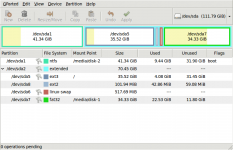
But I don't even see the point of using different partitions for everything on Linux, for a 'newbie' machine for desktop/laptop purposes.
I don't say there's a point of making more than 2 linux partitions for 'newbie'. If you want only one Linux partition, then create it instead of LVM or multi-partition. But the best is to leave /boot on a dedicated partition to prevent deletion or movement of grub files to other location on disk (and I don't mean directory, but disk sector), or filesystem corruption. And with that, you can even use reiser3/4 or btrfs with tails and compression for root partition which grub doesn't support.
The partition where the windows OS is installed needs to be a primary partition. Maybe it also needs to be at the beginning of the disk (within first 1024 cylinders), but I'm not sure about that. Also, I don't know whether these things have improved in win7.
Not true. I have temporary Windows XP installation on laptop at the end of disk on active hda4 (NTFS primary), and hda1 (NTFS primary) is reserved for "permanent" installation of Windows, when I find time to backup all data from it.
Windows used to support only a single primary partition, and a single extended partition, in which all other partitions are present as logical partitions. I don't know if this is still true for win7, but I tend to follow this rule.
Also not true. There can be either 4 primary partitions and 0 logical, or 3 primary and more than 0 logical. On the computer I'm currently sitting I have 3 primary partitions in MBR, 2 for Windows, 1 for LVM, and extended one which holds /boot and the rest of Windows partitions. There can be only one extended partition, and only extended partition must have only one logical partition entry, and one extended partition entry pointing to next logical partition, if there is space left, to be valid.
However, remember that in windows XP it is impossible to format a > 32 GB partition as FAT32.
This is also not true. Impossible only for explorer formatting / disk management utility.
Also, for some changes to the Linux partition (I don't know exactly which), GRUB needs to be re-installed in the MBR.
The problem could be moving stage / menu files to other disk sector, or that if you delete some of logical partitions, the logical partition numbers for next partitions will also change for grub (i.e. if you deleted hd(0,5), hd(0,6) becomes hd(0,5), hd(0,7) becomes hd(0,6), and so on).
The best IMO is creating one primary for Windows (1st or 2nd entry in MBR, depending on which system is your primary - if Windows, then at beginning of disk, otherwise after linux partition), one primary for LVM [or whole Linux] (1st or 3rd MBR entry), the extended one with logical partitions for Windows (on 2nd or 3rd partition - following Windows primary), and last primary for /boot (4th MBR entry / last few cylinders of disk - it can sit at the end of disk, because it's only read once during boot, or is the least used partition, and even doesn't need to be mounted for normal operation). Even if you delete all but 4th primary partition, grub loader will work, and 4th partition will still be the 4th, it won't change like for logical partitions. That's what I have on my desktop, and I've never had problems with grub not working after repartitioning / configuration change, when MBR program code was intact.
And here's my current disk map for my desktop in disk position / volume creation order:
- sda1: NTFS (C: system)
- sda2: extended
- sda5: NTFS (D: programs and data)
- sda6: NTFS (E: storage)
- sda7: FAT32 (F: linux exchange)
- sda3: LVM (vg: Gentoo)
- root Reiser4 (/)
- usr Reiser4 (/usr)
- var Reiser4 (/var)
- swap0 swap (1st swap)
- home Reiser4 (/home)
- tmp Reiser4 (/tmp)
- vartmp Reiser4 (/var/tmp)
- opt Reiser4 (/opt)
- src Reiser4 (/usr/src)
- distfiles Reiser4 (/usr/portage/distfiles)
- swap1 swap (2nd swap - for TuxOnIce hibernation mostly)
- sda4: Minix (/boot)
All this may change when I switch to btrfs.
The windows MBR program tends to make a difference between active and non-active partitions: it executes the boot sector program of the active partition, which usually loads the OS on that partition. AFAIK, GRUB does not make that distinction.
Partition table is legacy of DOS, so it is also active partition flag, and it needn't be respected by other than Windows' MBR loaders. BTW, there are also Dynamic Disk Volumes which can be used instead of partitions in Windows since W2K/XP Pro (it's something like LVM for Linux). And that is also next argument to the point that Windows doesn't need to be installed on primary partition.
There used to be some incompatibilites between different partitioning programs. I usually choose the best one I have for all my partitioning actions, and (re-)do the formatting with the OS that is supposed to use the partition. In the past, I've used Partition Magic, but as it's non-free, and gparted has become quite good, I've switched to gparted for partitioning.
The fdisk for Linux is the best partitioning program I've used. And formatting of partitions I leave for other programs.


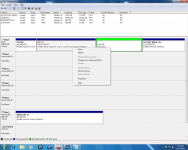
 However, it did say that my hard drive was "BAD," so hopefully the factory restore will fix the partitions too...


 .
.