Project Space Shuttle Vessel

So, I didn't download the Orbiter 2024 SSV v1.11 and which I did now. And installed it in the directory structure of the files where it should get copied into.

It seem to be working but the vessel itself is missing.

with these 4 errors

Could not load vessel module: SSV_LCC ( code 126)
[Vessel: : LoadModule l D:\a\orbiter\Src\Orbiter\Vessel.cpp l 5969 ]

Could not load vessel module: SSV_OV ( code 126)
[Vessel: : LoadModule l D:\a\orbiter\Src\Orbiter\Vessel.cpp l 5969 ]

Could not load vessel module: SSV_LC39 ( code 126)
[Vessel: : LoadModule l D:\a\orbiter\Src\Orbiter\Vessel.cpp l 5969 ]

Could not load vessel module: SSV_MLP ( code 126)
[Vessel: : LoadModule l D:\a\orbiter\Src\Orbiter\Vessel.cpp l 5969 ]

I can't seem to find the Modules
What did you download exactly: the "SpaceShuttleVessel_v1.11.zip" or one of the "Source Code"?
You need the first file, extracted maintaining the file structure inside.
 
So, I didn't download the Orbiter 2024 SSV v1.11 and which I did now. And installed it in the directory structure of the files where it should get copied into.

It seem to be working but the vessel itself is missing.

with these 4 errors

Could not load vessel module: SSV_LCC ( code 126)
[Vessel: : LoadModule l D:\a\orbiter\Src\Orbiter\Vessel.cpp l 5969 ]

Could not load vessel module: SSV_OV ( code 126)
[Vessel: : LoadModule l D:\a\orbiter\Src\Orbiter\Vessel.cpp l 5969 ]

Could not load vessel module: SSV_LC39 ( code 126)
[Vessel: : LoadModule l D:\a\orbiter\Src\Orbiter\Vessel.cpp l 5969 ]

Could not load vessel module: SSV_MLP ( code 126)
[Vessel: : LoadModule l D:\a\orbiter\Src\Orbiter\Vessel.cpp l 5969 ]

I can't seem to find the Modules

Did you, by any chance download the code from github, rather than the release?

We're there any .dlls in the zip you downloaded?
 
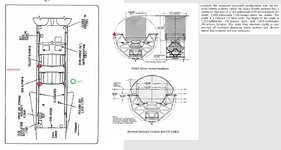
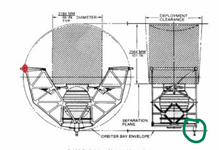
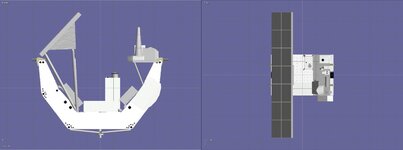
Working on the ASEs. But trying to figure where the attachment on the ASE structure should be and the keel trunnion. It looks like it is in line of the side ones?
Then I can adjust the payload latches to fit the mesh.
For STS 5 it is just a guess where the latches go as there is no specs just how it looks
 

Attachments

  • sts5layout2024.jpg
    sts5layout2024.jpg
    98.5 KB · Views: 9
Yes. But i wonder how far it is set back. That would determine the keel attachment
 
Yes. But i wonder how far it is set back. That would determine the keel attachment

@DaveS Do you maybe have an interface document for the ASE with the exact numeric offset? I know that I don't have any of these, I would need to search for a higher quality drawing of it to measure the offset.
 
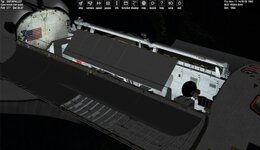
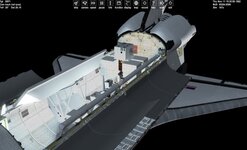
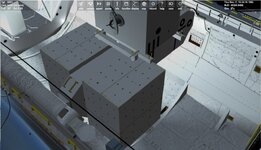
Working on STS2 for SSV. The OSTA pallet is one I made for STS2016. So I had to remove the Passive latches as they are on the mesh for STS2016 and SF.
Really not sure of the dimensions of the pallet.

It has the CBSA, rigid guidewires, and OSTA pallet

On the Mission editor could an orbit scenario be added? I had one created and just made a launch scn and copied the attachment info.
 

Attachments

  • STS2SETUPSSV.jpg
    STS2SETUPSSV.jpg
    70 KB · Views: 13
  • sts2ssvsetup3.jpg
    sts2ssvsetup3.jpg
    84.9 KB · Views: 13
  • osta1palletssv.jpg
    osta1palletssv.jpg
    29.7 KB · Views: 13
On the Mission editor could an orbit scenario be added?
I decided against that... it is just too many variables to consider: when does the scenario start, where is the vehicle, in what state is the vehicle, in what state are the payloads... nah, too insane for me. Same for landing scenarios.

What would be nice to have is a "pre-launch view" of the payload, maybe in the OPF, or better, at the pad in the PCR...
Hmm, this might not be that time consuming: a button in ME for this feature, it creates a temporary scenario and launches it automatically. The scenario would be +/- the launch scenario but with a dormant vehicle, all tanks empty and PLBDs open, and the user would be in the PCR and have the capability to "fly around" to check out the payload bay.
 
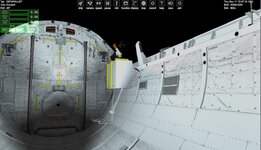
This is what I get for STS 2. I had to switch to my sts2 DEFI from sts2016. It seems that for STS2 the DEFI had a structure to attach the IECM. The thing I don't know is if the SSV rms will attach to the IECM.
The attachment info is:
P -0.62 0.05 -0.03 -0.91 -0.42 0 0 0 1 GS ;RMS/PYLON-RMS GRAPPLE
 

Attachments

  • STS2SSV.jpg
    STS2SSV.jpg
    67.9 KB · Views: 7
  • STS2SSVIECM.jpg
    STS2SSVIECM.jpg
    86.3 KB · Views: 6
It seems that for STS2 the DEFI had a structure to attach the IECM.
Yeah, no attachments in there yet... not sure how that SPARTAN-like attachment was controlled (independent switches, PRLA logic, something else?), and so I haven't ventured into that territory.

BTW: in ME, you have the EDO stuff enabled and are missing the DFI cable tray.
 
Yeah, no attachments in there yet... not sure how that SPARTAN-like attachment was controlled (independent switches, PRLA logic, something else?), and so I haven't ventured into that territory.

BTW: in ME, you have the EDO stuff enabled and are missing the DFI cable tray.
The DFI (not "DEFI") pallet always had IECM pallet, even on STS-1 as the original plan was fly it on that mission. But due to development and certification delays with both the RMS and the IECM, both were left off for STS-1 and the DFI pallet flew solo.
 
Yeah, no attachments in there yet... not sure how that SPARTAN-like attachment was controlled (independent switches, PRLA logic, something else?), and so I haven't ventured into that territory.

BTW: in ME, you have the EDO stuff enabled and are missing the DFI cable tray.
Not sure about the EDO stuff. Can I reuse your cables for my mesh?
Yes. I just have the spartan guides and an attachment point. Then coded if near there attach.
Not sure if they lock,... Never really found a good drawings,....
 
Not sure about the EDO stuff. Can I reuse your cables for my mesh?
Yes. I just have the spartan guides and an attachment point. Then coded if near there attach.
Not sure if they lock,... Never really found a good drawings,....
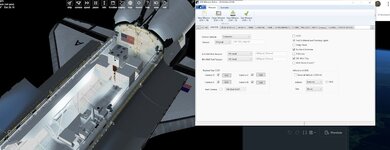
There's no need to "reuse meshes" as SSV implements the DFI wiring natively by checking the "DFI Wiring Tray" checkbox on the ORBITER tab of the SSV Mission Editor. At the same time, make sure that the EDO Kit" checkbox on the CONSUMABLES tab is unchecked.
 
Weird. Not sure why it is not showing up?
 

Attachments

  • sts2dfiwires.jpg
    sts2dfiwires.jpg
    61.4 KB · Views: 26
Back
Top