Project Space Shuttle Vessel

DaveS,

I tried your scen file and found it CTD as well. I removed the "Mir" from the scen and it loaded fine. Not sure what the conflict is - but it's with the Mir.
 
DaveS,

I tried your scen file and found it CTD as well. I removed the "Mir" from the scen and it loaded fine. Not sure what the conflict is - but it's with the Mir.
Thanks for the second set of eyes on the issue. I confirmed that it was the Mir vessel that was source and the root cause was that I had forgotten the "STATUS Orbiting Earth" line in the Mir vessel section. For some reason the SSV Mission Editor didn't pick up on this when I checked the whole thing for issues using it's built in checker, not sure if that's because it only checks the actual mission file or there's no sanity check for the "Other vessels" section.
 
Hello!

Is there a specific reason why I cannot control the speedbrake or rudder, during landing, with my joystick?

For the speedbrake I saw there is a keyboard command to deploy/stow but I am not able to switch the speedbrake to manual.

Best regards,
 
Hello!

Is there a specific reason why I cannot control the speedbrake or rudder, during landing, with my joystick?

For the speedbrake I saw there is a keyboard command to deploy/stow but I am not able to switch the speedbrake to manual.

Best regards,
HI!
The rudder is controlled with the RPTA (a.k.a. pedals), and not with the RHC. During entry, the RHC is "2-axis" only: pitch and roll.
For the speedbrake, the SBTC has a red button called "takeover button", which during landing will switch the speedbrake channel to manual. For return to auto, press the SPD BK PBI on panel F2 or F4.

Both the RPTA and SBTC are mapped to keys, and listed in the manual.
 
So trying to undock from ISS, could not find the checklist, I reversed the procedure from docking, opening/closing hooks and latches..even hit control D and nothing is releasing me from ISS..what’s the short sweet solution?
 
So trying to undock from ISS, could not find the checklist, I reversed the procedure from docking, opening/closing hooks and latches..even hit control D and nothing is releasing me from ISS..what’s the short sweet solution?
It's the UNDOCKING pushbutton which is under a cover labeled APDS CONTROL COMMANDS on APDS CONTROL PANEL (A7L). Push it and about 2:30 later, physical separation.
 
Ok, that’s what I did wrong (too impatient) I pushed it and seemed like nothing was happening. Thanks Dave!
 
Update time!

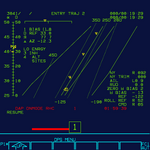
So, DPS work has progressed generally well, although there are still lots of open issues. I was sort of forced into increasing the MFD resolution to 1024x1024, so that the (few) display coordinates I have could be used without conversion, and certainly rounding, which would result in things not lining up as they should. Performance doesn't seem to have degraded much, so I'm sticking with it.
Here is the current state:
DPS_ENTRY_TRAJ.png
The menu, as well as the MEDS displays, are still in need of a "review" of pens and font sizes, as I've just multiplied everything by 2. Only the DPS display is +/- done. In this one, the main issue is the font: D3D9 has some extra bits showing in some chars (right-pointing arrow on alpha scale), and no function can't rotate my custom font. Plus, some chars are still not finished, and I might have to resize the whole font a bit. And also, I had to move the first 32 chars of the font to other locations, as them being visible isn't "certain", and convert the indexes so the GPC still kept the original char table.
On the other hand, the IDP now receives the background part of the display once and keeps it in memory, and the GPC only sends the dynamic parts 2 times per second, which means MFD redraw requests no longer have to go into to the GPC, making it a bit more independent from Orbiter Still, more work is needed on the GPC: internal display management, DK bus commander management, BFS displays, IDP clock update.

Another great source of work is the A/E PFD. With the bump up to 1024, some tapes no longer work, as their size is just too large, so I need to rework all that to draw in real-time only the part that is needed... fun. 😒 I also need to finish work on the IDP "crew station" management, to decide which data is used on which MDU.

All of this work will slow down as I'll now turn my attention to having a version ready for Orbiter 2024, and maybe a final version for 2016 (it depends on which is faster: SSV or Orbiter). I can't tell what new features it will have, as I honestly haven't decided.
 
Wow it looks amazing! I can't wait to see this addon evolving to at least the same (or above!) level of detail in the avionics department as FG Space Shuttle!
 
Hi everyone! I am trying the add-on after a long time without using it, and can see the effort put in and how it has improved. It looks really good.
So, I have reached NCC burn but when I want to use item 28 in SPEC34, I get an illegal entry. What could be the reason?
 
Hi everyone! I am trying the add-on after a long time without using it, and can see the effort put in and how it has improved. It looks really good.
So, I have reached NCC burn but when I want to use item 28 in SPEC34, I get an illegal entry. What could be the reason?
Hi there!
It seems like you didn't enable Rendezvous Nav in SPEC 33. Go there and make an ITEM 1 EXEC before starting computations in SPEC 34.
 
How to Do the Deorbit Burn in SSV with BaseSyncMFD

You need an 160 nmi x 160 nmi orbit.
When the white highlighted solution Reaches 1, Do an Quicksave.
The time for burn says INFUS, i don't know what time is the Deorbit burn.
Time Warp until the Green Line reaches the White Line, Calculate the Mission Time for TIG and Load the Quicksave.

Load BaseSyncMFD with this Deorbit Configuation:

Angle: 0.98°
Anticipation: 74.48°
Altitude: 121.92 km

Select an Landing Site:

Kennedy Space Center (Site 1)
Edwards Air Force Base (Site 45)
White Sands Space Harbor (Site 42-43)

Deorbit Preparation:

Stow the RMS.
Stow the KU Band Antenna.
Stow the Radiators.
Close the Payload Doors.
Close the Star Trackers.
Go to MM301.

Deorbit Burn:

Load the Trim: ITEM 6+0.0-5.7+5.7 EXEC
Select Timer for TIG: ITEM 10+XX+XX+XX+XX EXEC
Load PEG-4 C1: ITEM 14+14992 EXEC
Load PEG-4 C2: ITEM 15-0.6017 EXEC
Load PEG-4 HT: ITEM 16+65.8 EXEC
Load PEG-4 θT: ITEM 17+107.9 EXEC
Load the Burn: ITEM 22 EXEC
Load the Timer: ITEM 23 EXEC
Manuever to Burn Att: ITEM 27 EXEC

10 Minutes before TIG, Go to MM302, Load SPEC 50 PRO, Select an Landing Site.
5 Minutes before TIG, Turn on the Flight Controller Power, Pre-Start the APUs.
2 Minutes before TIG, Turn on the OMS, Start an Single APU.
15 Seconds before TIG, Confirm the Burn: EXEC
After TIG: Turn off the Flight Controller Power and the OMS, Go to MM303.

Post Deorbit Burn:

The TFF (Time for 400000 Feet) is the time remaining for EI (Entry Interface).
20 Minutes before EI, Manuever to Entry Att: ITEM 27 EXEC
13 Minutes before EI, Start the Remaining APUs.
5 Minutes before EI, Go to MM304.

Entry:

Mach 10, Speedbrake to 81%.
Mach 5, Deploy the Air Data Probes.
Mach 2.7, Turn on the HUDs.
Mach 1, RCS Disabled, going CSS as reqd.
Att 10k ft, OGS (Outer Glide Slope).
Att 5k ft, Radar Att enabled.
Att 2k ft, Pre-Flare, the gear is armed.
Att 300 ft, Gear Down.
Vel 195 KEAS, Drag Chute Deployed.
Vel 185 KEAS, Derotate 2° Max.
Vel 120 KEAS, Brakes as reqd (8-10fps).
 
Hello.

Its possible to Add the HUDs Covers and will removed i go to MM302?

When i see the Shuttle VC, there no astronauts inside, Can you Add Astronauts inside from Launch and Entry/Landing?
 
When i see the Shuttle VC, there no astronauts inside, Can you Add Astronauts inside from Launch and Entry/Landing?
Eventually I'll get there... there are still a few things to do before that.
 
Back
Top
