General Question Rendering issues with D3D7 and D3D9 clients (Open Orbiter)

D-mo

Member
Orbiter Contributor
Joined
Dec 11, 2014
Messages
43
Reaction score
8
Points
8
Location
US
Downloaded latest build of OpenOrbiter from the github page.

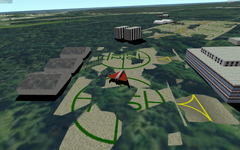
If I launch Orbiter.exe and use built-in D3D7 client I see this at the Cape Canaveral (which is OK):
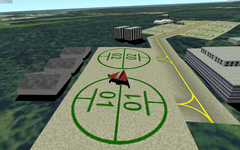
Screenshot from 2023-06-15 23-57-59.png

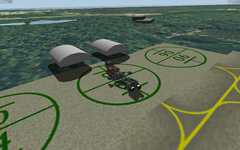
But, if I launch Orbiter_ng.exe and select D3D7 client in the Video tab, I see this instead:


Screenshot from 2023-06-15 23-57-23.png

If I zoom out, I see less of the "grass encroachment". It seems like it might be some sort of rounding error? Has anyone else seen this?

As a note, I am running Orbiter under Wine, so maybe this is a Wine problem and has nothing to do with Orbiter.
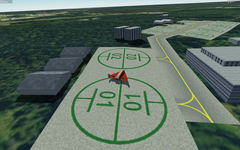
 
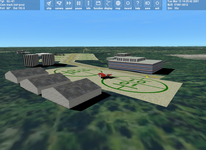
Another interesting thing I am seeing is with the D3D9 client (not D3D7) is that the shadows seem to be offset, which makes the buildings seem like they floating in the air. I do see a little bit of that with the D3D7 client, but with D3D9 it looks exaggerated because of the shadows. Especially the 3 hangars on the left and two more by the other spaceship up ahead.

Screenshot from 2023-06-15 23-56-32.png

Again, I am just curious if anyone else is experiencing this. Or, perhaps there are some settings I am missing?
 
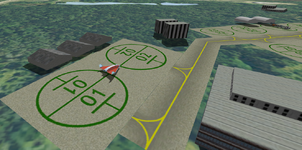
By the way, I am also seeing the shadow problem in Orbiter 2016 with D3D9 version R4.26, so it's doesn't seem to be related to the OpenOrbiter itself. Here is closer look from the other space ship:

Screenshot from 2023-06-16 10-35-56.png
 
Anybody?... Nobody?...
 
Ignore the D3D9 shadow issue. It just seems to be a bug. I am mainly interested in knowing if anyone else experiences the same problem when launching D3D7 client through Orbiter_ng.exe.
 
That's interesting. I will give it a try later and let you know.
 
Meh... @n72.75 just to confirm, this is OpenOrbiter and you've launched Orbiter_ng.exe and not Orbiter.exe, right?
 
Meh... @n72.75 just to confirm, this is OpenOrbiter and you've launched Orbiter_ng.exe and not Orbiter.exe, right?
The screenshots above show Orbiter 2016, but I have virtually identical results in OO. Which likely means it's not a new bug.
 
The thing is: With OpenOrbiter, if I start Orbiter.exe which only allows the built-in D3D7 client, everything is fine (first screenshot). But if I start Orbiter_ng.exe and pick D3D7 client in the Video tab, I see the rendering issues (second screenshot).

Can't do that with 2016 because it doesn't let you pick D3D7 with Orbiter_ng.exe.
 
@n72.75 could you try with OO + Orbiter_ng.exe + D3D7?
 
D3D7Client in Orbiter.exe and D3D7Client in Orbiter_ng.exe work differently.
Сheck also 'Delta-glider\Brighton Beach.scn' for example.
 
[...] if I start Orbiter.exe which only allows the built-in D3D7 client, everything is fine (first screenshot). But if I start Orbiter_ng.exe and pick D3D7 client in the Video tab, I see the rendering issues (second screenshot).[...]
Build-in D3D7 and D3D7-Client.dll are not the same and have not the same "feature-set".
A little history might help to understand:
  • In the beginning Orbiter was closed-source and only the inline graphics could be used (DirectX 7).
  • Then @martins decided to give us a chance to improve the graphics and "extracted" some of the graphics interface so we could build/link against it;
    In that he made the D3D7-Client.dll (and it's source code) available, but it was not fully featured!
  • Based on the source-code of D3D7-Client (DLL) other graphic clients were implemented - D3D9Client is just one of them.
  • The "feature-set" of the D3D7-Client (DLL) source-code was just a "template" to build upon, not a one-to-one replacement.

...just for the record ;)
 
I'm out of town for a few days, but I can look in more depth on Monday.
 
huh... @kuddel so you are saying launching D3D7 client through Orbiter_ng.exe is not the same as launching Orbiter.exe?...
 
Back
Top