
Scenario Question : how to display text on screen

jacquesmomo

Addon Developer
Addon Developer
Joined
Jun 14, 2008
Messages
811
Reaction score
860
Points
108
Location
FRANCE
Website
francophone.dansteph.com
Hi 🇫🇷

I would like to know if it's possible to display text during a mission.
(And also, some commands ?) 🤔

Let me explain:

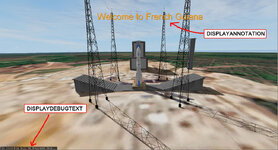
With the scenarios provided for my Ariane 6 rocket (for Orbiter 2016, to be precise), commands are executed, and explanatory texts are regularly displayed on the screen.
These commands and texts are declared in the scn file in a sector that is read by the Dan's OrbiterSound module (v5.1 only).

Here is an example (section in the scn file):

BEGIN_OrbiterSound
////// Display at the bottom left of the screen///////////////////
DISPLAYDEBUGTEXT T:1 Text:The countdown display will be here...
DISPLAYDEBUGTEXT T:+6 Text:


///////// On-screen display (customizable size, position and colors) //////////////////
DISPLAYANNOTATION T:0 Color:1 1 0 FontSize:1.0 ScreenRectangle:0.01 0.94 1 1 Text: décollage automatique dans 25 secondes
DISPLAYANNOTATION T:+5 Color:1 1 0 FontSize:1.0 ScreenRectangle:0.01 0.94 1 1 Text:


///////////////// Example of a command (here press the P key for the APU vessel) //////////////
///////////////// but other commands are possible//////////////

SENDVESSELKEY T:557 Key:OAPI_KEY_P Vessel:APU
END


question.jpg

Since XRSound is used by default with Orbiter 2024, these commands are ineffective unless you install OrbiterSound v5.1 (which works very well with Orbiter 2024).
However, you must select which of OrbiterSound or XRSound you want to use at startup in the "Modules" section of the "OpenOrbiter Server Launchpad."
.... This is not very user-friendly...

Note that the "OrbiterSound bridge" (made by Face if I remember) works, but then Orbitersound is in version 4, that is to say that the commands and the text display do not work....

Thank you in advance for your answers. :hailprobe:
 
Last edited:
You could use Lua as replacement and write a script for your scenario. You don't need any plugins for that, just an additional line in your scenario and a .lua script file in the "Orbiter/Scripts" folder. This is a little bit more challenging than OrbiterSound, I admit, but you also get way more possibilities to control how and whenyour annotations are displayed.

What is not possible right now, is placing an annotation in a position on a 2D panel or inside a VC, so you could more directly guide the player towards the next action.
 
Hi,
Where is this available please?
Here :


@ Urwumpe : Thanks for your reply.
I suspected we could do that with Lua...

@ Buck Rogers :
So yes, I've seen that Thunder Chicken explains a lot about "Lua".
And I found an example in one of the scenarios for Orbiter 2024.

Is there documentation with the lines of code for "Lua" ?
I saw some *.chm files, but I can't open them...

And I need to learn how it works.... (I'm new - a real beginner :rolleyes: with "Lua")
 
Last edited:
Is there documentation with the lines of code for "Lua" ?
I saw some *.chm files, but I can't open them...

And I need to learn how it works.... (I'm new - a real beginner :rolleyes: with "Lua")

I recommend simply reading the scripts and adapting them to your needs without fully understanding them. Also, its better to do that in Orbiter 2024 than Orbiter 2016, since the Lua interface was really improved in the latest version and offers more functions. The manual is only needed if you really want to be creative.

And yes, having the LDoc output only as CHM file is IMHO bad. Microsofts compressed HTML format is already outdated and not even supported much by Microsoft itself. A plain HTML help, ideally hosted online for each release, would be more versatile.

BUT: There are online and offline converters available for converting the CHM to PDF. You should try these if everything else fails.

Take for example this code snippet from one of the Challenges scenario (Script/Challenges/Challenge1.lua):

Code:
hd = v:get_dockhandle (0)
hp0 = v:get_propellanthandle (0)  -- main tank
hp1 = v:get_propellanthandle (1)  -- RCS tank
m0 = 13500
m1 = v:get_propellantmass (hp0) + v:get_propellantmass (hp1)
if m0 == m1 then
    ptext = string.format ("Initial propellant mass: %.2f kg\n", m0)
else
    ptext = string.format ("Initial propellant mass: %.2f kg\nUsed so far: %.2f kg\n", m0, m0-m1)
end
htext = hscore2str(slist)
term.out(ptext..'\n'..htext..'\n')

note = oapi.create_annotation()
note:set_pos (0.25,0.05,0.9,0.95)
note:set_colour ({r=1,g=0.6,b=0.2})
note:set_text (intro..'\n'..ptext..'\n'..htext)

Pay attention to the the variable "note" there.

This line creates a new annotation on the screen:

Code:
note = oapi.create_annotation()

All lines starting with "note:" then modify this annotation by changing on-screen position, colour and text.
 
I recommend simply reading the scripts and adapting them to your needs without fully understanding them.
I'll try to do this (I used to do like this for learning modeling, create add-on etc...)

There are online and offline converters available for converting the CHM to PDF. You should try these if everything else fails.
I've already managed to find out how to open *.chm files:
1) Right-click on the CHM file => Properties
2) Security => Unlock
Then
3) Right-click the file again => Open with "Microsoft HTML Help function"

Pay attention to the the variable "note" there.
This line creates a new annotation on the screen:

Code:
note = oapi.create_annotation()

All lines starting with "note:" then modify this annotation by changing on-screen position, colour and text.
Thank you Urwumpe for your tips. :hailprobe:

I will have to learn... o_O

I will certainly have questions as I go along, because I am not yet familiar with this language.

I'm beginning to understand the basics... 🤔

Could you explain to me the difference between :
proc.wait_simdt(5)
and
proc.wait_sysdt(5)
 
Last edited:
Could you explain to me the difference between :
proc.wait_simdt(5)
and
proc.wait_sysdt(5)

The first waits 5 seconds in simulation time, so time acceleration and pausing effect the delay. The second one waits for 5 seconds in real system time and is not affected by time acceleration or pausing the simulation.

You can find more such functions and some comments for understanding their behaviour in Scripts/oapi_init.lua.
 
So, a big thank you to you, Urwumpe.
Thanks to your advice, I now know how to display text on the screen.

I also find how to run a command with (for example here "press on key G"):
oapi.simulatebufferedkey(OAPI_KEY.G)


I would like to ask you another question (again !) 🤗 :

Example:
If I want to trigger this command 1 minute after the simulation starts, I can write:

proc.wait_simdt(60)
oapi.simulatebufferedkey(OAPI_KEY.G)

but... instead of using "wait" wouldn't there be another way, like:

When sim=60 (or time since begining of simulation=60 seconds)
then press the key G
(instead of "wait for 60 seconde then press G" what is written above)

It's a like DanSteph explained in the commands declared in the scn file and interpreted by orbitersound:
T:# = time in seconds since start of simulation (eg: "T:4" ) OR "+" for offset since last command (eg: "T:+4" )

And lastly (?) 😅
what is the command with Lua that would correspond to the command from Orbitersound:
SETTIMEACCELERATION T:240 TimeAcc:1x
(which means "acceleration set to x1 when sim=240)

When I have understood all this, I won't miss much to configure OrbiterSound's controls in Lua.
(Yes, the cameras positions, but I'll learn that later.)

Anyway, I made a lot of progress today. :hailprobe:
 
Thats what the proc functions do internally BUT just saying "if simt == 60 then" would fail for trivial reasons:

  1. What if the statement is executed at another time? It is only executed once as soon as possible, and if that isn't 60s, nothing happens.
  2. What if you have a timestep at 59.9s and the next one at 60.1s? Then your code would obviously never get triggered.
  3. What if the scenario is saved and resumed?
So, you need to explain Orbiter in a more precise language what you actually want.

Lets say, you don't want a sequential script (all actions are written down in sequence, nothing happens parallel), but you still want to trigger an action at a certain time once. In that case, me, as your trustworthy used code trader, would point at you to look at the function proc.bg().

Code:
-- Create a new branch coroutine, store it in the branch
-- table, and execute its first cycle

function proc.bg (func,...)

WARNING: Background tasks (AKA coroutines) in Lua are highly ineffective compared to treads in most other languages, less such background tasks is clearly more.

Also, always write your functions with adequate tolerances. Use for example:

Code:
triggerflag = false
triggerflag2 = false
-- something might happen here

func timetriggers() 
    repeat
         if not triggerflag and oapi.get_simtime() >= 60 then
             triggerflag = true
             -- do something once at 60s
        end
        if not triggerflag2 and oapi.get_simtime() >= 80 then
             triggerflag2 = true
             -- do something once at 80s
        end
   until triggerflag and triggerflag2
end

proc.bg(timetriggers)

And cross fingers that it works, I have not done much Lua in the past 15 years. :cheers:

Also you should look at the function oapi.set_tacc(1)
 
Thats what the proc functions do internally BUT just saying "if simt == 60 then" would fail for trivial reasons:
(...)
So, you need to explain Orbiter in a more precise language what you actually want.
Ah ok I undertand... 🤔

And cross fingers that it works, I have not done much Lua in the past 15 years. :cheers:
And me... never !
I'm not a computer scientist: my job is a doctor!! 😅

Also you should look at the function oapi.set_tacc(1)
Well, that's quite a lot to digest. o_O

I'll keep looking at the examples... and try to understand! 🤒 This is how I learned to make add-ons...
I think this will also help me one day for creating DLLs.
(BrianJ has already helped me a lot with this : I can already compile a DLL with a CPP source file he wrote for me.)

But... I'll definitely need your help again. :hailprobe:

Regarding my Ariane 6 rocket, I think I'll continue adapting it for Orbiter 2024, but with Orbiter Sound.
Once this version is functional, I will make it available on OH.
Then (after) I will do the conversion for XRSound and therefore also Lua...

I have plenty to keep me busy for quite a while
 
Back
Top