

- Joined
- Jun 14, 2008
- Messages
- 813
- Reaction score
- 868
- Points
- 108
- Location
- FRANCE
- Website
- francophone.dansteph.com
Hi 
I would like to know if it's possible to display text during a mission.
(And also, some commands ?)
Let me explain:
With the scenarios provided for my Ariane 6 rocket (for Orbiter 2016, to be precise), commands are executed, and explanatory texts are regularly displayed on the screen.
These commands and texts are declared in the scn file in a sector that is read by the Dan's OrbiterSound module (v5.1 only).
Here is an example (section in the scn file):
BEGIN_OrbiterSound
////// Display at the bottom left of the screen///////////////////
DISPLAYDEBUGTEXT T:1 Text:The countdown display will be here...
DISPLAYDEBUGTEXT T:+6 Text:
///////// On-screen display (customizable size, position and colors) //////////////////
DISPLAYANNOTATION T:0 Color:1 1 0 FontSize:1.0 ScreenRectangle:0.01 0.94 1 1 Text: décollage automatique dans 25 secondes
DISPLAYANNOTATION T:+5 Color:1 1 0 FontSize:1.0 ScreenRectangle:0.01 0.94 1 1 Text:
///////////////// Example of a command (here press the P key for the APU vessel) //////////////
///////////////// but other commands are possible//////////////
SENDVESSELKEY T:557 Key:OAPI_KEY_P Vessel:APU
END
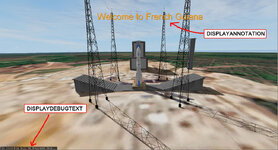
Since XRSound is used by default with Orbiter 2024, these commands are ineffective unless you install OrbiterSound v5.1 (which works very well with Orbiter 2024).
However, you must select which of OrbiterSound or XRSound you want to use at startup in the "Modules" section of the "OpenOrbiter Server Launchpad."
.... This is not very user-friendly...
Note that the "OrbiterSound bridge" (made by Face if I remember) works, but then Orbitersound is in version 4, that is to say that the commands and the text display do not work....
Thank you in advance for your answers.
I would like to know if it's possible to display text during a mission.
(And also, some commands ?)
Let me explain:
With the scenarios provided for my Ariane 6 rocket (for Orbiter 2016, to be precise), commands are executed, and explanatory texts are regularly displayed on the screen.
These commands and texts are declared in the scn file in a sector that is read by the Dan's OrbiterSound module (v5.1 only).
Here is an example (section in the scn file):
BEGIN_OrbiterSound
////// Display at the bottom left of the screen///////////////////
DISPLAYDEBUGTEXT T:1 Text:The countdown display will be here...
DISPLAYDEBUGTEXT T:+6 Text:
///////// On-screen display (customizable size, position and colors) //////////////////
DISPLAYANNOTATION T:0 Color:1 1 0 FontSize:1.0 ScreenRectangle:0.01 0.94 1 1 Text: décollage automatique dans 25 secondes
DISPLAYANNOTATION T:+5 Color:1 1 0 FontSize:1.0 ScreenRectangle:0.01 0.94 1 1 Text:
///////////////// Example of a command (here press the P key for the APU vessel) //////////////
///////////////// but other commands are possible//////////////
SENDVESSELKEY T:557 Key:OAPI_KEY_P Vessel:APU
END
Since XRSound is used by default with Orbiter 2024, these commands are ineffective unless you install OrbiterSound v5.1 (which works very well with Orbiter 2024).
However, you must select which of OrbiterSound or XRSound you want to use at startup in the "Modules" section of the "OpenOrbiter Server Launchpad."
.... This is not very user-friendly...
Note that the "OrbiterSound bridge" (made by Face if I remember) works, but then Orbitersound is in version 4, that is to say that the commands and the text display do not work....
Thank you in advance for your answers.
Last edited:


 with "Lua")
 :
:

 This is how I learned to make add-ons...


