Problem OpenOrbiter2024 Testphase User Issues

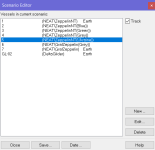
The Luna-OB1 is presented on the Scenario Editor list, but not on the "Select spacecraft" panel:

Без імені.jpg

It happens in Orbiter 2016 as well.

That's the default Checklists/Quickstart scenario.
 
I am just thinking about solar glare in open orbiter, it is not as impressive\massive I have on Orbiter 2016. Is there a texture file, to tweak it? Also in debug sliders I see only water adjusting (which works), others do nothing (although it's written something like "water and glare settings").
 
I am just thinking about solar glare in open orbiter, it is not as impressive\massive I have on Orbiter 2016. Is there a texture file, to tweak it? Also in debug sliders I see only water adjusting (which works), others do nothing (although it's written something like "water and glare settings").
Nevermind, Just found this myself: "There's no lens flare, just the sun glare which can be tuned in realtime from D3D9Graphics Controls, you can also customize it by editing Glare.hlsl in /Modules/D3D9Client/", so I have replied to myself...
 
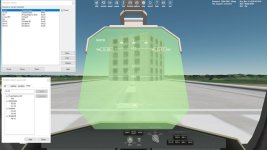
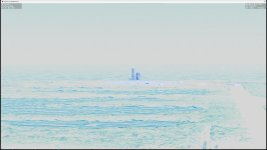
I think that the atmospheric distance haze on objects is too blue on Earth. This is illustrated in the screenshot attached to this report with HDR turned all the way to max. I haven't found any controls for this, is it part of the Earth.cfg file? It seems to me that the distance haze rendering on objects is not part of the general atmosphere as it retains the exact same blue color no matter how you set things up through the Atmosphere Controls.

The blue haze is more associated with humidity and low cloud cover, so unless this is in preparation for actual weather implementation, I'd suggest removing it or making blend in better.

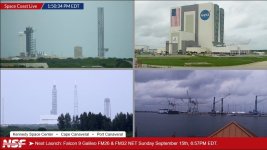
This is a screenshot of NASASpaceflight.com's Space Coast Live Youtube feed as of now. This shows the haze due to the atmospheric conditions over the Cape right now which are 15k ft, FEW, 19k ft FEW, 29.6°C, 24.9°C DEW, RH 75%, 03007KT. Top left is LC39A, top right is VAB/LCC, bottom left is SLC36 and bottom right is Port Canaveral.
 

Attachments

  • OpenOrbiter_D3D9Client_distance_haze_too_blue.jpg
    OpenOrbiter_D3D9Client_distance_haze_too_blue.jpg
    72.5 KB · Views: 21
  • NSF_SpaceCoastLive.jpg
    NSF_SpaceCoastLive.jpg
    90.8 KB · Views: 20
Last edited:
I think that the atmospheric distance haze on objects is too blue on Earth. This is illustrated in the screenshot attached to this report with HDR turned all the way to max. I haven't found any controls for this, is it part of the Earth.cfg file? It seems to me that the distance haze rendering on objects is not part of the general atmosphere as it retains the exact same blue color no matter how you set things up through the Atmosphere Controls.

The blue haze is more associated with humidity and low cloud cover, so unless this is in preparation for actual weather implementation, I'd suggest removing it or making blend in better.

This is a screenshot of NASASpaceflight.com's Space Coast Live Youtube feed as of now. This shows the haze due to the atmospheric conditions over the Cape right now which are 15k ft, FEW, 19k ft FEW, 29.6°C, 24.9°C DEW, RH 75%, 03007KT. Top left is LC39A, top right is VAB/LCC, bottom left is SLC36 and bottom right is Port Canaveral.
That would be in the atmospheric controls for d3d9 client. in the f4 menu. There are several "profiles". it's a challenge to make something that works in all cases.
 
Both ShuttlePB and ScriptPB don't perform aileron and elevator animation, and its aerodynamic surfaces don't work. It happens both in OpenOrbiter and Orbiter 2024 RC1

In Orbiter 2016 the animation and aerodynamic surfaces work correctly both for the ShuttlePB and ScriptPB.
 
Both ShuttlePB and ScriptPB don't perform aileron and elevator animation, and its aerodynamic surfaces don't work. It happens both in OpenOrbiter and Orbiter 2024 RC1

In Orbiter 2016 the animation and aerodynamic surfaces work correctly both for the ShuttlePB and ScriptPB.
Looks like aerodynamic control surfaces are off by default in OpenOrbiter, you can toggle them with "alt-/".
 
Yes, it is, thank you. Sorry, I didn't thought about that.
 
I started getting unexpected behavior when closing a scenario when the "De-allocate memory and display launchpad dialog" option is set in "Orbiter shutdown options". At first everything was fine and I didn't make anything (just editing my script code), but now the launchpad window isn't visible after closing a scenario. Can I delete some files (or do anything else) to recover the right behavior? I tried to launch and close various scenarios in the Checklists directory.
Code:
**** Orbiter.log
000000.000: Build Aug 17 2024 [v.602931718]
000000.001: Timer precision: 1e-07 sec
000000.167: Found 0 joystick(s)
000000.396: ---------------------------------------------------------------
000000.396: BaseDir    : C:\Users\xolms\Downloads\Orbiter-2024-rc1\
000000.397: ConfigDir  : C:\Users\xolms\Downloads\Orbiter-2024-rc1\Config\
000000.397: MeshDir    : C:\Users\xolms\Downloads\Orbiter-2024-rc1\Meshes\
000000.397: TextureDir : C:\Users\xolms\Downloads\Orbiter-2024-rc1\Textures\
000000.397: HightexDir : C:\Users\xolms\Downloads\Orbiter-2024-rc1\Textures2\
000000.397: ScenarioDir: C:\Users\xolms\Downloads\Orbiter-2024-rc1\Scenarios\
000000.398: ---------------------------------------------------------------
000000.399: D3D9 DLLs  : C:\Windows\SYSTEM32\d3dx9_43.dll [v 9.29.952.3111]
000000.399:            : C:\Windows\SYSTEM32\d3d9.dll [v 10.0.19041.4842]
000000.400: ---------------------------------------------------------------
000000.400: Module D3D9Client.dll ........ [Build 240817, API 240817]
000000.461: [D3D9] Native Interface
000000.462: [D3D9] DirectX9 Created...
000000.462: [D3D9] Initialize VideoTab...
000000.484: Loading module D3D9Client
000000.486: Module ScnEditor.dll ......... [Build 240817, API 240817]
000000.488: Loading module ScnEditor (legacy interface)
000000.490: Module XRSound.dll ........... [Build 240817, API 240817]
000000.491: Loading module XRSound
000000.491: Module TerrainToolKit.dll .... [Build 240817, API 240817]
000000.492: Loading module TerrainToolKit
000000.492: Module AtlantisConfig.dll .... [Build 240817, API 240817]
000000.493: Loading module AtlantisConfig (legacy interface)
000000.493: Module AtmConfig.dll ......... [Build 240817, API 240817]
000000.494: Loading module AtmConfig (legacy interface)
000000.494: Module DGConfigurator.dll .... [Build 240817, API 240817]
000000.495: Loading module DGConfigurator (legacy interface)
000007.414:
000007.414: **** Creating simulation session
000007.425: D3D9: [DirectX 9 Initialized]
000007.426: D3D9: 3D-Adapter.............. : NVIDIA GeForce GTX 1650 Ti
000007.429: D3D9: MaxTextureWidth......... : 16384
000007.429: D3D9: MaxTextureHeight........ : 16384
000007.430: D3D9: MaxTextureRepeat........ : 8192
000007.430: D3D9: VolTexAddressCaps....... : 0x3F
000007.431: D3D9: NumSimultaneousRTs...... : 4
000007.431: D3D9: VertexDeclCaps.......... : 0x30F
000007.431: D3D9: MiscCaps................ : 0x2FCEF2
000007.432: D3D9: Separate AlphaBlend..... : Yes
000007.432: D3D9: Shadow Mapping.......... : Yes
000007.432: D3D9: D3DFMT_A16B16G16R16F.... : Yes
000007.433: D3D9: Vertex_A16B16G16R16F.... : Yes
000007.433: D3D9: Vertex_A32B32G32R32F.... : Yes
000007.433: D3D9: Vertex_R16F............. : Yes
000007.433: D3D9: Vertex_R32F............. : Yes
000007.433: D3D9: D3DFMT_A32B32G32R32F.... : Yes
000007.434: D3D9: D3DFMT_D32F_LOCKABLE.... : Yes
000007.434: D3D9: D3DFMT_A2R10G10B10...... : Yes
000007.434: D3D9: D3DFMT_L8............... : Yes
000007.434: D3D9: D3DDTCAPS_DEC3N......... : No
000007.434: D3D9: D3DDTCAPS_FLOAT16_2..... : Yes
000007.435: D3D9: D3DDTCAPS_FLOAT16_4..... : Yes
000007.435: D3D9: Runs under WINE......... : No
000007.435: D3D9: D3D9Build Date.......... : 0
000008.546: D3D9: Available Texture Memory : 4080 MB
000008.551: D3D9: [3DDevice Initialized]
000019.013: Loaded 41057 records from star database
000020.631: D3D9: [D3D9Client Initialized]
000020.781: Module Sun.dll ............... [Build 240817, API 240817]
000020.805: VSOP87(E) Sun: Precision 1.0e-06, Terms 554/6634
000020.829: Module Mercury.dll ........... [Build 240817, API 240817]
000020.837: GRAVITY MODEL: GravityModels\jgmess_160a_sha.tab LOADED, Terms 65/13040
000020.863: VSOP87(B) Mercury: Precision 1.0e-05, Terms 167/7123
000020.897: Module Venus.dll ............. [Build 240817, API 240817]
000020.902: GRAVITY MODEL: GravityModels\mod_shgj120p.a01 LOADED, Terms 65/7380
000020.903: Module VenusAtm2006.dll ...... [Build 240817, API 240817]
000020.904: Loading module VenusAtm2006 (legacy interface)
000020.910: VSOP87(B) Venus: Precision 1.0e-05, Terms 79/1710
000020.955: Module Earth.dll ............. [Build 240817, API 240817]
000020.992: GRAVITY MODEL: GravityModels\egm96_to360.tab LOADED, Terms 65/65340
000020.999: Module EarthAtmJ71G.dll ...... [Build 240817, API 240817]
000020.999: Loading module EarthAtmJ71G (legacy interface)
000021.009: VSOP87(B) Earth: Precision 1.0e-08, Terms 2564/2564
000021.852: Module Moon.dll .............. [Build 240817, API 240817]
000021.862: GRAVITY MODEL: GravityModels\jgl165p1.sha LOADED, Terms 65/13860
000021.868: ELP82: Precision 1.0e-05, Terms 116/829
000021.913: Module Mars.dll .............. [Build 240817, API 240817]
000021.917: GRAVITY MODEL: GravityModels\jgmro_120f_sha.tab LOADED, Terms 65/7380
000021.918: Module MarsAtm2006.dll ....... [Build 240817, API 240817]
000021.919: Loading module MarsAtm2006 (legacy interface)
000021.941: VSOP87(B) Mars: Precision 1.0e-05, Terms 405/6400
000021.963: Module Phobos.dll ............ [Build ******, API 060425]
000021.980: Module Deimos.dll ............ [Build ******, API 060425]
000022.013: GRAVITY MODEL: GravityModels\JGDWN_VES20H_SHA.TAB LOADED, Terms 65/230
000022.048: Module Galsat.dll ............ [Build 240817, API 240817]
000022.050: Module Jupiter.dll ........... [Build 240817, API 240817]
000022.063: VSOP87(B) Jupiter: Precision 1.0e-06, Terms 1624/3625
000022.070: Module Io.dll ................ [Build 240817, API 240817]
000022.097: Module Europa.dll ............ [Build 240817, API 240817]
000022.113: Module Ganymede.dll .......... [Build 240817, API 240817]
000022.130: Module Callisto.dll .......... [Build 240817, API 240817]
000022.164: Module Satsat.dll ............ [Build 240817, API 240817]
000022.169: Module Saturn.dll ............ [Build 240817, API 240817]
000022.192: VSOP87(B) Saturn: Precision 1.0e-06, Terms 2904/6365
000022.199: Module Mimas.dll ............. [Build 240817, API 240817]
000022.199: SATSAT Mimas: Terms 113
000022.213: Module Enceladus.dll ......... [Build 240817, API 240817]
000022.213: SATSAT Enceladus: Terms 33
000022.230: Module Tethys.dll ............ [Build 240817, API 240817]
000022.230: SATSAT Tethys: Terms 101
000022.246: Module Dione.dll ............. [Build 240817, API 240817]
000022.246: SATSAT Dione: Terms 59
000022.263: Module Rhea.dll .............. [Build 240817, API 240817]
000022.264: SATSAT Rhea: Terms 68
000022.280: Module Titan.dll ............. [Build 240817, API 240817]
000022.281: SATSAT Titan: Terms 100
000022.313: Module Iapetus.dll ........... [Build 240817, API 240817]
000022.313: SATSAT Iapetus: Terms 605
000022.345: Module Uranus.dll ............ [Build 240817, API 240817]
000022.364: VSOP87(B) Uranus: Precision 1.0e-06, Terms 1827/5269
000022.371: Module Miranda.dll ........... [Build ******, API 060425]
000022.397: Module Ariel.dll ............. [Build ******, API 060425]
000022.413: Module Umbriel.dll ........... [Build ******, API 060425]
000022.430: Module Titania.dll ........... [Build ******, API 060425]
000022.447: Module Oberon.dll ............ [Build ******, API 060425]
000022.480: Module Neptune.dll ........... [Build 240817, API 240817]
000022.489: VSOP87(B) Neptune: Precision 1.0e-06, Terms 391/2024
000022.531: Finished initialising world
000022.780: Module DeltaGlider.dll ....... [Build 240817, API 240817]
000022.790: Module LuaInline.dll ......... [Build 240817, API 240817]
000022.791: Loading module LuaInline
000023.475: Module ShuttleA.dll .......... [Build 240817, API 240817]
000023.810: Module ShuttlePB.dll ......... [Build 240817, API 240817]
000023.848: Finished initialising status
000023.848: Finished initialising camera
000023.960: Finished setting up render state
000023.984: D3D9: [Scene Initialized]
000024.232: Finished initialising panels
000024.250: XRSound 3.00 RC2 [32-bit Release], Build Date : Aug 17 2024 initialized using sound driver DirectSound8; irrKlang version = 1.6.0.  XRSound UpdateInterval = 0.050 (20.0 updates per second)
000025.485: D3D9: NewShader [DG\deltaglider_ns]=4
000025.489: D3D9: NewShader [DG\deltaglider_ns]=4
000030.274: D3D9: [Session Closed. Scene deleted.]
000030.278: Unloading module VenusAtm2006
 
That would be in the atmospheric controls for d3d9 client. in the f4 menu. There are several "profiles". it's a challenge to make something that works in all cases.
But there isn't any controls for object distance haze in there. And the "profiles", are you talking about the "Earth visual config" drop down in the D3D9Client Advanced Setup?
 
Yes, it is, thank you. Sorry, I didn't thought about that.
Don't be sorry, I find this annoying too when I load a scenario and the plane crashes at the end of the runway because AF ctrl surfaces are off...
This may warrant some modifications, either update every ships in every scenarios to add the AFCMODE line with a sensible value (On if in the atmosphere, Off of not), or just set it to On on vessel load if it's not present.
 
But nevertheless it adds a lot of realism, since you should check your aerodynamic control surfaces before starting.
 
I really hope Buck Rogers hasn't gone on another 18-month hiatus, considering that the two of us still have a lot to do regarding my B5 stuff.
 
When resuming a scenario by clicking on "Current state" Orbiter log gets filled with
Code:
000069.413: D3D9ERROR: D:\a\orbiter\orbiter\OVP\D3D9Client\Scene.cpp Line:1249 Error:-2005530516 pDevice->Clear(0, NULL, D3DCLEAR_TARGET | D3DCLEAR_ZBUFFER | D3DCLEAR_STENCIL, 0, 1.0f, 0L)

000069.414: D3D9ERROR: D:\a\orbiter\orbiter\OVP\D3D9Client\Scene.cpp Line:1249 Error:-2005530516 pDevice->Clear(0, NULL, D3DCLEAR_TARGET | D3DCLEAR_ZBUFFER | D3DCLEAR_STENCIL, 0, 1.0f, 0L)
000069.520: D3D9ERROR: D:\a\orbiter\orbiter\OVP\D3D9Client\Scene.cpp Line:1249 Error:-2005530516 pDevice->Clear(0, NULL, D3DCLEAR_TARGET | D3DCLEAR_ZBUFFER | D3DCLEAR_STENCIL, 0, 1.0f, 0L)
000069.765: D3D9ERROR: D:\a\orbiter\orbiter\OVP\D3D9Client\Scene.cpp Line:1249 Error:-2005530516 pDevice->Clear(0, NULL, D3DCLEAR_TARGET | D3DCLEAR_ZBUFFER | D3DCLEAR_STENCIL, 0, 1.0f, 0L)
000069.889: D3D9ERROR: D:\a\orbiter\orbiter\OVP\D3D9Client\Scene.cpp Line:1249 Error:-2005530516 pDevice->Clear(0, NULL, D3DCLEAR_TARGET | D3DCLEAR_ZBUFFER | D3DCLEAR_STENCIL, 0, 1.0f, 0L)
000069.971: D3D9ERROR: D:\a\orbiter\orbiter\OVP\D3D9Client\Scene.cpp Line:1249 Error:-2005530516 pDevice->Clear(0, NULL, D3DCLEAR_TARGET | D3DCLEAR_ZBUFFER | D3DCLEAR_STENCIL, 0, 1.0f, 0L)
000070.056: D3D9ERROR: D:\a\orbiter\orbiter\OVP\D3D9Client\Scene.cpp Line:1249 Error:-2005530516 pDevice->Clear(0, NULL, D3DCLEAR_TARGET | D3DCLEAR_ZBUFFER | D3DCLEAR_STENCIL, 0, 1.0f, 0L)
000070.143: D3D9ERROR: D:\a\orbiter\orbiter\OVP\D3D9Client\Scene.cpp Line:1249 Error:-2005530516 pDevice->Clear(0, NULL, D3DCLEAR_TARGET | D3DCLEAR_ZBUFFER | D3DCLEAR_STENCIL, 0, 1.0f, 0L)
000070.234: D3D9ERROR: D:\a\orbiter\orbiter\OVP\D3D9Client\Scene.cpp Line:1249 Error:-2005530516 pDevice->Clear(0, NULL, D3DCLEAR_TARGET | D3DCLEAR_ZBUFFER | D3DCLEAR_STENCIL, 0, 1.0f, 0L)
000070.417: D3D9ERROR: D:\a\orbiter\orbiter\OVP\D3D9Client\Scene.cpp Line:1249 Error:-2005530516 pDevice->Clear(0, NULL, D3DCLEAR_TARGET | D3DCLEAR_ZBUFFER | D3DCLEAR_STENCIL, 0, 1.0f, 0L)
000070.501: D3D9ERROR: D:\a\orbiter\orbiter\OVP\D3D9Client\Scene.cpp Line:1249 Error:-2005530516 pDevice->Clear(0, NULL, D3DCLEAR_TARGET | D3DCLEAR_ZBUFFER | D3DCLEAR_STENCIL, 0, 1.0f, 0L)
000070.583: D3D9ERROR: D:\a\orbiter\orbiter\OVP\D3D9Client\Scene.cpp Line:1249 Error:-2005530516 pDevice->Clear(0, NULL, D3DCLEAR_TARGET | D3DCLEAR_ZBUFFER | D3DCLEAR_STENCIL, 0, 1.0f, 0L)
000070.664: D3D9ERROR: D:\a\orbiter\orbiter\OVP\D3D9Client\Scene.cpp Line:1249 Error:-2005530516 pDevice->Clear(0, NULL, D3DCLEAR_TARGET | D3DCLEAR_ZBUFFER | D3DCLEAR_STENCIL, 0, 1.0f, 0L)
000070.750: D3D9ERROR: D:\a\orbiter\orbiter\OVP\D3D9Client\Scene.cpp Line:1249 Error:-2005530516 pDevice->Clear(0, NULL, D3DCLEAR_TARGET | D3DCLEAR_ZBUFFER | D3DCLEAR_STENCIL, 0, 1.0f, 0L)
000070.752: D3D9ERROR: D:\a\orbiter\orbiter\OVP\D3D9Client\Scene.cpp Line:1249 Error:-2005530516 pDevice->Clear(0, NULL, D3DCLEAR_TARGET | D3DCLEAR_ZBUFFER | D3DCLEAR_STENCIL, 0, 1.0f, 0L)
000070.851: D3D9ERROR: D:\a\orbiter\orbiter\OVP\D3D9Client\Scene.cpp Line:1249 Error:-2005530516 pDevice->Clear(0, NULL, D3DCLEAR_TARGET | D3DCLEAR_ZBUFFER | D3DCLEAR_STENCIL, 0, 1.0f, 0L)
000070.935: D3D9ERROR: D:\a\orbiter\orbiter\OVP\D3D9Client\Scene.cpp Line:1249 Error:-2005530516 pDevice->Clear(0, NULL, D3DCLEAR_TARGET | D3DCLEAR_ZBUFFER | D3DCLEAR_STENCIL, 0, 1.0f, 0L)
000071.024: D3D9ERROR: D:\a\orbiter\orbiter\OVP\D3D9Client\Scene.cpp Line:1249 Error:-2005530516 pDevice->Clear(0, NULL, D3DCLEAR_TARGET | D3DCLEAR_ZBUFFER | D3DCLEAR_STENCIL, 0, 1.0f, 0L)
000071.107: D3D9ERROR: D:\a\orbiter\orbiter\OVP\D3D9Client\Scene.cpp Line:1249 Error:-2005530516 pDevice->Clear(0, NULL, D3DCLEAR_TARGET | D3DCLEAR_ZBUFFER | D3DCLEAR_STENCIL, 0, 1.0f, 0L)
000071.195: D3D9ERROR: D:\a\orbiter\orbiter\OVP\D3D9Client\Scene.cpp Line:1249 Error:-2005530516 pDevice->Clear(0, NULL, D3DCLEAR_TARGET | D3DCLEAR_ZBUFFER | D3DCLEAR_STENCIL, 0, 1.0f, 0L)
000071.300: D3D9ERROR: D:\a\orbiter\orbiter\OVP\D3D9Client\Scene.cpp Line:1249 Error:-2005530516 pDevice->Clear(0, NULL, D3DCLEAR_TARGET | D3DCLEAR_ZBUFFER | D3DCLEAR_STENCIL, 0, 1.0f, 0L)
000071.315: D3D9ERROR: D:\a\orbiter\orbiter\OVP\D3D9Client\Scene.cpp Line:1249 Error:-2005530516 pDevice->Clear(0, NULL, D3DCLEAR_TARGET | D3DCLEAR_ZBUFFER | D3DCLEAR_STENCIL, 0, 1.0f, 0L)
000071.426: D3D9ERROR: D:\a\orbiter\orbiter\OVP\D3D9Client\Scene.cpp Line:1249 Error:-2005530516 pDevice->Clear(0, NULL, D3DCLEAR_TARGET | D3DCLEAR_ZBUFFER | D3DCLEAR_STENCIL, 0, 1.0f, 0L)
000071.428: D3D9ERROR: D:\a\orbiter\orbiter\OVP\D3D9Client\Scene.cpp Line:1249 Error:-2005530516 pDevice->Clear(0, NULL, D3DCLEAR_TARGET | D3DCLEAR_ZBUFFER | D3DCLEAR_STENCIL, 0, 1.0f, 0L)
000071.430: D3D9ERROR: D:\a\orbiter\orbiter\OVP\D3D9Client\Scene.cpp Line:1249 Error:-2005530516 pDevice->Clear(0, NULL, D3DCLEAR_TARGET | D3DCLEAR_ZBUFFER | D3DCLEAR_STENCIL, 0, 1.0f, 0L)
000071.432: D3D9ERROR: D:\a\orbiter\orbiter\OVP\D3D9Client\Scene.cpp Line:1249 Error:-2005530516 pDevice->Clear(0, NULL, D3DCLEAR_TARGET | D3DCLEAR_ZBUFFER | D3DCLEAR_STENCIL, 0, 1.0f, 0L)
000071.434: D3D9ERROR: D:\a\orbiter\orbiter\OVP\D3D9Client\Scene.cpp Line:1249 Error:-2005530516 pDevice->Clear(0, NULL, D3DCLEAR_TARGET | D3DCLEAR_ZBUFFER | D3DCLEAR_STENCIL, 0, 1.0f, 0L)
000071.435: D3D9ERROR: D:\a\orbiter\orbiter\OVP\D3D9Client\Scene.cpp Line:1249 Error:-2005530516 pDevice->Clear(0, NULL, D3DCLEAR_TARGET | D3DCLEAR_ZBUFFER | D3DCLEAR_STENCIL, 0, 1.0f, 0L)
000071.436: D3D9ERROR: D:\a\orbiter\orbiter\OVP\D3D9Client\Scene.cpp Line:1249 Error:-2005530516 pDevice->Clear(0, NULL, D3DCLEAR_TARGET | D3DCLEAR_ZBUFFER | D3DCLEAR_STENCIL, 0, 1.0f, 0L)
000071.437: D3D9ERROR: D:\a\orbiter\orbiter\OVP\D3D9Client\Scene.cpp Line:1249 Error:-2005530516 pDevice->Clear(0, NULL, D3DCLEAR_TARGET | D3DCLEAR_ZBUFFER | D3DCLEAR_STENCIL, 0, 1.0f, 0L)
000071.439: D3D9ERROR: D:\a\orbiter\orbiter\OVP\D3D9Client\Scene.cpp Line:1249 Error:-2005530516 pDevice->Clear(0, NULL, D3DCLEAR_TARGET | D3DCLEAR_ZBUFFER | D3DCLEAR_STENCIL, 0, 1.0f, 0L)
000071.440: D3D9ERROR: D:\a\orbiter\orbiter\OVP\D3D9Client\Scene.cpp Line:1249 Error:-2005530516 pDevice->Clear(0, NULL, D3DCLEAR_TARGET | D3DCLEAR_ZBUFFER | D3DCLEAR_STENCIL, 0, 1.0f, 0L)
000071.441: D3D9ERROR: D:\a\orbiter\orbiter\OVP\D3D9Client\Scene.cpp Line:1249 Error:-2005530516 pDevice->Clear(0, NULL, D3DCLEAR_TARGET | D3DCLEAR_ZBUFFER | D3DCLEAR_STENCIL, 0, 1.0f, 0L)
This happens on Windows 10 with Orbiter 240704 and Linux/Wine with Orbiter 2024-rc2.
Here's the whole log:
 

Attachments

But nevertheless it adds a lot of realism, since you should check your aerodynamic control surfaces before starting.

Mmhyeah... With spacecraft as advanced as the ShuttlePB, you'd expect it to have some built-in AI managing most of the systems...
 
I noticed that my D3D9 advanced settings aren't saved after closing the game. These settings are just reset to default ones. It happens even without running a simulation, for example, I set the settings, close the launchpad, reopen the game and see that the settings are default. It happens both in the OpenOrbiter (240315) and Orbiter 2024 RC1.

Maybe I should edit/delete some configuration file, I don't know. The settings are saved in the Orbiter 2016.

Also, the "Orbiter shutdown options" with the "De-allocate memory..." option leads to a crash to desktop after closing a simulation (Ctrl Q).
 
Today I started using the Orbiter 2024 RC2, and I'm not noticing both those issues. Maybe they were caused by some add-ons/my changes I installed/made before.
 
A planet name (Earth) isn't presented in the list if the ship name (and path) is too long:

Без імені2.png
 
I launch "texpack.exe" included in "Utils" directory of Orbiter 2024 and get the error related with "zlib.dll" missing. After coppying "zlib.dll" from the Orbiter root directory into "Utils" directory the "texpack.exe" runs correctly. Is it expected behavior?
 
Back
Top