New Release OGLAClient release 091011

Okay, it's working now. However, it only appears in a small window in the upper left corner of my screen regardless of the video settings. Very annoying.
Have you set the resolution in the video tab?
What video settings have you chosen?
Screenshot please?
 
I normally have Orbiter set to run in full-screen. However, OGLA only has a windowed mode. If I set the resolution settings to 1024 x 768, I can get something similar, but it's not an actual full-screen mode.

The small window was due to the fact that I left the resolution settings on their default of 400x300.
 
There's a link to a more recent version of the Orbiter beta in the first post of this thread. You also have to use the Orbiter_ng.exe file to run Orbiter.
 
I normally have Orbiter set to run in full-screen. However, OGLA only has a windowed mode. If I set the resolution settings to 1024 x 768, I can get something similar, but it's not an actual full-screen mode.

The small window was due to the fact that I left the resolution settings on their default of 400x300.
Wait, you have it set to 400x300 and are wondering why it's small?

Set it to something bigger...
 
I originally had those settings on 400x300. However, that was for windowed mode. I kept trying to set it to full screen mode with 1024 x 768. However, it kept going back to windowed mode, with those settings. When I set the windowed mode resolution settings to 1024 x 768, it was the same size as my screen, but it's not actually full-screen mode.
 
I kept trying to set it to full screen mode with 1024 x 768. However, it kept going back to windowed mode, with those settings. When I set the windowed mode resolution settings to 1024 x 768, it was the same size as my screen, but it's not actually full-screen mode.
The fullscreen mode is somewhat incomplete, there seems to be a bug that cause the selector to be ignored and the numbers entered into windowed mode's boxes to be used as fullscreen resolution.
To be fixed.
 
ATI card? I get a similar problem on Radeon 4670 - some settings and VC results in a total hang-up.
Since nothing but a reset cures that it's hellishly hard to debug or even figure out WTF, so i plugged Nvidia in for the moment.
To be eventually fixed.

Yes, hd3850. After this hang happen, and i kill orbiter process i often get some textures look like they have 8bit(maybe 4 bit) color depth (fe opera browser backround image, windows desktop background image, and color bugs in other 3d too. I can cure it by setting display settings to another (fe disable extended desktop, or change display refresh rate).
But i remember something like this happened for me also with ogla, and it was connected with the dll-s what the orbiter and ogla always miss for me (MSVCP71.DLL, msvcr71.dll), and what i've downloaded from dll-files.com these files have 2003-2004 create date, and im using now windows 7, so it seems they are too old, and maybe that cause this problem.
 
Update 4:
http://orbides.1gb.ru/orbf/oglaclient-091011_beta-090728.zip

Changes:
*Planetary shine prototype
*Fixed haze in vacuum
*Fixed the Moon in daylight
*Fixed fullscreen mode
*Fixed video tab
*Video mode selection preserved after exit
*Fixed configurator
*Moved configurator button to the video tab

ogla-091011-1.jpg

ogla-091011-2.jpg

ogla-091010-6.jpg


---------- Post added 10-12-2009 at 12:01 AM ---------- Previous post was 10-11-2009 at 03:37 PM ----------

A quick fix-up: If the mouse cursor is invisible in fullscreen mode, redownload the file.
 
That haze problem isn't entirely fixed :) on earth at night there is also blue haze from some angles.

And it crashed the display driver at loading when i loaded OGLA_DG_ISS-night, and OGLA_Moon view from Habana
 
Hello Artlav.
Can you please do something about the MFD's, the target window and the SEL menu to be more precise.
Thank you in advance. Otherwise i think it looks amazing. Great job.
 
Iceman: You may wish to clarify your request, as it stands it is slightly vague. :)

Artlav: Very nice! :)
 
Artlav, I haven't had a chance to try out the latest release (too busy with research atm), but hope to give this a spin in the next couple weeks.

Looks amazing, and glad to see you're still working on it :cheers:
 
To be realistic the high energy output of the DGs engines ought to vaporize any landing pad and melt buildings.

Artistic is far better. Addon developers can use realistic values if wanted.


About OGL 3.2 features and anything related to the next gen cards. You cant develop a client for a card type that does not even had its mid range variants out yet much less Low end and northbridge. You have to assume most of the users are using around the 3x series from ATI and 7x series from Nvidia to be safe.
 
I love this project but the orbiter090722beta_base.zip download links are all dead.. :(
 
Iceman: You may wish to clarify your request, as it stands it is slightly vague. :)

Artlav: Very nice! :)

Here are some pictures of what i mean.
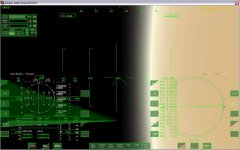
The HUD and MFD's look like this. The display and buttons on the MFD's are messed up. (untitled.jpg)
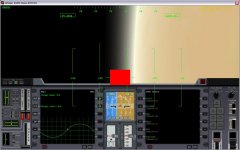
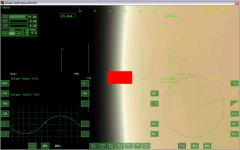
The red (black sometimes) window in the center should be the target window from the Map MFD on the left (untitled1.jpg) also shown in the next picture (untitled2.jpg) as the target window from the Transfer MFD on the right. Also the MODE SELECT MFD screen on the right (untitled1.jpg) appears offset which makes it very difficult to select other MFD's.
Now you tell me if you can manage a simple trip to the moon with these HUD and MFD's.
I understand that this is a visual project but it's useless if you can't do anything with it like taking a trip to another world.
 

Attachments

  • untitled.jpg
    untitled.jpg
    86.4 KB · Views: 25
  • untitled1.jpg
    untitled1.jpg
    85.4 KB · Views: 21
  • untitled2.jpg
    untitled2.jpg
    67.5 KB · Views: 20
That haze problem isn't entirely fixed :) on earth at night there is also blue haze from some angles.
Confirmed, to be fixed.

but the orbiter090722beta_base.zip download links are all dead.. :(
Indeed.
I set up a beta mirror on my site:
http://orbides.1gb.ru/orbiter_public_beta.php
You can get them there while the main place is dead.

About OGL 3.2 features and anything related to the next gen cards. You cant develop a client for a card type that does not even had its mid range variants out yet much less Low end and northbridge. You have to assume most of the users are using around the 3x series from ATI and 7x series from Nvidia to be safe.
One thing is certain - OpenGL 3+ is so different from OpenGL 2 that it will require a capital rewrite of the client just to get started. In the meantime, i'd really wanted to find some reference to compare the performance to. What kind of performance is to be expected from this feature or that, and especially their fusion.

The HUD and MFD's look like this. The display and buttons on the MFD's are messed up. (untitled.jpg)
That is seriously weird.
What GPU and windows do you use?

The red (black sometimes) window in the center should be the target window
Confirmed, that one appears to be broken for some reason. To be fixed.

Also the MODE SELECT MFD screen on the right (untitled1.jpg) appears offset which makes it very difficult to select other MFD's.
That is to be fixed eventually. For the moment the fonts system is a bit cryptic, and i can't determine what is it exactly that is sent wrong that makes the core print them offsetted.
 
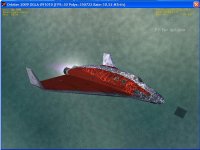
I experience a weird bug when using mapped shadows:

OGLAbug.JPG

Definitely faster FPS now, though - Up to 40 with everything on for me, on 4870 with XP.
 
Artlav i noticed something. For me with hd3850 the "high" shadow setting the best. It's strange, but the with high, i get more fps than with low, and medium... the mapped is just unplayable.
 
That is seriously weird.
What GPU and windows do you use?

I have the same problems, and I'm on Windows XP 32 bit Home edition, with a 512MB ATI Radeon HD 3650 AGP.

EDIT: I also get the same bug with mapped shadows as posted above, and also some exhaust flames appear in the wrong places for me.
 
Back
Top