Project Negishima Space Center

As a rule of thumb, the less exports / imports the better, so you should concentrate on modeling software that writes Orbiter meshes directly. It's much easier.

Like AC3D... :yes:
 
Like AC3D... :yes:
"free for 14 days" - no thanks.

Anyway, I don't understand your problem with triangles.

Would you rather have this?
g4kh.png


Or this?
eq4o.png


Anyways, from now on, I'll use a modded version of Wings3D called ManifoldLab. It allows you to perform [ame="http://en.wikipedia.org/wiki/Boolean_operations_on_polygons"]boolean operations[/ame], and can be downloaded here (click "Daily (Recent) Releases").
 
Last edited:

Who pays the bard, decides the tune.

Who holds a sword at his throat, can choose a whole symphony.

EDIT: And you are aware, that any GPU in the whole world only renders triangles? Any geometric shape can be describes by triangles (sometimes spherical triangles, ok... but triangles)
 
Last edited:
Pipcard, you should learn a bit more about 3D graphic theory.

I understand what you are saying. You are considering the "ground" object inside the program. Sure, the program know it's a flat surface, so it hides the triangles.

But they are there! In SU you have an option to hide edges. The program simply does that by default.

A simple primitive such as a cube, once exported into Orbiter, will turn into triangles.
So both your images will give the same mesh in Orbiter!


Did I mention Blender? It's free... completely free and works well. Sure, not as simple as SU for what you are doing, but none of the problems also.

Anyway, the way to go is to study some theory, and do some experiments. Get those meshes to orbiter and open the file with notepad and read what's there. Otherwise you will find more problems once materials get in the way. :thumbup:

 
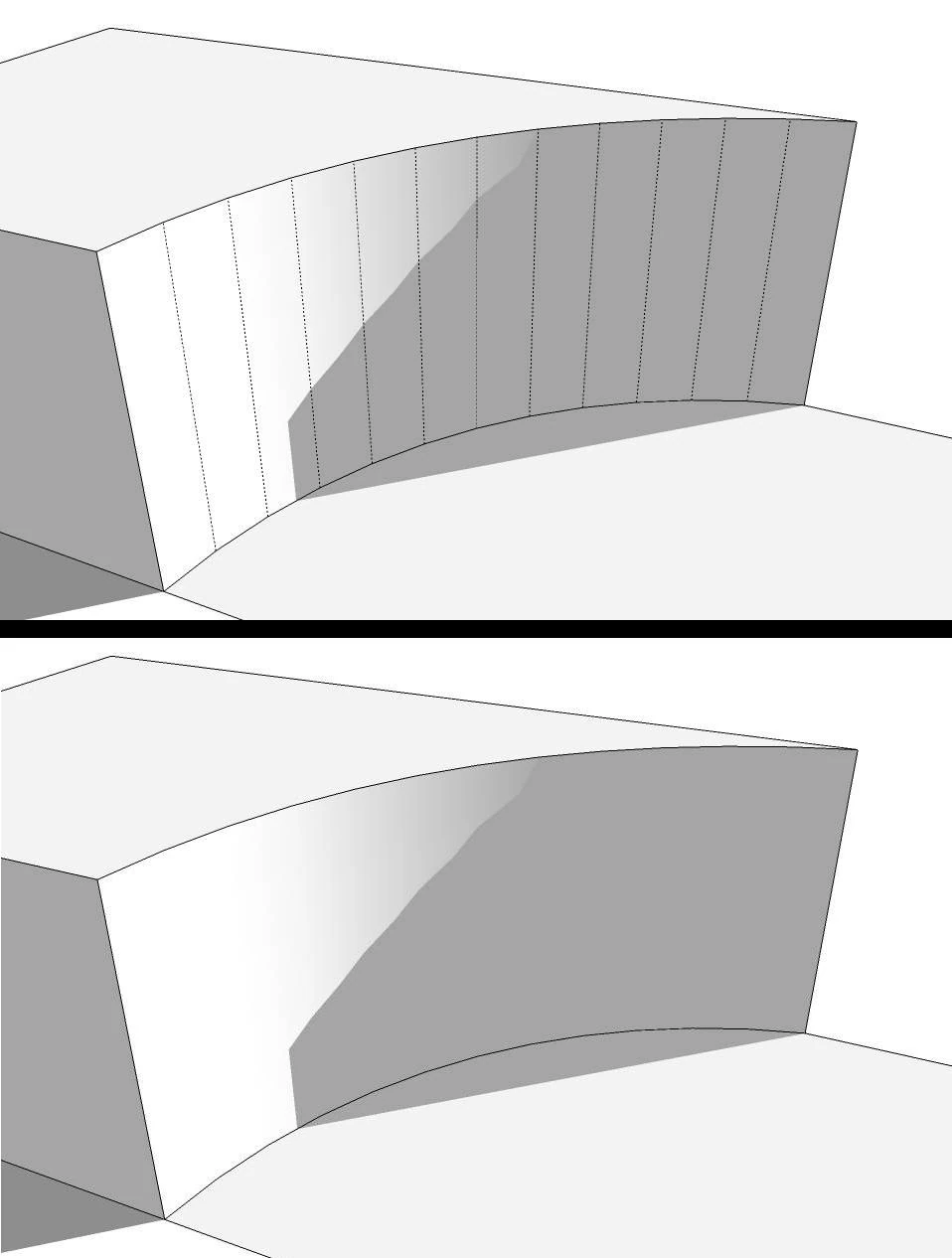
I know that exporting a mesh into Orbiter will triangulate the polygons. That's okay; I have no problem with that.

It's just easier to UV map this:

eq4o.png


than have a bunch of thin triangles everywhere.
 
I think you are getting there but still missing the point ;-)

Here's an example of hidden edges in SU:
Curve2.jpg


Geometry is the same... on the way the program shows it AND selects that surface is different.

Here's a mesh seen on Orbiter Mesh Wizard, with all the triangles visible. They are always there.
tortmeshnm4.jpg


Sketchup does not do proper UV mapping.
A more complete 3D program would allow you to define "seams" to UV map only certain areas of a mesh. Those seams can encompass many polygons.

3.jpg


This example shows the head and mouth being separated like that. The program can then select all polygons inside each area.


Anyway, keep modeling, your base looks fine. And keep the 3D simple. That's the only way to move to more complex programs/work.
What we are suggesting here is not to put you down, just something to help you, now or in the future!
 
Last edited:
Who pays the bard, decides the tune.

Who holds a sword at his throat, can choose a whole symphony.

EDIT: And you are aware, that any GPU in the whole world only renders triangles? Any geometric shape can be describes by triangles (sometimes spherical triangles, ok... but triangles)

My wife and I both own a hammer, hers was $7.99, mine was $49.00. Hers works fine for 6 penny nails, but don't try to drive spikes with it.
 
I redid the crawlerways as well (to make it look more like the Yoshinobu launch complex).

zrhj.jpg


mc3k.jpg


Donamy, can you please tell me how you find images for your textures? Like this?

4zuz.jpg


Is there some secret repository for launch pad images taken at just the right angle? Because I can't find that on Google Images.
 
Last edited:
Bing

JAXA H2B images
 
So I found this through Bing:
kx2o.jpg


and searched for it on Google, and found a larger version:
z85n.jpg


(they're on imageshack because I don't want to hotlink to the source)
 
Last edited:
You can search for larger versions of any image on bing also.
 
The Negi-5 pad:

k84q.png


Anyways, from now on, I'll use a modded version of Wings3D called ManifoldLab. It allows you to perform boolean operations, and can be downloaded here (click "Daily (Recent) Releases").
I forgot to tell you this, but Wings3D crashes whenever I try to make a UV map after I have performed a boolean operation, so I still use Sketchup.
 
Hey, that's nice looking!

Could you maybe do it as an SC3 vessel so that it could have "exhaust" (meaning sound suppression) flowing out the flame trench?

AIA's big pad does the same trick, I think it looks pretty cool.
 
Last edited:
Pj8Nfou.png


I added two M-II and Negi-5 models, an ATC tower, hangar meshes, 33.9 m tracking antennae, and made the airport smaller.

bmMwCyh.png


Here's the Negi-5 launch pad (I'm seriously tired of texturing buildings).

If you look closely, you can see a large VTOL pad in the distance.

What should the power plant be for an island spaceport? Nuclear? Because I saw what looked like a nuclear power plant at the [ame="http://www.orbithangar.com/searchid.php?ID=5067"]Jarvis Space Center[/ame].
 
I'd recommend nuclear. For something that size I'd "recommend" a modular pebble-bed reactor, yielding about 400Mw. You could sell off any unused Mw into the local "virtual" grid, essentailly the nearest electric co-op would be buying your excess power.

The next step up would be maybe one of the new"ish" AP-1000 plants, but that'd be way too much overkill.

A smaller Sterling wouldn't give you what you need, it'd be fine for a lunar base, but not something Earthside.

Here's ya a link http://www.ecogeek.org/component/content/article/3657-alternative-nuclear-power-pebble-bed-reactor

Food for thought.
 
Last edited:
FYI Jarvis SC uses 4 [ame="http://en.wikipedia.org/wiki/S6G_reactor"]S6G reactors[/ame]
 
Last edited:
Back
Top