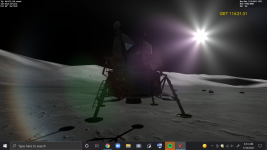
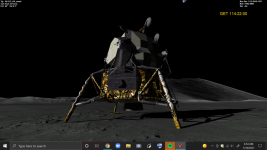
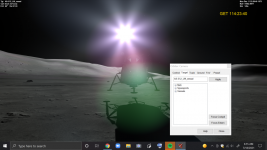
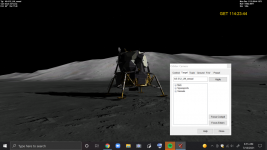
Problem LEM/Moon Surface Issue.

It is a bit random, sometimes everything is fine and sometimes this vibration appear. Not sure when it first started appearing but it could very well be R4.22.
I commented out the line suggested and I can't reproduce it now.
 
@jarmonik regarding the tearing you can check the scenario:
\2016 Edition\The Alps in 3D.scn
In VC mode, look to the left and zoom out. These black triangles are what I call tearing.
The problem disappears when zoomed in, and is worse when zoomed out.
I'm using the latest D3D9Client R4.22 on a Nvidia board.

Yes, I know that one and completely forgot it. I made a pretty long debug session regarding that problem half a year ago and sadly came empty handed. There is something wrong in the edge match algorithm. Martin wrote the algorithm and he obviously have a working one in the inline engine. If those two could be compared then the problem could be spotted. I know the basic idea of the algorithm but I don't know every tiny detail about it. Redesigning a new algorithm could be an option but it would take plenty of time.
 
I commented out the line suggested and I can't reproduce it now.
In that case it must be uninitialized variable that feeds the noise.
 
If you comment out this line (657) from the Surface.fx does it fix the problem ?
C:
// Disrecard elevation and make the surface spherical
// if (bSpherical) vPosW = (normalize(vCameraPos + vPosW) * fRadius) - vCameraPos;

No change. This started with the current or previous D3D9 release - the versions that added the new metallic shader I think.
The issue is recent and it never happened before.

To reproduce you need to zoom in fully. At that point my Orbiter stops to load the needed tiles (that's normal, slow disc).
When it resumes at full zoom all it well. Buy when you zoom out you get the glitches.
 
No change. This started with the current or previous D3D9 release - the versions that added the new metallic shader I think.
The issue is recent and it never happened before.

To reproduce you need to zoom in fully. At that point my Orbiter stops to load the needed tiles (that's normal, slow disc).
When it resumes at full zoom all it well. Buy when you zoom out you get the glitches.
Yeah, that happens to me as well.
 
Just to add something important:
I noticed this when I update to the current or previous D3D9 releases.
But I've just tested it on R4.7 (from 2020) and I have the same problem!

So I'm 100% sure that the problem is not with D3D9....
Sorry for only testing this now, but better late than never!
 
So far I have had no luck in reproducing the problem. But it appears to be pretty common. The line I mentioned above is the only relatively recent change and the only thing that could make some sense.

Ok, I can reproduce it now. I just tested if the frame-rate limiter can be used to bring the frame rate down to 10 fps. And the problem appeared....
 
Hi there,
So I ran into a problem with the Lunar terrain, but I listed it hear because I don't know if the problem involves AMSO as well. Please referee View attachment 26036 to the screenshot below.
I'm stull getting the same problem. The photos are attached bellow, I installed the latest version of D3D9
 

Attachments

  • Screenshot (369).png
    Screenshot (369).png
    456.5 KB · Views: 16
  • Screenshot (370).png
    Screenshot (370).png
    342.2 KB · Views: 16
  • Screenshot (371).png
    Screenshot (371).png
    398.1 KB · Views: 16
  • Screenshot (372).png
    Screenshot (372).png
    334.8 KB · Views: 15
never mind
 
Last edited:
never mind
 
Last edited:
Back
Top