BETA release
We've decided to prepare a release, because fully integrating PEG will take Agentgonzo some more time.
I need to prepare docs for a release, and while this is happening, you can give me some feedback about the newest changes, in particular, about their ergonomics - what you think could be done better, even if it means a redesign.
Here's the BETA:
http://www.elwico.pl/~ender-sz/orbiter-pdf/pliki/LaunchMFD-v.1.2-BETA.zip
The newest changes are:
1) New target input box (includes TransX semi-integration)
2) New altitude input box for PEG which itself isn't integrated yet. This is NOT the old Reference Alt.
3) Compass with different views (by Agentgonzo)
Minor:
4) Inclination change by buttons upgraded.
5) Reference Alt removed from user's interface and is fully automatic
6) Code restructuring (joint effort)
Ad 1) New target input box
It looks like this:

you can enter for example:
ISS
- as usual
51.57
- in equatorial frame, as this is the frame that is used for LEO satellites in programs/web pages that I know
64.54 250
- in ecliptic frame, as this is the frame that TransX uses. It's the frame used for interplanetary travels.
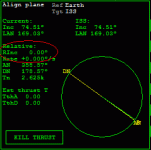
The values that you enter here usually come from TransX. I'll refer to this image again:

This TransX view is displayed after setting an Ejection plan and picking a target, and then setting up the transfer (velocities and date, etc.). After doing that, you must return to the first stage.
In this case, you would enter:
101.3 91.2
The proper incl. & LAN values are displayed by TransX after correctly adjusting the Ej. Orientation. The gray line must be placed so that it is some length before your position,
when your apoapsis touches the surface of the planet in this projection. You will need to accelerate time to find out when the apoapsis is in place. The redundant distance between your position and the gray line defines your radial distance to the target orbit, thus the Launch Window Time. You know what to do with this time, don't you ?

Refer to Launch MFD docs if not.
ad 2) New altitude input box for PEG which itself isn't integrated yet. This is NOT the old Reference Alt.

This is not used for now, but it would be good if somebody tested it. It is the target altitude for PEG algorithm. When you set a target in the previous input box, both the PeA and ApA are automatically set to target's (PeA + ApA)/2 . In the altitude input box, you can change this alt by entering for example:
250
- for PeA = ApA = 250 km (a circular orbit)
230 260
or an equivalence:
260 230
- for an elliptic 230x260 km orbit
a
- for automatic altitude selection. This means a circular orbit 20 km above planet's atmosphere or 50 km above surface for bodies without the atmosphere.
So please tell me if this design fits you. For example a thing to consider would be setting the exact values for PeA and ApA as in automatic alt when you set a target in target input box, and setting the target's (PeA + ApA)/2 deliberately when you enter for eg. "t" in altitude input box (inverse from the current situation). You tell me. I don't perform too many launches.
Also, I made some sanity checks to prevent wrong input. Try to break them for a special reward ! ^_^
Ad 3) Compass with different views (by Agentgonzo)
A compass for vertical launches (like the Shuttles). Selectable with Shift M or MOD button. It has a few views, switchable with VW button. it displays both azimuths when no particular target is selected, or only one otherwise.
Ad 4) Inclination change by buttons upgraded.
When you add or subtract inclination to values beyond the possible values, then the inclination isn't reverted (or left alone), but is set to maximal/minimal possible values +- 0.00001. It has some educational value. Set incl. adj. factor to 10*, then switch on launch compass and have fun with Inclination +, Inclination - buttons, seeing how the compass reacts.
Ad 5) Reference Alt removed from user's interface and is fully automatic
I removed it from user's interface, because I doubt that anybody used it, as the error which is produced by leaving it alone equals to 0.03* for Earth. If you think that you need it, then tell me.
Happy testing !