API Question I need help with cockpit redraw events.

That said is it really better to make it a single row? I need the full alphabet and I'm worried that having a texture that is 64x1024 (or similar) might be a bit much.

You shouldn't make too many different texture files. The more you get into the same file, the better (up to a certain size, of course). Since this font is most likely not the only texture you're going to need, make a file where you can put all the stuff in (for panels, you usually seperate this by panel. Every panel a texture file. For VCs you can use a similar sorting mechanic, if you need more than one texture). My panel textures are 2048 x 1024, so there should be plenty of space to put your font.

But of course you don't have to do it, it's just important that you have a means of finding the correct corner points for a given ASCII code.

Now I have no intention of changing my text's justification so i can ignore the T_Pos switch correct?

You can ignore the switch, but you still have to calculate the target position of your text. That is, the T_LEFT entry.

Anyway, where do I go from here. don't I need four x/y coordinates to define an area not just two?

Because the other two are derived from your xharacter width and height. Take a look at oapiBlt, you'll see that it takes tgtX, tgtY, srcX, srcY, width, and height. I think there is also a version of it that allows for scaling where you can enter two different dimensions for target and source surface, but I'd only use that if there is no humanly possible way to do what you want to do, as it is slow and the interpolation can look crappy.

once I have my coordinates what do I do with them?

Code:
oapiBlt(surf, Src, tgtx, _y, srcx, 0, fWidth, fHeight);
;)
 
Because the other two are derived from your xharacter width and height. Take a look at oapiBlt, you'll see that it takes tgtX, tgtY, srcX, srcY, width, and height...

Which corner am I passing it then? Top left? Bottom right?

as for the rest...

Ok so you're saing that all of my displays, (or at least the LCD ones) should be a single texture?

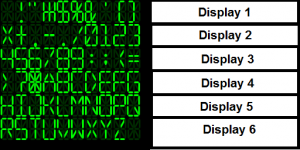
Something like this for instance?
 

Attachments

  • LCD.png
    LCD.png
    27.1 KB · Views: 18
Which corner am I passing it then? Top left?

Yes, Top left. It's pretty much standard for any and all bliting operations that you orient yourself at the top left corner, since by file logic, top left is 0/0.

Ok so you're saing that all of my displays, (or at least the LCD ones) should be a single texture?

I'm saying that your whole cockpit should be a single texture, as long as you can reasonably fit all elements into one single texture. It's not strictly speaking necessary, but its usually faster, as there has to be less read/write accesses to different surfaces. At least I think so, I'm not exactly an expert on the topic. But it's what I've been told so far.
 
Which corner am I passing it then? Top left? Bottom right?

Should be top left. Don't forget the top left pixel is 0,0.
X increases to the right, but Y increases going down.

0,0 -> 1,0
|
v
0,1 -> 1,1
 
I'm saying that your whole cockpit should be a single texture, as long as you can reasonably fit all elements into one single texture. It's not strictly speaking necessary, but its usually faster, as there has to be less read/write accesses to different surfaces. At least I think so, I'm not exactly an expert on the topic. But it's what I've been told so far.

The thing is that I'm doing a VC not a 2D panel so I'm dealing with painting multiple mesh groups and the documentation is rather vague about it all. VCs were clearly an afterthought.


In the end though this should work yes?

Code:
void Spider::LCDPrint(SURFHANDLE (displaysurface), char* text, int _length)
{
int cHeight = 40;	// Character height [pixles]
int cWidth = 24;	// Character width [pixels] 
int cRow, cCol;	// Character's position in bitmap [row / column]
int textwidth = cWidth * _length;

for (int i = 0; i < _length; ++i)
{
	cRow = (text[i] - 32) / 10;
	cCol = (text[i] - 32) % 10;

	int srcX = cCol * cWidth;
	int srcY = cRow * cHeight;

	int tgtX = i * cWidth; 
	int	tgtY = 0; // for single line display only, multi-linedisplays would need adiditional function here

	oapiBlt( (displaysurface), (mybitmap), tgtX, tgtY, srcX, srcY, cWidth, cHeight);
}

then in my cockpit redraw event i'd call...

LCDPrint( (displaysurface), "(string)", (string length) );
 
Last edited:
The thing is that I'm doing a VC not a 2D panel so I'm dealing with painting multiple mesh groups and the documentation is rather vague about it all.

It merely means that you have more different target surfaces, it's not any different in anything else. You could define all the panel elements as meshgroups n 2d panel too, it's just not a necessity.

In the end though this should work yes?

Can't find anything wrong with it when reading through it, at least.
 
Ok but I'm still unclear about how exactly I go about including bitmaps in a C++ project.

Do I have need to have a "Panels.dds" in my orbiter/textures folder which I blit things onto?

How does this play into more complicated panel elements such as an ADI or other gauge?

Basically, once I've generated this texture what steps do I need to take to apply it to the mesh?

---------- Post added 07-04-12 at 01:15 AM ---------- Previous post was 07-03-12 at 09:20 PM ----------

I have my bitmap sitting as a resource in my VC2010 project how do I actually call it for use in a function?

also, what is this g.param.hDll that I see getting called in pretty much all the SDK samples? It seems to have something to do with this.

---------- Post added at 05:34 AM ---------- Previous post was at 01:15 AM ----------

ok I've marked LCDfont.bmp as a resource and copy/pasted all instances of g_Param and hDll from the DG sample into my code.

the code compiles but I'm getting the following error on the .bmp itself.

Code:
1>Bitmaps\LCDfont.bmp : fatal error LNK1136: invalid or corrupt file

Is there a specific format (other than simply *.bmp) that it needs to be in?
 
Last edited:
Generally, you import a .bmp into Visual Studios as a resource, and assign it an ID, usually something like IDB_BITMAP. Then you can load it and get a handle with somethinglike:
LoadBitmap(NULL, MAKEINTRESOURCE(IDB_BITMAP))

Not sure on the first parameter that I put a NULL in for...

More here:
http://msdn.microsoft.com/en-us/library/windows/desktop/ms647558(v=vs.85).aspx

How do I import and give it the ID?

Is this seperate from simply going into the file menu and clicking "add existing file to project"?
 
Last edited:
Generally, you import a .bmp into Visual Studios as a resource, and assign it an ID, usually something like IDB_BITMAP. Then you can load it and get a handle with somethinglike:
LoadBitmap(NULL, MAKEINTRESOURCE(IDB_BITMAP))

No, that's the old way of doing it, when we still used winAPI functions to blit panel bitmaps. as of Orbiter 2010, we have functions provided by the Orbiter API that use DirectX, so includng every bitmap as a resource is not necessary. You can still do it if you want to incorporate your textures directly into the executable. Advantages of this are a bit faster loading times, and the textures are inaccessible to the user, but it is a big hassle during development (longer compilng times, need to recompile the whole thing everytime you make a change to the texture, etc).
Just make your textures a dds, drop it in the textures folder and load it as shown in the tutorial I posted.
 
Thank you, but for future reference how do I import and give it the ID?

Also...

I can still blit from a texture that exists outside the dll to one that exists inside correct?

If so this is what i'm thinking. (please tell me if you see any issues)

LCDfont exists as a dds in my vessel's texture folder and gets loaded by the module.

in my clbkRedrawVC I call "oapiCreateTextureSurface()" to create a blank texture.

I then populate it with characters using my "LCDprint()" routine discussed above.

from there I can use "oapiSetTexture()" asign my new display to it's associated meshgroup, is that correct?
 
Thank you, but for future reference how do I import and give it the ID?

You give the ID in resources.h, and you import it by editing the code of your project's resource file (as VS express doesn't have a resource manager). It's something I only did once so far, so I'm not exactly fluent in the procedure...

I can still blit from a texture that exists outside the dll to one that exists inside correct?

Sure.

LCDfont exists as a dds in my vessel's texture folder and gets loaded by the module.

Yep.

in my clbkRedrawVC I call "oapiCreateTextureSurface()" to create a blank texture.

No. clbkRedrawVC will give you the surface if the apropriate element is triggered. You create and assign the surface to the meshgroup in clbkLoadVC.

I then populate it with characters using my "LCDprint()" routine discussed above.

yes.

from there I can use "oapiSetTexture()" asign my new display to it's associated meshgroup, is that correct?

No, as said before, the association between meshgroup and texture surface happens in clbLoadVC, when you define the panel elements. clbkRedrawVC will automatically pass you the correct surface if a redraw of the element is triggered.
 
Ok in that case I'm confused then.

I put...
Code:
SURFHANDLE LCD_dv = oapiCreateTextureSurface(40, 144); // a 6 digit display, (cHeight * 1, cWidth * 6)
LCDPrint(LCD_dv, "123456", 6); // *placeholder value*
...in my clbkLoadVC and now (in theory) I have a texture that is 40 pixels by 144 and reads "123456" in my LCD font.

how do I go about adding it to a meshgroup? There are no mesh or group handles in the oapiVCRegisterArea function.

Likewise how do I get it to update when the value changes?
 
Last edited:
how do I go about adding it to a meshgroup? There are no mesh or group handles in the oapiVCRegisterArea function.

Hmmm, this might just be where the differences between panel and vc become too large for me to be of much help. For a panel, you create the meshgroups right there and then. For a VC, obviously not.

But all is not lost: you said you got the MFDs working, that means that you have already done all of this for them. It doesn't work any different for all the other elements.
 
Hmmm, this might just be where the differences between panel and vc become too large for me to be of much help. For a panel, you create the meshgroups right there and then. For a VC, obviously not.

But all is not lost: you said you got the MFDs working, that means that you have already done all of this for them. It doesn't work any different for all the other elements.

Well in the MFDSPEC there is a value slot for mesh_handle and vertices all I had to do was declare the mesh group comprising my MFD and I was in buisiness.
 
Right, had to throw a short look in the API doc, but thinks I got it all together now.

This is a short example of registering I found in the API guide, should be pretty clear:

Code:
SURFHANDLE tex = oapiGetTextureHandle (vcmesh, 10); 
oapiVCRegisterArea (AID_BUTTON, _R(0,0,20,10), PANEL_REDRAW_ALWAYS, PANEL_MOUSE_LBDOWN, PANEL_MAP_BGONREQUEST, tex);
 oapiVCSetAreaClickmode_Spherical (AID_BUTTON, _V(5,3.3,7.1), 2.5);

The first line obtains the texture surface from the VC mesh.
The second line registers the Element as an active area in the VC, sets the redraw events and registers the texture surface for that element (note that this can be one big texture for the whole VC, as I explained, but doesn't have to).
The last line is pretty specific to VCs and seems to define the clickable area on the VC...

All in all, it seems quite similar to panels, except for that special registration in the third line...

P.s: The API guide has a tutorial on virtual cockpits, but beware, it was written for Orbiter 2006. Those methods will still work, but it's well possible that there are better methods around now. Or maybe VCs haven't changed as much as panels. In any case It'll explain a good many thing and point you to the right functions.
 
I read it and...

i_never_would_have_passed_kindergarten.png


This is what I have in my clbkloadVC now. The group/texture is marked for dynamic update in the *msh file and by all rights it should work but when the simulation lloads all I get is my stupid place-holder texture.

Code:
SURFHANDLE LCD_dv = oapiGetTextureHandle (mh_cockpit, 3); //SURFHANDLE LCD_dv = oapiGetTextureHandle (mh_cockpit, display_dv); 
LCDPrint(LCD_dv, "123456", 6);
oapiVCRegisterArea (1, _R(0,40,144,0), PANEL_REDRAW_ALWAYS, PANEL_MOUSE_IGNORE, PANEL_MAP_NONE, LCD_dv);
 
Nonono...

You mustn't call LCDprint directly out of loadVC. LCDprint goes into the redraw function of you panel element, which in turn will be called by clbkVCRedrawEvent. LoadVC is only responsible for registering everything.

also, :lol: at the rabbits. So true. I'm afraid I'm not much better currently, but at least I have the excuse of typing with one hand while trying to put my son to sleep with the other (not the one that had surgery, he's sleeping fine, given all the drugs stll circulating through him...)

---------- Post added 07-05-12 at 07:19 AM ---------- Previous post was 07-04-12 at 10:15 PM ----------

Having both hands free at the moment, I'll try to be a little more helpful, and describe the basic workings of the whole system.

First, we have

Code:
clbkLoadVC  ( int  id   )
It is used to initialise your virtual cockpit and register active areas. Active areas have to be registered so orbiter can decide when they were clicked and when they have to be redrawn, and also to associate each area with a drawing surface (if the element needs to draw anything). That is, the surface you associate them with here will be the one passed to you later on when the element needs to be redrawn. If you look at the DG source code, you'll see that it obtains only three different surfaces, presumably equivalent to the upper, middle and lower panel, for which it uses three different surfaces even in VC mode (this should have more to do with the structuring of the VC mesh than with the panels, really, I assume that the bulk of the VC uses three meshgroups who are modeled after the three panels purely for convienience).

Anyways, this tells you one thing: Your element does not have to be its very own meshgroup, but it very well can be. If it is, you will need to get its specific surface (which orbiter will already have created for the meshgroup when you loaded the mesh, at least if you UV-maped the thing), and use it to register your VC area.
The redraw events you enter when registering will determine when orbiter will do a redraw of the element (for example if left mouse clicked aso). If you want your element to only update at certain times and not by user input, you use only PANEL_REDRAW_USER and then trigger the redraw yourself at apropriate times, for example at a regular interval if your element is supposed to be updating every second or so. You'll also have to provide your element with a unique ID, which orbiter will pass to clbkRedrawVC so you can identify it.

Next up, clbkVCRedrawEvent:

Code:
clbkVCRedrawEvent  ( int  id,  
  int  event,  
  SURFHANDLE  surf   
 )
In here you do all the drawing, or you call redraw functions of elements to be redrawn (usually the better way, as this function will get impossibly long if you do all the drawing directly in here).
It is important to understand when this function is called: It is called when one of your registered panel elements decides it should be redrawn, based on the redraw event identifiers you registered it with. THIS FUNCTION CANNOT BE CALLED DIRECTLY!

The function allways gets called from a registered panel element, that will provide it with its id, so you know which element called the function and wants to be redrawn, the event that triggered it so you know what's going on, and the surface you registered it with so you know where to draw on. If you registered a wrong surface, you will see your element redrawing at the wrong position, if you'll see it redrawing at all.
If you want to force a redraw on a cockpit element, make sure you registered it with PANEL_REDRAW_USER as a event identifier, and use oapiTriggerRedrawArea. The element specified will then call clbkVCRedrawEvent and provide you with the neccesary data. If you wouldn't do it that way, you would have to obtain the surface directly from the VC mesh every time you want to draw on it.

When using oapiTriggerRedrawArea, especially for redraw events that work on a timer, make sure the vessel calling it is the current focus vessel! oapiTriggerRedraw will NOT identify the vessel that called it, and calling it while another vessel has the focus may trigger a redraw on its panel/VC, and that can have some rather unpredictable consequences...

Anyways, now you have to identify the element that triggered the redraw event and draw it. I see above that you simply stated 1 as ID for your element. I guess it would work, but it's very prone to duplication due to human error. Best is to define all your element identifiers in an enum in the header, for example
Code:
enum {AID_MFD1_LEFT_BTNS, AID_MFD1_Right_BTNS, AID_LCD_DISPLAY}
or somesuch.

Then you can check the id of the calling element in clbkVCRedrawEvent like this:

Code:
if (id == AID_LCD_DISPLAY)
  LCDPrint(surf, "123456", 6);
This is more or less the process. What we haven't looked at yet is the source surface, that is the surface that contains the texture you want to draw from, in your case the dds containing your font.
This source surface can be the same as the drawing surface, but it mustn't. If it is, what you most likely did is put the font into the texture of your VC mesh, in an unused place. Since it obviously isn't we're going to do it the other way and load it from the file you created for it.
Add a SURFHANDLE as a public member of your vessel in the header, for example
Code:
SURFHANDLE LCDfont;
In the tutorial, the file is loaded into the surface during clbkInitModule. I guess it should also work in the constructor, but this way is better since in case that there are multiple instances of your class in a scenario, the file is still only loaded once. This is also why we made the handle public. So in clbkInitModule, you add a line that goes somewhat like this:

Code:
MyVesselClass::LCDfont = oapiLoadTexture ("LCDfont.dds");
From now on out, LCDfont will contain your font bitmap as a texture. Now observe that in your LCDPrint function, you must use this surface as source surface, and the surface passed to you by clbkVCRedrawEvent as target surface.

There. All that's left to do is free the LCDfont surface when you exit the module, so in clbkExitModule you put the line

Code:
    oapiDestroySurface (MyVesselClass::LCDfont);
I hope that helps to at least partly aleviate your confusion.

 
Last edited:
Thanks for that jedidia, been following this, and other threads relating to panels and virtual cockpits. Hopefully some of it will sink in!

N.
 
Thank you Jedia. That's the sort of thing that the tutorials touch on but never explain in detail.

I've done my best to follow along but It's still not working and my code is a mess of comments and changes.

In the interests of solving this problem and doing some clean up, here's everything I've got so far.

In the header file...

Code:
// Define colors for display output
#define	BLACK		RGB(0x00, 0x00, 0x00)
#define	WHITE		RGB(0xFF, 0xFF, 0xFF)
#define RED			RGB(0xFF, 0x00, 0x00)
#define GREEN		RGB(0x00, 0xFF, 0x00)
#define BLUE		RGB(0x00, 0x00, 0xFF)
#define YELLOW		RGB(0xFF, 0xFF, 0x00)


typedef struct {
	HINSTANCE hDLL;
	SURFHANDLE tkbk_label;
	HFONT font[1];
} GDIParams; // I don't know what exactly this does but it's associated with graphics in some way so I copy/pasted it from the stock Atlantis' header file  


// ==============================================================
//Cockpit Definitions
// ==============================================================
#define MFD_L 0
#define MFD_R 1

#define AID_MFD0_LBUTTONS	01
#define AID_MFD0_RBUTTONS	02
#define AID_MFD0_PWR		03
#define AID_MFD0_SEL		04
#define AID_MFD0_MNU		05

#define AID_LCD_DISPLAY		100

SURFHANDLEs sh_LCDfont and sh_LCDdisplay are both declared as public class members.

Code:
sh_LCDfont = oapiLoadTexture ("Spider/PanelElements/LCDfont.dds");

...is called in the constructor and released in the destructor

In clbkLoadVC I have...

Code:
sh_LCDdisplay = oapiGetTextureHandle (mh_cockpit, 2); // (mh_cockpit, 0P1LCDs); 
oapiVCRegisterArea (AID_LCD_DISPLAY, _R(0,40,144,0), PANEL_REDRAW_ALWAYS, PANEL_MOUSE_IGNORE, PANEL_MAP_BACKGROUND, sh_LCDdisplay);

and finally

Code:
bool Spider::clbkVCRedrawEvent (int id, int event, SURFHANDLE surf)
{
	switch (id) 
	{
	case AID_LCD_DISPLAY:
		LCDPrint(surf, "123456", 6);
		return true;
	}
	return true;
}

what am I missing?
 
Back
Top