API Question I need help with cockpit redraw events.

After that there's the AI and X-pointer but I really have no idea how to do that without sketchpad or transperancy as there are as I'm gonna need a way to do crosshairs.

Well, I do have scanlines in one of my displays that are composed of three elements (vertical line, horizontal line and cross section). I couldn't use sketchpad because then I would have lost the blurry screen glow look, but usually sketchpad is the best way to go for such stuff.
 
For those who've been following this thread, I've opened a development thread for this project here.
 
I've run into more issues and rather than start a new thread I figure that I'll just continue this one.

My laptop is my test machine and while it maintains 30 fps in exterior or glass cockpit views this dropped into single digits in my VC. Because my FPS remained steady with the redraw events commented out (an the code was a complete mess) I've spent the last week tearing it down and rebuilding.

Now I've traded low-FPS for new problem, CTDs.

The culprit is our old friend, the LCD print function. :facepalm:

The function worked previously and recieved only minor changes so I'm not sure where the issue lies. The changes were...

...In clbkloadvc
Code:
// Register main panel numerical displays
sh_LCDdisplay = oapiGetTextureHandle (mh_cockpit, [COLOR="Red"]GRP_Panel_LCDs[/COLOR]); 
oapiVCRegisterArea (AID_LCD_simdate, _R(0,0,216,40), PANEL_REDRAW_ALWAYS, PANEL_MOUSE_IGNORE, PANEL_MAP_BACKGROUND, sh_LCDdisplay);
I now have header file for my cockpit mesh generated in meshc that allows me to call meshgroups by name, I don't think this should be an issue but it was after incorperating this change that the CTDs started.

...in the function it's self
Code:
void LEM::LCDPrint(SURFHANDLE surf, char* text, int row, int _length)
{
int cHeight = 40;	// Character height [pixles]
int cWidth = 24;	// Character width [pixels] 
int cRow, cCol;		// Character's position in bitmap [row / column]
int textwidth = cWidth * _length;

int fontxofs = 0;
int fontyofs = 15;

for (int i = 0; i < strlen(text); ++i)
	{
[COLOR="red"]	cRow = (text[i] - 32) / 30;
	cCol = (text[i] - 32) % 30;

	int srcX = fontxofs + cCol * cWidth;
	int srcY = fontyofs + cRow * cHeight;[/COLOR]

	int tgtX = i * cWidth; 
	int	tgtY = row * cHeight; 

	oapiBlt( surf, [COLOR="red"]sh_Inst[/COLOR], tgtX, tgtY, srcX, srcY, cWidth, cHeight); // blit
	}
}

After all the issues with the MFDs I decided to follow Martins lead in the DG inst classes and create a unified dds to hold all my blitting operations (sh_Inst). My first impulse is to assume that there is omething wrong with sh_inst but it renders fine when not being called in a redraw and before I started the rebuild I was using it to redraw the MFD buttons.

Finally: Are there any general rules of thumb for optimising VCs that anyone can share? I'm learning as I go here.

---------- Post added 08-05-12 at 01:35 AM ---------- Previous post was 08-04-12 at 09:47 PM ----------

Solved the CTDs! :woohoo:

oapiGetTextureHandle takes the texture index as an argument not the meshgroup. :facepalm:

The SDK's panel tutorials refer to a "mesh surface" which i thought refered to a specific face/group but it does not. Now that I know what I was doing wrong I can get back to work.

The funny thing is that before I began consolidating/optimising I literally had "texture #1" assigned to "Group #1", "texture #2" to "Group #2", and so on.

It worked after a fashion but boy do I feel silly now.

---------- Post added at 01:45 AM ---------- Previous post was at 01:35 AM ----------


Question!

From a processing/memory standpoint is it better to do multiple simple redraw events(update each gauge individually) or do fewer but more complex redraw events such as redrawing a whole section of the panel?

The VC is turning into a real frame rate killer and I'm looking for advice on how best to prevent this.
 
From a processing/memory standpoint is it better to do multiple simple redraw events(update each gauge individually) or do fewer but more complex redraw events such as redrawing a whole section of the panel?

more operations that blit less are more advisable. Note, however, that you "pay" your GPU cycle not per pixel blitted, but more or less by rectangle (of course, larger rectangles eat more, but not linearly so) So if you can blit two things with the same rectagle, that's a speed increase. If the rectangle is quadratic and to a power of two, that's a speed increase (not that much anymore, but still enough that any tile based game is arranged in PoT tiles). If two elements can be blitted in one rectangle for fifty % of the time (e.g. two neighbouring buttons with one blinking), blinking both in one rectangle and the blitting the other over it again when you have to is faster. etc.

But what you have to ask yourself the most is how often the whole panel actually needs to redraw, and wheather it needs to be all at once. Most elements are enough to update once per second, and you don't have to do them all at the same time. For those elements where it doesn't matter, compensate time acceleration and update them in real time. I really can't see how you could run into framerate troubles when you divide up the workload smartly (you can't possibly have much more of it than IMS.... :shifty:)

And if the thing is still too slow, you might take Urwumpe's advise about editing texture coordinates under advisement.
 
Could you explain "divide up the workload smartly" are there general rules of thumb for optimising VCs that I should be aware of?

Likewise you say "you don't have to do them all at the same time" but how does that work? You either update at every time step or you update when a condition changes. Either way the calculation for a given timestep are all going to be done together.

picture.php


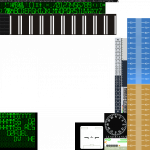
If you look at the image above you'll see 20 tape gauges (10 sets of 2) as it stands I calulate/redraw each set seperately but in the actual sh_Inst texture they are contiguous so in theory I could render them all in a single (large) rectangle, should I?
 

Attachments

  • LEM_Inst.png
    LEM_Inst.png
    109.4 KB · Views: 10
Likewise you say "you don't have to do them all at the same time" but how does that work? You either update at every time step or you update when a condition changes.

Or you update, say, every second? like I assume (and if my assumption is wrong, I would strongly recommend) you do with your clocks? Now just because they all update every second, doesn't mean they all have to update in the same frame Shifting their update's by 0.05 seconds will, at least at no time acceleration, cause them to update practicaly simultaniously, but the work is still divided among several frames.

as it stands I calulate/redraw each set seperately but in the actual sh_Inst texture they are contiguous so in theory I could render them all in a single (large) rectangle, should I?

Yap. The backgrounds for these thing belong in the background texture, not to be blitted at all, as all static stuff should. Anything that doesn't need to be animated comes into the background. You only blit animated stuff over it.

However, you already have to blit the scales into the tapes, so blitting the background separately is a doubly bad idea. You could just make that background part of the scale and save yourself an entire operation per tape...
 
Or you update, say, every second? like I assume (and if my assumption is wrong, I would strongly recommend) you do with your clocks? Now just because they all update every second, doesn't mean they all have to update in the same frame Shifting their update's by 0.05 seconds will, at least at no time acceleration, cause them to update practicaly simultaniously, but the work is still divided among several frames.

What's the best way to go about doing this?

Right now the clocks are all 'PANEL_REDRAW_ALWAYS' and display SimT and SimDT respectively. The MFD buttons are triggered by mouse event.

Yap. The backgrounds for these thing belong in the background texture, not to be blitted at all, as all static stuff should. Anything that doesn't need to be animated comes into the background. You only blit animated stuff over it.

However, you already have to blit the scales into the tapes, so blitting the background separately is a doubly bad idea. You could just make that background part of the scale and save yourself an entire operation per tape...

The texture is still a WIP, I actually intend to incorperate the scales into the background texture but would it be more efficient to blit them if I'm going to be redrawing the whole rectangle anyway?
 
Right now the clocks are all 'PANEL_REDRAW_ALWAYS' and display SimT and SimDT respectively. The MFD buttons are triggered by mouse event.

Ah... never use REDRAW_ALWAYS unless you really need it for a panel element. And in my expierience, that's practicaly never the case.

I use only REDRAW_USER for all my panel elements. In my mouse handling, each element evaluates the situation for itself and triggers only a redraw if the event actually changes something.
For elements that redraw on timer, my panel element class has it's own timer function that gets updated every frame, but of course only triggers the redraw when it should happen. And, as I said, if you still have trouble, you can offset the timers a few centiseconds so they don't all redraw in the same frame.

The texture is still a WIP, I actually intend to incorperate the scales into the background texture but would it be more efficient to blit them if I'm going to be redrawing the whole rectangle anyway?

Ah, now I'm not sure anymore. I was under the impression that these scales actually scroll, I.E. that they are not fixed. If they are fixed, yes, by all means, keep them on the background and never even think about blitting them anywhere (as I see it, the needles won't overlap the scales, right?).

Also, about those needles: If you really want high performance, make the needle a meshgroup and move it by animation instead of bliting (you'll also get "transparency" this way, so win all the way), and suddenly you end up with your 20 tapes not needing even a single bliting operation ever instead of what currently seems like three every frame...

If the scales scroll, you could do the same and make the whole tape its own meshgroup, that rotates just like a real one to move the scale.
 
Ah... never use REDRAW_ALWAYS unless you really need it for a panel element. And in my expierience, that's practicaly never the case.

I use only REDRAW_USER for all my panel elements. In my mouse handling, each element evaluates the situation for itself and triggers only a redraw if the event actually changes something.
For elements that redraw on timer, my panel element class has it's own timer function that gets updated every frame, but of course only triggers the redraw when it should happen. And, as I said, if you still have trouble, you can offset the timers a few centiseconds so they don't all redraw in the same frame.

Ahh...

Could you post an example?


Ah, now I'm not sure anymore. I was under the impression that these scales actually scroll, I.E. that they are not fixed. If they are fixed, yes, by all means, keep them on the background and never even think about blitting them anywhere (as I see it, the needles won't overlap the scales, right?).

Also, about those needles: If you really want high performance, make the needle a meshgroup and move it by animation instead of bliting (you'll also get "transparency" this way, so win all the way), and suddenly you end up with your 20 tapes not needing even a single bliting operation ever instead of what currently seems like three every frame...

If the scales scroll, you could do the same and make the whole tape its own meshgroup, that rotates just like a real one to move the scale.

The Altimeter and Range/Rate indicators are the only ones who's scales scroll independantly of the needle. Is animation and (the additional vertices required) really that much more efficient than blitting?

I had already been considering doing the ADI ball as an actual mesh because I thought the code might be simpler, should I just go a head and do it?

---------- Post added at 07:29 PM ---------- Previous post was at 07:12 PM ----------

If I'm not going to have a scrolling scale should I do the gauges seperately?

One benefit that comes to mind is being able to stagger the redraw events as you described above.

Of course if I really wanted to go overboard I'd do the whole cockpit as mesh animations but I've been trying to keep the vert count to an absolutminimum because I was under the impression that animations/mesh rendering were a much bigger drain on system resources than textures.
 
Last edited:
Could you post an example?

Sure.

Here's what the registering of my "MFC" class looks like in clbkLoadPanel (well, one of the instances, anyways):

Code:
		RegisterPanelArea(hPanel, AID_MFC1, _R(8,8,258,238), PANEL_REDRAW_USER, PANEL_MOUSE_LBDOWN|PANEL_MOUSE_LBPRESSED|PANEL_MOUSE_LBUP|PANEL_MOUSE_ONREPLAY, panel2dtex, mfc[0]);

As you can see, I'm registering all mouse events, but only the USER redraw event, because I want total control over when a redraw occurs and when not.

The class has a function for triggering its own redraw:

Code:
void IMS_MFC::TriggerRedraw()
{
	
	if (vessel->GetActivePanel() == Panelid && oapiCameraInternal() && vessel == oapiGetFocusInterface())
		oapiTriggerPanelRedrawArea(Panelid, MYid);
}

The class has to know three things: the vessel it is a part of, its panel id (not relevant for VC) and its own id (to tell Orbiter that it wants to be redrawn).
The first line checks if it is even located on the currently active panel of the vessel (as this function is also used for timed redraws, not just for input triggered redraws. Also, this isn't an API function, but it's irrelevant for VC anyways), if Orbiter is even in cockpitmode and wheather or not the current focus vessel is the vessel that contains this panel elements (otherwise, redrawing would not just be futile, but ctd-ishly dangerous, as I noticed).

If all these conditions are fulfilled, the function triggers the redraw of its panel element. Otherwise there won't be a redraw (as none is necessary).

In the event processing function of the class, it determines what exactly has been modified, and if the event warrants a re-write (that is, the apearance of the element changes by the event), it simply callsTriggerRedraw, like for example (mostly pseudocode):

Code:
bool IMS_MFC::ProcessMouse2D(int event, int mx, int my)
{
    if (ThisImportantButtonPressed)
    {
         Do;
         Stuff;
         This;
         Button;
         Should;
         Do;
 
         TriggerRedraw();
         return true;
    }
    return false;
}

and that's that. When the user clicks on an inactive area of the panel, the redraw won't occur (as it would if I simply told orbiter to redraw everytime the element has been clicked). This can make sense or not, depending on wheather you have inactive areas inside a panel element (and I have lots of them, as this is a dynamic "touchscreen" interface, that means the same element can execute various functions and display various information).

Then there's the timer function of the class, which is pretty straightforward too:

Code:
bool IMS_MFC::CheckRedrawTimer(double simdt)
{
	if (RedrawTimer == 0 || !active || mnu) return false; //if timer set to zero, not active or in menu mode, don't even bother

	ElapsedTime += simdt / oapiGetTimeAcceleration();		//adjust for time acceleration. mor fps friendly.
	if (ElapsedTime > RedrawTimer)
	{
		ElapsedTime = 0;
		timerInterval = !timerInterval;	//just a variable tat changes state every time. Usually used for blinkenlights
		TriggerRedraw();
	}
	return true;
}

This function gets called for every instance of the class in every frame (from clbkPreStep). It updates the elapsed time since the last timer, and if the time is larger than the interval set (can be different for every instance, deending on what the instance is displaying) it resets the elapsed time and calls TriggerRedraw(). So every time the timer of an element elapses, Orbiter will get a RedrawEvent from that instance, if the conditions in TriggerRedraw are met. Note that this function automatically compensates for time acceleration, meaning, the redraw intervall will always be in real time. This can make sense or not, depending on the display. For a clock it might make sense to update it in sim time, for a life support display usually not so much.

Is animation and (the additional vertices required) really that much more efficient than blitting?

Ohhhhh yes. Our Graphics Hardware is heavily optimised for that kind of stuff. Blitting is more of an afterthought in the design, really (As far as I know, the good old Supernintendo can rival a modern low to mid-end GPU in blitting performance under certain circumstances (very narrow circumstances, admittedly), because blitting speed was pretty much the only thing that stuff was designed for).

I had already been considering doing the ADI ball as an actual mesh because I thought the code might be simpler, should I just go a head and do it?

If it's even simpler to code, there's no reason whatsoever not to.

EDIT:

If I'm not going to have a scrolling scale should I do the gauges seperately?

Not sure what you mean, you'll need to be a bit more specific.

Of course if I really wanted to go overboard I'd do the whole cockpit as mesh animations but I've been trying to keep the vert count to an absolutminimum because I was under the impression that animations/mesh rendering were a much bigger drain on system resources than textures.

More taxing than textures, yes. More taxing than blitting stuff around in memory? Hell no!!

 
Last edited:
If it's even simpler to code, there's no reason whatsoever not to.

I already have a bunch of functions for calculating vectors/rotation that I could re-use so the complex part of the code has already been written.

All that remains (aside from creating the 3d model) is to rotate the mesh X, Y, and Z degrees along the given axes.

Not sure what you mean, you'll need to be a bit more specific.

Should I blitt each tape as an individual active area/rectangle or combine them?
 
Last edited:
Should I blitt each tape as an individual active area/rectangle or combine them?

If you have to blit them, combine them. But as I see it, you can do much better without blitting in this case.
 
If you have to blit them, combine them. But as I see it, you can do much better without blitting in this case.

Are you refering to doing the needles as mesh groups instead of textures?

---------- Post added at 11:48 PM ---------- Previous post was at 10:36 PM ----------

As an aside, I've adapted your timer routine to my LCDs and my fps has jumped from 12 to 25. Still not the 30-40 that I get in the default "glass cockpit" but a marked improvement none the less.
 
Still not the 30-40 that I get in the default "glass cockpit" but a marked improvement none the less.

Now wait until you fix those tapes ;)

Are you refering to doing the needles as mesh groups instead of textures?
That, and to the fact that you can make the scale part of the static background texture so you don't have to blit them every time the texture updates.
 
Back
Top