
You are using an out of date browser. It may not display this or other websites correctly.
You should upgrade or use an alternative browser.
You should upgrade or use an alternative browser.
OHM Dragon DLL
- Thread starter OrbitHangar
- Start date
First install the IDA1 pre-release addon from here.
http://www.orbiter-forum.com/attachment.php?attachmentid=13744&d=1433450175
Rename the .txt file attached below to a .cfg and replace the one in config/vessels/dragon1
Then add this to BrianJ's scenario above
for the IDA1 payload.
http://www.orbiter-forum.com/attachment.php?attachmentid=13744&d=1433450175
Rename the .txt file attached below to a .cfg and replace the one in config/vessels/dragon1
Then add this to BrianJ's scenario above
for the IDA1 payload.
Code:
IDA1:IDA
  STATUS Orbiting Earth
  RPOS 4275227.96 2868183.37 4279272.32
  RVEL -1002.307 -5843.120 4942.558
  AROT -61.69 -56.73 91.22
  ATTACHED 0:0,IDAmount
  AFCMODE 7
  NAVFREQ 0 0
END
IDAmount:IDA_mount
  STATUS Landed Earth
  POS -90.3950427 38.8311759
  HEADING 189.51
  ATTACHED 0:0,Dragon
  AFCMODE 7
  NAVFREQ 0 0
END
Attachments
Excellent! Thanks Don. Might be good to reduce the Dragon "ballast" in the scenario from 1952 to 1652, that's the last line in the Dragon scenario entry:
All set for tomorrow 
Code:
PYLD 0 0 0 0 0 0.0010 0 1652.0 0.0000

boogabooga
Bug Crusher
- Joined
- Apr 16, 2011
- Messages
- 3,010
- Reaction score
- 16
- Points
- 63
I will never release an addon before a launch again.:uhh:
Well, when you produce an add-on for every ISS launch, it is bound to happen.

Interceptor
Well-known member
Hi Brianj,I was wondering if you could please add a second payload attachment to the Dragon1 in a future update.Thanks,and great work.
Hi Interceptor,
all payload attachment points are set from the file Config/Vessels/dragon1/dragon1_capsule.cfg.
You should have three by default (two in the trunk section, one in the capsule).
You can add more if needed.
Cheers,
Brian
all payload attachment points are set from the file Config/Vessels/dragon1/dragon1_capsule.cfg.
You should have three by default (two in the trunk section, one in the capsule).
You can add more if needed.
Cheers,
Brian
Interceptor
Well-known member
Ok Brianj,I must of missed it some how,I had thought there was only one payload attachment,thanks for clearing that up.Thanks
Last edited:
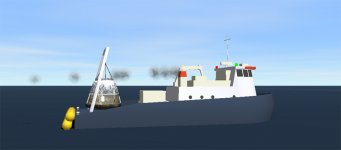

Many thanks for the update, now we have a nice boat to go a bit sailing in orbiter.:thumbup:
But there seems to be one issue with the attachments.
Whenever I tried to attach the new Dragon to the F9 (or F9 1.2...I tried both) in a running scenario, the Dragon attaches 180 degrees rotated to the gound (dragon nose points to ground).
I have replaced the new Dragon-module with the previous one(dragon1_150625.zip), and here all went fine.
So there must be something wrong within the new Dragon module.
Maybe related to a new internal attachment-point for the boat ?
But there seems to be one issue with the attachments.
Whenever I tried to attach the new Dragon to the F9 (or F9 1.2...I tried both) in a running scenario, the Dragon attaches 180 degrees rotated to the gound (dragon nose points to ground).
I have replaced the new Dragon-module with the previous one(dragon1_150625.zip), and here all went fine.
So there must be something wrong within the new Dragon module.
Maybe related to a new internal attachment-point for the boat ?
Interceptor
Well-known member
Excellent job brianj,really liking the new Recovery Vessel,many thanks.
But there seems to be one issue with the attachments.
Whenever I tried to attach the new Dragon to the F9 (or F9 1.2...I tried both) in a running scenario, the Dragon attaches 180 degrees rotated to the gound (dragon nose points to ground).
I have replaced the new Dragon-module with the previous one(dragon1_150625.zip), and here all went fine.
So there must be something wrong within the new Dragon module.
Maybe related to a new internal attachment-point for the boat ?
Hi,
yes, I had to rework the attachment point management on the new Dragon dll, so it's now attachment no.2 that attaches to the Falcon9. In the scenario file, the vessel entry for the Dragon should have the attachment as:
Code:
ATTACHED 2:0,Falcon9Cheers,
Brian
Thanks for the quick feedback.
I tried allready various attachment settings in the cfg. But allways got the nose-down issue.
The documantion is a bit confusing to me, it states that the Falcon will use the first available CHILD attachment found in the vessels/payload config.
But in the dragon1_capsule there is an attachmenet-point marked as "F9", but its set up as a PARENT.
I tried to put this on top of the attachment-list, but still....node-down.
There seems to be no reference in the sources to attach-ID "F9".
My current workaround is to use the "old" previousDragon1 module and set an additionally CHILD attachment point markes as "RV".
So I have both: I can correctly attach the dragon to the F9 AND I can use the recovery vessel...with some limitations (the chute is still attached during recovery...).
I tried allready various attachment settings in the cfg. But allways got the nose-down issue.
The documantion is a bit confusing to me, it states that the Falcon will use the first available CHILD attachment found in the vessels/payload config.
But in the dragon1_capsule there is an attachmenet-point marked as "F9", but its set up as a PARENT.
I tried to put this on top of the attachment-list, but still....node-down.
There seems to be no reference in the sources to attach-ID "F9".
My current workaround is to use the "old" previousDragon1 module and set an additionally CHILD attachment point markes as "RV".
So I have both: I can correctly attach the dragon to the F9 AND I can use the recovery vessel...with some limitations (the chute is still attached during recovery...).
That's right, if you're attaching a payload in-sim(press [P], enter payload name), Falcon9 will look through all payload CHILD attachment points (starting at 0) and attach to the first available.The documantion is a bit confusing to me, it states that the Falcon will use the first available CHILD attachment found in the vessels/payload config.
In a .cfg file, the declaration "P" means "attaches to a PARENT".But in the dragon1_capsule there is an attachmenet-point marked as "F9", but its set up as a PARENT.
I tried to put this on top of the attachment-list, but still....node-down.
There seems to be no reference in the sources to attach-ID "F9".
What you can't see in the .cfg file is that there are 2 other CHILD (attaches to PARENT) attachment points created by the .dll - no.0 and no.1.
ID "F9" is just there to indicate what the attachment point is intended for.
Whatever works! And no, the old Dragon .dll won't hide the chutes when grappled. But I reckon it probably is easier just to edit your scenario file with the lineMy current workaround is to use the "old" previousDragon1 module and set an additionally CHILD attachment point markes as "RV".
So I have both: I can correctly attach the dragon to the F9 AND I can use the recovery vessel...with some limitations (the chute is still attached during recovery...).
ATTACHED 2:0,Falcon9
However, I think it is kind of dumb that folks can't use the Falcon9 "attach payload-in-sim function" for the Dragon. I'll change the Dragon .dll so the attach point to the Falcon is hard-coded in the .dll as no.0. asap.
Or maybe I should put an extra field for the user to specify attachment point by number, in the Falcon9 "attach payload in-sim" function? Have to think about that
Cheers,
Brian
---------- Post added 01-12-16 at 03:08 PM ---------- Previous post was 01-11-16 at 11:38 PM ----------
Updated on OH: attachment point for Falcon9 now coded into the .dll, it should always be no.0. The included scenario file also updated accordingly.
So the correct scenario vessel entry for the Dragon attached to Falcon9 should now always be
Code:
ATTACHED 0:0,Falcon9You should be able to attach the Dragon to the Falcon9 during sim without problem now. Sorry for any confusion.
Cheers,
Brian
Last edited:
Wow, this was a very quick fix. :tiphat:
I have tested this and it works perfect now.
I am currently busy to build-up my own space-station and doing multiple Dragon starts within one and the same orbiter-session.
I am also enjoying the exceptional simulated Falcon flyback feature. I cannot get enough of this...:yes:
So many thanks again.
I have tested this and it works perfect now.
I am currently busy to build-up my own space-station and doing multiple Dragon starts within one and the same orbiter-session.
I am also enjoying the exceptional simulated Falcon flyback feature. I cannot get enough of this...:yes:
So many thanks again.

pappy2
Active member
- Joined
- May 3, 2012
- Messages
- 410
- Reaction score
- 43
- Points
- 43
Hello everyone,
I installed with Orbiter 2010 P1
ADDON DRAGON DLL (dragon1_160112.zip) of "BrianJ" 01/11/16
and
ADDON FALCON9R (falcon9r_150612.zip) of "BrianJ" 06/11/15
During re-entry module with solar panels are not dropped
Can you tell me the control buttons for the drop.
EDIT:
OK OK
I found, in fact the separation place with the "?" Key " AZERTY "
Thank you for this wonderful ADDON
Right in the target

Excuse my bad English because I use Google translation
I installed with Orbiter 2010 P1
ADDON DRAGON DLL (dragon1_160112.zip) of "BrianJ" 01/11/16
and
ADDON FALCON9R (falcon9r_150612.zip) of "BrianJ" 06/11/15
During re-entry module with solar panels are not dropped
Can you tell me the control buttons for the drop.
EDIT:
OK OK
I found, in fact the separation place with the "?" Key " AZERTY "
Thank you for this wonderful ADDON
Right in the target
Excuse my bad English because I use Google translation
Last edited:

It translates well enough Pappy!
Looks like you nearly hit a Bullseye. Nice work!
Looks like you nearly hit a Bullseye. Nice work!
Similar threads


- Replies
- 2
- Views
- 2K

- Replies
- 215
- Views
- 76K