
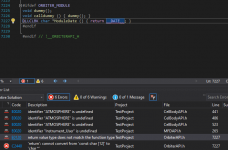
Thanks, I'll check that one out next. I did try following computerex's old tutorial just to see what would happen, creating a simple plugin that outputs the sim time to the debug string. I'm getting errors in OrbiterAPI.h of all places.

ORBITER-FORUM will be temporarily closed at 2026-07-23 18:00 UTC while we complete some OF maintenance tasks. The amount of downtime is expected to take up to one hour, but probably less.

#define STRICT
#define ORBITER_MODULE

#include <Orbitersdk.h>


DLLCLBK void opcPreStep(double simt, double simdt, double mjd) {
    sprintf(oapiDebugString(), "%.2f", oapiGetSimTime());
}
Source: https://stackoverflow.com/a/48554786VisualStudio 2017 15.5 started setting the/permissive-flag for all new solutions, which disallows the implicit conversion of string literals to non-constchar*.
You can edit the solution's properties to disable that flag while you update your codebase to conform to the C++ standard.
It's listed as "Conformance mode" in the "Language" tab under "C/C++" in the project's properties.
So here's what I would do:
The rest I would check is not really necessary, but most of the time correct:
- check that your projects configuration type is set to "Dynamic Library (.dll)"
- check that your project has added "OrbiterSDK/include" to the "Additional Include Directories" (@ C/C++ -> General)
- check that your project has added "OrbiterSDK/lib" to the "Additional Library Directories" (@ Linker -> General)
- "Preprocessor Definitions" should have "WIN32" and "_WINDOWS" defined (@ C/C++ -> Preprocessor).
...AAANNND... Do a RE-build sometimes, as the cache(s) can make non-buildable solutions stay un-buildable :/
So a "Clean Solution" now and than does not hurt.
I had all of the above suggestions already configured, but it appears when I imported the property sheets, it wiped all of those settings. I'm going to delete the entire solution and start again.
Should I continue discussing in this thread, or start another?
Orbiter SOLution GENerator tool v0.9    (c) 2020 Peter Schneider
        ¯¯¯      ¯¯
slngen [/T <type>][/VS <version>][/N <name>][/O <version>][/S][/C] <name> [/?]

  <name>        (required) Name of the addon.
                Enclosed in double-quotes (") if it contains spaces.
  /T <type>     AddonType (MFD|Dialog|LaunchpadParam|Vessel).
                The Addon type to be created.
  /VS <version> VisualStudioVersion (2017|2019|all|auto).
                The Visual Studio Version to create the solution for.
  /N <name>     Name of the addon (if parameter-value pair is preferred).
                Same rules for name with spaces applies here.
  /O <version>  OrbiterVersion (2016|2010|BETA|auto).
                The Orbiter Version to create the solution for.
                'auto' will automatically detect the version by the current working path.
  /S            WithSubDirs.
                Creates sub-directories in the addon-directory, containing the project-,
                resource- and source-files.
  /C            Compact.
                Generate project-file with fewer 'Debug|Release' 'Condition's.
/? Displays this usage information and exits.Orbitersdk\utils\ folder (so it's in a known place), but can also be invoked directly from within your newly created "addon folder" in the Orbitersdk\samples\ (Orbiter 2010 & 2016) rsp. Orbitersdk\samples\Modules or Orbitersdk\samples\Vessel (Orbiter BETA).samples directory and create a new folder to contain your new addonC:\Wherever\Orbiter\Orbitersdk\samples> mkdir DemoAddonC:\Wherever\Orbiter\Orbitersdk\samples> cd DemoAddonC:\Wherever\Orbiter\Orbitersdk\samples\DemoAddon> ..\..\utils\slngen /T MFD /VS 2017 "Demo Addon MFD"


