New Release D3D9Client Development

Surface brightness can be adjusted from the atmospheric control panel. Is the darkness due to low sun angle or is the Moon globally dark ?
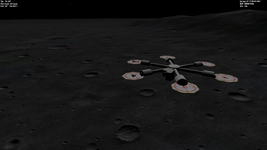
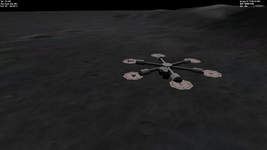
Thanks, I've set the same values of Terrain Brightness and Gamma in Atmospheric Controls, and runned the same scenario. Surface brightness in Orbiter 2016 (right) seems to be definitely lighter compared to OpenOrbiter (left):

111.png222.png

(Surface Brightness and Gamma have been setted higher in 2016 in Atmospheric Controls at first. And there was more of the difference.)
 
can we forget the brightness of Orbiter 2016 for a moment
and talk about why the Open version have much sharper ground textures !?? :eek:
 
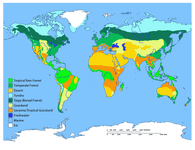
The surface micro textures make the Orbirer landscape much prettier. And they look really nicer in Open Orbiter D3D9 Client. I was just going to ask/suggest about such micro textures for other planets and their natural satelites. Is this difficult to do? Pardon my ignorance 🙂 Also, I was thinking about the Earth landscape micro textures. Without objects (buildings, trees and so on). Maybe it can be released as Earth biomes: green field, desert, ice, and more detailed water. Of cource, it's much harder to do for Earth, because the biomes border must be setted, but it can be done for some Earth regions, around some airports, for example. But the main idea is filling all Earth surface with biome micro textures. How feasible and adequate is this idea? 🙂 I could do some manual work on biome borders or something else.

Added: Something like these:
world-biomes-map.gifTypes.jpg
 
Last edited:
I updated it, but I get this problem in orbiter_ng.exe:

Module Satsat.dll ............ [Build 100215, API 100212]
Module Saturn.dll ............ [Build 100830, API 100830]
Module Mimas.dll ............. [Build 100215, API 100212]
Module Enceladus.dll ......... [Build 100215, API 100212]
Module Tethys.dll ............ [Build 100215, API 100212]
Module Dione.dll ............. [Build 100215, API 100212]
Module Rhea.dll .............. [Build 100215, API 100212]
Module Titan.dll ............. [Build 100215, API 100212]
Module Hyperion.dll .......... [Build 100215, API 100212]
Module Iapetus.dll ........... [Build 100215, API 100212]
Module Uranus.dll ............ [Build 100830, API 100830]
Module Miranda.dll ........... [Build ******, API 060425]
Module Ariel.dll ............. [Build ******, API 060425]
Module Umbriel.dll ........... [Build ******, API 060425]
Module Titania.dll ........... [Build ******, API 060425]
Module Oberon.dll ............ [Build ******, API 060425]
Module Neptune.dll ........... [Build 100830, API 100830]
Finished initialising world
Module DeltaGlider.dll ....... [Build 100830, API 100830]
Module LuaInline.dll ......... [Build 100830, API 100830]
Module ShuttleA.dll .......... [Build 100830, API 100830]
Module ShuttlePB.dll ......... [Build 100830, API 100830]
Finished initialising status
Finished initialising camera
Finished setting up render state
-----------------
Orbiter NG (no graphics)
Running in server mode (no graphics client attached).
Type "help" for a list of commands.
And I activated it in "modules"
 
Can you post the complete log file?
 
**** Orbiter.log
Build Aug 30 2010 [v.100830]
Timer precision: 1e-007 sec
Found 0 joystick(s)
Module AtlantisConfig.dll .... [Build 100830, API 100830]
Module AtmConfig.dll ......... [Build 100830, API 100830]
Module DGConfigurator.dll .... [Build 100830, API 100830]
Error loading module Modules\Plugin\D3D9Client.dll (code 126)
Module ScnEditor.dll ......... [Build 100830, API 100830]

**** Creating simulation session
Module Sun.dll ............... [Build 100830, API 100830]
VSOP87(E) Sun: Precision 1e-006, Terms 554/6634
Module Mercury.dll ........... [Build 100830, API 100830]
VSOP87(B) Mercury: Precision 1e-005, Terms 167/7123
Module Venus.dll ............. [Build 100830, API 100830]
Module VenusAtm2006.dll ...... [Build 100830, API 100830]
VSOP87(B) Venus: Precision 1e-005, Terms 79/1710
Module Earth.dll ............. [Build 100830, API 100830]
Module EarthAtmJ71G.dll ...... [Build 100830, API 100830]
VSOP87(B) Earth: Precision 1e-008, Terms 2564/2564
Module Moon.dll .............. [Build 100830, API 100830]
ELP82: Precision 1e-005, Terms 116/829
Module Mars.dll .............. [Build 100830, API 100830]
Module MarsAtm2006.dll ....... [Build 100830, API 100830]
VSOP87(B) Mars: Precision 1e-005, Terms 405/6400
Module Phobos.dll ............ [Build ******, API 060425]
Module Deimos.dll ............ [Build ******, API 060425]
Module Galsat.dll ............ [Build 100217, API 100215]
Module Jupiter.dll ........... [Build 100830, API 100830]
VSOP87(B) Jupiter: Precision 1e-006, Terms 1624/3625
Module Io.dll ................ [Build 100217, API 100215]
Module Europa.dll ............ [Build 100217, API 100215]
Module Ganymede.dll .......... [Build 100217, API 100215]
Module Callisto.dll .......... [Build 100217, API 100215]
Module Satsat.dll ............ [Build 100215, API 100212]
Module Saturn.dll ............ [Build 100830, API 100830]
VSOP87(B) Saturn: Precision 1e-006, Terms 2904/6365
Module Mimas.dll ............. [Build 100215, API 100212]
SATSAT Mimas: Terms 113
Module Enceladus.dll ......... [Build 100215, API 100212]
SATSAT Enceladus: Terms 33
Module Tethys.dll ............ [Build 100215, API 100212]
SATSAT Tethys: Terms 101
Module Dione.dll ............. [Build 100215, API 100212]
SATSAT Dione: Terms 59
Module Rhea.dll .............. [Build 100215, API 100212]
SATSAT Rhea: Terms 68
Module Titan.dll ............. [Build 100215, API 100212]
SATSAT Titan: Terms 100
Module Hyperion.dll .......... [Build 100215, API 100212]
SATSAT Hyperion: Terms 595
Module Iapetus.dll ........... [Build 100215, API 100212]
SATSAT Iapetus: Terms 605
Module Uranus.dll ............ [Build 100830, API 100830]
VSOP87(B) Uranus: Precision 1e-006, Terms 1827/5269
Module Miranda.dll ........... [Build ******, API 060425]
Module Ariel.dll ............. [Build ******, API 060425]
Module Umbriel.dll ........... [Build ******, API 060425]
Module Titania.dll ........... [Build ******, API 060425]
Module Oberon.dll ............ [Build ******, API 060425]
Module Neptune.dll ........... [Build 100830, API 100830]
VSOP87(B) Neptune: Precision 1e-006, Terms 391/2024
Finished initialising world
Module DeltaGlider.dll ....... [Build 100830, API 100830]
Module LuaInline.dll ......... [Build 100830, API 100830]
Module ShuttleA.dll .......... [Build 100830, API 100830]
Finished initialising status
Finished initialising camera
Finished setting up render state
**** Closing simulation session

All steps I did:

  • Double click orbiter_ng.exe
  • Launch scenario "delta-glider/cape canaveral"
  • Type "exit" on the console when it prompted me to enter a command
  • Exit launchpad
 
Did you activate D3D9Client in Orbiter_ng? Orbiter and Orbiter_NG do not share configurations so what you do in one does not affect the other.
 
All steps I did:

  • Double click orbiter_ng.exe
  • Launch scenario "delta-glider/cape canaveral"
  • Type "exit" on the console when it prompted me to enter a command
  • Exit launchpad
Yep, the D3D9 module is not being loaded... excuse the obvious question, but did you actually install the 2010 D3D9 files?
If that is not it, then you might need to install the 2010 (or 2008, please check the D3D9 docs) redistributable runtime libraries, which should be available in one of the Microsoft websites.
 
I extracted the zip folder into the Orbiter main folder.
It says "Error loading module Modules\Plugin\D3D9Client.dll", but that file (and all other D3D9 files that are in the zip) exist, so it could be a problem with the add-on or Orbiter 2010
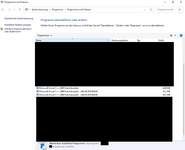
And yes, I activated the D3D9 client in the orbiter_ng.exe Launchpad "Modules" tab and I already have Microsoft VC 2008 installed, but it's still not running properly
Also, I don't get any errors (except the module loading error), not even a missing a file that is required by D3D9.
 

Attachments

  • Screenshot (2166).png
    Screenshot (2166).png
    82.3 KB · Views: 5
I extracted the zip folder into the Orbiter main folder.
It says "Error loading module Modules\Plugin\D3D9Client.dll", but that file (and all other D3D9 files that are in the zip) exist, so it could be a problem with the add-on or Orbiter 2010
And yes, I activated the D3D9 client in the orbiter_ng.exe Launchpad "Modules" tab and I already have Microsoft VC 2008 installed, but it's still not running properly
Also, I don't get any errors (except the module loading error), not even a missing a file that is required by D3D9.
Do you have the 2010 redistributables installed? If not, try them please.
For a more "deep" assessment of what is missing, you can get the Dependency Walker tool, which lists all the dependencies of a module, and if they are found in your system.
 
Usually these steps make it:
1. Extarct Orbiter2016 zip (you've done that)
2. Install 2010 redistributables (can also be found in folder Install. Install\vcredist_x86.exe to be precise)
3. Start Orbiter_ng.exe
4. Enable D3D9Client in Modules Tab
5. Configure settings in Video Tab (mainly the 3D Device and start in windowd mode) - no need for the Advanced setup yet.
6. Start a simple scenario (my goto is always: Scenarios\Delta-glider\DG Mk4 in orbit.scn)

Sometimes I close the Launchpad dialog after step 5, but that's probabbly just a habbit of me ;)
 
Usually these steps make it:
1. Extarct Orbiter2016 zip (you've done that)
2. Install 2010 redistributables (can also be found in folder Install. Install\vcredist_x86.exe to be precise)
3. Start Orbiter_ng.exe
4. Enable D3D9Client in Modules Tab
5. Configure settings in Video Tab (mainly the 3D Device and start in windowd mode) - no need for the Advanced setup yet.
6. Start a simple scenario (my goto is always: Scenarios\Delta-glider\DG Mk4 in orbit.scn)

Sometimes I close the Launchpad dialog after step 5, but that's probabbly just a habbit of me ;)
Before your #3 point, I'd add "extract D3D9Client" :cool:
 
can we forget the brightness of Orbiter 2016 for a moment
and talk about why the Open version have much sharper ground textures !?? :eek:

Much sharper ? In which way ? I didn't notice anything unusual while testing it during development. There is a little more contrast added between terrain facing the sun and away from the sun. Or could this be micro texture filter issue, make sure it's "anisotropic" not "point".
 
Much sharper ? In which way ? I didn't notice anything unusual while testing it during development. There is a little more contrast added between terrain facing the sun and away from the sun. Or could this be micro texture filter issue, make sure it's "anisotropic" not "point".
I mean looking at these two pictures

👇

 
I mean looking at these two pictures
The right one seems unnaturally flat in contrast. On moon the contrast is pretty high. You can get a flatter microtexture (almost like the right one) by setting the "Blend Mode" to "soft light".
 
In those two pictures I setted the "Blend Mode" to "normal light" both for Orbiter 2016 and OpenOrbiter. Maybe there are some other parameters that make the landscape better in OpenOrbiter.
 
Is it possible that at some time in the future we could get pbr shading and shadows for the vc, like we already have in the external view? Or is there some technical limitation that wont allow it?
 
Here's a development patch (only for developers) for a ray-traced VC textures. It's been a while since I last time build a binary patch so I hope I didn't forget anything. Orbiter can be downloaded from the GitHub page by clicking a small "tag" icon next to "branches" and then select "downloads". This patch is x86 build
 

Attachments

Back
Top