- Joined
- Feb 4, 2008
- Messages
- 9,758
- Reaction score
- 1,028
- Points
- 203
What modified shader? I have not modified the shaders at all, just the parameters.Could you post the modified shader ?

What modified shader? I have not modified the shaders at all, just the parameters.Could you post the modified shader ?
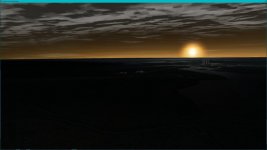
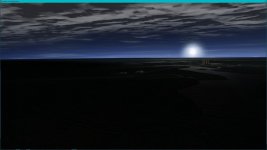
Sorry, this led me to believe that you experimented with the shader code.So far all my experiments have confirmed this, that the best solution for now is to tie horizon haze color and intensity to the actual solar angle.


My display is probably 12 years old running in sRGB. But, of course, there are "Movie" and "Photo" modes giving a very different color scale which don't look good for any purpose. The display on my Intel HD Graphics 4000 laptop is terrible even if it's not that old.
But, yes, agreed. Let's forget the build in calibration.

 www.windowscentral.com
Just out of curiosity, which of the shaders in the D3D9Client folder of Modules\ do control the atmosphere rendering?Could you post the modified shader ?

[
BaseDir    : D:\Orbiter2016\
ConfigDir  : D:\Orbiter2016\Config\
MeshDir    : D:\Orbiter2016\Meshes\
TextureDir : D:\Orbiter2016\Textures\
HightexDir : D:\Orbiter2016\Textures2\
ScenarioDir: D:\Orbiter2016\Scenarios\
000000.000: ---------------------------------------------------------------
D3D9 DLLs  : C:\WINDOWS\SYSTEM32\d3d9.dll [v 10.0.19041.928]
           : C:\WINDOWS\SYSTEM32\d3dx9_43.dll [v 9.29.952.3111]
000000.000: ---------------------------------------------------------------
000000.000: Module D3D9Client.dll ........ [Build 200907, API 160828]
000000.000: Module ParkingBrakeMFD.dll ... [Build 210307, API 160828]
000000.000: Module CamControl.dll ........ [Build ******, API 050206]
000000.000: Module CameraMFD.dll ......... [Build 201023, API 160828]
000000.000: Module ScnEditorTLE.dll ...... [Build ******, API 060425]
000000.000: Module GPCMFD.dll ............ [Build 111222, API 100830]
000000.000: ---------------------------------------------------------------
000000.000: >>> WARNING: Obsolete API function used: oapiRegisterMFDMode
000000.000: At least one active module is accessing an obsolete interface function.
000000.000: Addons which rely on obsolete functions may not be compatible with
000000.000: future versions of Orbiter.
000000.000: ---------------------------------------------------------------
000000.000:
000000.000: **** Creating simulation session
000000.000: D3D9: [DirectX 9 Initialized]
D3D9: 3D-Adapter.............. : NVIDIA GeForce GTX 1660 Ti
D3D9: MaxTextureWidth......... : 16384
D3D9: MaxTextureHeight........ : 16384
D3D9: MaxTextureRepeat........ : 8192
D3D9: VolTexAddressCaps....... : 0x3F
D3D9: NumSimultaneousRTs...... : 4
D3D9: VertexDeclCaps.......... : 0x30F
D3D9: MiscCaps................ : 0x2FCEF2
D3D9: XNA Math Support........ : Yes
D3D9: Vertex Texture.......... : Yes
D3D9: Separate AlphaBlend..... : Yes
D3D9: Shadow Mapping.......... : Yes
D3D9: D3DFMT_A16B16G16R16F.... : Yes
D3D9: D3DFMT_A32B32G32R32F.... : Yes
D3D9: D3DFMT_D32F_LOCKABLE.... : Yes
D3D9: D3DFMT_A2R10G10B10...... : Yes
D3D9: D3DFMT_L8............... : Yes
D3D9: D3DDTCAPS_DEC3N......... : No
D3D9: D3DDTCAPS_FLOAT16_2..... : Yes
D3D9: D3DDTCAPS_FLOAT16_4..... : Yes
D3D9: Runs under WINE......... : No
D3D9: D3D9Build Date.......... : 200906
D3D9: Available Texture Memory : 4073 MB
000000.000: D3D9: [3DDevice Initialized]
000000.000: D3D9: [Loading Constellations]
000000.000: D3D9: [D3D9Client Initialized]
...
D3D9: ERROR: D3D9ClientSurface: GetDC() Failed
D3D9: ERROR: Surface name is clbkCreateSurfaceEx Handle=0x223A5998 (256,256)
D3D9: ERROR: Surface Has a Surface Interface
D3D9: ERROR: Surface Is Lockable
D3D9: ERROR: Surface is in a DefaultPool
D3D9: ERROR: Surface has RENDERTARGET usage
D3D9: ERROR: Surface Format is 22
D3D9: ERROR: ActiveFlags( OAPISURFACE_RENDERTARGET )
/ICODE]

here is the code where I changed from HDC to sketchpad.  I also noticed the font did not change in the rcsqty.
[ICODE]
void Atlantis::RedrawPanel_PANELRCSstatus(SURFHANDLE surf, int part)

{

    char cbuf[20];


    oapi::Font* font = oapiCreateFont(50, true, "Seven Segment");
    oapi::Sketchpad* skp = oapiGetSketchpad(surf);

    skp->SetFont(font);
    skp->SetTextColor(0x0000FF);
    skp->SetTextAlign(oapi::Sketchpad::LEFT);

    sprintf(cbuf, "%2.0f", RCSQTY);

    skp->Text(0, 100, cbuf, strlen(cbuf));
    skp->Text(210, 100, cbuf, strlen(cbuf));
    skp->Text(105, 100, cbuf, strlen(cbuf));


                oapiReleaseSketchpad(skp);

}
void Atlantis::RedrawPanel_EVENTAFTstatus(SURFHANDLE surf, int part)

{
    char cbuf[20];


    oapi::Font* font = oapiCreateFont(70, true, "Arial");
    oapi::Sketchpad* skp = oapiGetSketchpad(surf);

    skp->SetFont(font);
    skp->SetTextColor(0x000000);
    skp->SetTextAlign(oapi::Sketchpad::LEFT);


    sprintf(cbuf, "%d", Minutes4set);

    skp->Text(5, 85, cbuf, strlen(cbuf));

    sprintf(cbuf, "%d", Minutes3set);

    skp->Text(70, 85, cbuf, strlen(cbuf));

    sprintf(cbuf, "%d", Minutes2set);

    skp->Text(145, 85, cbuf, strlen(cbuf));

    sprintf(cbuf, "%d", Minutes1set);

    skp->Text(220, 85, cbuf, strlen(cbuf));


    oapiReleaseSketchpad(skp);

}
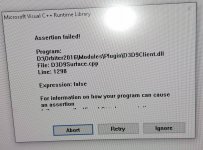
Weird. So I am converting some my HDC to sketchpad. When I run it in D3D9 I get a message Assertion fail.
I am using r4.11
oapi::Font* font1 = oapiCreateFont(50, true, "*Seven Segment");. And I got the font to show. No issues. but where to set the debug level?
D3D9: ERROR: UnDeleted Surface(s) Detected
D3D9: ERROR: Surface 0x16D13E70 (clbkCreateSurface) (256,36)
D3D9: ERROR: [Failed to Reset DirectX Device] (Likely blocked by undeleted resources)
Video tab, Advanced button.but where to set the debug level?
000000.000: D3D9: [Scene Initialized]
000000.000: Finished initialising panels
D3D9: ERROR: D3D9ClientSurface: GetDC() Failed
D3D9: ERROR: Surface name is clbkCreateSurfaceEx Handle=0x240824B8 (256,256)
D3D9: ERROR: Surface Has a Surface Interface
D3D9: ERROR: Surface Is Lockable
D3D9: ERROR: Surface is in a DefaultPool
D3D9: ERROR: Surface has RENDERTARGET usage
D3D9: ERROR: Surface Format is 22
D3D9: ERROR: ActiveFlags( OAPISURFACE_RENDERTARGET )
D3D9: ERROR: Surface 0x16D13E70 wasn't in the catalog
void Atlantis::RedrawPanel_MFDButton(SURFHANDLE surf, int mfd)
{
    oapi::Font* font = oapiCreateFont(-11, true, "Arial");
    //g_Param.font[0] = CreateFont (-11, 0, 0, 0, 400, 0, 0, 0, 0, 0, 0, 0, 0, "Arial");
    oapi::Sketchpad* skp = oapiGetSketchpad(surf);

    skp->SetFont(font);
    skp->SetTextColor(0x0000FF);
    skp->SetTextAlign(oapi::Sketchpad::CENTER);

    if (oapiGetMFDMode(mfd) == MFD_NONE) {
        RECT r = { 0, 0, 255, 13 };
        FillRect(skp, &r, (HBRUSH)GetStockObject(BLACK_BRUSH));

}
    else {   // MFD powered on
        HFONT pFont = (HFONT)SelectObject(skp);
        const char* label;
        int x = 24;
        for (int bt = 0; bt < 5; bt++) {
            if (label = oapiMFDButtonLabel(mfd, bt)) {
                skp->Text( x, 1, label, strlen(label));
                x += 42;
            }
            else break;
        }
        skp->Text(234, 1, "PG", 2);
        SelectObject(skp, pFont);
    }

    oapiReleaseDC(surf, skp);

/*    HDC hDC = oapiGetDC(surf);

    // D. Beachy: BUGFIX: if MFD powered off, cover separator lines and do not paint buttons
    if (oapiGetMFDMode(mfd) == MFD_NONE) {
        RECT r = { 0, 0, 255, 13 };
        FillRect(hDC, &r, (HBRUSH)GetStockObject(BLACK_BRUSH));
    }
    else {   // MFD powered on
        HFONT pFont = (HFONT)SelectObject(hDC, g_Param.font[0]);
        SetTextColor(hDC, RGB(0, 255, 216));
        SetTextAlign(hDC, TA_CENTER);
        SetBkMode(hDC, TRANSPARENT);
        const char *label;
        int x = 24;

        for (int bt = 0; bt < 5; bt++) {
            if (label = oapiMFDButtonLabel(mfd, bt)) {
                TextOut(hDC, x, 1, label, strlen(label));
                x += 42;
            }
            else break;
        }
        TextOut(hDC, 234, 1, "PG", 2);
        SelectObject(hDC, pFont);
    }

    oapiReleaseDC(surf, hDC);
    */
    //oapi::Font* font = oapiCreateFont(40, true, "*Seven Segment");
    //oapi::Sketchpad* skp = oapiGetSketchpad(surf);

    //skp->SetFont(font);
    //skp->SetTextColor(0x0000FF);
    //skp->SetTextAlign(oapi::Sketchpad::LEFT);
}
void Atlantis::RedrawPanel_MFDButton (SURFHANDLE surf, int mfd)
{
    HDC hDC = oapiGetDC (surf);

    // D. Beachy: BUGFIX: if MFD powered off, cover separator lines and do not paint buttons
    if (oapiGetMFDMode(mfd) == MFD_NONE) {
        RECT r = { 0,0,255,13 };
        FillRect(hDC, &r, (HBRUSH)GetStockObject(BLACK_BRUSH));
    } else {   // MFD powered on
        HFONT pFont = (HFONT)SelectObject (hDC, g_Param.font[0]);
        SetTextColor (hDC, RGB(0,255,216));
        SetTextAlign (hDC, TA_CENTER);
        SetBkMode (hDC, TRANSPARENT);
        const char *label;
        int x = 24;

        for (int bt = 0; bt < 5; bt++) {
            if (label = oapiMFDButtonLabel (mfd, bt)) {
                TextOut (hDC, x, 1, label, strlen(label));
                x += 42;
            } else break;
        }
        TextOut (hDC, 234, 1, "PG", 2);
        SelectObject (hDC, pFont);
    }

    oapiReleaseDC (surf, hDC);
}
void Atlantis::RedrawPanel_MFDButton(SURFHANDLE surf, int mfd)
{

    oapi::Font* font = oapiCreateFont(-11, true, "Arial");
    //g_Param.font[0] = CreateFont (-11, 0, 0, 0, 400, 0, 0, 0, 0, 0, 0, 0, 0, "Arial");
    oapi::Sketchpad* skp = oapiGetSketchpad(surf);
    //skp->SetTextColor(BBGGRR)
    skp->SetFont(font);
    skp->SetTextColor(0x00FF00);
    skp->SetTextAlign(oapi::Sketchpad::CENTER);

    if (oapiGetMFDMode(mfd) == MFD_NONE) {
        RECT r = { 0, 0, 255, 13 };

        skp->Rectangle(0, 0, 255, 13);
}
    else {   // MFD powered on

        const char* label;
        int x = 24;
        for (int bt = 0; bt < 5; bt++) {
            if (label = oapiMFDButtonLabel(mfd, bt)) {
                skp->Text( x, 1, label, strlen(label));
                x += 42;
            }
            else break;
        }
        skp->Text(234, 1, "PG", 2);

    }

    oapiReleaseSketchpad(skp);
}
D3D9: ERROR: D3D9ClientSurface: GetDC() Failed
D3D9: ERROR: Surface name is clbkCreateSurface Handle=0xF58D8E0 (256,36)
D3D9: ERROR: Surface Has a Texture Interface
D3D9: ERROR: Surface Has a Surface Interface
D3D9: ERROR: Surface is in a DefaultPool
D3D9: ERROR: Surface has DYNAMIC usage
D3D9: ERROR: Surface Format is 22
D3D9: ERROR: Surface Has 1 MipMaps
D3D9: ERROR: ActiveFlags( )
000000.000: D3D9: [Scene Initialized]
000000.000: Finished initialising panels
000023.457: D3D9: [Session Closed. Scene deleted.]
000023.457: D3D9: [Destroy Render Window Called]
D3D9: ERROR: [Failed to Reset DirectX Device] (Likely blocked by undeleted resources)
000023.457: **** Closing simulation session