New Release D3D9Client Development

Edit: Uploaded "Before" image


Ok, Thanks. I can reproduce the issue. Looks like the local lights code has gone broken during some cleanups are code reorganizations. I am looking into it. I also try to implement the range parameter so that the actual range is either the input range or 2% illumination range, which one is shorter.
 
The planet "dots" are not being updated: when focused on a planet, zooming out until it it becomes a dot and then moving the camera, the F9 yellow box moves as it should but the dot stays put relative to the stars.
This also causes planets (actually their dots) to show up in places, but the planets aren't there (zooming in only shows the dot).
Using D3D9 R4.0 in Orbiter 2016.
 
I noticed that when inside a vc, if the viewport is pointed away from Earth the frame rate is higher that when it is pointer in the direction of Earth, but, because of the vc mesh the Earth is never visible in either view.
So the (probably dumb) question is: shouldn't the object that isn't in view not be rendered? I'd expect that since the Earth isn't in view, it shouldn't matter where I'm looking, so the framerate should not change... :shrug: Or is this an "advanced feature" of graphics engines, that isn't implemented? Or even something that doesn't exist, and I'm here showing that I don't know as much about rendering as I thought I knew?
BTW, the reaction is the same in MOGE.
 
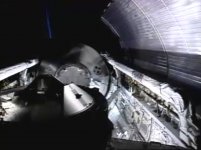
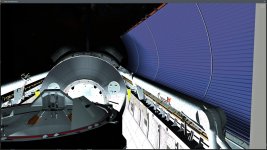
Just checking here: Is local light sources unable to cast shadows in D3D9Client? If this isn't case, then I've a bug to report. As seen in attached screenshot from a video of PLBD closure for landing, the stowed RMS casts a shadow on the left PLB radiator panels (this is in full orbital night so the PLB flood-lights were on, the left door began moving shortly after sunset, you can see the limb of the Earth), but in D3D9Client there's no sign of the RMS shadow. Also, there's no sign of any specular reflections from the lights either, despite this should be the case as shown in the screenshot.

Just to be sure this had nothing to do with the environmental cams, I disabled those, so this is a pure as it gets.
 

Attachments

  • STS114_PLBD_closure.jpg
    STS114_PLBD_closure.jpg
    315 KB · Views: 23
  • STS114_PLBD_closure_D3D9Client.jpg
    STS114_PLBD_closure_D3D9Client.jpg
    218.8 KB · Views: 18
@DaveS No, the local light sources (currently?!) do not cast shadows, sorry.
They only cast light cones ;)
 

Attachments

  • CurrentState.jpg
    CurrentState.jpg
    106.9 KB · Views: 21
That would definitely be a question for Jarmonik[1]


[1] or any other volunteer with knowledge of how these "Shaders" work :shrug:
 
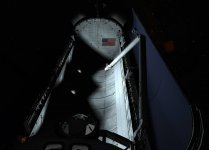
Another shader bug I believe, no specular reflections in PBR mode:
 

Attachments

  • No_specular_reflections_D3D9Client_PBR_mode.jpg
    No_specular_reflections_D3D9Client_PBR_mode.jpg
    343.4 KB · Views: 32
OK, thanks for answer. How hard would be to implement? Along with the specular reflections?


The local lights sources do have two different modes (Partial, Full) the "Partial" lights won't cast specular reflections, this is sort of a low weight mode for laptops. The "Full" mode should cast specular reflections. If they don't then it might be related to "No specular reflectins in PBR mode" you reported later on. Is there a pre-build binary package for the SSU that could be used for debugging the specular issue ?


Implementing shadows for local lights isn't that difficult from source code point of view. But it's kinda performance heavy. So, let's say that shadow casing is limited to 2 or 4 local light sources (depending on settings) then which one ? How should the client know which lights should cast shadow ? Finding a solid answer to that question would make the case half solved.

---------- Post added at 14:17 ---------- Previous post was at 14:10 ----------

So the (probably dumb) question is: shouldn't the object that isn't in view not be rendered?


Of course, they shouldn't be rendered but it is very very difficult to detect (efficiently) if an object is obscured by on other one. Especially if texture transparency is taken in account. There would need to be some kind of low-poly mesh to help with visibility detection. This is unlikely going to happen. Too complex, too little benefits.
 
Of course, they shouldn't be rendered but it is very very difficult to detect (efficiently) if an object is obscured by on other one. Especially if texture transparency is taken in account. There would need to be some kind of low-poly mesh to help with visibility detection. This is unlikely going to happen. Too complex, too little benefits.

Thanks!
A couple a things I found in file gcConst.h:
line 495: nameless structs containing variables with same name
line 578: missing return
 
Mouse unavailable after loading ...

When I am setting up a session in orbiter-ng my mouse works fine. When I launch the mouse will respond to movement but mouse click on any selection is not recognized. Any idea what I did and how to get it back? Oh, yes in the parameters focus follows mouse is set.
 
Implementing shadows for local lights isn't that difficult from source code point of view. But it's kinda performance heavy.

Since performance will depend on unknowns (number of lights, mesh complexity and CPU power) the only answer it to let the user decide. But it should be implemented for all lights of course.
So a "Compute local light shadows ON/Off" switch would do.
 
I was Testing my system in the D3d9Client, and i have Meshes that Play as Planets.. but in the D3D9 client they are not showing up.. anyone any Idea how to fix this?
 
The local lights sources do have two different modes (Partial, Full) the "Partial" lights won't cast specular reflections, this is sort of a low weight mode for laptops. The "Full" mode should cast specular reflections. If they don't then it might be related to "No specular reflectins in PBR mode" you reported later on. Is there a pre-build binary package for the SSU that could be used for debugging the specular issue ?


Implementing shadows for local lights isn't that difficult from source code point of view. But it's kinda performance heavy. So, let's say that shadow casing is limited to 2 or 4 local light sources (depending on settings) then which one ? How should the client know which lights should cast shadow ? Finding a solid answer to that question would make the case half solved.

---------- Post added at 14:17 ---------- Previous post was at 14:10 ----------


Of course, they shouldn't be rendered but it is very very difficult to detect (efficiently) if an object is obscured by on other one. Especially if texture transparency is taken in account. There would need to be some kind of low-poly mesh to help with visibility detection. This is unlikely going to happen. Too complex, too little benefits.

Since performance will depend on unknowns (number of lights, mesh complexity and CPU power) the only answer it to let the user decide. But it should be implemented for all lights of course.
So a "Compute local light shadows ON/Off" switch would do.
I agree with this option as it is an option seeing in many modern AAA games. Another shadow related bug is that what shadows are seen depends on what vessel is in focus. This is an old bug that I have reported earlier: https://www.orbiter-forum.com/showthread.php?p=579460&postcount=4566
 
Thanks!
A couple a things I found in file gcConst.h:
line 495: nameless structs containing variables with same name
line 578: missing return

a) That's the 'a' float used both in {R,B,G,A} and {{RGB},A} "union". they should be O.K. from a memory layout. I haven't found a good way to work around that (yet).
b) Right! Good catch. Will be fixed! :thumbup:
 
a) That's the 'a' float used both in {R,B,G,A} and {{RGB},A} "union". they should be O.K. from a memory layout. I haven't found a good way to work around that (yet).
b) Right! Good catch. Will be fixed! :thumbup:
and the 'w'
 
Changing the FVECTOR4 from
PHP:
typedef union FVECTOR4 
{
	// ...
	float data[4];
	struct {
		float x, y, z, w;
	};
	struct {
		float r, g, b, a;
	};
	struct {
		FVECTOR3 rgb;
		float a;
	};
	struct {
		FVECTOR3 xyz;
		float w;
	};
} FVECTOR4;
...to...
PHP:
typedef union FVECTOR4 
{
	// ...
	float data[4];
	struct {
		float x, y, z, w;
	};
	struct {
		struct {
			float r, g, b;
		};
		struct {
			FVECTOR3 rgb;
		};
		float a;
	};
	struct {
		FVECTOR3 xyz;
		float w;
	};
} FVECTOR4;
...should do the trick.

But it greatly reduces readability ;)

I might have to add some comments ?!

By the way here's a nicer summary of that.

---------- Post added at 00:03 ---------- Previous post was at 00:02 ----------

and the 'w'

Oh, 'w' has also to be moved. Thanks!

---------- Post added at 00:09 ---------- Previous post was at 00:03 ----------

So this should be it, right?
PHP:
typedef union FVECTOR4 
{
	// ... 
	float data[4];
	struct { // {x,y,z,w} or {xyz,w}
		struct {
			float x, y, z;
		};
		struct {
			FVECTOR3 xyz;
		};
		float w;
	};
	struct { // {r,g,b,a} or {rgb,a}
		struct {
			float r, g, b;
		};
		struct {
			FVECTOR3 rgb;
		};
		float a;
	};
} FVECTOR4;
 
So this should be it, right?
PHP:
typedef union FVECTOR4 
{
	// ... 
	float data[4];
	struct { // {x,y,z,w} or {xyz,w}
		struct {
			float x, y, z;
		};
		struct {
			FVECTOR3 xyz;
		};
		float w;
	};
	struct { // {r,g,b,a} or {rgb,a}
		struct {
			float r, g, b;
		};
		struct {
			FVECTOR3 rgb;
		};
		float a;
	};
} FVECTOR4;

It seems ok now.


Ok, Thanks. I had some trouble getting it to work, it seems to crash in a cockpit view but I was able to make the necessary test.


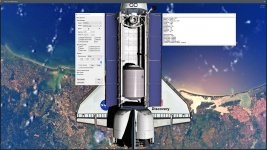
Here's a slightly modified shader and textures. Some of the textures were pretty badly out of reasonable range. Even if we have a "roughness map" it is in-fact a smoothness map so 255 is mirror smooth and 0 is very rough. This article speaks of a "Microsurface" https://marmoset.co/posts/physically-based-rendering-and-you-can-too/


The textures should be remade the ones in the package have been modified-compressed-modified-compressed... so the quality have deteriorated.


Could you test these textures and the modified shader to see if there are any fundamental issues remaining. I wasn't able to test the local lights due to no access in cockpit.
 

Attachments

But it greatly reduces readability ;)


It's readable well enough :thumbup:

---------- Post added at 18:13 ---------- Previous post was at 18:12 ----------

Since performance will depend on unknowns (number of lights, mesh complexity and CPU power) the only answer it to let the user decide. But it should be implemented for all lights of course.
So a "Compute local light shadows ON/Off" switch would do.


Ok, Agreed.
 
Back
Top