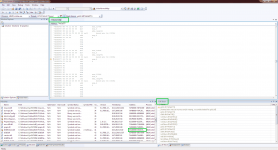
'orbiter.exe': Loaded 'C:\SSU dev\Modules\Server\orbiter.exe', Binary was not built with debug information.
'orbiter.exe': Loaded 'C:\Windows\SysWOW64\ntdll.dll', Cannot find or open the PDB file
'orbiter.exe': Loaded 'C:\Windows\SysWOW64\kernel32.dll', Cannot find or open the PDB file
'orbiter.exe': Loaded 'C:\Windows\SysWOW64\KernelBase.dll', Cannot find or open the PDB file
'orbiter.exe': Loaded 'C:\Windows\SysWOW64\dinput.dll', Cannot find or open the PDB file
'orbiter.exe': Loaded 'C:\Windows\SysWOW64\msvcrt.dll', Cannot find or open the PDB file
'orbiter.exe': Loaded 'C:\Windows\SysWOW64\advapi32.dll', Cannot find or open the PDB file
'orbiter.exe': Loaded 'C:\Windows\SysWOW64\sechost.dll', Cannot find or open the PDB file
'orbiter.exe': Loaded 'C:\Windows\SysWOW64\rpcrt4.dll', Cannot find or open the PDB file
'orbiter.exe': Loaded 'C:\Windows\SysWOW64\sspicli.dll', Cannot find or open the PDB file
'orbiter.exe': Loaded 'C:\Windows\SysWOW64\cryptbase.dll', Cannot find or open the PDB file
'orbiter.exe': Loaded 'C:\Windows\SysWOW64\user32.dll', Cannot find or open the PDB file
'orbiter.exe': Loaded 'C:\Windows\SysWOW64\gdi32.dll', Cannot find or open the PDB file
'orbiter.exe': Loaded 'C:\Windows\SysWOW64\lpk.dll', Cannot find or open the PDB file
'orbiter.exe': Loaded 'C:\Windows\SysWOW64\usp10.dll', Cannot find or open the PDB file
'orbiter.exe': Loaded 'C:\Windows\SysWOW64\winmm.dll', Cannot find or open the PDB file
'orbiter.exe': Loaded 'C:\Windows\winsxs\x86_microsoft.windows.common-controls_6595b64144ccf1df_6.0.7601.17514_none_41e6975e2bd6f2b2\comctl32.dll', Cannot find or open the PDB file
'orbiter.exe': Loaded 'C:\Windows\SysWOW64\shlwapi.dll', Cannot find or open the PDB file
'orbiter.exe': Loaded 'C:\Windows\SysWOW64\shell32.dll', Cannot find or open the PDB file
'orbiter.exe': Loaded 'C:\Windows\winsxs\x86_microsoft.vc80.crt_1fc8b3b9a1e18e3b_8.0.50727.6195_none_d09154e044272b9a\msvcp80.dll', Cannot find or open the PDB file
'orbiter.exe': Loaded 'C:\Windows\winsxs\x86_microsoft.vc80.crt_1fc8b3b9a1e18e3b_8.0.50727.6195_none_d09154e044272b9a\msvcr80.dll', Cannot find or open the PDB file
'orbiter.exe': Loaded 'C:\Windows\SysWOW64\imm32.dll', Cannot find or open the PDB file
'orbiter.exe': Loaded 'C:\Windows\SysWOW64\msctf.dll', Cannot find or open the PDB file
'orbiter.exe': Loaded 'C:\Windows\SysWOW64\uxtheme.dll', Cannot find or open the PDB file
'orbiter.exe': Loaded 'C:\Windows\SysWOW64\hid.dll', Cannot find or open the PDB file
'orbiter.exe': Loaded 'C:\Windows\SysWOW64\setupapi.dll', Cannot find or open the PDB file
'orbiter.exe': Loaded 'C:\Windows\SysWOW64\cfgmgr32.dll', Cannot find or open the PDB file
'orbiter.exe': Loaded 'C:\Windows\SysWOW64\oleaut32.dll', Cannot find or open the PDB file
'orbiter.exe': Loaded 'C:\Windows\SysWOW64\ole32.dll', Cannot find or open the PDB file
'orbiter.exe': Loaded 'C:\Windows\SysWOW64\devobj.dll', Cannot find or open the PDB file
'orbiter.exe': Loaded 'C:\Windows\SysWOW64\wintrust.dll', Cannot find or open the PDB file
'orbiter.exe': Loaded 'C:\Windows\SysWOW64\crypt32.dll', Cannot find or open the PDB file
'orbiter.exe': Loaded 'C:\Windows\SysWOW64\msasn1.dll', Cannot find or open the PDB file
'orbiter.exe': Loaded 'C:\Windows\SysWOW64\dwmapi.dll', Cannot find or open the PDB file
'orbiter.exe': Loaded 'C:\SSU dev\Modules\Startup\AtlantisConfig.dll', Binary was not built with debug information.
'orbiter.exe': Loaded 'C:\Windows\SysWOW64\msvcr100.dll', Cannot find or open the PDB file
'orbiter.exe': Loaded 'C:\SSU dev\Modules\Startup\AtmConfig.dll', Binary was not built with debug information.
'orbiter.exe': Loaded 'C:\SSU dev\Modules\Startup\DGConfigurator.dll', Binary was not built with debug information.
'orbiter.exe': Loaded 'C:\Windows\SysWOW64\psapi.dll', Cannot find or open the PDB file
'orbiter.exe': Loaded 'C:\SSU dev\Modules\Plugin\D3D9Client.dll', Cannot find or open the PDB file
'orbiter.exe': Loaded 'C:\Windows\SysWOW64\d3d9.dll', Cannot find or open the PDB file
'orbiter.exe': Loaded 'C:\Windows\SysWOW64\version.dll', Cannot find or open the PDB file
'orbiter.exe': Loaded 'C:\Windows\SysWOW64\d3d8thk.dll', Cannot find or open the PDB file
'orbiter.exe': Loaded 'C:\Windows\SysWOW64\D3DX9_42.dll', Cannot find or open the PDB file
'orbiter.exe': Loaded 'C:\Windows\SysWOW64\nvapi.dll', Cannot find or open the PDB file
The thread 'Win32 Thread' (0x1a60) has exited with code 0 (0x0).
'orbiter.exe': Loaded 'C:\Windows\SysWOW64\nvd3dum.dll', Cannot find or open the PDB file
'orbiter.exe': Loaded 'C:\Windows\SysWOW64\powrprof.dll', Cannot find or open the PDB file
'orbiter.exe': Loaded 'C:\Program Files (x86)\NVIDIA Corporation\3D Vision\nvSCPAPI.dll', Cannot find or open the PDB file
'orbiter.exe': Loaded 'C:\Windows\SysWOW64\dxgi.dll', Cannot find or open the PDB file
'orbiter.exe': Loaded 'C:\Windows\SysWOW64\D3DCompiler_42.dll', Cannot find or open the PDB file
'orbiter.exe': Unloaded 'C:\Windows\SysWOW64\D3DCompiler_42.dll'
'orbiter.exe': Loaded 'C:\Windows\SysWOW64\D3DCompiler_42.dll', Cannot find or open the PDB file
'orbiter.exe': Unloaded 'C:\Windows\SysWOW64\D3DCompiler_42.dll'
'orbiter.exe': Loaded 'C:\Windows\SysWOW64\D3DCompiler_42.dll', Cannot find or open the PDB file
'orbiter.exe': Unloaded 'C:\Windows\SysWOW64\D3DCompiler_42.dll'
'orbiter.exe': Loaded 'C:\Windows\SysWOW64\D3DCompiler_42.dll', Cannot find or open the PDB file
'orbiter.exe': Unloaded 'C:\Windows\SysWOW64\D3DCompiler_42.dll'
'orbiter.exe': Loaded 'C:\Windows\SysWOW64\D3DCompiler_42.dll', Cannot find or open the PDB file
'orbiter.exe': Unloaded 'C:\Windows\SysWOW64\D3DCompiler_42.dll'
'orbiter.exe': Loaded 'C:\Program Files (x86)\NVIDIA Corporation\3D Vision\nvStereoApiI.dll', Cannot find or open the PDB file
'orbiter.exe': Loaded 'C:\SSU dev\Modules\Celbody\Sun.dll', Binary was not built with debug information.
'orbiter.exe': Loaded 'C:\SSU dev\Modules\Vsop87.dll', Binary was not built with debug information.
'orbiter.exe': Loaded 'C:\SSU dev\Modules\Celbody\Mercury.dll', Binary was not built with debug information.
'orbiter.exe': Loaded 'C:\SSU dev\Modules\Celbody\Venus.dll', Binary was not built with debug information.
'orbiter.exe': Loaded 'C:\SSU dev\Modules\Celbody\Venus\atmosphere\VenusAtm2006.dll', Binary was not built with debug information.
'orbiter.exe': Loaded 'C:\SSU dev\Modules\Celbody\Earth.dll', Binary was not built with debug information.
'orbiter.exe': Loaded 'C:\SSU dev\Modules\Celbody\Earth\atmosphere\EarthAtmJ71G.dll', Binary was not built with debug information.
'orbiter.exe': Loaded 'C:\SSU dev\Modules\Celbody\Moon.dll', Binary was not built with debug information.
'orbiter.exe': Loaded 'C:\SSU dev\Modules\Celbody\Mars.dll', Binary was not built with debug information.
'orbiter.exe': Loaded 'C:\SSU dev\Modules\Celbody\Mars\atmosphere\MarsAtm2006.dll', Binary was not built with debug information.
'orbiter.exe': Loaded 'C:\SSU dev\Modules\Celbody\Phobos.dll', Cannot find or open the PDB file
'orbiter.exe': Loaded 'C:\SSU dev\Modules\Celbody\Deimos.dll', Cannot find or open the PDB file
'orbiter.exe': Loaded 'C:\SSU dev\Modules\Celbody\Jupiter.dll', Binary was not built with debug information.
'orbiter.exe': Loaded 'C:\SSU dev\Modules\Galsat.dll', Binary was not built with debug information.
'orbiter.exe': Loaded 'C:\SSU dev\Modules\Celbody\Io.dll', Binary was not built with debug information.
'orbiter.exe': Loaded 'C:\SSU dev\Modules\Celbody\Europa.dll', Binary was not built with debug information.
'orbiter.exe': Loaded 'C:\SSU dev\Modules\Celbody\Ganymede.dll', Binary was not built with debug information.
'orbiter.exe': Loaded 'C:\SSU dev\Modules\Celbody\Callisto.dll', Binary was not built with debug information.
'orbiter.exe': Loaded 'C:\SSU dev\Modules\Celbody\Saturn.dll', Binary was not built with debug information.
'orbiter.exe': Loaded 'C:\SSU dev\Modules\Satsat.dll', Cannot find or open the PDB file
'orbiter.exe': Loaded 'C:\SSU dev\Modules\Celbody\Mimas.dll', Cannot find or open the PDB file
'orbiter.exe': Loaded 'C:\SSU dev\Modules\Celbody\Enceladus.dll', Cannot find or open the PDB file
'orbiter.exe': Loaded 'C:\SSU dev\Modules\Celbody\Tethys.dll', Cannot find or open the PDB file
'orbiter.exe': Loaded 'C:\SSU dev\Modules\Celbody\Dione.dll', Cannot find or open the PDB file
'orbiter.exe': Loaded 'C:\SSU dev\Modules\Celbody\Rhea.dll', Cannot find or open the PDB file
'orbiter.exe': Loaded 'C:\SSU dev\Modules\Celbody\Titan.dll', Cannot find or open the PDB file
'orbiter.exe': Loaded 'C:\SSU dev\Modules\Celbody\Iapetus.dll', Cannot find or open the PDB file
'orbiter.exe': Loaded 'C:\SSU dev\Modules\Celbody\Uranus.dll', Binary was not built with debug information.
'orbiter.exe': Loaded 'C:\SSU dev\Modules\Celbody\Miranda.dll', Cannot find or open the PDB file
'orbiter.exe': Loaded 'C:\SSU dev\Modules\Celbody\Ariel.dll', Cannot find or open the PDB file
'orbiter.exe': Loaded 'C:\SSU dev\Modules\Celbody\Umbriel.dll', Cannot find or open the PDB file
'orbiter.exe': Loaded 'C:\SSU dev\Modules\Celbody\Titania.dll', Cannot find or open the PDB file
'orbiter.exe': Loaded 'C:\SSU dev\Modules\Celbody\Oberon.dll', Cannot find or open the PDB file
'orbiter.exe': Loaded 'C:\SSU dev\Modules\Celbody\Neptune.dll', Binary was not built with debug information.
'orbiter.exe': Loaded 'C:\SSU dev\Modules\SpaceShuttleUltra.dll', Binary was not built with debug information.
'orbiter.exe': Loaded 'C:\SSU dev\lua5.1.dll', Binary was not built with debug information.
'orbiter.exe': Loaded 'C:\Windows\SysWOW64\msvcp100.dll', Cannot find or open the PDB file
First-chance exception at 0x0430caf7 in orbiter.exe: 0xC0000005: Access violation writing location 0x046428c4.
Unhandled exception at 0x775915de in orbiter.exe: 0xC0000005: Access violation writing location 0x046428c4.
First-chance exception at 0x7758016e in orbiter.exe: 0x00000000: Åtgärden har slutförts.
Unhandled exception at 0x775915de in orbiter.exe: 0x00000000: Åtgärden har slutförts.
First-chance exception at 0x7758016e in orbiter.exe: 0x00000000: Åtgärden har slutförts.
Unhandled exception at 0x775915de in orbiter.exe: 0x00000000: Åtgärden har slutförts.
First-chance exception at 0x7758016e in orbiter.exe: 0x00000000: Åtgärden har slutförts.
Unhandled exception at 0x775915de in orbiter.exe: 0x00000000: Åtgärden har slutförts.
First-chance exception at 0x7758016e in orbiter.exe: 0x00000000: Åtgärden har slutförts.
Unhandled exception at 0x775915de in orbiter.exe: 0x00000000: Åtgärden har slutförts.
First-chance exception at 0x7758016e in orbiter.exe: 0x00000000: Åtgärden har slutförts.
Unhandled exception at 0x775915de in orbiter.exe: 0x00000000: Åtgärden har slutförts.
First-chance exception at 0x7758016e in orbiter.exe: 0x00000000: Åtgärden har slutförts.
Unhandled exception at 0x775915de in orbiter.exe: 0x00000000: Åtgärden har slutförts.
First-chance exception at 0x7758016e in orbiter.exe: 0x00000000: Åtgärden har slutförts.
Unhandled exception at 0x775915de in orbiter.exe: 0x00000000: Åtgärden har slutförts.
First-chance exception at 0x7758016e in orbiter.exe: 0x00000000: Åtgärden har slutförts.
Unhandled exception at 0x775915de in orbiter.exe: 0x00000000: Åtgärden har slutförts.
First-chance exception at 0x7758016e in orbiter.exe: 0x00000000: Åtgärden har slutförts.
Unhandled exception at 0x775915de in orbiter.exe: 0x00000000: Åtgärden har slutförts.
First-chance exception at 0x7758016e in orbiter.exe: 0x00000000: Åtgärden har slutförts.
Unhandled exception at 0x775915de in orbiter.exe: 0x00000000: Åtgärden har slutförts.
First-chance exception at 0x7758016e in orbiter.exe: 0x00000000: Åtgärden har slutförts.
Unhandled exception at 0x775915de in orbiter.exe: 0x00000000: Åtgärden har slutförts.
First-chance exception at 0x7758016e in orbiter.exe: 0x00000000: Åtgärden har slutförts.
Unhandled exception at 0x775915de in orbiter.exe: 0x00000000: Åtgärden har slutförts.
First-chance exception at 0x7758016e in orbiter.exe: 0x00000000: Åtgärden har slutförts.
Unhandled exception at 0x775915de in orbiter.exe: 0x00000000: Åtgärden har slutförts.
First-chance exception at 0x7758016e in orbiter.exe: 0x00000000: Åtgärden har slutförts.
Unhandled exception at 0x775915de in orbiter.exe: 0x00000000: Åtgärden har slutförts.
First-chance exception at 0x7758016e in orbiter.exe: 0x00000000: Åtgärden har slutförts.
Unhandled exception at 0x775915de in orbiter.exe: 0x00000000: Åtgärden har slutförts.
First-chance exception at 0x7758016e in orbiter.exe: 0x00000000: Åtgärden har slutförts.
Unhandled exception at 0x775915de in orbiter.exe: 0x00000000: Åtgärden har slutförts.
First-chance exception at 0x7758016e in orbiter.exe: 0x00000000: Åtgärden har slutförts.
Unhandled exception at 0x775915de in orbiter.exe: 0x00000000: Åtgärden har slutförts.
First-chance exception at 0x7758016e in orbiter.exe: 0x00000000: Åtgärden har slutförts.
Unhandled exception at 0x775915de in orbiter.exe: 0x00000000: Åtgärden har slutförts.
First-chance exception at 0x7758016e in orbiter.exe: 0x00000000: Åtgärden har slutförts.
Unhandled exception at 0x775915de in orbiter.exe: 0x00000000: Åtgärden har slutförts.
First-chance exception at 0x7758016e in orbiter.exe: 0x00000000: Åtgärden har slutförts.
Unhandled exception at 0x775915de in orbiter.exe: 0x00000000: Åtgärden har slutförts.
First-chance exception at 0x7758016e in orbiter.exe: 0x00000000: Åtgärden har slutförts.
Unhandled exception at 0x775915de in orbiter.exe: 0x00000000: Åtgärden har slutförts.
First-chance exception at 0x7758016e in orbiter.exe: 0x00000000: Åtgärden har slutförts.
Unhandled exception at 0x775915de in orbiter.exe: 0x00000000: Åtgärden har slutförts.
First-chance exception at 0x7758016e in orbiter.exe: 0x00000000: Åtgärden har slutförts.
Unhandled exception at 0x775915de in orbiter.exe: 0x00000000: Åtgärden har slutförts.
First-chance exception at 0x7758016e in orbiter.exe: 0x00000000: Åtgärden har slutförts.
Unhandled exception at 0x775915de in orbiter.exe: 0x00000000: Åtgärden har slutförts.
First-chance exception at 0x7758016e in orbiter.exe: 0x00000000: Åtgärden har slutförts.
Unhandled exception at 0x775915de in orbiter.exe: 0x00000000: Åtgärden har slutförts.
First-chance exception at 0x7758016e in orbiter.exe: 0x00000000: Åtgärden har slutförts.
Unhandled exception at 0x775915de in orbiter.exe: 0x00000000: Åtgärden har slutförts.
First-chance exception at 0x7758016e in orbiter.exe: 0x00000000: Åtgärden har slutförts.
Unhandled exception at 0x775915de in orbiter.exe: 0x00000000: Åtgärden har slutförts.
First-chance exception at 0x7758016e in orbiter.exe: 0x00000000: Åtgärden har slutförts.
Unhandled exception at 0x775915de in orbiter.exe: 0x00000000: Åtgärden har slutförts.
First-chance exception at 0x7758016e in orbiter.exe: 0x00000000: Åtgärden har slutförts.
Unhandled exception at 0x775915de in orbiter.exe: 0x00000000: Åtgärden har slutförts.
First-chance exception at 0x7758016e in orbiter.exe: 0x00000000: Åtgärden har slutförts.
Unhandled exception at 0x775915de in orbiter.exe: 0x00000000: Åtgärden har slutförts.
First-chance exception at 0x7758016e in orbiter.exe: 0x00000000: Åtgärden har slutförts.
Unhandled exception at 0x775915de in orbiter.exe: 0x00000000: Åtgärden har slutförts.
First-chance exception at 0x7758016e in orbiter.exe: 0x00000000: Åtgärden har slutförts.
Unhandled exception at 0x775915de in orbiter.exe: 0x00000000: Åtgärden har slutförts.
First-chance exception at 0x7758016e in orbiter.exe: 0x00000000: Åtgärden har slutförts.
Unhandled exception at 0x775915de in orbiter.exe: 0x00000000: Åtgärden har slutförts.
First-chance exception at 0x7758016e in orbiter.exe: 0x00000000: Åtgärden har slutförts.
Unhandled exception at 0x775915de in orbiter.exe: 0x00000000: Åtgärden har slutförts.
First-chance exception at 0x7758016e in orbiter.exe: 0x00000000: Åtgärden har slutförts.
Unhandled exception at 0x775915de in orbiter.exe: 0x00000000: Åtgärden har slutförts.
First-chance exception at 0x7758016e in orbiter.exe: 0x00000000: Åtgärden har slutförts.
Unhandled exception at 0x775915de in orbiter.exe: 0x00000000: Åtgärden har slutförts.
First-chance exception at 0x7758016e in orbiter.exe: 0x00000000: Åtgärden har slutförts.
Unhandled exception at 0x775915de in orbiter.exe: 0x00000000: Åtgärden har slutförts.
First-chance exception at 0x7758016e in orbiter.exe: 0x00000000: Åtgärden har slutförts.
Unhandled exception at 0x775915de in orbiter.exe: 0x00000000: Åtgärden har slutförts.
First-chance exception at 0x7758016e in orbiter.exe: 0x00000000: Åtgärden har slutförts.
Unhandled exception at 0x775915de in orbiter.exe: 0x00000000: Åtgärden har slutförts.
First-chance exception at 0x7758016e in orbiter.exe: 0x00000000: Åtgärden har slutförts.
Unhandled exception at 0x775915de in orbiter.exe: 0x00000000: Åtgärden har slutförts.
First-chance exception at 0x7758016e in orbiter.exe: 0x00000000: Åtgärden har slutförts.
Unhandled exception at 0x775915de in orbiter.exe: 0x00000000: Åtgärden har slutförts.