
-
ORBITER-FORUM will be temporarily closed at 2026-07-23 18:00 UTC while we complete some OF maintenance tasks. The amount of downtime is expected to take up to one hour, but probably less.
You are using an out of date browser. It may not display this or other websites correctly.
You should upgrade or use an alternative browser.
You should upgrade or use an alternative browser.
New Release D3D9Client Development
- Thread starter jarmonik
- Start date
- Joined
- Mar 28, 2008
- Messages
- 2,707
- Reaction score
- 881
- Points
- 128
From a texture standpoint, I can no longer control the reflections the way I used to. How should I color and format the control textures (_spec and _refl) now?
That may depend about what you are trying to do. Can't you read the shader code ? Only difference is that _refl texture is now containing intensity in alpha so there is no need to compute it run time.
There are two optional control textures for the reflections:
_spec.dds
rgb = specular color
a = specular power
_refl.dds
rgb = reflection color
a = diffuse texture attennuation. (usually set to intensity of rgb)
You are editing a wrong files. Have you set your installation to use model 2.0 shaders from advanced setup dialog by any change ?Also, editing either NormalMap.fx or Mesh.fx does not change anything anymore. What did I miss?
---------- Post added at 01:56 ---------- Previous post was at 01:55 ----------
I think there's a problem with the earth glow: It appears even when on the ground.
Will be fixed. Any ideas for a proper intensity settings ?
---------- Post added at 02:00 ---------- Previous post was at 01:56 ----------
Look there, or in the post above yours.
Thanks,
Just noticed that the code should be actually like this:
Code:
// Horizon haze pixel-shader frg.tex0.y is the altitude. 0.0 = Horizon (ground level) 1.0 = top of atmosphere
//
float4 HazeTechPS(HazeVS frg) : COLOR
{
    return frg.color * tex2D(ClampS, frg.tex0);

    //return float4(frg.color.rgb, frg.color.a*frg.tex0.y*frg.tex0.y);
    //return float4(frg.color.rgb*(frg.tex0.y+0.30), frg.color.a*frg.tex0.y*frg.tex0.y);
}- Joined
- Feb 4, 2008
- Messages
- 9,758
- Reaction score
- 1,028
- Points
- 203
Thanks. I'm running with 0.75. Something I have noticed is that the light should be more towards white:Will be fixed. Any ideas for a proper intensity settings ?

Compare it to this Orbiter screenshot taken in the same attitude:

Last edited:

Astronut25
New member
Using quick and dirty normal and spec maps. Made with D3D9 alpha 2
I can't seem to find where the instructions on how to add reflections are, did I miss a post or something?
Edit:
Never mind, I found it, [filename]_refl.dds
Last edited:
Have you set your installation to use model 2.0 shaders from advanced setup dialog by any change ?
No, the shader set still says "Default". But in following your suggestion, I discovered that "Default" now points to the Modules/D3D9Client20 shader folder, and changing the shader set to "Level20" does not change anything.
But now I can tinker with it again. Thanks for the suggestion.

Thanks. I'm running with 0.75. Something I have noticed is that the light should be more towards white: http://spaceflight.nasa.gov/gallery/images/shuttle/sts-107/hires/s107e05353.jpg
Compare it to this Orbiter screenshot taken in the same attitude:
How do you make that? Is incredible.

How do you make that? Is incredible.
I think this is SSU (Space Shuttle Ultra). I found the pic almost real ! (expect the earth-glow too intense for me)
- Joined
- Mar 28, 2008
- Messages
- 2,707
- Reaction score
- 881
- Points
- 128
I discovered that "Default" now points to the Modules/D3D9Client20 shader folder, and changing the shader set to "Level20" does not change anything.
That's the case if your GPU is using shader model 2.0

That's the case if your GPU is using shader model 2.0
Yes, that's what is happening.
Probably because I switched to a shader model 2.0 setup for testing. :facepalm:
Changes:
Fresnel reflection equation is changed. It looks and works better, and has been built to avoid over-saturating the reflections. It no longer uses the gMtrl.foffset parameter, but uses reflection intensity instead to provide the minimum reflection offset.
Fresnel reflections can now be applied to surfaces with reflection maps.
Reflection color comes from _refl texture, instead of _spec texture.
Alpha channel is not used in _refl texture. The reasons is that reflection intensity is derived from cRefl.rgb and adjusted on the fly with the Fresnel equation. There is still a small tweak needed to fix a tiny issue with the color of the Fresnel reflection, but the tweak pushes the code over the 64-instruction limit.
Fresnel reflections are still controlled across the whole texture, and it is not possible to mask off Fresnel reflections on a per-pixel basis without breaking the 64-instruction limit.
Dissolve is disabled, because it won't fit in alongside the Fresnel code, and the same effect can be made with normal maps. It is still possible to enable it, but it requires a change to the Fresnel code which makes it less realistic.
Overall, it works well enough for me. It's not perfect, but it still looks beautiful and the imperfections are minor and can be fixed for the 3.0 shaders.
In the debug window, I suggest removing the Fresnel offset parameter, and merging the Fresnel and Reflection controls. There would then be five parameters to ajust: red, green, blue, reflection intensity, and Fresnel intensity.
Also included are some test textures for the XR-2 (backup your originals first!). Remember to enable the Fresnel reflections using the debug window.
Fresnel reflection equation is changed. It looks and works better, and has been built to avoid over-saturating the reflections. It no longer uses the gMtrl.foffset parameter, but uses reflection intensity instead to provide the minimum reflection offset.
Fresnel reflections can now be applied to surfaces with reflection maps.
Reflection color comes from _refl texture, instead of _spec texture.
Alpha channel is not used in _refl texture. The reasons is that reflection intensity is derived from cRefl.rgb and adjusted on the fly with the Fresnel equation. There is still a small tweak needed to fix a tiny issue with the color of the Fresnel reflection, but the tweak pushes the code over the 64-instruction limit.
Fresnel reflections are still controlled across the whole texture, and it is not possible to mask off Fresnel reflections on a per-pixel basis without breaking the 64-instruction limit.
Dissolve is disabled, because it won't fit in alongside the Fresnel code, and the same effect can be made with normal maps. It is still possible to enable it, but it requires a change to the Fresnel code which makes it less realistic.
Overall, it works well enough for me. It's not perfect, but it still looks beautiful and the imperfections are minor and can be fixed for the 3.0 shaders.
In the debug window, I suggest removing the Fresnel offset parameter, and merging the Fresnel and Reflection controls. There would then be five parameters to ajust: red, green, blue, reflection intensity, and Fresnel intensity.
Also included are some test textures for the XR-2 (backup your originals first!). Remember to enable the Fresnel reflections using the debug window.
Attachments
Astronut25
New member
I keep getting this error when I try to use your "R10 Beta4 Shaders." What am I doing wrong?
Code:
D3D9Client: [DirectX 9 Initialized]
D3D9Client: Sytem has XNA math support
D3D9Client: [3DDevice Initialized]
D3D9Client: [Compiling Effects for Shader Model 2.0]
.\D3D9Effect.cpp Line:260 Error:-2147467259 D3DXCreateEffectFromFileA(pDev, name, macro, 0, 0, 0, &FX, &errors)
Effect Error: E:\Program Files\Games\Orbiter\101016e\Modules\D3D9Client20\D3D9Client.fx(390,13): warning X3205: conversion from larger type to smaller, possible loss of data
E:\Program Files\Games\Orbiter\101016e\Modules\D3D9Client20\D3D9Client.fx(391,13): warning X3205: conversion from larger type to smaller, possible loss of data
E:\Program Files\Games\Orbiter\101016e\Modules\D3D9Client20\D3D9Client.fx(396,13): warning X3205: conversion from larger type to smaller, possible loss of data
E:\Program Files\Games\Orbiter\101016e\Modules\D3D9Client20\D3D9Client.fx(419,14): warning X3205: conversion from larger type to smaller, possible loss of data
E:\Program Files\Games\Orbiter\101016e\Modules\D3D9Client20\D3D9Client.fx(424,14): warning X3205: conversion from larger type to smaller, possible loss of data
E:\Program Files\Games\Orbiter\101016e\Modules\D3D9Client20\D3D9Client.fx(477,18): warning X3205: conversion from larger type to smaller, possible loss of data
E:\Program Files\Games\Orbiter\101016e\Modules\D3D9Client20\D3D9Client.fx(478,18): warning X3205: conversion from larger type to smaller, possible loss of data
E:\Program Files\Games\Orbiter\101016e\Modules\D3D9Client20\D3D9Client.fx(479,15): warning X3205: conversion from larger type to smaller, possible loss of data
NormalMap.fx(65,11): warning X3206: 'mul': implicit truncation of vector type
NormalMap.fx(65,9): warning X3206: implicit truncation of vector type
NormalMap.fx(70,17): warning X3205: conversion from larger type to smaller, possible loss of data
NormalMap.fx(74,5): warning X3205: 'LocalVertexLight': conversion from larger type to smaller, possible loss of data
NormalMap.fx(74,5): warning X3205: 'LocalVertexLight': conversion from larger type to smaller, possible loss of data
NormalMap.fx(80,17): warning X3205: conversion from larger type to smaller, possible loss of data
NormalMap.fx(81,16): warning X3206: implicit truncation of vector type
NormalMap.fx(87,13): warning X3205: conversion from larger type to smaller, possible loss of data
NormalMap.fx(87,13): warning X3206: implicit truncation of vector type
NormalMap.fx(90,17): error X3004: undeclared identifier 'gMtrl'I keep getting this error when I try to use your "R10 Beta4 Shaders." What am I doing wrong?
Sorry, probably because a mistake crept in before I zipped it and posted it. I'll check.
---------- Post added at 04:47 AM ---------- Previous post was at 04:27 AM ----------
It seems to work fine here. The error output mentions an "undeclared identifier 'gMtrl'" so maybe you're using a different version of the client. I'm using the D3D9ClientR10-Beta2.zip with D3D9ClientBeta4.zip installed on top of it. Are you?
Astronut25
New member
I'm using D3D9ClientR9 with Beta 3. Where can I find R10, I can't find it anywhere?
Astronut25
New member
I can't seem to get D3D9ClientR10-Beta2 w/ D3D9ClientBeta4 to work properly, the vessels with reflections are black with some groups transparent. (I seem to be having another one of those weeks :beathead
I've also got a questions if I may ask. Isn't specular basically just a simplified version of reflection, only unfocused/more diffused. Couldn't you just make a reflection map with the alpha channel controlling how much the reflection is scattered and remove specular entirely?
I've also got a questions if I may ask. Isn't specular basically just a simplified version of reflection, only unfocused/more diffused. Couldn't you just make a reflection map with the alpha channel controlling how much the reflection is scattered and remove specular entirely?

- Joined
- Sep 12, 2010
- Messages
- 3,131
- Reaction score
- 415
- Points
- 123
- Location
- Rome
- Website
- www.tuttovola.org
Even if it looks like Astronut25 did find them, page number depends upon how many posts-per-page each user selects in his/her CP.The D3D9ClientR10-Beta2.zip is on page 136 of this thread, and D3D9ClientBeta4.zip on page 137.
R10 Beta2
http://www.orbiter-forum.com/showthread.php?p=405912&postcount=2034
D3D9Client Beta4
http://www.orbiter-forum.com/showthread.php?p=406037&postcount=2047
Last edited:
- Joined
- Mar 28, 2008
- Messages
- 2,707
- Reaction score
- 881
- Points
- 128
Fresnel reflection equation is changed. It looks and works better, and has been built to avoid over-saturating the reflections.
I don't agree with that. Now I can't get any reflections for angles greater than 20 degrees. Reflections are unrealistically weak now. Also the initial implementation was designed to give more freedom to customize the reflections including over boosting them.
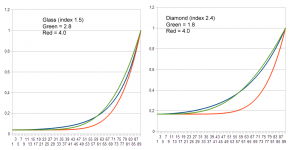
It looks like your implementation is pretty close to http://en.wikipedia.org/wiki/Schlick's_approximation I suppose it works somehow on water and class but if it is applied to diamond it's not even close to realistic. Also, power of 4 is far too high something like 2.8 would be more realistic.
It no longer uses the gMtrl.foffset parameter, but uses reflection intensity instead to provide the minimum reflection offset.
I suppose that is one way of defining it. But a step towards a lesser freedom to customize the reflections. Let's consider that we a metallic surface with a weak blue reflection and we apply a glass coating on the surface then what makes you think that the metallic blue reflection will define the offset for the fresnel reflection from a glass ?
If we don't use gMtrl.foffset then it would be better to write the equation like this:
cRefl.rgb += (1.0-cRefl.rgb) * pow(1.0 - saturate(dot(CamW, nrmW)), gMtrl.fresnel);
But it would be lacking a proper offset.
cRefl.rgb += gMtrl.foffset + (1.0-gMtrl.foffset) * pow(1.0 - saturate(dot(CamW, nrmW)), gMtrl.fresnel);
I suppose one possibility is to compute gMtrl.foffset and gMtrl.fresnel from the refractive index of the material. gMtrl.foffset is simply ((n1-n2)/(n1+n2))^2 but I'll need to think about the gMtrl.fresnel. It would vary in range 1.5 to 5.0 depending about the index. Simple linear mapping should work.
Here is a chart. The blue curve is the realistic reflection. Green and red curves are drawn using approximation with a different power setting. Power 4.0 is close to a realistic reflection from a water.
Attachments
Last edited:
It is true, I traded off customizing the equation to be able to use the 4th degree equation as an approximation.
I used this graph as a target: http://en.wikipedia.org/wiki/File:Fresnel_reflection.svg I think it uses refractive index of glass, the same as one in your attachment. I decided to make the approximation fixed, and make it like glass, because I could think of only glass, water, and glossy paint that might be seen in Orbiter. Do we need to define different refractive indexes (i.e. for diamonds)? It might be possible to make an approximation equation which is continuously adjustable across many refractive indexes, but it might not be practical.
Equations based around this function:
pow(1.0 - saturate(dot(CamW, nrmW)), gMtrl.fresnel);
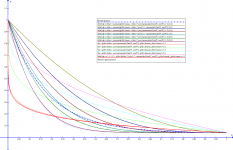
have a problem as the angle approaches 90 degrees from the normal. For any gMtrl.fresnel, the slope changes too quickly at angles approaching 90, unlike the target graphs. The target graphs show a much more gradual increase in slope, starting very near zero and increasing somewhat steadily.
Yes, there is less freedom, and yes, there probably is a better way, but it might still be possible to obtain that effect with some planning. If we wanted to make a metallic surface with a weak blue reflection with a glass overlay, we could paint the underlying diffuse texture some color like what the surface would look from directly above with no reflection. Then we would paint the reflection texture with a dark gray color to set the glass offset, while at the same time adding a bit of dark blue color. The total reflection would be the sum of the dark gray glass reflection, plus the dark blue metal reflection, plus the Fresnel reflection at the particular angle. Another option is to color the specular map dark blue, and then give a pure dark gray for the reflection texture.
Here is a picture of several equations and their resulting curves, which I plotted using a open-source graphing program called Graph (http://www.padowan.dk/). Here also is the project file with all the equations, so that my math can be checked. Edit: when loaded into the program, the refraction indexes can be changed to simulate different materials.
It looks like your implementation is pretty close to http://en.wikipedia.org/wiki/Schlick's_approximation I suppose it works somehow on water and class but if it is applied to diamond it's not even close to realistic.
I used this graph as a target: http://en.wikipedia.org/wiki/File:Fresnel_reflection.svg I think it uses refractive index of glass, the same as one in your attachment. I decided to make the approximation fixed, and make it like glass, because I could think of only glass, water, and glossy paint that might be seen in Orbiter. Do we need to define different refractive indexes (i.e. for diamonds)? It might be possible to make an approximation equation which is continuously adjustable across many refractive indexes, but it might not be practical.
Equations based around this function:
pow(1.0 - saturate(dot(CamW, nrmW)), gMtrl.fresnel);
have a problem as the angle approaches 90 degrees from the normal. For any gMtrl.fresnel, the slope changes too quickly at angles approaching 90, unlike the target graphs. The target graphs show a much more gradual increase in slope, starting very near zero and increasing somewhat steadily.
But a step towards a lesser freedom to customize the reflections. Let's consider that we a metallic surface with a weak blue reflection and we apply a glass coating on the surface then what makes you think that the metallic blue reflection will define the offset for the fresnel reflection from a glass ?
Yes, there is less freedom, and yes, there probably is a better way, but it might still be possible to obtain that effect with some planning. If we wanted to make a metallic surface with a weak blue reflection with a glass overlay, we could paint the underlying diffuse texture some color like what the surface would look from directly above with no reflection. Then we would paint the reflection texture with a dark gray color to set the glass offset, while at the same time adding a bit of dark blue color. The total reflection would be the sum of the dark gray glass reflection, plus the dark blue metal reflection, plus the Fresnel reflection at the particular angle. Another option is to color the specular map dark blue, and then give a pure dark gray for the reflection texture.
Here is a picture of several equations and their resulting curves, which I plotted using a open-source graphing program called Graph (http://www.padowan.dk/). Here also is the project file with all the equations, so that my math can be checked. Edit: when loaded into the program, the refraction indexes can be changed to simulate different materials.
Attachments
Last edited:
- Joined
- Mar 28, 2008
- Messages
- 2,707
- Reaction score
- 881
- Points
- 128
It's already implemented and having the ability to do that doesn't hurt, should we remove it because you don't like it.Do we need to define different refractive indexes (i.e. for diamonds)? It might be possible to make an approximation equation which is continuously adjustable across many refractive indexes, but it might not be practical.
Of course it does. You have used values 0.1 to 0.4 in your plots when the proper range is 1.5 to 5.0. It's not the same equation as in the Beta 4.Equations based around this function:
pow(1.0 - saturate(dot(CamW, nrmW)), gMtrl.fresnel);
have a problem as the angle approaches 90 degrees from the normal.
Similar threads

- Sticky
- Replies
- 6
- Views
- 10K

- Replies
- 10
- Views
- 4K


- Replies
- 1
- Views
- 4K


- Replies
- 7
- Views
- 4K