
New Release D3D9Client Development

From post #1220 (about Brighton Beach update)
It did rotate when I tested it, every time, like in the video. I had the runway lights code disabled at that time but it shouldn't effect. Is there a key to enable/disable the animation...

From post #1224
Ok, so it could be a install problem on my side. I'll try to make another test later on.
No, there's no such key.

Some time has passed. I just made another fresh O2010P1 install, and I have to report that I still have the same error I reported earlier: the central hub is not rotating with latest RC44 client, while it is with inline client.

The key to toggle the rotation is LEFT_SHIFT-0 (num pad) with focus set on "disc3". I didn't know it at the time.

The "video" reference is this (graphics from inline client):
https://vimeo.com/48455763


But this is how it looks in RC44:
MGalleryItem.php


And there are some other anomalies as well. I don't know if it can help troubleshooting.
From the original instructions, setting focus on "cover" with F3, one can close the clamshell cover with LEFT_SHIFT-0 (num pad).
It works fine with inline graphics, and it does not in RC44.
 
Last edited:
Did you place the spacecraft folder into server/config folder ? If you did, try to do it again, it may have been changed.
 
You mean like this? Yes I did...

YDiep.jpg
No, not this way. This is "$(OrbiterDir)/Config", and you should have it in "$(OrbiterDir)/Modules/Server/Config".
 
Remember, every time you alter a file in the config/spacecraft, you have to modify the the one in modules/server/config/spacecraft, as well.
 
Above my pay grade. ;)
 
I was looking for a reason to get windows 7. :lol:
 
I was looking for a reason to get windows 7. :lol:
Look at the post below the one Cras linked, and you have the same in Windows XP, even with symbolic links (not only junctions). :P
 
PB NASSP VS

Hello everyone, I present my nickname for Pappy2, I do not speak English, so I hope you will forgive mefor my sins text.Here,:lol:

I use Orbiter 2010-P1,I had problems with Framrate of AMSO

my computer is a: Toshiba Qosmio, Win VISTA,NTFSNVIDIA GeForce 9800M GTS,1024 MB of GDDR3,INTEL (R) Core (TM) Duo CPU 2.13GHz

On recommendation from a friend on the site Dansteph I installed D3D9RC44. great I recovered the framerateand now my simulator is fluid and better quality.
Congratulations :thumbup:to all the team of developersyou made a happy little French.:cheers:

But ... that gives compatible with NASSP,
I have problems: :compbash2:

Not display the KLC34 addon (Apollo firing 7)
No display of force vectors (F4 - visual helpers - forces - axes)
No music outside (in orbit)

Can you confirm this bug, or is there any bad client settings D3D9RC44,or a problem with VISTA, or NVIDIA

Thank you in advance and again congratulation for your work of passionate :thumbup:
@ + Pappy2

:hello:Dans le cas ou ma traduction soit vraiment mauvaise et qu'il y ai des Orbinautes Francophone sur le site, voilà le texte originale::hello:
Bonjour a tous, je me presente j'ai pour pseudo Pappy2,je ne parle pas anglais, alors j'espere que vous me pardonnerez
pour mes fautes de texte.

Voila, j'utilise ORBITER 2010-P1,
j'avais des problemes de Framrate avec AMSO

mon ordinateur est un:

TOSHIBA QOSMIO, Win VISTA,
NTFS,
NVIDIA GeForce 9800M GTS,
GDDR3 de 1024 MB,
INTEL(R) Core(TM) Duo CPU de 2.13GHz

Sur conseil d'un ami sur le site de Dansteph j'ai installé D3D9RC44. formidable j'ai recupere de la framerate
et maintenant mon simulateur est fluide et de meilleurs qualite. Felicitation a toute l'equipe de developpeur :thumbup:
vous avez rendu un petit français heureux. :thumbup:

Mais...bien que donne comme compatible avec NASSP, j'ai des problemes:

Pas d'affichage de l'addon KLC34 (pas de tir Apollo 7)
Pas d'affichage des vecteurs de forces (F4 - visual helpers - forces - axes)
Pas de musique en exterieur (en orbite)

Pouvez vous me confirmer ces bug, ou bien s'agit t'il d'un mauvais réglages du client D3D9RC44,
ou d'un probleme avec VISTA, ou NVIDIA

Merci d'avance et encore félicitation pour votre travail de passionnés :cheers:

@+pappy2
 
Hi, there. Neither spacecraft3.dll-vessels or my music with OrbiterSound works. I have read the post by dbeachy1 on page 36 in this very thread, but I don't understand computer language. I can live without music or ATC, but some spacecraft3-vessels like Deepstar2.0 cause a massive framerate drop, and I would like to fly it in the client.

Dbeachy1 says:
Code:
1. Open an administrator Command Prompt and cd $ORBITER_ROOT\Modules\Server.
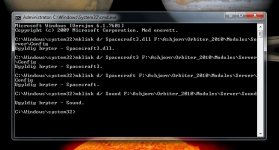
2. Execute: mklink /d Sound ..\..\Sound
I wanted to get spacecraft3 to work again, so I opened the CMD as a administrator and wrote "mklink /d Spacecraft3 F:\Asbjørn(my name and the folder that Orbiter is inside)\Orbiter_2010(the folder's name is Orbiter 2010. Should I write [space] insead of _?)\Modules\Server\Config". Then I pressed enter, but it just said "invalid switch".


What should I do? I am obviously doing something wrong, so what is it? I guess that I have to do the same with multistage2.dll and stage.dll too, so what should I write there?
If it is to help, I have Windows 7. I have also tried the "Create Symbolic Links"-button in the advanced menu in Orbiter. Then it creates a sort of shortcut for sound only, but that doesn't work either.
Please help me, I'm getting a litte bit frustrated... :idk:
 

Attachments

  • Problem.jpg
    Problem.jpg
    88.8 KB · Views: 22
Last edited:
That command isn't "mklink d/" like on the screenshot, but "mklink /d", and first argument after the switch is the created link name, the next is existing path used for that link.

I wanted to get spacecraft3 to work again, so I opened the CMD as a administrator and wrote "mklink /d Spacecraft3 F:\Asbjørn(my name and the folder that Orbiter is inside)\Orbiter_2010(the folder's name is Orbiter 2010. Should I write [space] insead of _?)\Modules\Server\Config". Then I pressed enter, but it just said "invalid switch".
Do you have spaces in the path? If the path contains spaces place it in quotes (i.e. "<your path>") and use spaces instead of characters that aren't there.


What should I do? I am obviously doing something wrong, so what is it? I guess that I have to do the same with multistage2.dll and stage.dll too, so what should I write there?
If it is to help, I have Windows 7. I have also tried the "Create Symbolic Links"-button in the advanced menu in Orbiter. Then it creates a sort of shortcut for sound only, but that doesn't work either.
Please help me, I'm getting a litte bit frustrated... :idk:
If the mklink doesn't want to work for you, you can do the same using Link Shell Extension, but without need for writing commands, but only by dragging and dropping folders with right mouse button, and selecting to create symbolic links.
 
OK, thank you Orb. I tried you "Link Shell Extension", and now finally my music works (:thankyou:) but the Spacecraft3- and Multistage2-based vehicles still don't work. Which file/folder shall I create a symbolic link for?

----

By the way, discovered that this was my 100th post since I joined this great forum over a year ago. I look forward to the next hundred!
 
Last edited:
Which file/folder shall I create a symbolic link for?
Create link to the whole Orbiter's Config folder in Modules/Server directory (i.e. "Modules/Server/Config" symbolic link should point to "../../Config" or "<Path to Orbiter>/Config" directory).
 
F3 Change Ship problems with 111105 + RC41 in full screen mode

Hi.
I am running RC41 with 111105 Beta in full screen mode (actually stereoscopic 5760x1080 x 120 Hz on 3 monitors / Nvidia glasses). Everything is fine until I press any key that pops up a window, like change ship (F3), or display info. The dialogue window does not appear, and the screen mode somehow changes, loosing all stereoscopic effects in display (with glasses it then looks like a double picture as seen in functional stereoscopic mode without glasses). This loss of 3D is also happening with other screen resolutions like 1980x1080x120Hz single monitor. Monitor info says it is still running with 120 Hz refresh needed for stereo.
The 3D stereoscopic display is not lost when using keys not creating a pop-up window, like F1, F8, F9, or F4, or when popping up an MFD.

When running windowed mode (non-stereoscopic), the pop-up windows work fine - thus I assume it is not a problem with the installation.

I am aware that this may be an exotic problem to many not running stereoscopic mode, but then D3D9 is giving anyone the experience of a livetime in 3D - hence I do appreciate a check of the probable cause (and would offer a donation for that great D3D9 client work).

Regards - Rob
 
Last edited:
Hi all.

I have a question about d3d9 client and d3d11.
testing some scenarios (baikonur soyuz night launchings) I see that in d3d9 RC41 for beta and d3d11 RC34.90 the terrain lightning does not appear. The night lightning seems to work fine when the thrusters are running but the light in the terrain does not. Is it a TODO stuff into the clients?

And another question will be a RC44 for the beta orbiter in a near future?.

Keep the good work and greetings, thanks in advance.
 
Back
Top