Request Visual terrain editor

DaveS

Addon Developer
Addon Developer
Donator
Beta Tester
Joined
Feb 4, 2008
Messages
9,753
Reaction score
1,024
Points
203
This is a request that goes in hand with what I have posted previously in this thread: https://www.orbiter-forum.com/threads/flat-cape-canaveral-area.41771/
This editor would take the guessing out of getting flat/elevated areas. Right now, using the D3D9Client *.flt files, it's a pure guessing game of trial&error to see where you are actually editing the the terrain. It would work in tandem with the actual planetary textures so you could see the terrain you're editing.
 
A very needed thing.

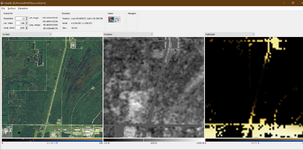
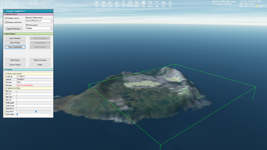
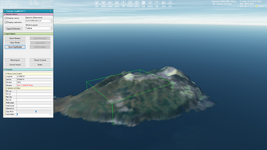
It looks like the elevation editing was planned to add to the Terrain ToolKit. Just look at the screenshot.

Also, I saw a very interesting Elv Tile Splitter V2. I was just about to read the manual and watch the included vidoeos these days.

Elevation is mentioned in the OT3 as well.

I'm wondering if some visual editor for elevation tiles will be implemented. Something easy and convenient. Maybe like the VecMapper.
 
This is a request that goes in hand with what I have posted previously in this thread: https://www.orbiter-forum.com/threads/flat-cape-canaveral-area.41771/
This editor would take the guessing out of getting flat/elevated areas. Right now, using the D3D9Client *.flt files, it's a pure guessing game of trial&error to see where you are actually editing the the terrain. It would work in tandem with the actual planetary textures so you could see the terrain you're editing.
Such a tool already exists. Tileedit in your utils folder, though I recommend the beta version from here:


Place it in the utils folder overwriting the default one that comes with Orbiter.

Run Orbiter and use the scenario editor to place a vessel near the coordinates that you want to flatten.

Use this tool to figure out which tile you need to edit. (copy/paste latitude and longitude from Orbiter, select the resolution level and it will return the tile index).

Run tileedit.
Press File->Open and navigate to Textures\Earth. Press Select Folder.
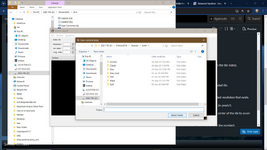
1719944130302.png

Enter the endices from the excel file. --Or you can simply zoom in to the area that you want to edit by clicking on the correct quadrant of the loaded tile.
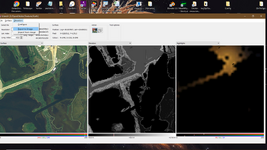
You can zoom in on a particular quadrant of a tile (and load the next resolution level) by clicking on it. Select Surface on one side and Elevation in the middle (or whatever combination suits you).
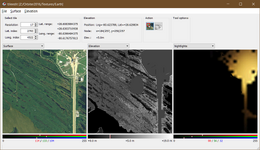
1719944219271.png

When you see 2 numbers on the tile, it means that you're passed the max resolution that exists for that level and you are looking at a part of the last resolution that exists. Don't edit an elevation tile for which the resolution doesn't exist. IIRC the tile will be created, but you will probably get visible seams.
(in this pic the elevation shows 2 numbers. The area showing is at level 18 but the tile loaded is level 17 because 18 doesn't exist.
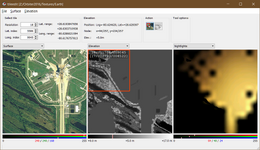
1719944490582.png

You want to focus on the Elev tiles. Select the Edit Elevation icon from the Action icons and set the elevation (in meters) and the size of the brush (in pixels?).
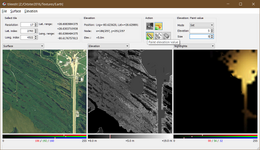
1719944548470.png

Paint on the elevation tile the area that you wish to flatten. When you are done, select the Navigate icon in the Actions area and click once in the center of the tile to zoom out.

The changes that you made will be applied to the tile and also to the previous resolutions (I think up to some levels before, but I don't remember the number).

You can navigate to the adjacent tiles by clicking on the edge of the tile (a red arrow will appear, action must be set to navigate)
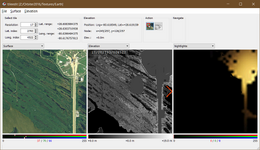
1719944659063.png
When you are done, load Orbiter to check your flattened area.
I strongly recommend making backups of the elev tiles that you will edit, in case you are not happy with the result. (that is if you have already extracted the elev tiles from the archive files).

 
@dgatsoulis The only problem with Tileedit is that it is very crash happy. I can barely manage 2 minutes of editing without it just crashing over and over again. Nothing to indicate that I have done anything wrong. Seems to coincide with it saving the edits I have made.
 
@dgatsoulis The only problem with Tileedit is that it is very crash happy. I can barely manage 2 minutes of editing without it just crashing over and over again. Nothing to indicate that I have done anything wrong. Seems to coincide with it saving the edits I have made.
In my case, using the beta version of the tool and not editing tiles for which the resolution doesn't already exist has been rock solid.
I have the high resolution elev tiles and I have extracted them from the archive, so I don't know if that plays a role.


The beta tool has another very handy feature: You can extract a png file from the elevation tile, make your changes in an image editing program and then re-import the tile in Orbiter:

1719969137457.png
1719969183317.png
The png file and its meta data will be exported in your utils directory.

Open the image in your image editing software.
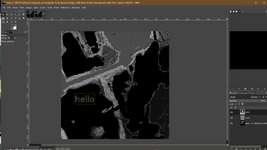
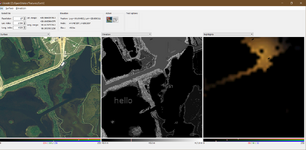
Use the eyedrop tool to take the gray color value from an area with known height and paint the part of the image you want. In this example I am writing the word "hello" in the value of height 5 meters in the sea.

1719969701731.png
Save your file (replacing the one you extracted) and go back to Tileedit.

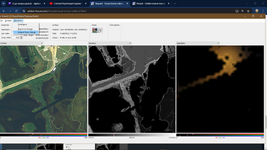
Select Elevation->Import from image
1719969936550.png

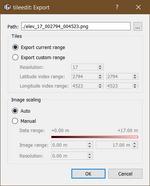
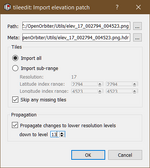
Click on the dots icon next to the path and select the png file you saved. Its Meta data will be loaded by default.
In the propagation section, select down to level 13 (I don't recommend going lower than that, even though you can propagate all the way to level 4).
Press OK let it load the tile.

1719970064525.png

1719970277716.png

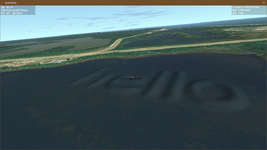
Run Orbiter and check your changes.

1719970675045.png
 
Would it be much work to extend the tileedit with a function to edit .flt files for DX9?
 
Would it be much work to extend the tileedit with a function to edit .flt files for DX9?
Not sure what you mean. The created flt tiles work fine with the D3D9 client already. (EDIT: Sorry I misread that and thought you were talking about the .elv files)

Not sure how the interaction would be. Tileedit directly edits the elevation tiles (or the Elev_mod tiles). I believe that terrain flattening flt files act after the tiles are loaded.

I think that adding a thicker brush (it's now limited to sizes 1 to 5) and the addition of the ability to draw squares and ellipses would vastly improve the tool.
But with the direct png editing feature already existing, I think it is kind of redundant.
 
Last edited:
So is it possible to build the a launchpad as part of the terrain so that vehicles could drive up it. I know the crawlers are hard coded to adjust TD points.
 
@dgatsoulis I'm only editing the level 17 tiles and it still crashes with the version you linked to.
 
@dgatsoulis I'm only editing the level 17 tiles and it still crashes with the version you linked to.
In that case you can either try the export to image->edit image->import from image method (which in my opinion is faster and gives you more control) or you can try making smaller edits, zoom out one level for the changes to take effect and repeat.
 
I'm trying your method of externally editing the exported images, the only problem is that the edited areas seem to loose all the terrain data when imported back into Tileedit. Those areas are all set to +0 m when I'm certain I used the correct color for +5 m. Is there any special settings I need to use when saving the edited *.png file?
 
I'm trying your method of externally editing the exported images, the only problem is that the edited areas seem to loose all the terrain data when imported back into Tileedit. Those areas are all set to +0 m when I'm certain I used the correct color for +5 m. Is there any special settings I need to use when saving the edited *.png file?
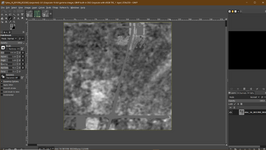
I am using GIMP. I make my changes to the png and then:
1720025554700.png

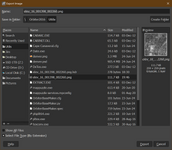
Export as -> (utils\same name and extension as the file exported from tileedit)
1720025598032.png

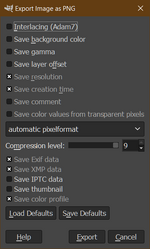
These are the export settings:
1720025638046.png

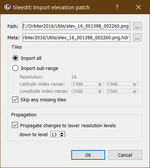
And here are the import settings in tileedit:
1720025698197.png

Here is the file imported in tiledit
1720025767735.png
 
Tileedit is just not working for me as either it won't properly import edited images or it crashes. So a new program is needed.
 
I eddited an elevation tile of the level 13 (this tile exists, but not as an individual tile in the "Elev" directory). It's crashing, especially when I zoom out one level for the changes applying. But sometimes it doesn't crash, so I get some ELV files in my "Elev_mod" directory for levels 8-13.

Once the crashes were so strong that I couldn't even set the lat. index, so I deleted the "tileedit.ini", and those crashes dissapeared. But if I don't even delete this file I have to set the patch to my "/Textures/Earth" directory every time I launch the tool.

Should I extract ELV tiles I want to edit from the TREE file locaded in the "Archive" directory to the "Elev" directory? Initially I didn't have both "Elev" and "Elev_mod" directories. Then I made some changes on one tile of the level 13 using a brush. I see the changes in game, but they dissapeare when I get closer. It looks like I need to create ELV files for 14, 15, ... levels... Now I don't have the "Elev" directory.

I haven't tried the image importing/exporting method yet.
 
"PlanetTextures.pdf" says:

This will not modify the original Elev layer, but write into the Elev_mod layer.

A tile in the Elev_mod layer can only modify an existing tile in the Elev layer, not create a new tile. Therefore, for each tile in the Elev_mod layer, the corresponding tile in the Elev layer must exist.
 
Currently, tileedit only works with tile trees represented by individual files, not with compressed archive files.

But it's in the documentation for Orbiter 2016. It looks like the "tileedit" from GitHub works with TREE files.
 
As far as I can tell, the main reason for me not experiencing the problems that you guys seem to have, is that I have extracted the tiles from the archive. If it's not that, then I don't know what it is. Best of luck!
 
I have extracted the tiles from the archive
What tool are you using for this?

I tried the "image method", and got a crash after clicking "OK" in the importing window. But I got ELV files for the 4-13 levels, although I set it to 8, not 4, but it was that crash.

I see my changes when the 16 level is currently rendered, but they dissapear if I get a little bit closer and the 17 level is rendered:

16.png17.png

@dgatsoulis, do you know how to make custom cloud tiles? I just saw the corresponding directory on your screenshot.
 
What tool are you using for this?

I tried the "image method", and got a crash after clicking "OK" in the importing window. But I got ELV files for the 4-13 levels, although I set it to 8, not 4, but it was that crash.

I see my changes when the 16 level is currently rendered, but they dissapear if I get a little bit closer and the 17 level is rendered:

View attachment 39295View attachment 39296

@dgatsoulis, do you know how to make custom cloud tiles? I just saw the corresponding directory on your screenshot.

For the extraction I used treeman: by Face.

Here is the link to the thread with instruction on the first post:

I haven't made cloud tiles, but I probably extracted them back when I extracted all the tiles with treeman.
 
Seems like Tileedit for whatever reason doesn't like the *.png exported by Paint.NET. I've tried every combination in the Paint.NET PNG export dialog and nothing will make it play nice with Tileedit. So in the end I'm not sure if this is Tileedit problem or a Paint.NET problem.
 
Back
Top