New Release D3D9Client Development

Did you forget MicroTex.cfg file ?
No, it's present in Config folder.
It is deployed during install step!
Shouldn't the Textures itself also be in the repository then? Mine were from ZIP and those might not be compatible anymore?

MD5 sums of the files I have:

a997077cfb13c9c1554fadeac23ee7ad *D3D9Mars_A.dds
c3e408df5385f97e9c3daaaa976c12fb *D3D9Mars_B.dds
7eda9dc168dbe2fa41917019742e4ae8 *D3D9Moon_A.dds
6f2c6d4fd4e4cab44b012b9b44c816f7 *D3D9Moon_B.dds
a75c60afa7d4a374cf4dbad6f67667cd *D3D9Moon_C.dds
49a465848e213cb668a3fc1785cb9557 *D3D9Moon_C2.dds
 
I've checked agains the "main" branch:
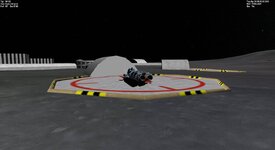
The microtextures seem to be rendered, but not so 'sharp' as I would like them to be (or as I'm used to see them)

1. current "main" branch (see the "edgier" rocks in foreground):
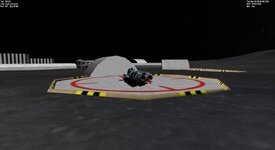
CurrentState.main.jpg

2. current "d3d9_atmosphere_remake" branch ("soft"rendered rocks in foreground):
CurrentState.branch.jpg

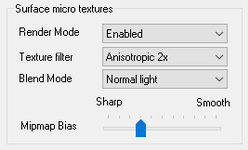
I've also tried to tune all the "Surface micro textures" settings, but none changed much.
1671743436125.png

Maybe this is intentional, but I would love to see the rubble again ;)
 
Sorry, but I found another issue (in d3d9_atmosphere_remake branch):

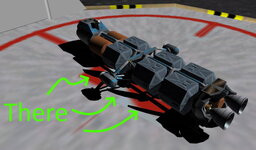
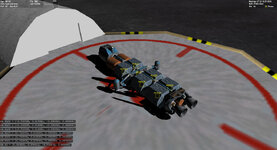
The shadows seem to behave very odd. When you run the attached scenario and rotate a bit around you will see what I mean.
Those shadows behave as if the casting body is 2D and rotation wierd...
CurrentState.branch.shadow-issue+notes.jpg
 

Attachments

Thanks for the reports, I will look into the shadow and rock edge issues. There's been no change in micro texture formats so the files you got from the zip are good. I was hoping to upgrade the textures to support color and normals, this would work better on Mars but do nothing on the Moon. But I haven't had time to prepare new textures. Including the textures in the repository is fine by me but it will increase the size by 28MB
 
I looked at the shadow problem and it also occurs in D3D7 client but not in the inline-engine. It looks like the problem could be in the Orbiter. Surface normals don't match, for some reason the normals for payload canisters are misplaced. Problem seems to be in HorizonInvRot(). So, it might be better to hand this issue to @martins

Code:
VECTOR3 hn, hnp = vessel->GetSurfaceNormal();
vessel->HorizonInvRot(hnp, hn);
D3D9DebugLogVec(name, FVECTOR4(hn, 0));
normals.jpg
 
Last edited:
The problem mentioned above is tied to vessel status. As long as it remains "landed" HorizonInvRot() is incorrect for attachments but becomes correct when vessel status changes to "active".
 
The surface micro texture problem should be fixed now. I noticed that due to ambient light, terrain slopes facing to the sun or away from it has very little difference in lighting. I have to do something about that.
 
The surface micro texture problem should be fixed now. I noticed that due to ambient light, terrain slopes facing to the sun or away from it has very little difference in lighting.
Thank you,
that's the way I used to see my pebbles (y) :D
 
Minor bug? The sun texture appears to be visible through Jupiter at certain distances from the vessel.
Also, the sun texture gets hidden by the DG hud glass, but seems to be okay with other transparent things.

Looks beautiful in earth orbit, by the way :)

1672504789585.png
 

Attachments

Minor bug? The sun texture appears to be visible through Jupiter at certain distances from the vessel.
Also, the sun texture gets hidden by the DG hud glass, but seems to be okay with other transparent things.

DG HUD glass is intentional, I will look into it later on when working on virtual cockpit rendering, it's a little more problematic since the glass should change the color of the glare. Thanks for reporting Jupiter issue.
 
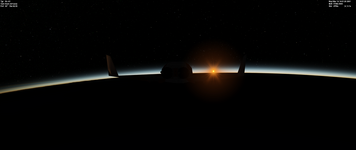
I've done some early checking of the new atmosphere rendering and while it is miles better than what came before it, it's still not quite right. For one thing, Earth is extremely hazy and dark, even at high orbital noon. Also, it has this weird green tinge to it, and playing with the "Green" slider does to eliminate it. Right now the atmosphere appears to very sick, not letting much sun light through, very much what it would be a few minutes after the Chicxulub impact happened.

Good videos for calibration:

 
Help, please!
The link to the Project Site "D3D9Client is available for download from Project Site as well as from Tuttovola.org"
does not work anymore respectively links to this site:

Where can one download the latest clients for Orbite 2016 and Orbiter 2016 Beata?

Thank you very much!

Best regards
Cougar
 
Last edited:
Small showcase of the new atmosphere model at different altitudes with all three Earth visual configs (Default, 10_Ratio, and Hazy - in that order):

One thing I'd like to add regarding the sun glare: currently it appears to emphasize the background stars in its vicinity; I'm not an expert on this matter by any means but generally I'd assume that opposite should happen and the sun would make it very difficult to make out any of those nearby stars due to brightness of the glare itself - hopefully this can demonstrate the 'issue' better (using default celestial sphere settings - added circle for clarity):Sol.png

I believe this used to occur with the old lens flare implementation as well so I'm not really sure if it's something that can be 'fixed' easily, but I figured I'd point it out anyway while the new sun glare option is being introduced.
 
Where can one download the latest clients for Orbite 2016 and Orbiter 2016 Beata?

I don't really know. The old website is no longer available. I tried to upload/add the client to Orbiter Downloads but it gave me an unknown error.
 
I don't really know. The old website is no longer available. I tried to upload/add the client to Orbiter Downloads but it gave me an unknown error.
I can host/mirror them in my very slow home server if you want. Temporarily at least.
 
I can host/mirror them in my very slow home server if you want. Temporarily at least.
That would be a great short solution! Thank you very much!
But on the long term we will need to have a fixed download location like e.g. on the "Orbiter 2016 Download" website itself.
 
Back
Top