Portable Space Sim

Donamy

Addon Developer
Addon Developer
Donator
Beta Tester
Joined
Oct 16, 2007
Messages
6,958
Reaction score
278
Points
158
Location
Cape
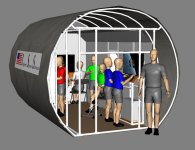
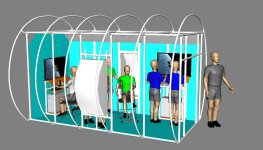
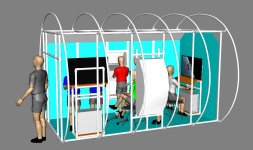
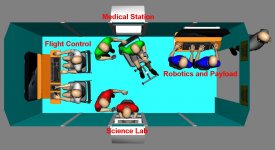
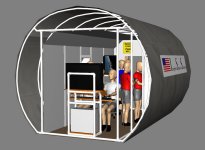
Something I developed, and hope to use to, inspire space science to kids. I have most of the hardware, and will be using Orbiter (duh!)

I would like some ideas to best impliment it, and how best to hook-up the hardware to run as a simulator. I have 2 computers, running Windows 7 with 2 big monitors. Some mission ideas are, launching and retrieving a satellite, using robotics, an asteroid rendezvous.
 

Attachments

  • front view.jpg
    front view.jpg
    106 KB · Views: 172
  • aft view.jpg
    aft view.jpg
    107.4 KB · Views: 174
  • Port view.jpg
    Port view.jpg
    162.6 KB · Views: 127
  • Stbd view.jpg
    Stbd view.jpg
    157 KB · Views: 111
  • orbitOPS.jpg
    orbitOPS.jpg
    140 KB · Views: 142
  • Brianblue.jpg
    Brianblue.jpg
    74.2 KB · Views: 113
Some suggestions:

1. Thrustmaster Cougar MFD frames + 2 x 7" tables + VNCMFD:

attachment.php


2. A properly configured joystick allows intuitive controlling of spacecraft position.

3. Multiple keyboard remapper, custom labels and some usb numpads (or a typematrix keyboards).
 
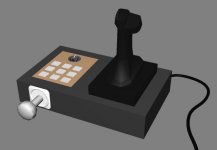
Wondering if anyone could make this, or could point me to where I could find out how to make one ?
 

Attachments

  • OrbiterJoy.jpg
    OrbiterJoy.jpg
    17.5 KB · Views: 155
Wondering if anyone could make this, or could point me to where I could find out how to make one ?

Wow, that would be the ultimate Orbiter controller.
 
How could we not think that ?
 
Why not use one of the 3DConnexion devices for the portable version?

http://www.3dconnexion.com/

(I think these would make much better controllers for a spacecraft anyway, pretty intuitive)

Please elaberate !

---------- Post added at 08:41 PM ---------- Previous post was at 08:32 PM ----------

Looking closer it is a no-go. Unfortunatly price is a huge matter. :blush:
 
Please elaberate !

---------- Post added at 08:41 PM ---------- Previous post was at 08:32 PM ----------

Looking closer it is a no-go. Unfortunatly price is a huge matter. :blush:

Well. if price is a huge matter, you need a more flexible plan.

Flea Markets would be one option, too look for suitable junk to mod into a controller - especially old digital joysticks are pretty cheap and in 99% of all cases, so broken, that except the stick itself, everything else needs a replacement anyway.
 
Wondering if anyone could make this, or could point me to where I could find out how to make one ?

Depends... could you elaborate more on the design of the controller, i.e. which button/knob does what?

BTW, you actually don't need the RCS ROT/LIN switch -- you can control both rotation and translation at the same time if you have enough buttons or joystick axes. This switch is an artifact of using keyboard numpad to control RCS.
 
Depends... could you elaborate more on the design of the controller, i.e. which button/knob does what?

BTW, you actually don't need the RCS ROT/LIN switch -- you can control both rotation and translation at the same time if you have enough buttons or joystick axes. This switch is an artifact of using keyboard numpad to control RCS.

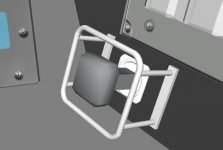
It is basically a controller for the Cupola type arrangement. The hand grip joystick would be for rotational axis, and the front stick is for translational left/right/up/down/forward/back. This would allow steering for docking, and also would be used for SiameseCat's great Canada2 arm. The rotary switch for switching between modes, buttons for selecting various single joints on the arm.
 
Last edited:
It is basically a controller for the Cupola type arrangement. The hand grip joystick would be for rotational axis, and the front stick is for translational left/right/up/down/forward/back. This would allow steering for docking, and also would be used for SiameseCat's great Canada2 arm. The rotary switch for switching between modes, buttons for selecting various single joints on the arm.

Considering that a flight sim joystick nowadays has also rotation (rudder) axis, would that allow eliminating the knob? Because if so, your device becomes joystick + numpad. Use NumLock for mode switch (it even has an LED!).
 
Considering that a flight sim joystick nowadays has also rotation (rudder) axis, would that allow eliminating the knob? Because if so, your device becomes joystick + numpad. Use NumLock for mode switch (it even has an LED!).

The rotation (rudder) isn't intuitive enough for a translational axis to me. How about, just the 'knob' ? Then I suppose, I could just use a flightstick and labled keyboard.


P.I.Engineering have some nice products too.

Those are cool, but still too pricey. Unfortunatly the budget was already exceeded with the main construction, computers and monitors. :(
 
Those are cool, but still too pricey. Unfortunatly the budget was already exceeded with the main construction, computers and monitors. :(

OK, so you have nailed the economic part of simulating space flight. :lol:

On a more general note: I never thought that analogue controllers were very realistic for RCS, especially for linear RCS. If you have a 3-axis joystick (twist handle) with 6 spare buttons, you can use Fly-By-Wire to set up a 'digital' Linear RCS button array if you don't want to make a dedicated Lin RCS stick.
 
The rotation (rudder) isn't intuitive enough for a translational axis to me.

I believe that no setup involving a LIN/ROT switch is going to be intuitive. To quote myself (emphasis added):

This is a 3-axis joystick (forward/back, left/right and rotation "Rudder"), so I mapped the joystick axes to RCS rotation and KILLROT to the "Rockets" button. (I have also mapped flight control surfaces to the same axes, so everything works the same way regardless if I am in atmosphere or not). Then I have mapped RCS translation up/down/left/right to "Change view" 4-way switch, RCS forward to "Fire weapons" and RCS backward to "Target camera" -- all these switches are accessible using just forefinger and thumb. So this allowed me to control 3D rotation and translation using one hand, in a way which is completely intuitive. If you are correctly aligned with target (HUD takes care of that), the docking approach boils down to pressing the "Change view" switch in the direction shown by arrow on Docking MFD. With that setup, my girlfriend has managed to successfully dock with ISS on a first try.

Seriously, get a fighter-style joystick, configure it the way I'm saying and try it.

That, or use joystick for ROT and keypad for LIN, and another keypad for controlling the arm (using my multiple keyboard remapper).
 
Last edited:
I'm curious to know why, you guys think it not intuitive, when it was used in, and will be (hopefully) in Orion. How does the Russian one work ?

Shuttle translational controller.
 

Attachments

  • transControl.jpg
    transControl.jpg
    23.9 KB · Views: 43
Shuttle translational controller.

How does that controller work exactly? I assume pressing it to the left moves to the vessel to the left? Right pressure moves it to the right? Are up and down "backwards"? Press up to thrust down and down to thrust up? What about forward and backward translation? Push in / pull out?
 
How does that controller work exactly? I assume pressing it to the left moves to the vessel to the left? Right pressure moves it to the right? Are up and down "backwards"? Press up to thrust down and down to thrust up? What about forward and backward translation? Push in / pull out?
That is exactly how the Translational Hand Controller (THC) works. Instead of the third axis being twist, it is push/pull. Other than that, it is the same as a joystick.
 
That is exactly how the Translational Hand Controller (THC) works. Instead of the third axis being twist, it is push/pull. Other than that, it is the same as a joystick.

Does a controller like this actually exist for simulation (gaming) purposes?
 
Back
Top