API Question I need help with cockpit redraw events.

Hlynkacg

Aspiring rocket scientist
Addon Developer
Tutorial Publisher
Donator
Joined
Dec 27, 2010
Messages
1,868
Reaction score
4
Points
0
Location
San Diego
Like the title says, I'm trying to impliment a VC but need help figuring out cockpit redraw events.

Thus far I've got the MFD's up and running but haven't even been able to manage a simple "hello world" beyond that.

Code:
bool LEM::clbkLoadVC (int id) // Render Virtual Cockpit
{
//Define MFDs 
static VCMFDSPEC Cmd_MFD = {mesh_VC, 0}; // Define surface on which to display MFDs. [Mesh, Mesh Group #] 
static VCMFDSPEC Pilot_MFD = {mesh_VC, 1};

oapiVCRegisterMFD (0, &Cmd_MFD); // Register MFDs in orbiter's interface [registry # and VCMFDSPEC]. (registry numbers start at 0 and count up)
oapiVCRegisterMFD (1, &Pilot_MFD);

//Define Other Displays
SURFHANDLE tex = oapiGetTextureHandle (mh_cockpit, 3); 
oapiVCRegisterArea (AID_CLOCK, _R(0,0,256,256), PANEL_REDRAW_ALWAYS, PANEL_MOUSE_LBDOWN, PANEL_MAP_BGONREQUEST, tex); 
oapiVCSetAreaClickmode_Spherical (AID_CLOCK, _V( 0.334, 0.814, 1.789), 2.5);
return true;
}

bool LEM::clbkVCRedrawEvent (int id, int event, SURFHANDLE surf)
{
????????????????
 return true;
}

I was trying to rig a simple clock to start but outside of "oapiGetSimMJD ()" and converting to Date/Time format I haven't been able to figure out what actually goes in the clbkVCRedrawEvent. The API documentation is rather vague on this subject and Martin's code in the SDK is a little too dense to parsed by a C++ neophite such as myself.

Any assistance would be greatly appreciated.
 
You'll have to write a class that does the drawing, and call it from clbkVCRedrawEvent when the id of the element is passed to it. At least that's the most convienient option. you could do the blitting or sketchpading directly in clbkVCRedrawEvent, of course, but that will become an organisational nightmare real quick.

Here's a very good tutorial for panels, but VC works pretty similar, so you'll be able to adapt most of it:

http://www.orbiter-forum.com/blog.php?b=574
 
How would I go about setting up the "drawing class" that you describe?

Also the tutorial describes taking a bitmap and manually defining ascii characters as x y coordinates on that bitmap. Isn't there a way to simply "sprintf" to a surface?
 
There is if you use sketchpad. It's slower, and can have trouble with graphics clients if you draw directly to a video surface. The best way with sketchpad is to create a new surface, do the drawing and the blit the contents of that surface onto the video surface.

On the other hand, if you make a monotype bitmap font (there are apps that can make a bitmap out of a font) and take what is already there in the tutorial, a print function almost writes itself. Here's what mine looks like (only works for monotype fonts!):

Code:
void IMS_MFC::MFCprint(SURFHANDLE surf, char* text, int _length, int _x, int _y, MFC_TEXT_POS tpos)
{
	int fWidth = 9;
	int fHeight = 13;
	int textwidth = fWidth * _length;

	for (int i = 0; i < _length; ++i)
	{
		int srcx = (text[i] - 32) * fWidth;
		int tgtx;
		switch (tpos)
		{
		case T_LEFT:
			tgtx = _x + i * fWidth;
			break;
		case T_RIGHT:
			tgtx = _x - textwidth + i * fWidth;
			break;
		case T_CENTER:
			tgtx = _x - textwidth / 2 + i * fWidth;
		}
		oapiBlt(surf, Src, tgtx, _y, srcx, 0, fWidth, fHeight);
	}
}

Of course you'd have to adjust text width, height an source position to your texture. I use the irrfonttool for making the bitmaps, a tool tat comes with the irrlicht sourcecode (believe it or not, most 3d engines use bitmap fonts rather than truetype fonts. tt fonts are just too slow for use in a game).

How would I go about setting up the "drawing class" that you describe?

Take the instrument class from the tutorial as a base class. All my panel elements, some of which are quite complex and have sliders, listboxes and whatnot are derived from that class. It's just a matter of what you put into the redraw2d and processmouse2d functions.
 
If its any help, I'm trying! to make a 2D panel, and an MFD using the MFD template in the samples directory. Plodding alomg slowly.

This is the thread:
http://www.orbiter-forum.com/showthread.php?t=19866&page=6&highlight=westcott

Currently working on the panel, the MFD is finished:
http://i89.photobucket.com/albums/k207/Notebook_04/LoxMFD_2.jpg


Code:
// ==============================================================
//                 ORBITER MODULE: DialogTemplate
//                  Part of the ORBITER SDK
//          Copyright (C) 2003-2010 Martin Schweiger
//                   All rights reserved
//
// MFDTemplate.cpp
//
// This module demonstrates how to build an Orbiter plugin which
// inserts a new MFD (multi-functional display) mode. The code
// is not very useful in itself, but it can be used as a starting
// point for your own MFD developments.
// ==============================================================

#define STRICT
#define ORBITER_MODULE
#include "windows.h"
#include "orbitersdk.h"
#include "MFDTemplate.h"

// ==============================================================
// Global variables

int g_MFDmode; // identifier for new MFD mode

// ==============================================================
// API interface

DLLCLBK void InitModule (HINSTANCE hDLL)
{
	static char *name = "MyMFD Template";  // MFD mode name
	MFDMODESPECEX spec;
	spec.name = name;
	spec.key = OAPI_KEY_T;                // MFD mode selection key
	spec.context = NULL;
	spec.msgproc = MFDTemplate::MsgProc;  // MFD mode callback function

	// Register the new MFD mode with Orbiter
	g_MFDmode = oapiRegisterMFDMode (spec);
}

DLLCLBK void ExitModule (HINSTANCE hDLL)
{
	// Unregister the custom MFD mode when the module is unloaded
	oapiUnregisterMFDMode (g_MFDmode);
}

// ==============================================================
// MFD class implementation

// Constructor
MFDTemplate::MFDTemplate (DWORD w, DWORD h, VESSEL *vessel)
: MFD2 (w, h, vessel)
{
	font = oapiCreateFont (w/20, true, "Arial", FONT_NORMAL, 0);
	
	pRed = oapiCreatePen(1, 1, MFD_RED);
	pGreen = oapiCreatePen(1, 1, MFD_GREEN);
	pBlue = oapiCreatePen(1,1, MFD_BLUE);
	pWhite = oapiCreatePen(1,1, MFD_WHITE);
	pGaslox = oapiCreatePen(2,1, MFD_GASLOX);
	pControl = oapiCreatePen(2,1, MFD_Control);
	
	bBlack = oapiCreateBrush(MFD_BLACK);
	bWhite = oapiCreateBrush(MFD_WHITE);
	bRed = oapiCreateBrush(MFD_RED);
	bGreen = oapiCreateBrush(MFD_GREEN);
	bBlue = oapiCreateBrush(MFD_BLUE);
	bGaslox = oapiCreateBrush(MFD_GASLOX);
	bGasnit = oapiCreateBrush(MFD_GASNIT);
	bLox = oapiCreateBrush(MFD_LOX);
	// Add MFD initialisation here
}

// Destructor
MFDTemplate::~MFDTemplate ()
{
	oapiReleaseFont (font);
	
	oapiReleasePen  (pRed);
	oapiReleasePen  (pGreen);
	oapiReleasePen  (pBlue);
	oapiReleasePen  (pGaslox);
	oapiReleasePen	(pControl);

	oapiReleaseBrush(bBlack);
	oapiReleaseBrush(bWhite);
	oapiReleaseBrush(bRed);
	oapiReleaseBrush(bGreen);
	oapiReleaseBrush(bBlue);
	oapiReleaseBrush(bGaslox);
	oapiReleaseBrush(bGasnit);
	oapiReleaseBrush(bLox);
	// Add MFD cleanup code here
}

// Return button labels
char *MFDTemplate::ButtonLabel (int bt)
{
	// The labels for the four buttons used by our MFD mode
	static char *label[4] = {"PRE", "HYD", "ELE", "PNE"};
	return (bt < 4 ? label[bt] : 0);
}

// Return button menus
int MFDTemplate::ButtonMenu (const MFDBUTTONMENU **menu) const
{
	// The menu descriptions for the four buttons
	static const MFDBUTTONMENU mnu[4] = {
		{"Pressurisation", 0, '['},
		{"Hydraulic", 0, '['},
		{"Electrical", 0, '['},
		{"Pneumatic", 0, ']'}
	};
	if (menu) *menu = mnu;
	return 4; // return the number of buttons used
}


// Repaint the MFD
bool MFDTemplate::Update (oapi::Sketchpad *skp)
{
	Title (skp, "PACK A");
	// Draws the MFD title
		
	skp->SetFont (font);
	skp->SetTextAlign (oapi::Sketchpad::CENTER, oapi::Sketchpad::BASELINE);
	skp->SetTextColor (MFD_WHITE);
	
	skp->Rectangle (W/4, H/128, (3*W)/4, H/16);
	skp->Text (W/2, H/20,"LOX PRESSURISATION", 18);

	
	skp->Rectangle (W/80, H/12, (21*W)/64, H/7);
	skp->Text (W/6, H/8,"Main Sequencer", 14);

	skp->Rectangle ((3*W)/8, H/12, (5*W)/8, H/7);
	skp->Text (W/2, H/8,"- 00:00:10", 10);
	
	skp->Rectangle ((45*W)/64, H/12, (63*W)/64, (34*H)/128);
	skp->Text((27*W)/32,(9*H)/64, "Pressurisation",14);
	skp->Text((27*W)/32,(12*H)/64, "Control",7);
	skp->Text((27*W)/32,(30*H)/128, "Unit",4);

	skp->Rectangle((11*W)/32, H/6, (21*W)/32, (27*H)/128);
	skp->Text(W/2,H/5,"Ground Nitrogen",15);

	skp->Rectangle((11*W)/32, (55*H)/256, (21*W)/32, (33*H)/128);
	skp->Text(W/2,H/4,"Heat Exchanger", 14);

	skp->Rectangle((6*W)/32, (55*H)/256, (10*W)/32, (33*H)/128);
	skp->Text(W/4, (2*H)/8,"LOX", 3);
	
	skp->SetPen(pRed);	
	skp->Line((21*W)/64,H/9,(3*W/8),H/9);
	skp->Line((5*W)/8,H/9,(45*W/64),H/9);
	skp->Line((21*W)/32,12*H/64, (45*W/64),12*H/64);
	skp->Line((21*W)/32,15*H/64, (45*W/64),15*H/64); 
	skp->Line((10*W)/32,15*H/64, (11*W/32),15*H/64); 
	//	----------- end of control graphics -------------------------
	//  ------------- Tanks and valves ------------------------------
	//  --------------- Start Tank Assembly -------------------------
	skp->SetPen(pWhite);
	skp->Rectangle((1*W)/32, (12*H)/32, (8*W)/32, (24*H)/32);	// Start Tank
	skp->Text((9*W)/64, (51*H)/64, "Start Tank",10);
	skp->Rectangle((2*W)/32, (9*H)/32, (3*W)/32, (12*H)/32);	// Start Tank filler
	skp->Rectangle((1*W)/32, (17*H)/64, (4*W)/32, (9*H)/32);
	//Start Tank Pressurisation Pipe
	skp->SetBrush(bGasnit);
	skp->Rectangle((48*W)/64,(17*H)/64,(49*W)/64,(21*H)/64);	//	Pipe 1
	skp->Rectangle((8*W)/64,(20*H)/64,(49*W)/64,(21*H)/64);		//	Pipe 2 horiz
	skp->Rectangle((8*W)/64,(20*H)/64,(9*W)/64,(24*H)/64);		//	Pipe 3
	//skp->Rectangle((8*W)/32, (27*H)/64, (10*W)/32, (14*H)/32);		// Vent pipe
	skp->SetBrush(NULL);										// back to unfilled rectangles
	skp->Rectangle((8*W)/32, (12*H)/32, (17*W)/32, (27*H)/64);	//	Valve border
	skp->Text((23*W)/64,(53*H)/128, "Vent Valve",10);
	skp->SetBrush(bGreen);
	skp->Rectangle((15*W)/32, (12*H)/32, (17*W)/32, (27*H)/64);	//	Start Tank Vent
	skp->SetBrush(NULL);										// back to unfilled rectangles
	skp->SetPen(pWhite);
	//  -------------------- Run Tank Asembly -------------------------
	skp->Rectangle((16*W)/32, (16*H)/32, (24*W)/32, (24*H)/32);	// Run Tank
	skp->Text((10*W/16), (51*H)/64, "Run Tank",8);
	//Run Tank Pressurisation Pipes
	skp->SetBrush(bGaslox);
	skp->Rectangle((59*W)/64,(17*H)/64,(60*W)/64,(34*H)/64);	//	Pipe 1 vert
	skp->Rectangle((24*W)/32,(33*H)/64,(60*W)/64,(34*H)/64);	//	Pipe 2 horiz
	skp->SetBrush(NULL);										// back to unfilled rectangles
	skp->Rectangle((35*W)/64,(29*H)/64,(52*W)/64,(32*H)/64);	//	Valve border
	skp->Text((21*W)/32,(63*H)/128, "Vent Valve",10);
	skp->SetBrush(bGreen);
	skp->Rectangle((48*W)/64,(29*H)/64,(52*W)/64,(32*H)/64);	//	Run Tank Vent
	skp->SetBrush(NULL);										// back to unfilled rectangles
	// ------------------ Valve Control -----------------------------
	skp->SetPen(pControl);
	skp->Line((51*W)/64,(17*H)/64,(51*W)/64,(25*H)/64);
	skp->LineTo((33*W)/64,(25*H)/64);
	skp->Line((57*W)/64,(17*H)/64,(57*W)/64,(30*H)/64);
	skp->LineTo((52*W)/64,(30*H)/64);
	skp->Line((54*W)/64,(17*H)/64,(54*W)/64,(28*H)/64);
	skp->LineTo((24*W)/64,(28*H)/64);
	skp->LineTo((24*W)/64,(40*H)/64);
	// ------------------- end of valve control ----------------------
	// ------------------- Main Pipework -----------------------------
	skp->SetPen(pWhite);
	skp->Rectangle((8*W)/32, (20*H)/32, (16*W)/32, (22*H)/32);
	skp->Rectangle((24*W)/32, (20*H)/32, (28*W)/32, (22*H)/32);
	skp->Rectangle((28*W)/32, (19*H)/32, (57*W)/64, (23*H)/32);
	skp->Rectangle((57*W)/64, (19*H)/32, (58*W)/64, (23*H)/32);
	skp->Line((58*W)/64, (20*H)/32, (62*W)/64, (20*H)/32);
	skp->Line((58*W)/64, (22*H)/32, (62*W)/64, (22*H)/32);
	skp->Ellipse((11*W)/32, (20*H)/32, (13*W)/32, (22*H)/32);
	skp->Text((12*W)/32, (47*H)/64, "Fill/Check",10);
	skp->Text((28*W)/32, (49*H)/64, "To Engine",9);
	// ----------------------------------------------------------------
	// -------------------- Data Area ---------------------------------
	skp->Line(0,(52*H)/64,W, (52*H)/64);
	skp->Text(W/2, (55*H)/64, "Ullage Pressure",15);
	skp->Text(W/2, (58*H)/64, "Tank Volume",11);
	skp->Text(W/2, (61*H)/64, "Tank Flow",9);

	//--------------------- Fill/Check Valve draw ----------------------
	skp->SetBrush(bGreen);
	skp->Ellipse((11*W)/32, (20*H)/32, (13*W)/32, (22*H)/32);
	skp->SetBrush(bBlack);
	skp->Ellipse((11*W)/32, (20*H)/32, (13*W)/32, (22*H)/32);
	skp->SetBrush(bRed);
	skp->Rectangle((23*W)/64, (20*H)/32, (25*W)/64, (22*H)/32);
	skp->SetBrush(bBlack);
	skp->Rectangle((23*W)/64, (20*H)/32, (25*W)/64, (22*H)/32);

	// Add MFD display routines here.
	// Use the device context (hDC) for Windows GDI paint functions.

	return true;
}

// MFD message parser
int MFDTemplate::MsgProc (UINT msg, UINT mfd, WPARAM wparam, LPARAM lparam)
{
	switch (msg) {
	case OAPI_MSG_MFD_OPENED:
		// Our new MFD mode has been selected, so we create the MFD and
		// return a pointer to it.
		return (int)(new MFDTemplate (LOWORD(wparam), HIWORD(wparam), (VESSEL*)lparam));
	}
	return 0;
}

Code:
// ==============================================================
//                 ORBITER MODULE: DialogTemplate
//                  Part of the ORBITER SDK
//            Copyright (C) 2003 Martin Schweiger
//                   All rights reserved
//
// MFDTemplate.h
//
// This module demonstrates how to build an Orbiter plugin which
// inserts a new MFD (multi-functional display) mode. The code
// is not very useful in itself, but it can be used as a starting
// point for your own MFD developments.
// ==============================================================

#ifndef __MFDTEMPLATE_H
#define __MFDTEMPLATE_H

#define MFD_WHITE   0xFFFFFF
#define	MFD_BLACK	0x000000
#define MFD_RED		0x0000FF
#define MFD_GREEN   0x00FF00
#define MFD_BLUE	0xFF0000
#define	MFD_GASLOX	0x888888
#define MFD_GASNIT	0x88FF88
#define	MFD_Control	0x8888FF
#define	MFD_LOX		0xCCFFCC

class MFDTemplate: public MFD2 {
public:
	MFDTemplate (DWORD w, DWORD h, VESSEL *vessel);
	~MFDTemplate ();
	char *ButtonLabel (int bt);
	int ButtonMenu (const MFDBUTTONMENU **menu) const;
	bool Update (oapi::Sketchpad *skp);
	static int MsgProc (UINT msg, UINT mfd, WPARAM wparam, LPARAM lparam);

protected:
	oapi::Font *font;
	
	oapi::Pen *pRed;
	oapi::Pen *pGreen;
	oapi::Pen *pBlue;
	oapi::Pen *pWhite;
	oapi::Pen *pGaslox;
	oapi::Pen *pControl;

	oapi::Brush	*bBlack;
	oapi::Brush *bGreen;
	oapi::Brush *bRed;
	oapi::Brush *bBlue;
	oapi::Brush *bWhite;
	oapi::Brush *bGaslox;
	oapi::Brush *bGasnit;
	oapi::Brush	*bLox;
};

#endif // !__MFDTEMPLATE_H

N.
 
Last edited:
I can only recommend: Avoid blitting operations. They are pretty slow most of the time and use the bottleneck between GPU and CPU. There are many situations in which you can get better results with texture coordinate manipulations, than with painting on the textures.

And: Sure you can't use every surface in Sketchpad for painting. A surface for painting has to be decompressed and has to be stored in a memory location that permits such 2D operations. You can blit it to a hardware accelerated surface, but not just swap both types.
 
I can only recommend: Avoid blitting operations.

Well, they are not really a problem if you don't need to update every frame. If your display updates once per second you can blit as much as you like without a notable fps hit. After all, there was a time when entire graphics engines were based on up to hundreds of blitting operations per frame.
 
Well, they are not really a problem if you don't need to update every frame. If your display updates once per second you can blit as much as you like without a notable fps hit. After all, there was a time when entire graphics engines were based on up to hundreds of blitting operations per frame.

Yes, but even then, they are mostly annoying. Especially if you can today do better by just manipulating texture coordinates. For changing the state of a simple quadratic light, you just need to change 4 x 2 floats. Even if the whole meshgroup is updated and send to the GPU, it is less than transfering the bitmap data.
 
For some context here are some shots of what I've got so far.


For the attitude indicator I had initially intended to simply reuse the Stock DG's, but a cursory review of the code convinced me that I was in way over my head.

Right now I want to focus on creating a set of simple LCD-style numeric displays, as this will give me a way to display current thrust and propellant levels wich are currently my biggest obstical to release.

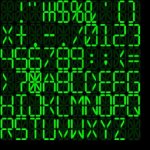
I generated the following Bitmap but where do I go from here?
View attachment LCDfont.bmp

the characters are 40x24 pixels and evenly spaced but how do I associate specific X, Y coordinates with specific characters to create a font?
 
Last edited:
make every digit of your display a single rectangle in the panel mesh and texture it with your character texture. Then program a list with 4 (u,v) coordinates per digit to display. each (u,v) pair defines one corner of the digit rectangle.

When changing the digit, copy the four (u,v) coordinates to the four vertexes of the rectangle in your Panel2D.

This way, your digit texture can be stored in compressed form on the GPU.
 
Having a seperate mesh group for every single character on a display sounds like it would get out of hand fast.

There's got to be a simpler way to do this.

@Jedia would you mind explaining what's happening in your IMS_MFC::MFCprint function?
 
Last edited:
Having a seperate mesh group for every single character on a display sounds like it would get out of hand fast.

There's got to be a simpler way to do this.

@Jedia would you mind explaining what's happening in your IMS_MFC::MFCprint function?

It is done pretty fast in a 3D editor, also the number of new groups would still be less than 100 in your model, if I see it correctly. You could also make the rectangles of one display one group, But then you need to code more information about which vertex is for which corner and digit into your vessel, could be pretty annoying.
 
I found the following code in the stock DG which appears to have the functionality I want. Namely printing a string to a mesh surface, is there any way I can adapt this?

Code:
// --------------------------------------------------------------
// Paint individual vessel markings
// --------------------------------------------------------------
void DeltaGlider::PaintMarkings (SURFHANDLE tex)
{
	oapi::Font *font = oapiCreateFont (38, true, "Sans", FONT_BOLD);
	oapi::Sketchpad *skp = oapiGetSketchpad (tex);
	if (skp) {
		skp->SetFont (font);
		skp->SetTextColor (0xD0D0D0);
		skp->SetTextAlign (oapi::Sketchpad::CENTER);
		char cbuf[32];
		strncpy (cbuf, GetName(), 10);
		int len = min(strlen(GetName()), 10);
		skp->Text (196, 10, cbuf, len);
		skp->Text (196, 74, cbuf, len);
		skp->SetTextColor (0x808080);
		skp->SetTextAlign (oapi::Sketchpad::RIGHT);
		skp->Text (120, 158, cbuf, len);
		skp->SetTextAlign (oapi::Sketchpad::LEFT);
		skp->Text (133, 158, cbuf, len);
		oapiReleaseSketchpad (skp);
	}
	oapiReleaseFont (font);
}

Alternately, If I finally cave and simply do the control panel in 2d is there a way that I can output the current 2d panel state (displays and all) as a texture to be painted on the VC?
 
Remember that this code is extremely versatile, but also extremely slow. The Text function isn't meant for rapid update rates. A blit function with a font texture would be better then, but still slower than direct texture coordinate manipulation.
 
Right I'm more concerned with getting something that works.
 
So in clbkLoadVC I call

SURFHANDLE tex_p1Display = oapiGetTextureHandle (mh_cockpit, 4);

to get the texture handle for my panel redraw map. The slot is already marked as dynamic in the .msh so from here all I have to do is call

oapiCreateSurface (LOADBMP (p1displays));

and the bitmap will be printed to the display correct?

from there I can just paint on it using sketchpad yes?

...No because it didn't work. can somebody please help me understand GDI?
 
So I'm stealin the "paint individual vessel markings" code from the stock delta glider as it seem to have the functionality I need. (printing a string to a mesh)

I have every thing set up but I'm confused about this line here...

Code:
insignia_tex = oapiCreateTextureSurface (256, 256);
[COLOR="red"]SURFHANDLE hTex = oapiGetTextureHandle (VCMFDSPEC , 5);[/COLOR]
if (hTex) oapiBlt (insignia_tex, hTex, 0, 0, 0, 0, 256, 256);

how is it calling VCMFDSPEC as a mesh handle?

Not only does it make no sense but my compiler marks it as an illegal operation.

It compiles in the Dg SDK sample but not my own code, what gives?
 
In my SDK example, it's:

// **************** vessel-specific insignia ****************

insignia_tex = oapiCreateTextureSurface (256, 256);
SURFHANDLE hTex = oapiGetTextureHandle (exmesh_tpl, 5);
if (hTex) oapiBlt (insignia_tex, hTex, 0, 0, 0, 0, 256, 256);
 
@Jedia would you mind explaining what's happening in your IMS_MFC::MFCprint function?

Sure. It's a direct adaptation from the code included in the tutorial, really.

Code:
void IMS_MFC::MFCprint(SURFHANDLE surf, char* text, int _length, int _x, int _y, MFC_TEXT_POS tpos)

In the header, I pass the surface the text should be drawn on (passed to your redraw function from the draw event calback), the text itself, the number of characters in the text, target x and y coordinates and a basic format identifier that modifies the x coordinate. Y coordinate is always upper edge, ad for x-coordinate I have the modifiers T_LEFT, T_cENTER and T_RIGHT, specifying wheather the x coordinate denotes the left edge, the center or the right edge of the text.


{
int fWidth = 9;
int fHeight = 13;
int textwidth = fWidth * _length;

here I define font width, font height and calculate the length of the whole string in pixels (since I have only one font size).


Code:
	for (int i = 0; i < _length; ++i)
	{
		int srcx = (text[i] - 32) * fWidth;
		int tgtx;
		switch (tpos)

here I start the drawing loop, from the first character of the string to the last. The first and most important thing is to find the the x and y coordinates on the source texture. This won't work for your bitmap quite as easily, unfortunately. The simplest way is to have the whole text on one line in order of their ASCII codes. Mine starts with the space character, which is ASCII 32, (that is, the numerical value of the character will be 32 if it is a space), and then progresses through to the tilde (~) in order of their ascii codes, starting at x zero of my texture. So, all I have to do is substract 32 from the value of the current character in the string and multiply it with my character width to get the x position of the character on my texture.

For your bitmap, this will be a bit more complicated... you can look the values up on an ASCII table and assign them manually, you can make a more practical bitmap, or you can figure out some logic to let the computer calculate the position in your current bitmap (you should put the bitmap into your panel texture, by the way, if that wasn't clear so far).

Code:
	{
		case T_LEFT:
			tgtx = _x + i * fWidth;
			break;
		case T_RIGHT:
			tgtx = _x - textwidth + i * fWidth;
			break;
		case T_CENTER:
			tgtx = _x - textwidth / 2 + i * fWidth;
		}
		oapiBlt(surf, Src, tgtx, _y, srcx, 0, fWidth, fHeight);
	}
}

All that's left to do now is figure out the x position of the current character on your panel. In my case, this is of course different depending on the format identifier. T_LEFT takes the passed value as the left edge of the first character and moves every character to the right by the character width. T_RIGHT does the opposite, and T_CENTER takes the passed x value as the middle of the string and calculates the characters target position from there. And then there's of course the blitting, which just uses all the values we calculated so far to blit the character from the right source position to the right target position. Finito!
 
Ok I generated a new bitmap that is in proper ASCII order, and much closer to the effect that I eventually want.

That said is it really better to make it a single row? I need the full alphabet and I'm worried that having a texture that is 64x1024 (or similar) might be a bit much.

I'm working on adapting what you have so here goes nothing...

Code:
void Spider::LCDPrint(SURFHANDLE surf, char* text, int _length, int _x, int _y, MFC_TEXT_POS tpos)
{

int cHeight = 40; // Character height [pixles]
int cWidth = 24; // Character width [pixels] 
int cRow, cCol; // Character's position in bitmap [row / column]
int textwidth = cWidth * _length;

for (int i = 0; i < _length; ++i)
{
  cRow = (text[i] - 32) / 10;
  cCol = (text[i] - 32) % 10;

  int srcx = cCol * cWidth;
  int srcy = cRow * cHeight;

  int tgtx, tgty;

...

Now I have no intention of changing my text's justification so i can ignore the T_Pos switch correct?

Anyway, where do I go from here. don't I need four x/y coordinates to define an area not just two?

once I have my coordinates what do I do with them?
 

Attachments

  • LCDfont.jpg
    LCDfont.jpg
    21.3 KB · Views: 8
Back
Top