
-
ORBITER-FORUM will be temporarily closed at 2026-07-23 18:00 UTC while we complete some OF maintenance tasks. The amount of downtime is expected to take up to one hour, but probably less.
You are using an out of date browser. It may not display this or other websites correctly.
You should upgrade or use an alternative browser.
You should upgrade or use an alternative browser.
New Release D3D9Client Development
- Thread starter jarmonik
- Start date

- Joined
- Mar 28, 2008
- Messages
- 2,707
- Reaction score
- 881
- Points
- 128
the flickering faces when lit by local light source is still there on R12now i got a radeon hd5770, and the same happens as on hd3850)
I am sorry to hear that. I made a debug build to diagnose the local lights problem and it was reported to be fixed. http://orbiter-forum.com/showthread.php?p=427985&postcount=2512
I am not going to start chasing a ghost here. I need to solid proof that something is wrong in the client and not in the user computer.

the flickering faces when lit by local light source is still there on R12
You may have posted earlier, but could you post a scenario or outline steps for testing this? I can do a quick test of this on multiple machines with different cards over the next day or so to see if I can reproduce.
- Joined
- Mar 28, 2008
- Messages
- 2,707
- Reaction score
- 881
- Points
- 128
Also, could you make sure you have the R12 activated from the modules tab and not the R11 Debug build.the flickering faces when lit by local light source is still there on R12

- Joined
- Mar 28, 2008
- Messages
- 2,707
- Reaction score
- 881
- Points
- 128
I'm running an nVidia GeForce 9500 with the latest drivers on an XP system and have flickering with default shader set. No flicker with Level 20 though. Not sure if that helps...
It helps a little. Level 20 and 30 shaders are identical. Only thing that will change is the target level for shader compiler. It could be a problem in the shader compiler but it still won't explain why the anomaly occurs so rarely and not for every frame. What makes it a random issue ?
---------- Post added at 21:45 ---------- Previous post was at 21:43 ----------
The code modification I have in this post is still valid does it remove the black artifacts ? http://orbiter-forum.com/showthread.php?p=427985&postcount=2512
---------- Post added at 21:47 ---------- Previous post was at 21:45 ----------
Is this a Windows XP specific problem ?

Columbia42
Member
I'm not sure if this is the issue being referred to by others, but for me the flickering is fixed with R11c but installing R12 brings the flickering back. I have an ATI Radeon 5570 GPU and Win XP.
- Joined
- Mar 28, 2008
- Messages
- 2,707
- Reaction score
- 881
- Points
- 128
I'm not sure if this is the issue being referred to by others, but for me the flickering is fixed with R11c but installing R12 brings the flickering back. I have an ATI Radeon 5570 GPU and Win XP.
You can apply this modification to R12 and see if it has any effect to the black artifacts (link in a post below)
There are no practical difference between R11c and R12 other then R11c is compiled in debug mode and R12 in release mode.
Last edited:

- Joined
- Sep 12, 2010
- Messages
- 3,131
- Reaction score
- 415
- Points
- 123
- Location
- Rome
- Website
- www.tuttovola.org
Jarmo, that link goes to a 404.
Should be this instead:
http://orbiter-forum.com/showthread.php?p=427985&postcount=2512
Should be this instead:
http://orbiter-forum.com/showthread.php?p=427985&postcount=2512
Last edited:
Einion Yrth
Hoopy Frood
I'm running an nVidia GeForce 9500 with the latest drivers on an XP system and have flickering with default shader set. No flicker with Level 20 though. Not sure if that helps...
Radeon HD7970M here. On Win 7. Same as Raven, standard shaders == flicker lvl 20 != flicker.
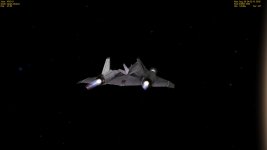

Should the engines' "flames" look like this?
That's rather clipping issue. GPU clips some polygons depending on distance to screen plane and angle.
Try both settings of highlited option

Strange.
Now the problem resolved itself with no reason or change in the configuration. :shrug:
First I have changed the FOV to 60 and the clipping issue dissapeared.
When I changed it back again the clipping did not reappear.
Any ideas?
Ok. The problem did not dissapear.
It seems that it depends on the camera angle in some strange way.
When it appears then it remains (and change) for different camera angles. But sometimes it takes time (and a lot of vessel direction and camera angle changing) to get it to appear.
I have no idea. It is a random situation I think.
Now the problem resolved itself with no reason or change in the configuration. :shrug:
First I have changed the FOV to 60 and the clipping issue dissapeared.
When I changed it back again the clipping did not reappear.
Any ideas?
Ok. The problem did not dissapear.
It seems that it depends on the camera angle in some strange way.
When it appears then it remains (and change) for different camera angles. But sometimes it takes time (and a lot of vessel direction and camera angle changing) to get it to appear.
I have no idea. It is a random situation I think.
Last edited:

Disconnect
New member
Also, could you make sure you have the R12 activated from the modules tab and not the R11 Debug build.
Not the debug version was activated, and still flickering.
Similar threads

- Sticky
- Replies
- 6
- Views
- 10K

- Replies
- 10
- Views
- 4K


- Replies
- 1
- Views
- 4K


- Replies
- 7
- Views
- 4K