New Release D3D9Client Development

Sorry, this may sound stupid but the function key menus do not appear when pressed;using ctrl-alt-del shows they appear underneath the main window. Is there a setting I may have missed somewhere. Btw, a brilliant work.

Thanks about reporting this. I can confirm the problem and it seems to be related in multisampling in a fullscreen mode. So, disabling the multisampling from a video tab or using a windowed mode should help. I'll take a look if there is something I can do to fix it.

EDIT: It's very well said in the ducumentation that there can be no multisampling with Win32/GDI based dialog boxes in a fullscreen mode.

---------- Post added at 22:20 ---------- Previous post was at 21:28 ----------

I have Windows 7 32-bit and I run it on nVidia 9500gt, I only get the error in fullscreen mode "1920 x 1080". In window mode everything works fine.

---------- Post added at 01:12 AM ---------- Previous post was at 01:08 AM ----------

I figured it out! I have dual monitors, when I disconected one, problem went away. :)

This problem could be connected into the multisample/fullscreen problem discussed in a previous post. In a dual monitor setup that could cause a lost device. Can you reproduce the "lost device" with multisampling disabled ?
 
Last edited:
jarmonik said:
It's a bit difficult to locate the latest version from this thread so, if everything is working well in the RC8 it might be good idea to launch a new thread for the release.
You could do like Artlav does with his long development threads and keep the first post updated with the latest release links/notes...
 
I know this is probably not the best time to submit requests regarding this amazing project, but I'd like to post mine anyway, as I'm not sure if they've been suggested before.

What I'm currently working on is a full size mockup of a LM. I plan to integrate it with Orbiter in the future, and so here we can find some unique problems - some of You who probably seen what people can do with several monitors in simulators already know what I'm talking about.

What I need most is an ability to set fixed cameras and send their viewports to predefined monitors. This way I could set views that would fit window positions, solving an issue with enhanced monitors (no gap). Possibility to send MFD to small LCDs would also be great feature for onboard instruments simulation, which with physical instrument would be hard to do.

Cheers. Keep up the good work!
 
D3D9ClientRC9

I have released the RC9 and it's located in the first post of this thread.

I have already started to work with the atmospheric scattering and I have done some cleaning in the effect files and preparing them for the scattering. I hope I haven't broken anything in the process. Following files MeshTech.fx, PlanetTech.fx, Particle.fx can be removed from /Modules/D3D9Client/

---------- Post added at 22:14 ---------- Previous post was at 21:58 ----------

What I need most is an ability to set fixed cameras and send their viewports to predefined monitors. This way I could set views that would fit window positions, solving an issue with enhanced monitors (no gap). Possibility to send MFD to small LCDs would also be great feature for onboard instruments simulation, which with physical instrument would be hard to do.
I can't promise anything at this point but I will keep that in mind. I am not exactly sure how to render in multible monitors at the same time. I suppose two monitors could be ok but having more than two monitors could be a problem.
 
Hi Jarmonik

Thanks for your work on this.

A quick test revealed that RC 9 appears to have broken the mesh-based planet surface rendering (Phobos, Deimos) which were OK in RC 8 (using SL version).
 
D3D9Client RC10

Issue with mesh-based planets/moons fixed.
 
I can't promise anything at this point but I will keep that in mind. I am not exactly sure how to render in multible monitors at the same time. I suppose two monitors could be ok but having more than two monitors could be a problem.

Thanks!
Well, I know for sure that Orbiter runs on two monitors with DX9 client beyond DX7 limit (I run ~2500 pix). I wonder if any of You tried it with two 1920x1080 tv screens? It should still be within DX9 limits.

Heh... looks like nobody makes square LCDs :P I guess pivot option would be nice for those small monitors. As for the rest - with that Matrox box I could split screens up to three monitors on one line, and use second line for small LCDs. Alternatively use SLI concept for more ports. Now the problem is how to identify exact monitors - I guess some preset would have to be added, which ones to use as camera(s) output and which ones for MFDs.

Anyway, it's just a suggestion. I'm sure that in 99% of cases people won't be interested with this...
 
This problem could be connected into the multisample/fullscreen problem discussed in a previous post. In a dual monitor setup that could cause a lost device. Can you reproduce the "lost device" with multisampling disabled ?

When multisampling is disabled, with dual monitors still causes the lost device.
 
Hmm, anyone of You tried running AMSO scenario "Apollo 15 final landing with dust"? If yes - have You seen shadows? I seem to lack object and vessel shadows in the sim. However in built in DX7 they show up fine.
 
Hmm, anyone of You tried running AMSO scenario "Apollo 15 final landing with dust"? If yes - have You seen shadows? I seem to lack object and vessel shadows in the sim. However in built in DX7 they show up fine.

The vessel shadow issue will be fixed from RC11. Currently D3D9Client doesn't support shadows from particle effects and surface meshes.
 
Development Test Release

Ok, I have implemented the skydome rendering using a modified version of the scattering technique described in GPU Gems 2. Planet surface and high altitude horizon rendering is not yet implemented.

In this implementation I have used the celestial sphere background image manager to render the skydome but it doesn't work very well in that purpose so a proper skydome mesh must be created in the future. I tried a vertex based computation of the scattering equations and it produced very bad rendering artifacts near the horizon. So, I took a shortcut and implemented the whole thing in a pixel shader so every pixel is now raytraced even the ones behind the planet surface. So, if you do experience some frame rate problems there is no need to worry about it because the rendering model can be improved a lot. (It's running around 120 to 250fps on my computer)

Here is a check list for running this version.
- Turn horizon haze off.
- Turn distance fog off.
- Select a celestial sphere background image and set the intensity below 0.1

Other notes:
- Camera must remain below the skydome. (40km in default settings)
- Press 'p' to activate/deactivate an interafce to adjust rendering parameters.
- Use numbers from '0' to '9' and leters 'a' and 'b' to select a parameter.
- Use Up and Down arrows to adjust the parameter.
- Press 'u' to update scattering tables when needed. (Required by params 'a' and 'b')
- Parameters are automatically saved when closing a simulation. So, take a backpus from Earth.scatter.cfg when needed.
 
Last edited:
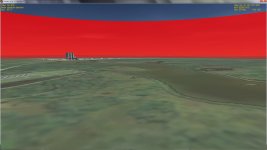
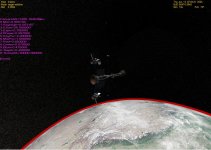
The atmosphere is now blood red (pic attached). Talk about red dawns and red sunsets when you're seeing them 28 times a day :)
 

Attachments

  • Interra.jpg
    Interra.jpg
    157.7 KB · Views: 99
The atmosphere is now blood red (pic attached). Talk about red dawns and red sunsets when you're seeing them 28 times a day :)

Could you check my first note in a post above. Camera must remain below 40km. In the screen shot the camera is about 1990km above the surface. High altitude rendering is not yet implemented.
 
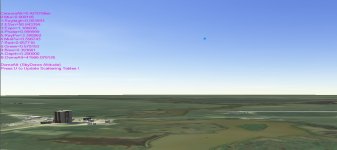
Works nicely for me:
 

Attachments

  • D3D9_new_atmosphere_rendering.jpg
    D3D9_new_atmosphere_rendering.jpg
    265 KB · Views: 133
Very good experience for me too. I havn't noticed any framerate drop with this test release.

Just some problems but I'm sure you know them, such as no more planet rotation, the moon sky is white, also on other planets such as venus or Mars.

But I love the way the becomes darker at the vertical of the ship. The default values are realistic enough.
Great job !
 
Works as advertised here! No problems with planetary motions at all. I've seen only the limitations pointed out by Jarmonik already regarding this new client version.

BTW, Jarmonik, the new skydome rendering looks outstanding. Love the gradual blue colors in the daytime sky. Played also with your rendering parameters adjustment interface, gives a good understanding of each parameter's meaning. Default looks best so far!
Can't wait for further updates! :)
 
It doesn't work nicely for me.The sky became red.
 

Attachments

  • sky.jpg
    sky.jpg
    217.8 KB · Views: 44
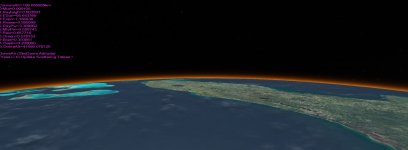
But the moon and earth's atmosphere didn't look good.
Here are the screen shots.
 

Attachments

  • moon.jpg
    moon.jpg
    118.1 KB · Views: 55
  • atm.jpg
    atm.jpg
    143.5 KB · Views: 54
Back
Top