Windows 7/Ubuntu help!

myles

New member
Joined
Oct 20, 2007
Messages
181
Reaction score
0
Points
0
I made a partition for installing Ubuntu, but when I put in the disk, it wouldn't use it, it had to make its own. So after I installed I deleted the other partition, and now whenever I boot I can't get the option (I was dual booting 7 and Ubuntu) to pick 7 or Ubuntu, it just says Grub Rescue with some error, and now I can't get any OS! The HP recovery disc did the diagnostics, and the disk failed with Boot path error BIOHD-4 - Unitialized boot structure detected. How do I fix this?? I'm really screwed!! Thanks X 10^10^10^10^10^10 for whoever helps!!!
 
I made a partition for installing Ubuntu, but when I put in the disk, it wouldn't use it, it had to make its own. So after I installed I deleted the other partition, and now whenever I boot I can't get the option (I was dual booting 7 and Ubuntu) to pick 7 or Ubuntu, it just says Grub Rescue with some error, and now I can't get any OS! The HP recovery disc did the diagnostics, and the disk failed with Boot path error BIOHD-4 - Unitialized boot structure detected. How do I fix this?? I'm really screwed!! Thanks X 10^10^10^10^10^10 for whoever helps!!!

What exact error number is it?
 
There is no number, it just says error code: BIOHD-4
 
I'd suggest one of two options

1. Reinstall your OS of choice and restore your data from a backup.

2. Put the hard drive into another machine and backup.

Either way, I suspect a rebuild of your vista machine is going to be required.

Yet another reason I refuse to use dual boot.
 
Oh my, I don't have the actual OS CD! Do you think Office Depot, where I got it from, would do it for free? They did give us a coupon for a free PC checkup...
 
Oh my, I don't have the actual OS CD! Do you think Office Depot, where I got it from, would do it for free? They did give us a coupon for a free PC checkup...

That you would have to take up with them but if you bought the PC with a license for the OS then you do have a valid license and so are entitled to a copy of the operating system itself.
Unfortunatley, many places have this nasty habit of using Recovery CD's that contain all the vendors rubbish.
 
That you would have to take up with them but if you bought the PC with a license for the OS then you do have a valid license and so are entitled to a copy of the operating system itself.
Unfortunatley, many places have this nasty habit of using Recovery CD's that contain all the vendors rubbish.

Someone check me on the legality of this, but could he not find someone else with the Windows CD/DVD for his operating system and then install using that disc and his license key? Either that, or perhaps the vendor you bought from will provide you with a disc or do the reinstall for you.

Also, the Ubuntu website details how to setup dual-boot between it and Windows. I believe the page you want is here: https://help.ubuntu.com/community/WindowsDualBoot. Check that before you continue, if you haven't already.
 
Actually, if you have a valid licence, aren't you allowed to download and burn the install CD?

My university offers student licences for various programs and also operating systems. They send us the licence over email and tell us to download the OS...
 
I bet you can download the trial versions of Windows and then use your license. That is if you can find a trial of XP/7. As far as I know, Microsoft doesn't have trials of XP/7. Best bet is to contact the computer store you bought the computer/OS and ask for another disk.

Anyway, instead of formatting everything, try booting up from your Ubuntu CD, and deleting your Ubuntu partition. You could use gParted if you want. But that's entirely up to you.

Next, restart the machine, see if it works, if so then great, but if (probably) not then continue on.

Re-boot from the Ubuntu CD. Make sure before you begin have only 2 partitions on you HD; First is a primary NTFS/FAT32 (though probably NTFS). This is your Windows Partition. Second partition should be RAW if you only deleted it. Make Ubuntu install to the RAW partition. After install, restart and see if it works. Theoretically this should re-set the GRUB and it will at least point to Ubuntu. Hopefully it will point to your XP install as well.


If you need me to, I can make a step by step instructions on how to do it.

If that doesn't work we can go and manually setup Grub through the shell, if you wish.

Edit:
I think it would be a good time to note: Ubuntu HowtoPartition
 
One more thing... reinstalling XP/Vista/7 might work without formatting. You'll have a whole lot of crap on your hard drive - like installed programs that don't work and a Windows.old with your old Windows installed, but you'll save your vital data.

I haven't formatted in about 3 years. Shameful, yes... but I managed to keep my Windows XP from fatally crashing for two and a half years. Now I have my XP working, but have a whole lot of crap on it...
 
myles - Not sure if it will help, but give this a try:
http://www.howtogeek.com/howto/ubuntu/reinstall-ubuntu-grub-bootloader-after-windows-wipes-it-out/

Just curious gary, did you have a bad experience with dual booting? I've personally never had any issues with dual booting. I've dual-booted most major OS's, with exception of Mac, with no problems and no loss of data. I've had XP/Vista, XP/Ubuntu, XP/Fedora, XP/Win7, Win7/Ubuntu, among others, and so far, all have installed and ran in their configurations flawlessly. Not slamming you or anything, just wondering what course of events led you to be against it.
 
Just curious gary, did you have a bad experience with dual booting?

Never but I've had to fix too many machines that have. Personally, I prefer VMWare or a cheap laptop or even swapping hard disks to dual booting.
 
Never but I've had to fix too many machines that have. Personally, I prefer VMWare or a cheap laptop or even swapping hard disks to dual booting.

That's cool. I've actually moved away from dual booting myself and into virtualization. I use MS Virtual PC 2007 only because it's free. I've used Sun's VirtualBox also, but VPC seems to suit me better. Virtualizing is so much easier than dual boot IMO, simply because you don't have to worry about Windows messing up GRUB, or vice-versa.

We also use VPC at work to mitigate risk on aging CNC machines that require a Win95 or Win98 controller PC. Makes it nice in that you can use newer hardware, and if the hardware fails, we have the virtual backed up and just slap another cookie-cutter box in there and move the virtual over.

But I've had my share of Windows/GRUB battles. Hopefully myles will get his worked out without losing anything...
 

The sudo grub command says,

"sudo: grub: command not found"

So is there any way to do the fix mbr under ubuntu/use the windows boot loader?

EDIT: I found this site : http://www.knowliz.com/2009/10/installed-windows-7-now-ubuntu-wont-start.html

What is the alternate CD? I downloaded my current CD's ISO from here: http://www.ubuntu.com/getubuntu/download

Where would I get the alternate?
 
Last edited:
I've had the exact same problem with Linux (arch Linux to be precise), and I got bored of this bloody boot error in linux (not grub), so I uninstalled "manually" completely forgetting the fact that deleting my linux partitions would also delete the grub.conf file, and grub started popping up an error.

for you're case, there are two options,

1. Re-install you're Linux distro with LILO instead of GRUB
2. get super grub disk witch can recover the grub.conf, unless you somehow screwed up you're bios, witch will require the manufacturer to take a look at the PC.
 
The sudo grub command says,

"sudo: grub: command not found"

So is there any way to do the fix mbr under ubuntu/use the windows boot loader?

EDIT: I found this site : http://www.knowliz.com/2009/10/installed-windows-7-now-ubuntu-wont-start.html

What is the alternate CD? I downloaded my current CD's ISO from here: http://www.ubuntu.com/getubuntu/download

Where would I get the alternate?

Since you installed Windows first and then Ubuntu, that tutorial probably doesn't apply to you.
 
Basically, the best thing to do when you end up with a faulty dual-boot configuration is to completely remove and then re-install both OS's. Shouldn't be too much trouble with free Ubuntu, but getting your hands on another Windows CD can be tricky. Can't really help you with that, I'm afraid.

I'm not sure about 7, but XP offers an option to create a bootable Windows CD. Vista did not offer such an option, which is why it has ceased to exist from my machine...
 
I've had the exact same problem with Linux (arch Linux to be precise), and I got bored of this bloody boot error in linux (not grub), so I uninstalled "manually" completely forgetting the fact that deleting my linux partitions would also delete the grub.conf file, and grub started popping up an error.

for you're case, there are two options,

1. Re-install you're Linux distro with LILO instead of GRUB
2. get super grub disk witch can recover the grub.conf, unless you somehow screwed up you're bios, witch will require the manufacturer to take a look at the PC.

I did the super grub disk, and I'm in windows 7 now!!! So, now when I boot and press F2, it's only Windows 7. I still want Ubuntu, so how do I make it show up again?

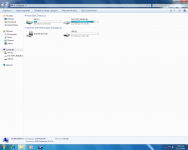
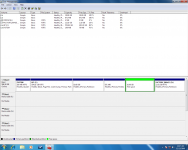
Also, look at my partitions vs my computer. How do I make it so it's just 2 partitions - the windows 7 and Ubuntu? I don't want the factory restore, HP's sending me the disks for it.
 

Attachments

  • Mycomputer.png
    Mycomputer.png
    177.2 KB · Views: 13
  • Windows7partitions.png
    Windows7partitions.png
    132.3 KB · Views: 16
Last edited:
That disk is partitioned really weird...
Anyway, you will need some fancy repartitioning. parted might be able to do it.
Such modifications to the partition table and the filesystems are always very risky!

Since you have a working grub now, read the grub manual on how to boot with the grub console. Alternatively you can try finding grub.conf and system.map to edit the entry properly.
 
Back
Top