Request Update Earth night light texture to latest NASA Black Marble version

DaveS

Addon Developer
Addon Developer
Donator
Beta Tester
Joined
Feb 4, 2008
Messages
9,753
Reaction score
1,024
Points
203
I originally posted this on the Orbiter Github issues page(issue#592), but to give it a bit of a wider exposure, I have also decided to post it here, as an add-on request:

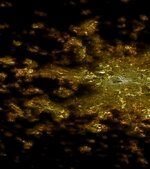
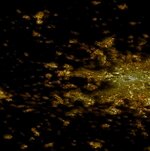
"This is a request to update the current Earth nightlight texture with a more accurate and recent one based on the NASA Black Marble project. which can be found here: https://blackmarble.gsfc.nasa.gov/

The current texture is a custom made one based off the same Blue Marble texture that is used for the actual surface texture, so it has a few issues in that there's lights where there should be any whatsoever (I'm looking at you general Cape Canaveral area).

Maybe even update the current Earth surface texture to Blue Marble: Next Generation: https://visibleearth.nasa.gov/collection/1484/blue-marble"
 
Back in 2013 I created a bunch of Earth textures using Blue Marble Next Generation, one for each month:

Not sure if it's compatible with the latest Orbiter.
 
Back in 2013 I created a bunch of Earth textures using Blue Marble Next Generation, one for each month:

Not sure if it's compatible with the latest Orbiter.
No, unfortunately any planetary textures created before Orbiter 2016 are completely incompatible with later versions as the entire system was changed then. Orbiter 2016 was the version that introduced the current tree system for planetary textures, before it was all baked into a single *.tex file so new textures must be made that are specifically for Orbiter 2016 and Orbiter 2024.
 
Also, I think BMNG is lower resolution than the current textures in Orbiter, so it would be a step backwards unless someone cleverly blended the two.
 
Also, I think BMNG is lower resolution than the current textures in Orbiter, so it would be a step backwards unless someone cleverly blended the two.
In that case, I think it can skipped then and focus could be on the night light texture.
 
Sorry for my off-topic. Are there ideas where @martins took map sources for creating high resolution surface textures for Earth, Moon, Mars? Could we find similar highly detailed sources for other planets and moons (with solid surface in reality for landing) for improving them?

Recently I mentioned the following, but I don't know where to find the source maps:

Post in thread 'Global planet/moons textures' https://www.orbiter-forum.com/threads/global-planet-moons-textures.42304/post-631486
 
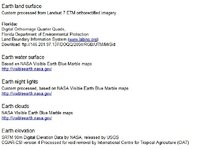
This is what I could find on the subject of Earth texture sources
 

Attachments

  • Orbiter_Earth_textures_sources.jpg
    Orbiter_Earth_textures_sources.jpg
    52.2 KB · Views: 15
I have asked myself the same question: How did Martin Schweiger create the high resolution textures and the night lights in particular and how could they be upgraded with more recent and possibly better data (and I also want to add some kind of basic auroral oval to it). It has been quite the rabbit hole to go into and more questions than answers have come up for me. Making global high resolution maps is some pretty sophisticated stuff even for someone who works with satellite data every day.

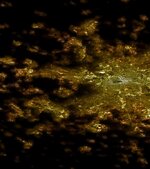
Firstly, the Blue Marble night lights made from VIIRS data only have a resolution of 750 meters/pixel because that is the resolution of the sensor. To my knowledge there has never been any public Earth at night data better than that. I'm not sure what data was used to create the Orbiter night light textures but it's clear to me, that whatever was used was combined most probably with Landsat data by some algorithm. It's a clever idea but it's not perfect and it created some weird results because in Orbiter it seems that sometimes things like fields are lit up brightly while other areas even within cities are completely dark like in this view of Denver:
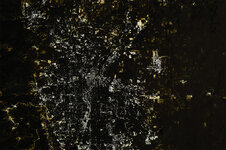
Skärmbild (752).jpg

It still gives not too bad an appearance and it seems to be at a quite high resolution, but then there's also areas not covered by night lights at all like northern Europe. It got me thinking what other ways might be feasible to make a new, maybe more realistic map. The available data is limited such that the result will always be some kind of compromise, but I thought it could be an interesting approach to use the Blue Marble night lights as a brightness and colour mask (works best if you blur it a little bit) for high resolution satellite imagery - in this case I used 10 m Sentinel 2 mosaic data scaled down to 75 meter resolution to make it less of a pain to work with. It would be enough to create a level 13 global map. That's unfortunately a lot of pixels.

I think the result is quite convincing though - not perfect either but imho it looks a bit more realistic.
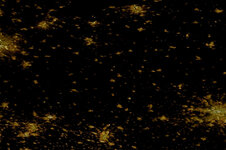
M38P7_1_Night_Lights_Converted.jpg

More detail (it's Berlin btw):
M38P7_1_Night_Lights_Converted_detail.jpg

But there is still a catch:
Doing that on a global scale again is a big task, especially when aiming at anything higher than a level 11 map. If you haven't got lots of disk space and computing power at hand it's almost impossible and even if this can be automated to a great degree, it will probably take a long time.
I think the most difficult to avoid bottleneck in this case is that I created this with a few not exactly trivial operations in Photoshop and while it is possible to do batch operations in Photoshop, I'm not sure it will help much in this case.

Then I'm also struggling to find an easily accessible data source for the high resolution satellite imagery and even after hours of searching the internet, I can't find easily accessible global high resolution (daylight) imagery that would enable me to make a global map like that within a comfortable amount of time because the biggest problem (for a change) is mostly too much resolution. Yup.
The best quality source that I found so far is a global Sentinel 2 (mostly) cloudfree mosaic, but you can currently only download it at full 10 m resolution in 5° x 5° raw data tiles. So even if you ignore most of the oceans (although there is a lot of lights in the ocean as well, like oil rigs, wind farms etc.) there is something between 1000-2000 individual tiles to process in the form of 10 m resolution 16 bit tiff raw data. That obviously is not doable for a single person with a standard PC as it's on the order of several TB worth of data. There seems to be a 120 meter Sentinel 2 mosaic somewhere but I haven't found a way to download it. I'm currently trying to use qgis and a few other tools and apis that I'm currently investigating (but unfortunately it's quite messy as well and I'm running into all kinds of weird problems) but maybe someone reading this has any idea how to easily get access to an easy to work with intermediate-high resolution global Landsat or Sentinel dataset with around 80-160 m downloadable resolution. That would be awesome.

I unpacked the mask.tree file to investigate it a bit and it's a bit funny that it contains up to level 19 textures that clearly are just upscaled by simple interpolation (which of course still makes some sense to reduce the appearance of sharp blocks). The highest resolution in terms of more information seems to be level 13, after that it's just interpolated. But still, level 13 is very high resolution in terms of image processing on a global scale. It equates to 80 m/pixel.

As another update I managed to get access to the Sentinel 2 120m mosaics, but it's the same problem, it's basically raw data and it's near impossible to process on a local machine. I'll have to think again which of the few extremely complicated ways would be the most promising, but this certainly is a disappointment.

 

Attachments

  • M38P7_1_Night_Lights_Converted_detail.jpg
    M38P7_1_Night_Lights_Converted_detail.jpg
    90.4 KB · Views: 4
Last edited:
I unpacked the mask.tree file to investigate it a bit and it's a bit funny that it contains up to level 19 textures that clearly are just upscaled by simple interpolation (which of course still makes some sense to reduce the appearance of sharp blocks).
What do you mean by ‘sharp blocks’? How does the upscaling (interpolation) help to improve the quality?
it's near impossible to process on a local machine
Can’t we do it on several computers of various users who would like to contribute it? But the question is how large size will be of the final TREE archive, namely if it makes sense to do.

Also, notice, that mask tiles in addition to night lights contain the coastline on the alpha channel that separates water from the land.
 
What do you mean by ‘sharp blocks’? How does the upscaling (interpolation) help to improve the quality?

It's just by the interpolation process that smoothes out upscaled pixels. I'm not sure Orbiter automatically interpolates blocky textures - could actually be but if not, interpolation of textures manually at higher levels would make sense to avoid blocky textures.

This is the difference of Bangkok airport between upscaling the same size image without and with interpolation (both images upscaled from 64 px to 1024 px):

Screenshot1_nointerpolation.jpg

Screenshot1_interpolated.jpg
Also, there's many different interpolation algorithms, some doing a better job at smoothing out while others try e.g. to preserve more details, use less resources, be faster or look better and so on.

Can’t we do it on several computers of various users who would like to contribute it? But the question is how large size will be of the final TREE archive, namely if it makes sense to do.

Also, notice, that mask tiles in addition to night lights contain the coastline on the alpha channel that separates water from the land.

I don't think that would make sense. Most of this very high resolution data is stored in data centers that do have computing power to do operations with the data before downloading them, so that would be the best approach, but to do that I have to learn how to do most of the important steps before actually downloading anything.

In the meantime I tried to use readily available high resolution imagery from google maps or bing maps (which essentially also use Landsat and Sentinel data) but the issue has been that it is distributed in a Mercator projection and while it is possible to transform it to a cylindrical, equirectangular projection, while doing that I ran into other issues that I couldn't yet resolve like the raster tile export tool in qgis doesn't want to export data on a different projection. It's a mess.

I don't think the final tree-file would be super big. The one I use at the moment has around 2 GB while it has textures up to level 19 (which is way higher than we probably actually need), because there are a lot of dark ocean areas and also most likely because of compression.

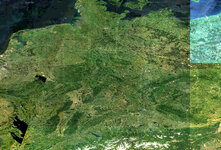
Here's a sample of a 10-day Sentinel-2 mosaic processed at 60 m resolution (unfortunately, though, there's no completely automated process of getting it at that resolution). In theory it should be good quality, but as you see, it still has a lot of problems like seams and gaps caused by cloud cover. So it doesn't even come close to the image quality that google maps provides. So that one is a no for even several reasons at once. :')

QuickLookRGB_2.jpg

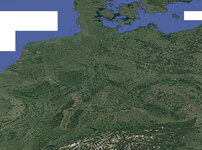
Compare it with a google maps version of the same area exported in cylindrical projection from qgis at ~50m/px (resized from ~18000 x 13400 px):

GMaps_Germany.jpg

But I still haven't figured out how to create global tiles in the correct coordinate system. I have successfully exported a level 10 map in tiles but it ignored all my attempts to export in a cylindrical projection and stayed in Mercator. I hate this guy. ;D
Once I figure out how to export these in a cylindrical projection that would be a huge step forwards.
 
Last edited:
It's just by the interpolation process that smoothes out upscaled pixels. I'm not sure Orbiter automatically interpolates blocky textures - could actually be but if not, interpolation of textures manually at higher levels would make sense to avoid blocky textures.
Thanks for the explanations.
Here's a sample of a 10-day Sentinel-2 mosaic processed at 60 m resolution (unfortunately, though, there's no completely automated process of getting it at that resolution). In theory it should be good quality, but as you see, it still has a lot of problems like seams and gaps caused by cloud cover. So it doesn't even come close to the image quality that google maps provides. So that one is a no for even several reasons at once. :')

QuickLookRGB_2.jpg


Compare it with a google maps version of the same area exported in cylindrical projection from qgis at ~50m/px (resized from ~18000 x 13400 px):

GMaps_Germany.jpg
Here you show surface (daily) maps, not night maps, so I'm confused. Do you want to get maps in a cylindrical projection for surface or night maps?
Once I figure out how to export these in a cylindrical projection that would be a huge step forwards.
Again, do you need it for surface or night maps? I just know where to get surface maps (from different map sources) in a cylindrical projection. Here I described how I make surface tiles (for local region):


Also, I used to make global surface tiles, but not for Earth:
 
Oh wow, thank you so much! That looks like someone already walked the walk. :cool:
Sometimes looking for literature and experience is much better than to reinvent the wheel.


Here you show surface (daily) maps, not night maps, so I'm confused. Do you want to get maps in a cylindrical projection for surface or night maps?

I guess both. I tried to explain earlier that I need the daylight maps in order to make the high resolution night light maps because the Black Marble VIIRS imagery comes at a max. resolution of 750 meters. If we want to make a texture at 160 meters resolution (level 12) or even less, we have to combine the VIIRS data with higher resolution data like I did in the example given above, resulting in an image like this (it's a bit stupidly cropped because it's at the very edge of the Sentinel 2 tile I used):

M38P7_1_Night_Lights_Converted_detail.jpg

This combination of both day and night datasets in Photoshop will be the most difficult or annoying to do I think, because at level 12, we are talking about a global size of 262 144 x 131 072 px or 64 tiles of 32768 x 16384 px which have to be blended with the VIIRS data, not even to think about doing that at even higher resolution. We/I have to do this manually because there is no other dataset out there giving us a result like this. Even if all the other things work well that's still a ton of additional work, much like making a new global high resolution cloud map (which I only did at level 11 and it still took me hours of work, while most of it still is just upscaled low res imagery, so a ton of work left to do).

But I think now that we have established a realistic path to that goal, I think just working through the process step by step is feasible.
It should even be a bit less complicated than making the cloud map because it's 'only' blending two existing layers. But we'll see.

In the meantime, I successfully managed to export the google map in qgis in cylindrical projection, so we're making some progress. :cool:
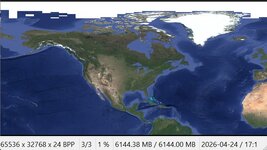
I think I just saved myself a lot of work - maybe. At least I'm celebrating this a little bit:

Screenshot 2026-04-24 171859.jpg

It means I could probably achieve level 12 by working on just 16 tiles. Still a lot but not a huge pain as 64.
 
Last edited:
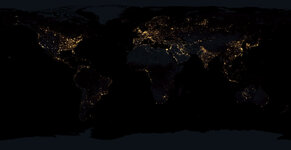
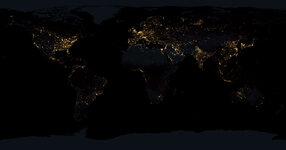
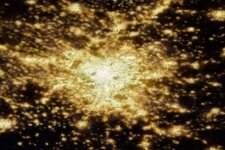
This is the edited Black marble image I want to use as brightness and colour mask. (The original resolution is 54000 x 27000 px)
I want to share it because even though I mostly hate light pollution, from space that looks pretty amazing...
NEW_Night_Lights.jpg

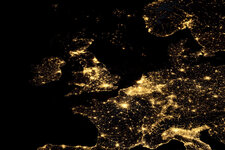
Here you can see a closeup of northwestern Europe with the North Sea, an area with lots of oil rigs and wind farms:

NEW_Night_Lights_WEurope.jpg


One more thing I'm thinking about is after blending with the high res imagery to also blend it with the cloud layer, because at night you can barely see the clouds in Orbiter (I'm not even sure if they are shown at all), but clouds do have a significant effect of damping and blurring city lights, as you can see on NASA Worldview
It will be a little more work but create even more realism. I might create a version with and without, depending on how much work it will be.

Also, notice, that mask tiles in addition to night lights contain the coastline on the alpha channel that separates water from the land.
Oh and btw this is giving me a little bit of anxiety at the moment because I don't have an exact plan for that. I'll have to study a bit more the tutorial you referred to.
 

Attachments

  • NEW_Night_Lights.jpg
    NEW_Night_Lights.jpg
    61.6 KB · Views: 4
Last edited:
Okay, after downloading the level 12 tile of most of Europe I wanted to do a test of what my idea was worked and how it would look in the end.
I experimented with layers, masks, blending, brightness and contrast and this is my best result so far.
Now you can be the judge, it that is good, or if you have any ideas on how to improve this even more. Don't be afraid to frankly say out loud what you think about it, I live in Germany after all, we can deal with criticism. :ROFLMAO:

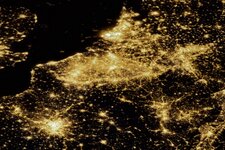
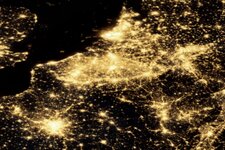
The first of each is the blended one, the second is the original unblended VIIRS image.

NEW_NIGHT_LIGHTS_tile03_TEST_1.jpgNEW_NIGHT_LIGHTS_tile03_TEST_2.jpg

NEW_NIGHT_LIGHTS_tile03_TEST_3.jpgNEW_NIGHT_LIGHTS_tile03_TEST_4.jpg

NEW_NIGHT_LIGHTS_tile03_TEST_5.jpgNEW_NIGHT_LIGHTS_tile03_TEST_6.jpg

This one is at full resolution (level 12). Can you guess what city it is?
NEW_NIGHT_LIGHTS_tile03_TEST_7.jpgNEW_NIGHT_LIGHTS_tile03_TEST_8.jpg
 
The first of each is the blended one, the second is the original unblended VIIRS image.
The second one looks much better. It looks very good.

Please, keep this work.
 
I will! But now I'm confused, is it a misunderstanding or do you really think the original VIIRS imagery looks better without the blending with the high res textures?
 
I’m sorry, I was wrong. I mean the first one with blending looks much better! Sorry for confusing you.
 
😅 that's relieving! On the other hand it would save me a lot of work. 🤣 I'm beginning to understand why jaquesmomo was using so many emojis like 🥵😤🫣o_O. My favourite one is that with a saw in the head. I'm starting to feel the same. It's probably going to be weeks before I complete the new map, because it's a lot of tiles to work on for level 12 and I think there might be problems ahead that I'm not even aware of yet. Even if you know exactly how to do it and work like a robot it's a pain. But I'm still looking forward to the result, so I'm not stopping. :)
When I get a little tired of it I'll just fix another patch of the cloud layer (though I will only upload an updated version once there is a significant improvement of high quality coverage), after all that one is only level 11. Still a little saw in the head, but that one doesn't cut as deep.

I'm also thinking that maybe it would be nice to keep the old night (and day) textures above level 12, which would only be shown when you are close to the ground. Because reworking the whole Earth above level 12 is just pure madness if you're not a serious programmer with a little supercomputer at your disposal. I think there is a reason we got the old one from a phd computational scientist. I only have a phb (physical brain injury).

Another little improvement: No more blocky Arctic and Antarctic textures. Besides the hi res land textures I found a nice 1x1 km sea ice dataset derived from MODIS data that I optimised a bit to remove pixelated areas and which I managed to put into the global map. 😎 It will still look a bit computer generated at high zoom levels but much better than the old textures. No penguins and polar bears yet though. 🐻‍❄️🐧🥲
 
Good plans.

If I understood correctly, you are going to make both night and day textures. Yes?
 
Yes, exactly. Because I need the daylight textures anyway to create the improved nighttime and coastline mask.
It is not working without some more hiccups though.

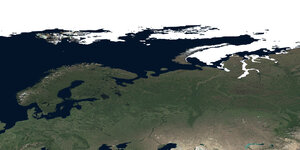
This is about the final look I'm aiming for for the daylight texture. It contains the edited google maps image as well as the optimised high res sea ice data.
GMAPS_tile3_L12.jpg

As you can see, the texture of Svalbard/Spitsbergen contains lots of blocks of different looking content, because of the high zoom level (the actual zoom level is even higher than at low latitudes because of the reduced area per degree² at high latitudes). So I have to blend in upscaled Level 11 or 10 textures in these locations, to make everything appear nice and seamless.

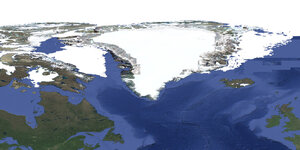
It's even worse in Greenland and probably also Antarctica.
GMAPS_tile2_L12.jpg

And then I'm also having another little issue with misaligned columns in the tiles:
GMAPS_L10_tile01_crop.tif.jpg

I may be able to resolve it by increasing the buffer extent during the export but it means I have to do everything again. EDIT: I tried and it didn't work. At this point I'll start to borrow a few emojis here: couteau.gifpeur.gif
 
Last edited:
Back
Top