GodAtum
Active member
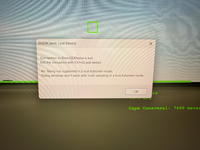
Obviously for long missions I need to turn off my monitor at times (ie when I go to bed or leave the house). But when I do I get the attached error. I am in windowed mode. Please help!

ORBITER-FORUM will be temporarily closed at 2026-07-23 18:00 UTC while we complete some OF maintenance tasks. The amount of downtime is expected to take up to one hour, but probably less.
On the video tab where it's says Full Screen Mode, select Full Screen Window. True Full Screen doesn't support anything that makes Orbiter lose focus.Are you sure that your GPU isn't powering off to save power or something like that ?
I think it can happen depending on your Windows power savings options.
On the video tab where it's says Full Screen Mode, select Full Screen Window. True Full Screen doesn't support anything that makes Orbiter lose focus.
Are you sure it's shutting down the monitor that does that and not your system going into sleep mode?

I can reproduce it on my end just locking/unlocking my session. It's a D3D limitation with no good workaround for us : usually you need to reset the device and recreate every buffers/textures. The problem is that Orbiter uses lots of render targets to create its visuals (the sketchpad API mainly, but also cockpit textures), and no provision was ever made to recreate them on the fly. I may be wrong but it looks like quite a task. @jarmonik could confirm.
just be careful about overheatingThank you for testing. It might be easier just to put a black cloth over my monitor!


That's a potential fire hazard. Maybe just a black image on a full-screen on an image viewer.Thank you for testing. It might be easier just to put a black cloth over my monitor!
You could also disable the graphics client.

No, unfortunately. The client connects to Orbiter through pointers and function calls, not over TCP.Is there a way to run without graphics on one PC (as a server) and with graphics on another (as a client)?


