General Question Transfering Orbiter 2016 to laptop

Sbb1413

Well-known member
Joined
Aug 14, 2018
Messages
1,013
Reaction score
401
Points
98
Location
West Bengal, India
Preferred Pronouns
he/his/him
Hi, I have just bought a laptop to ditch my 8-year old desktop computer. In order to ditch my desktop, I have to move everything from there to my laptop, including Orbiter 2016. As Orbiter 2016 is a huge file (2.5 GB), how can I move it to my laptop?
 
I have only an Acer laptop with older Win10 and run Orbiter most every day. May have to do some adjustments in the launchpad as it may not be able to do everything, but I have most everything turned on. It has to be plugged in, the battery goes quickly as it kicks the fan to high speed. I always get a laptop with the num keypad, which also gets me a bigger screen. I am also able to plug in a second monitor for manuals, the Wiki, checklists, etc. In the D3D9 development thread, kuddel indicated that he keeps a copy of Orbiter on a USB drive and runs it from that.
 
Do you have the hard drive from the desktop? When I got a new laptop, I transferred my files straight from the old computer’s hard drive with a SATA-USB adapter
 
Last edited:
Back when I was transferring computers, I kept my installation on an external hard drive that I bought online. Even though I no longer use my old laptop, I still have kept my installation on that external hard drive.
 
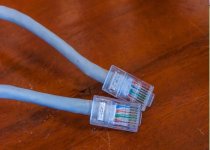
the cheapest and easiest way is a LAN cable (I used it to send a huge file from computer to laptop)
3-16-768x549.jpg
 
You can just copy it to any 8 GB USB thumbdrive you can grab near many store checkouts for a dollar and transfer it with that. :)

Or you can just use your laptop's WiFi to connect to your home network and copy the Orbiter files that way -- but you will need to mark your Windows drive on your desktop as a shared network drive first so that the laptop can access it. The USB thumbdrive approach is probably simpler.
 
I like to do it old-school. I keep a fresh install of Orbiter 2016 on CD, and also a separate CD where I keep all my downloaded addons organized, and some of my favourite scenarios (Inverted Direct Reentry from Moon, etc.). I just like re-installing things, as my Orbiter folder often gets clogged up with so many mods. This is the 2nd time I have reinstalled after going on a mod frenzy :) If you aren't like me with all those mods, you can either use a USB drive to store orbiter, orbiter mods, and scenarios on (Don't forget to organize, I had to learn the hard way after my entire downloads folder was turned into an orbiter mods folder.) Since my school computer doesn't read CDs, I keep a spare orbiter installation folder on my school's network server for playing during free time. Hope this helps.
 
the cheapest and easiest way is a LAN cable (I used it to send a huge file from computer to laptop)
View attachment 26851
We recently ran Cat-6 to every room in my house. File transfers fly compared to WiFi.

Now, buying a few hundred feet of cable and crawling around in the attic to make cable drops isn't exactly cheap and easy in the short term, but, ammortized over the life of the house...
 
Good news to all, I have finally managed to send my Orbiter downloads to my Lenovo laptop, thanks to the 2 TB external hard drive!
 
A 2 TB drive seems a bit overkill for a 2.5 GB file, but sure, if you happen to have one lying around, that'll work... :LOL:
 
A 2 TB drive seems a bit overkill for a 2.5 GB file, but sure, if you happen to have one lying around, that'll work... :LOL:
Yeah, but I wanted to transfer everything from my desktop to my laptop, and their memory combined is too big to be transferred by typical pendrives. So I bought a 2 TB drive to do so (and it replaced all the CDs and DVDs l currently have).
 
Does it matter? I have had more problems with the USB powered harddrives but have also lost external harddrives that were connected to line power. CDs and DVDs are not without their problems but are not reliant on external power. No matter what route is chosen, backup the data!
 
Back
Top