Project Titan II GLV

Niker

Active member
Joined
Jan 26, 2024
Messages
15
Reaction score
62
Points
28
Location
Buenos Aires
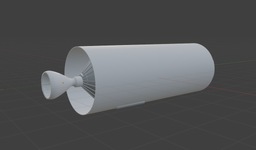
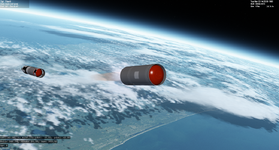
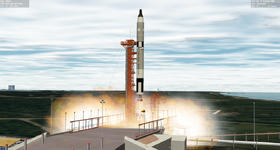
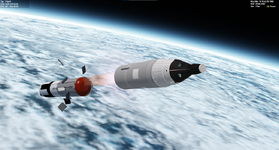
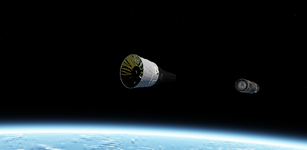
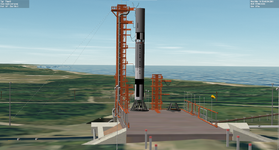
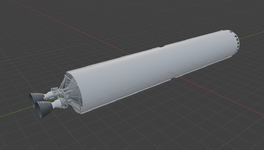
Hello everyone! I want to share with you a small project that I started: it is the Titan II GLV version for Orbiter 2024. I don't know how far this will go, but for now it is fully functional with its two stages!
1777875955424.png
1777876019830.png
1777876273528.png

PD: The LC19 model becomes from the old ProjectGemini2.0, until I have time and information necessary to model a new one.
PD2: 3D models are WIP!
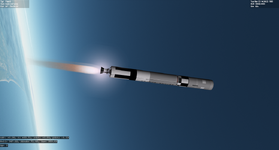
 
Hi there!

This week I was doing more autopilot tests.

As a basis it uses BrianJ's falcon9 guidance, with the real titan II guidance logic (no real software for now), and it works perfectly well.In the future I hope to be able to implement the real autopilot with the real equations and guidance, but for now that is out of my scope due to the little information there is about it.

Greetings.

1779415129315.png

1779415172023.png
 
Last edited:
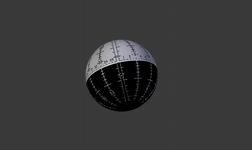
Hello everyone! I have been trying to animate the FDI ball but my base meshgroup is rotated 22.9º on the x axis, 13.1º on the y axis and 1.19º on the z axis (blender coordinates). My question is if any of you can help me know how to convert those Euler angles to vectors for the MGROUP_ROTATE const VECTOR3 &_axis value. Thanks!
PD:
my problem is that I have been using _V(0,0,1) as a reference vector, but it seems that orbiter does not take into account the base rotation of my meshgroup and I have been stuck on that

1781908823434.png
 
Well, it depends on how you want to work with the animation. If you want it to be at your modelled angles at (0°, 0°, 0°), you need to rotate the reference axes of the animations. If you want to feed it rotated angles.... well, not.
 
I'm so happy to see some Gemini action. Flying Gemini in Orbiter will be a pure joy!
True - in my mind the Gemini program always stood a bit in the shadow of Mercury and Apollo, but it truly is the one in which the US went from reaching space to actually working and doing things there.
 
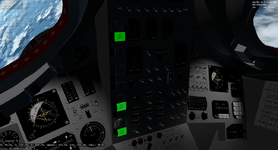
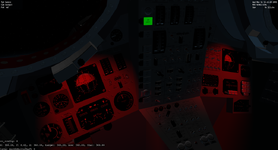
Hi everyone!
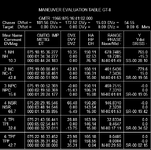
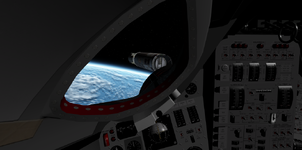
Here is an update on the progress made over the last few weeks:

-Sequencer lights are functional
-All the Virtual Cockpit Switches are animated (only sequencer buttons are functional for staging, retro or chutes deploy)
-FDI and Platform, Clocks and gauges are functional
-Cabin Lights are functional

1783891444438.png
1783891521070.png
 
Hi! I'm trying to get the Event Timer functional, but for some reason the texture doesn't change

RegisterSurfacesVC is called in clbLoadVC, the texture and mesh handle are correct, but oapiBlt doesn't change the surface.

void Gemini::RegisterSurfacesVC()
{
eventTimer_surf = oapiGetTextureHandle(hVC, 14);

oapiVCRegisterArea(
AID_dial_EventTimerMin_1,
_R(0, 0, 65, 59),
PANEL_REDRAW_ALWAYS,
PANEL_MOUSE_IGNORE,
PANEL_MAP_BACKGROUND,
eventTimer_surf
);
}

bool Gemini::clbkVCRedrawEvent(int id, int event, SURFHANDLE surf)
{
UpdateLights(id);
switch (id)
{
case AID_dial_EventTimerMin_1:
RenderEventTimer(surf); break;
}
return true;
}

void Gemini::RenderEventTimer(SURFHANDLE surf)
{
oapiBlt(
surf,
surf,
14,
0,
14,
49,
51,
59
);
oapiWriteLog((char*)"Function called");
}
 
Did you declare the texture as dynamic in the VC mesh?

(And did you consider just updating the UV coordinates instead of doing a blit on the same texture?)
 
Did you declare the texture as dynamic in the VC mesh?

(And did you consider just updating the UV coordinates instead of doing a blit on the same texture?)
Hi. I didn't, thank you for the clarification!

I didn't know that is possible change the UV coordinates in Orbiter.
 
Hi. I didn't, thank you for the clarification!

I didn't know that is possible change the UV coordinates in Orbiter.

It is, with the oapiEditMeshGroup function. It is sure not the most straight forward way to draw digits and requires some infrastructure around it, but it is much faster than oapiBlt.

Code:
/**
 * \brief Modify mesh group data.
 * \param hMesh mesh handle
 * \param grpidx mesh group index (>= 0)
 * \param ges replacement/modification data for the group
 * \return 0 on success, or error code
 * \note This function allows to modify a mesh group, by replacing vertex data,
 *   or group flags.
 * \note It should not be used to apply a linear transformation to the entire
 *   group (use \ref VESSEL::MeshgroupTransform instead), because such transformations
 *   are usually implemented by defining a transformation matrix instead of
 *   editing the vertex positions directly.
 * \note This version operates on device-independent meshes, e.g. mesh templates.
 * \note oapiEditMeshGroup should be used in preference to \ref oapiMeshGroup,
 *   because it is more likely to be supported by external graphics engines.
 * \sa oapiEditMeshGroup(DEVMESHHANDLE,DWORD,GROUPEDITSPEC*)
 */
OAPIFUNC int oapiEditMeshGroup (MESHHANDLE hMesh, DWORD grpidx, GROUPEDITSPEC *ges);

OAPIFUNC int oapiEditMeshGroup (DEVMESHHANDLE hMesh, DWORD grpidx, GROUPEDITSPEC *ges);

Since you plan to make a rather complex VC, this can make a huge difference in the end in FPS.
 
Back
Top