• ORBITER-FORUM will be temporarily closed at 2026-07-23 18:00 UTC while we complete some OF maintenance tasks. The amount of downtime is expected to take up to one hour, but probably less.

Installation Strange colours in DG

GodAtum

Active member
Joined
Jun 1, 2014
Messages
170
Reaction score
48
Points
28
Website
godatum.blogspot.com
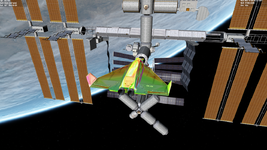
Have a fresh install of Orbiter 2024 with no addons. I get this when starting the DG docked at ISS scenario. I am using an Intel NUC with the onboard Intel iris Plus 640. Running D3D9Client.

Please help.

Untitled.png
 
Easter Egg!:cool:
Whats the cockpit look like?
 
Try disabling reflections or other graphic options 1 by 1 and see if you can narrow down the problem. You can also post your Orbiter.log, it never hurts.
 
If it lasts more than a couple of days then it's not an Easter Egg, also the cockpit should look funky too. Mine looks normal currently.
It's not, per se, a gfx problem, everything else renders fine, note the engines are normal, it's only the "skin". I take it all other vessels render without problems, the Dg skin has some specialities, you could try some extra skin addons (low-poly res?) and see if that makes a difference?
 
Last edited:
If it lasts more than a couple of days then it's not an Easter Egg, also the cockpit should look funky too. Mine looks normal currently.
It's not, per se, a gfx problem, everything else renders fine, note the engines are normal, it's only the "skin". I take it all other vessels render without problems, the Dg skin has some specialities, you could try some extra skin addons (low-poly?) and see if that makes a difference?
Try deleting Config\GC\DeltaGlider.cfg and DG-S.cfg and see if that makes a difference.
 
I have the same issue with a stock Orbiter and DG setup (my Graphics is a Intel(R) Iris(TM) Graphics 550 however).
This behavior appeared quite a long time ago (October 2022! See this post) on my machine and I could not find out what exactly is the issue.

I had to completely re-install my OS due to an SSD crash (yes that happens! o_O controller chip bricked) but still the issue is present.
I've then tried some "older" drivers, but still.

I think disabling one of the "enhanced" shaders (Metallness, I believe) was the only "fix", but it's more of a work-around than a fix.

@jarmonik might be the best one to get a grip on this, but since he can not reproduce the issue on his machine this might be very very hard. Maybe a remote session (on my machine) might be necessary, if time permits.

 
Last edited:
I have the same issue with a stock Orbiter and DG setup (my Graphics is a Intel(R) Iris(TM) Graphics 550 however).
This behavior appeared quite a long time ago (October 2022! See this post) on my machine and I could not find out what exactly is the issue.

I had to completely re-install my OS due to an SSD crash (yes that happens! o_O controller chip bricked) but still the issue is present.
I've then tried some "older" drivers, but still.

I think disabling one of the "enhanced" shaders (Metallness, I believe) was the only "fix", but it's more of a work-around than a fix.

@jarmonik might be the best one to get a grip on this, but since he can not reproduce the issue on his machine this might be very very hard. Maybe a remote session (on my machine) might be necessary, if time permits.

Were is that metallness option, I cant find it?
 
Back
Top